
Local service guide
Cloud Service Setup in Honolulu: Hiring Guide
For Cloud Service Setup in Honolulu, hire a technician against a written scope that names the accounts, devices, files and recovery tests you need. Ask for an upload-speed check before agreeing to a migration schedule, keep ownership of billing and administrator accounts, and require a demonstrated file restore before accepting the work. Hawaiian Telcom says technology and speed-tier availability vary by location; CISA recommends testing backups and limiting third-party access. Use those checks to compare proposals for your shop or office. [1] [4]
Define the job before requesting quotes
Write down the result you want: shared office files, automated backups, email migration or access from several devices. Name the current and intended platforms, the people who need access and the folders you want to move. Ask each bidder to explain which tasks they will complete and which require a separate specialist.
Give the technician a file inventory without sending private records in the initial inquiry. Include the approximate data volume, device types and any applications that must keep working during the move. Identify critical records first. CISA recommends inventorying data, software and hardware and deciding which systems matter most for restoration. [4]
Request separate quote lines for setup labor, migration, subscriptions, storage, follow-up support and any on-site visit. Ask for the recurring charge, who pays the cloud vendor and what happens when you end the support arrangement. The supplied sources do not establish a Honolulu setup-labor price range, so compare written quotes for the same scope.
Check upload capacity before choosing a migration window
Ask the technician to measure upload performance from the device and connection they intend to use. Hawaiian Telcom says actual speeds depend on factors including equipment, home-network devices, wiring or Wi-Fi, destination providers and congestion. A published plan speed alone cannot establish your migration completion time. [1]
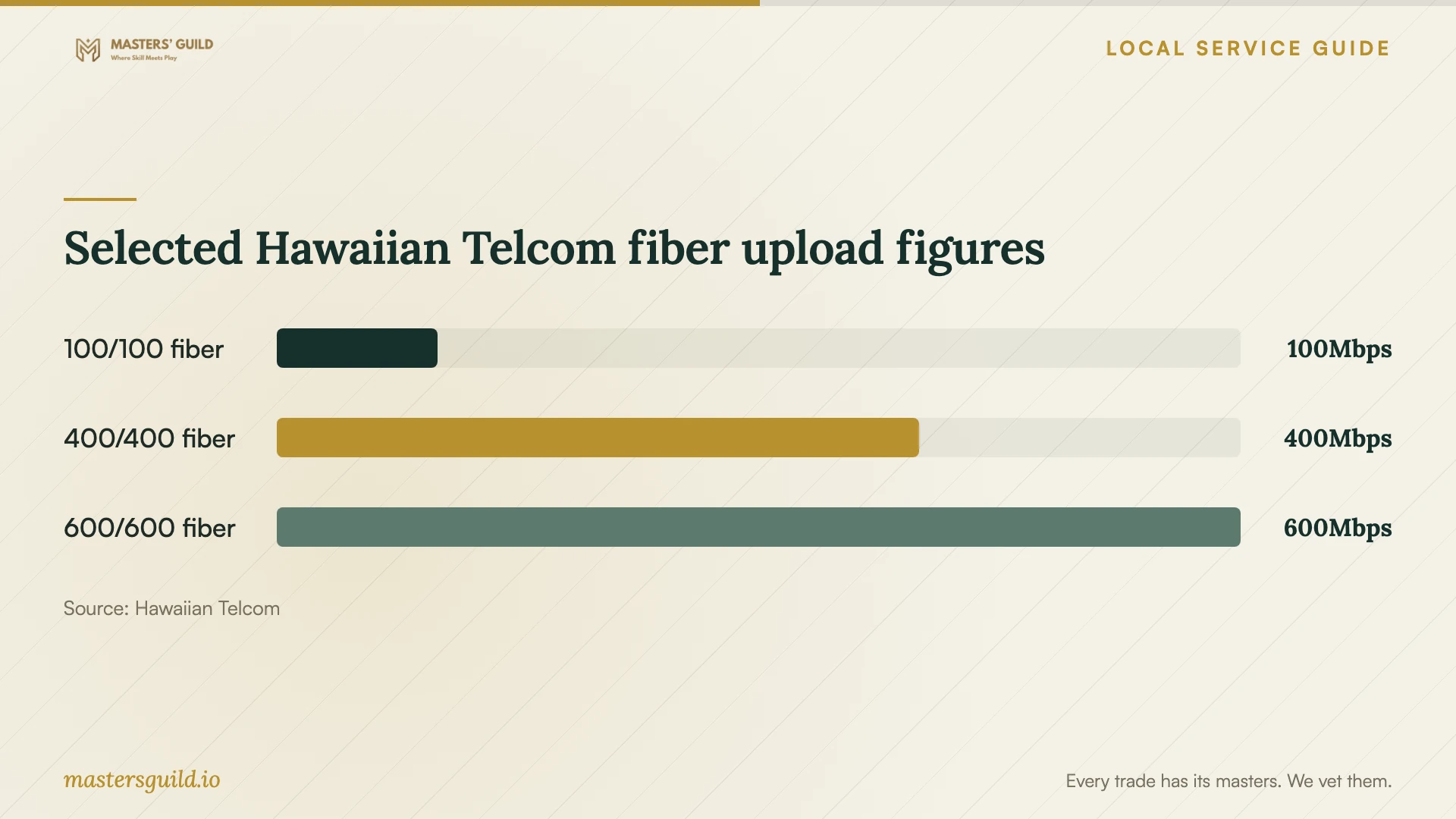
The chart compares selected upload figures from Hawaiian Telcom's broadband-policy table. Use it to understand why the upload side deserves attention when choosing a connection for cloud work. Confirm the service available at your premises and request a test upload to your intended cloud account before changing your internet plan. [1]
Agree on who monitors the upload after the technician's session ends, who investigates failed files and how you approve the move. Schedule the main transfer around your operating needs. Keep the original files until you have checked the destination and completed the agreed recovery test.
Specify account ownership and recovery
Create the business account under an owner-controlled email address and keep billing access with your business. Ask the technician to use a named account with permissions limited to the work. CISA recommends least privilege, separation of administrator and everyday accounts, and phishing-resistant multifactor authentication. [4]
Ask the technician to document how you recover a deleted or damaged file, how long you retain recovery copies and who can change backup settings. CISA recommends encrypted offline backups of critical data and tests of their availability and integrity. Its national guidance also discusses cloud-to-cloud backups and deletion protection where supported. [4]
Make the restore demonstration part of acceptance. Choose a non-sensitive sample file, have the technician recover it to a separate location and open it yourself. Record the steps and the person responsible for repeating the test. Ask the technician to explain any recovery limitations before you sign off.
Compare technicians by their handover plan
Ask bidders to describe their experience with your intended platform and to explain a migration similar in scope. Request a written plan for checking file completeness, managing access and reversing the move if your checks fail. Choose remote or on-site help according to the tasks you need someone to perform.
For ongoing support, put security responsibilities in the agreement. CISA recommends contract language that formalizes security requirements and limits a service provider's access to its responsibilities. Identify who reviews failed backups, responds to alerts and removes access when a worker or technician leaves. [4]
At handover, collect the account inventory, billing details, permission list, recovery instructions and support terms. Test owner access before removing temporary technician permissions. Agree in writing on any access the provider will retain and the work that access permits.
Selected Hawaiian Telcom fiber upload figures
Local details that affect your job
Verify technology at the exact premises
Hawaiian Telcom serves residential customers and small businesses using different broadband technologies. It says technology in a geographical area determines available speed tiers and describes fiber deployment within apartments, condominiums and townhomes. For an office in a multi-unit property, confirm service at your unit before accepting a proposal that assumes fiber upload capacity. [1]
Clarify Honolulu GET on the quote
Hawaii's Department of Taxation lists Honolulu's county surcharge as 0.5% through December 31, 2030, applicable to activities taxed at the 4.0% rate. Businesses may choose to pass on the tax; the listed maximum Honolulu pass-on rate is 4.7120%. Ask the provider whether its total includes any applicable passed-on GET rather than adding that percentage yourself. [2]
Assign responsibility for Hawaii customer records
Hawaii OCP says a business or government agency owning or licensing residents' personal information must give OCP written notice when a security breach affects at least 1,000 Hawaii residents. If you are moving customer records, identify who reports suspected exposure and who assesses notification duties. That OCP threshold does not establish that smaller breaches carry no other obligations. [3]
Choose the scope that fits your business
| Your situation | Scope to request | Acceptance check |
|---|---|---|
| Shared files with several staff | Folder organization, named users and role-based access | Each person can reach the intended folders; review unnecessary access |
| Moving an existing file archive | Connection test, sample transfer, migration and rollback plan | Check destination files before approving removal of originals |
| Protecting critical business records | Backup configuration, recovery instructions and restore testing | Open a restored sample and confirm who repeats the test |
| Keeping a technician for ongoing support | Written security duties and limited provider access | Confirm support terms, retained permissions and access-removal procedure |
Your hiring checklist
- List the accounts, devices, users and folders included in the job.
- Identify critical records and keep a separate recovery copy before migration.
- Confirm service availability at the premises and request an upload test.
- Compare itemized labor, subscriptions, support and tax treatment.
- Keep owner control of billing, recovery contacts and administrator access.
- Agree on a transfer window, failure checks and a rollback plan.
- Witness a sample restore and test access for the intended users.
- Collect recovery instructions and review retained technician permissions.
Frequently Asked Questions
How much should I budget for setup?
Request an itemized quote for your devices, data and recovery requirements. These sources do not establish a local labor rate. Separate one-time work from subscriptions and support, and ask whether the total includes any applicable passed-on GET. [2]
Can the technician finish the upload during one visit?
Ask for a test upload and a separate estimate for hands-on work and transfer completion. Hawaiian Telcom says actual performance varies with equipment, connection conditions, destination providers and congestion. Require a plan for monitoring unfinished transfers. [1]
Should the technician keep administrator access?
Agree on access according to the support tasks you authorize. CISA recommends limiting third parties to the devices and systems within their responsibilities. Keep owner access yourself and request removal of permissions that the provider no longer needs. [4]
What should I check before accepting the work?
Open transferred files, test staff permissions and witness a sample restore. Collect recovery instructions and billing details. CISA recommends testing backups and using least privilege; include those checks in your written acceptance criteria. [4]
Sources and scope
This guide combines the sources below with practical planning guidance. Figures apply to the stated geography and period; request a written quote for your property.