
Local service guide
Software Installation in Hialeah: Plan Your Setup
For Software Installation in Hialeah, ask the technician to quote the named programs, account setup, file handling and completion checks before booking. Explain whether you want help with one application, a new computer or an operating system replacement. Arrange temporary access before handing over your only computer. Hialeah libraries provide free computer use for cardholders in good standing or guest IDs, subject to availability and use limits. [1]
Define the installation before comparing quotes
Give each technician the same description: your computer model, current operating system, the software name and the result you need. Include the error message if an earlier attempt failed. Ask the technician to review compatibility and explain any proposed operating system change before you approve it.
Describe the household task behind the request. You might need to edit documents, join video appointments or use a printer from a new laptop. Ask for a quote that includes the relevant setup and a demonstration using a sample document or test call. Avoid accepting an installation-only scope when you also want account configuration or instruction.
Request separate amounts for labor, software purchases, subscriptions, backup and file transfer. Ask who will own the software account and approve any recurring charge yourself. Request a written installation quote; library printing fees do not indicate technician prices.
Choose the appointment format and access terms
Ask whether the technician proposes remote assistance, a home visit or a drop-off appointment, and what each quote includes. For remote work, request an explanation of the connection process, when you need to remain present and how to end access. For a home visit, agree on the arrival window and prepare the computer, charger and any accessories involved.
Before a drop-off, agree on the collection arrangements and how the technician will seek approval for extra work. Ask for a written device receipt and describe existing damage. Set a spending limit and require your approval before the technician erases files, replaces an operating system or buys software.
Prepare files and accounts
Make a backup of the files you want to keep and check that you can open a sample from that backup. Tell the technician which folders matter, including photographs and documents outside the usual folders. Agree on who will create any additional backup, where they will keep it and how they will return or remove copies after handover.
Have your purchase confirmation and account recovery method available. Enter your own passwords and verification codes during the appointment where possible. Ask the technician to explain any request for administrator access, and agree on whether they will create a temporary account. Request removal of temporary access when you accept the work.
Plan access while your computer is unavailable
For temporary access, Hialeah libraries offer public computers to cardholders in good standing or people with guest IDs. The city also lists in-library laptop borrowing for cardholders and Wi-Fi at all libraries. Check availability with staff before arranging an installation that leaves you without a device. [1]
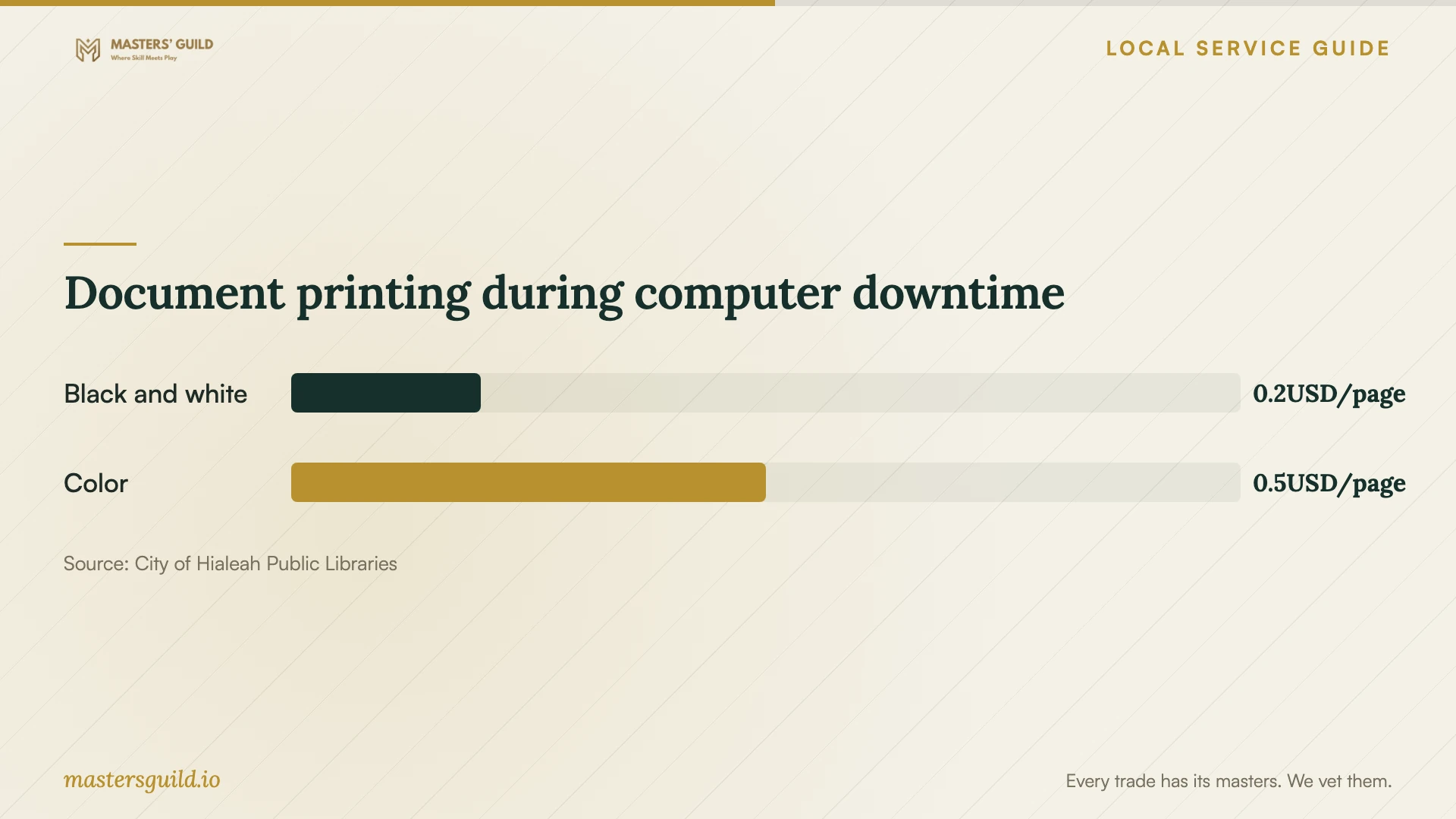
For an urgent printed document, the city offers mobile printing with collection at John F. Kennedy Library during regular business hours. The published charges are $0.20 per black-and-white page and $0.50 per color page. Use this option to plan document access during the appointment; confirm collection arrangements before sending anything sensitive. [1]
Accept the work and arrange instruction
Before accepting the job, open the installed program under your own account and complete the agreed task. Check the files included in the transfer scope, test the relevant printer or accessory and restart the computer with the technician present. Ask for a written summary of changes, purchases and any unresolved problem.
If you want practice after setup, John F. Kennedy Library lists computer workshops, and branches offer tech time. The city also lists computer classes through its partnership with Hialeah-Miami Lakes Adult & Community Education Center. Ask about the current schedule, registration and course content before paying for a separate instruction visit. These listings do not establish an installation service for personal computers. [2]
Document printing during computer downtime
Local details that affect your job
Confirm the type of loan device you need
Hialeah describes a Chromebook and Laptop Lending Program for families and households that lack computer access, with a library card in good standing required. Its separate computer-use page describes laptops for use inside the library. Ask staff which program fits your situation, whether a device is available and where you may use it before scheduling a drop-off. [1] [3]
Separate learning needs from installation work
The city lists computer workshops at John F. Kennedy Library and tech time at branches. Call your branch about dates and registration. For the classes offered with Hialeah-Miami Lakes Adult & Community Education Center, the city lists 305-823-1330 for information and registration. Ask whether instruction covers your software before treating it as follow-up support. [2]
Choose your next step
| Your situation | Next step | Confirm before committing |
|---|---|---|
| You know the program and need setup | Request a quote for installation and a task demonstration | Software purchases, account setup and follow-up terms |
| You want help learning after setup | Ask about library workshops or branch tech time | Registration, current schedule and relevant course content |
| Your only computer will be unavailable | Ask about Hialeah library computer access | Availability and computer-use limits |
| You need documents during downtime | Consider mobile printing at John F. Kennedy Library | Collection during regular business hours and page charges |
Your hiring checklist
- List the device, operating system, software and task you want to complete.
- Ask for an itemized quote and approval terms for extra work.
- Back up important files and open a sample from the backup.
- Prepare purchase records and your account recovery method.
- Agree on password entry, remote access and temporary account removal.
- Confirm temporary computer access and any document pickup arrangements.
- Test the agreed tasks before accepting the installation.
Frequently Asked Questions
How should I compare installation quotes?
Give technicians the same device details and task list. Ask them to separate labor, software, backup, transfer and instruction. Agree on a spending limit and the demonstration you will use to accept the job.
Can I use a library computer during the installation?
Hialeah provides free computer use for cardholders in good standing or guest IDs. Staff limit use and access depends on availability. Confirm access before relying on it for a deadline. [1]
Will library staff install software on my personal computer?
The city’s library pages describe computer access, lending and classes. They do not establish personal-device installation service. Ask staff what a workshop covers, and arrange a technician if you want installation work. [1] [2] [3]
Sources and scope
This guide combines the sources below with practical planning guidance. Figures apply to the stated geography and period; request a written quote for your property.