
Local service guide
Home Office Setup in Hialeah: Hiring and Planning
For Home Office Setup in Hialeah, choose an installer whose written scope covers your furniture, monitor supports, device connections, and cable routing. Separate any new outlets or wiring changes before booking: the city lists electrical repairs and alterations among projects requiring permits. Ask the Building Department about your proposed electrical work before committing to an installation date. [1]
Define the job before comparing installers
Send each installer the desk model, assembly instructions, monitor models, and photographs of the room. Mark the proposed desk position and existing outlets. Describe whether you want furniture assembly, equipment connections, wall mounting, network troubleshooting, or some combination. Ask the installer to identify which tasks they will perform and which need another specialist.
For a monitor arm, ask the installer to check the arm’s published compatibility against the screen and desk specifications. For a wall mount, request a review of the wall material, fixing method, and cable route before approving holes. Decide who supplies brackets, adapters, cables, and replacement parts if the supplied hardware does not suit the installation.
Request an itemized quote with labor, supplied materials, travel charges, disposal, and any return visit listed. Ask whether the installer charges a fixed amount or bills for time, and how they handle missing parts. Compare written quotes for your equipment list and installation scope.
Plan the room around your working position
Try the desk position with your chair before installation. Check that you can open drawers, move behind the chair, reach equipment, and enter the room without stepping over cables. Sit where you expect to work and check screen reflections, camera framing, and access to the keyboard and mouse.
Test your intended network connection at the proposed desk location. Ask for a video call and a file transfer during handover if those tasks matter to your work. For employer-managed devices, agree with your IT team on what the installer may connect or configure. Enter your own passwords and keep recovery codes private.
Ask the installer to leave enough cable movement for the desk’s full travel if you choose an adjustable model. Keep plugs reachable, label the connections, and request a demonstration before approving the cable routing. Include a seated fit check so you can adjust the monitor and input devices while the installer is present.
Resolve electrical work before installation day
Hialeah lists electrical repairs and alterations, along with interior renovations, among projects requiring permits. If your plan adds an outlet, changes wiring, or alters the room, describe that work to the Building Department. The city provides 305-883-5825 for questions about permit types. [1]
Ask who will handle any required permit, perform the electrical work, and coordinate inspections. Put those responsibilities in writing. Arrange the furniture installation around that work so you can approve the desk position and cable route against the finished outlet locations.
Include delivery protection and a storm routine
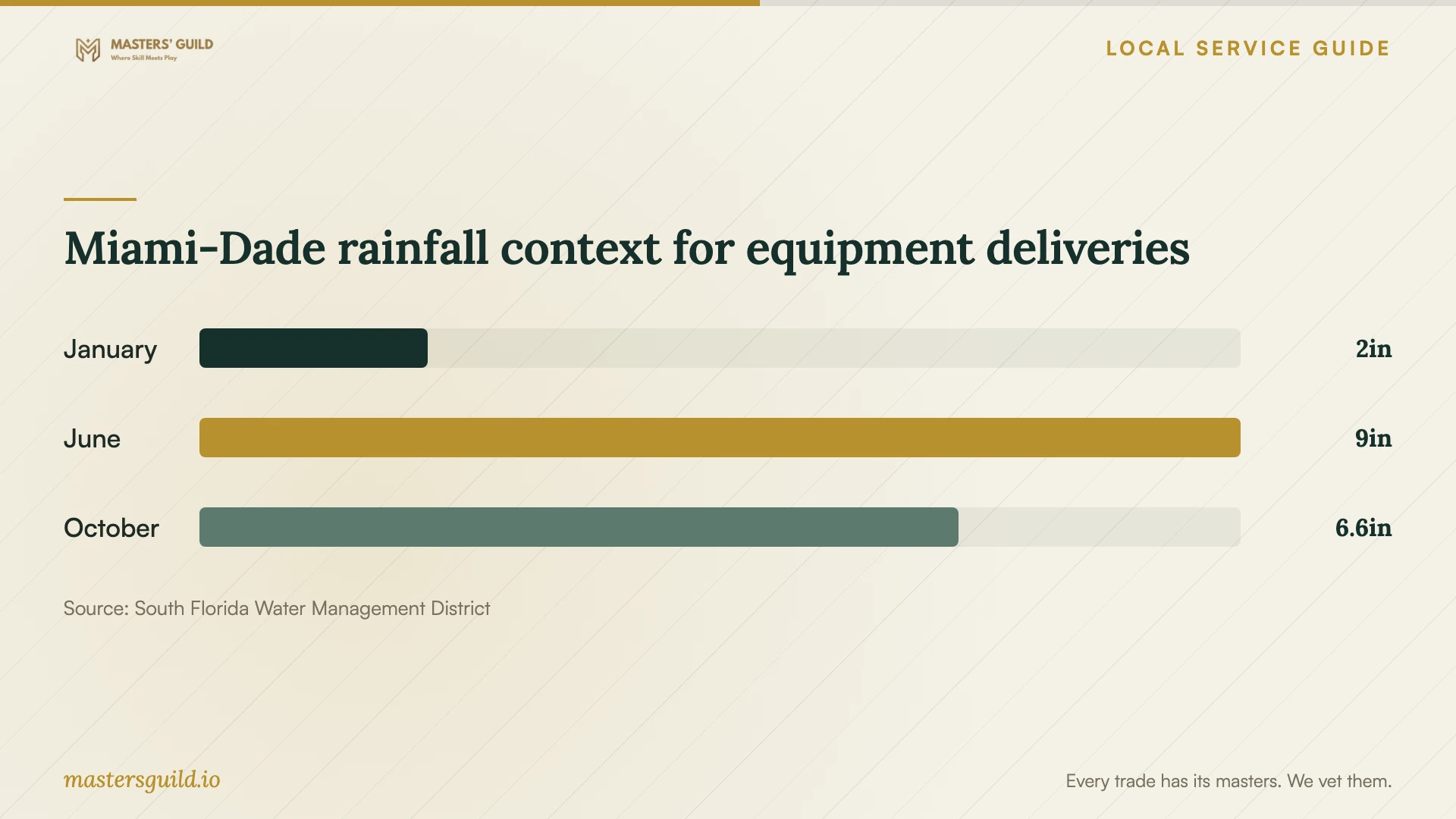
The South Florida Water Management District publishes Miami-Dade rainfall normals of 8.98 inches for June and 6.55 inches for October, compared with 1.97 inches for January, for 1991–2020. These county figures provide regional planning context. Ask how the installer will protect boxed electronics between the vehicle and your room, and agree on a weather rescheduling arrangement. [4]
FPL’s business storm guide advises users to make multiple computer-data backups, store records off-site, charge electronics, and move equipment away from windows before a threatening storm. It also advises unplugging computers and other equipment in case of a power surge. Apply that guidance to your office by keeping connections accessible and deciding where you would secure portable equipment. [3]
Before the installer leaves, ask them to demonstrate the desk controls, monitor adjustments, and device connections. Test the equipment you included in the quote and photograph the finished cable routing. Record unresolved items and agree who will address them, including any parts that still need to arrive.
Miami-Dade rainfall context for equipment deliveries
Local details that affect your job
Use the city’s permit contact for wiring changes
Hialeah’s permit page includes electrical repairs and alterations in its permit list and directs questions about other permit types to 305-883-5825. Describe the proposed outlet or wiring change before booking the installation. The page does not provide a specific ruling for desk assembly or monitor mounting, so ask about your exact scope rather than assuming one answer covers the whole job. [1]
Confirm business use before fitting out a client space
Hialeah’s FAQ says certain home-based businesses need a Business Tax Receipt and a home-office packet for Zoning approval. It also describes limits on client visits and an exception for office-equipment installation or repair visits. Treat these as municipal guidance to confirm against current requirements for your activity, rather than a complete statement of Florida law. Before furnishing a client meeting area, ask Business Tax and Zoning whether your intended use qualifies and which application route to follow. [2]
Match the setup scope to the help you request
| Your planned work | Help to request | Confirm before booking |
|---|---|---|
| Desk and chair assembly | Furniture assembly installer | Model instructions, moving assistance, and packaging removal |
| Monitor arm or wall mount | Installer who can assess the proposed mounting method | Equipment compatibility, mounting surface, hardware, and cable route |
| Computer, dock, and network connections | IT setup support | Device list, employer permissions, and connection tests |
| New outlet or wiring alteration | Electrical contractor and city permit guidance | Hialeah lists electrical repairs and alterations as permit work; establish permit responsibilities |
| Office for a home-based business | Business Tax and Zoning guidance before fitting out | Confirm the application and operating conditions for your intended activities |
Your hiring checklist
- Send room photographs, measurements, and furniture and equipment model numbers.
- Mark the desk position, existing outlets, and intended cable routes.
- Confirm mounting compatibility and who supplies brackets and adapters.
- Resolve any permit questions before scheduling electrical changes.
- Agree on access, furniture moving, packaging removal, and delivery protection.
- Set handover tests for desk movement, displays, network access, and peripherals.
- Keep a written list of exclusions, unfinished tasks, and return-visit terms.
Frequently Asked Questions
Can one installer handle the whole office?
Ask for a task-by-task scope. Have the installer confirm furniture assembly, mounting, device setup, and network support individually. If you need electrical alterations, resolve the city’s permit requirements and identify who will perform that work before booking. [1]
Do I need a permit for the setup?
Hialeah lists electrical repairs and alterations and interior renovations as permit projects. Its page does not give a specific answer for furniture assembly or monitor mounting. Describe the proposed work to the Building Department at 305-883-5825 if your scope raises a permit question. [1]
Can customers visit my home office?
The city’s FAQ describes restrictions on customer visits for home-based businesses. Confirm how current requirements apply to your business with Business Tax and Zoning before planning a customer-facing room. [2]
What should I include for storm preparation?
Keep plugs accessible and plan where to secure portable equipment. FPL advises backing up computer data, storing records off-site, charging electronics, moving items away from windows, and unplugging equipment before a threatening storm. [3]
Sources and scope
This guide combines the sources below with practical planning guidance. Figures apply to the stated geography and period; request a written quote for your property.