
Local service guide
Data Recovery and Backup in Hialeah
Arrange Data Recovery and Backup in Hialeah by separating the immediate recovery job from the ongoing backup plan. Ask for a written diagnostic scope, an approval limit, data-handling terms, and a way to check recovered files before accepting the work. For backup installation, require a demonstrated restore and instructions for accessing a copy when you cannot enter your premises.
Define the recovery job before approving work
Describe the device, the last time you accessed the files, and what happened before the problem. Record any error message without running another experiment to reproduce it. Tell the provider whether you have another copy and whether anyone has attempted a repair. Ask for handling instructions before transporting damaged equipment.
Name your priorities: accounting records, customer documents, project folders, or another specific set. Ask the provider to distinguish recovering those files from repairing the computer or reinstalling applications. Request an assessment before authorizing further work, and agree on how the provider will obtain your approval if the scope changes.
Compare quotes by scope and acceptance terms
Request an itemized quote covering diagnosis, recovery attempts, transport, replacement storage, and delivery of the recovered material. Ask whether the provider performs the work or sends the device elsewhere. Have them identify who will hold it, how they will record transfers, and how you will receive status updates.
Set acceptance terms around your priority files. Ask how you can inspect a file list and open representative documents before signing off. Confirm the charge for an unsuccessful attempt, cancellation terms, and the deadline for collecting the original device. Request a separate estimate for backup setup so you can evaluate each job on its own.
Specify privacy and account control
Ask who can view recovered content, where the provider will store working copies, and when they will delete them. Agree on an approved transfer method. If the job requires credentials or encryption keys, ask the technician to explain which access they need and how you will withdraw that access after handover.
For ongoing backups, arrange business ownership of the account and identify the people authorized to restore files. Document who receives failure alerts, who investigates them, and who covers absences. Ask for a handover that lets another technician take over without relying on the original provider's personal account.
Plan for flood access and power interruptions
The City of Hialeah describes limited stormwater drainage during heavy rainfall and says canals can overtop or back up. Ask your installer to review the placement of computers and backup equipment, then demonstrate how an authorized person could retrieve essential files from another location if the premises were inaccessible. [1]
FPL states that power disturbances can damage unprotected computers and other sensitive equipment. Include a UPS assessment in the scope, with a review of the manufacturer's instructions and battery condition. Ask the technician to document the shutdown procedure and explain which equipment the proposed UPS will serve. [2]
Accept the backup after a restore demonstration
Choose sample files with the technician and ask them to restore those files to a separate destination. Open the results yourself. Include a sample from each business application you intend to protect, and ask the provider to document any extra steps needed to use that application's restored data.
Before handover, agree on the backup schedule, how far back you want to retrieve earlier versions, and how much recent work you are prepared to recreate. Record recurring charges, storage limits, support responsibilities, and a date for the next restore exercise. Keep the recovery instructions somewhere you can access without the affected computer.
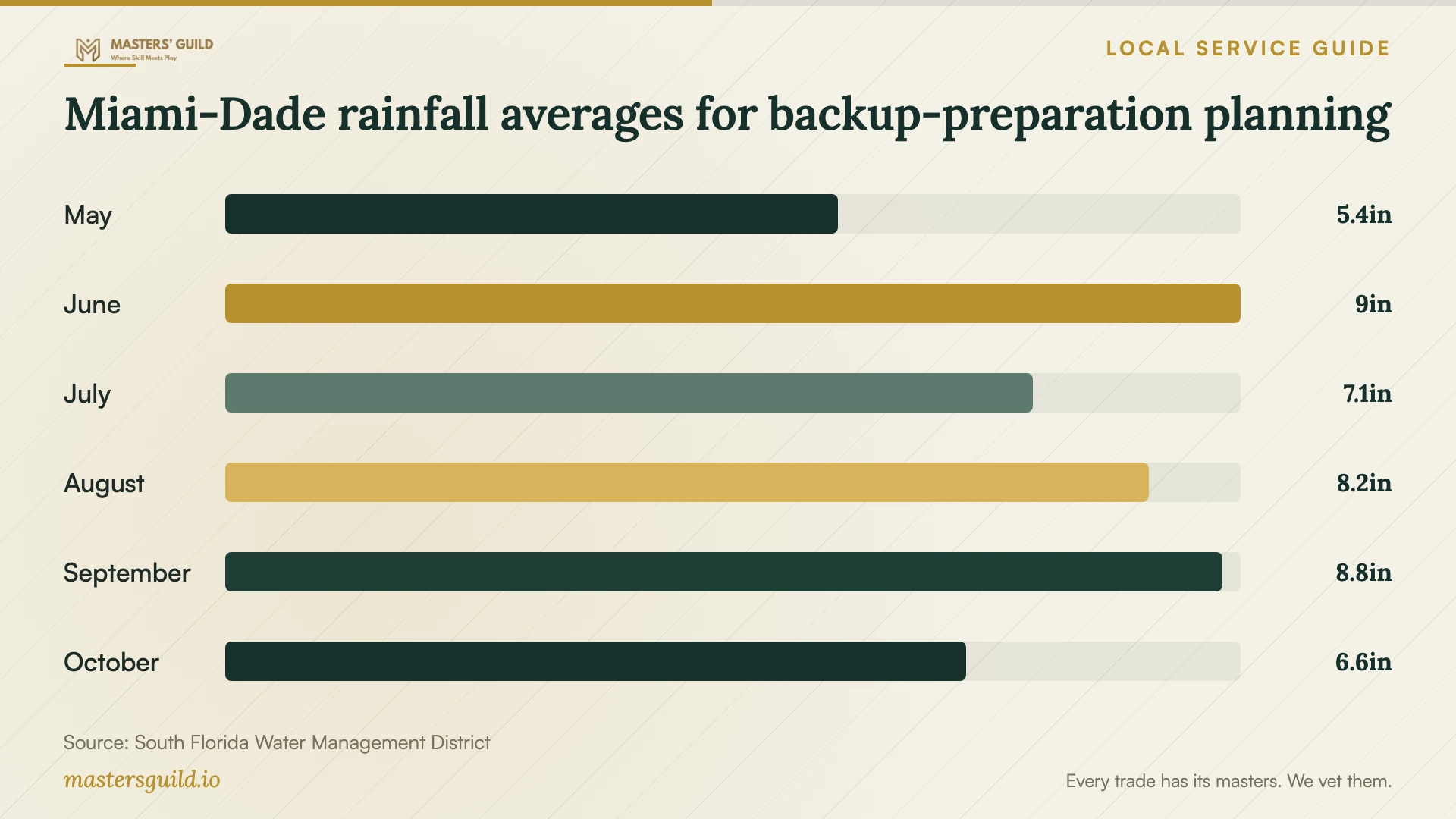
Miami-Dade rainfall averages for backup-preparation planning
Local details that affect your job
Include an inaccessible-premises scenario
Hialeah reports that groundwater rises close to the surface during the rainy season and that neighborhood drainage systems can become overwhelmed. Ask the provider to demonstrate retrieval from an offsite copy using an authorized device outside your premises. Include backup equipment placement in the site review. [1]
Investigate UPS beeping before replacing equipment
FPL explains that some UPS products activate during minor voltage fluctuations. It advises consulting the owner's manual or manufacturer and checking battery expiration. If beeping accompanies lights dimming or brightening, FPL directs customers to report the problem. Ask your technician to record those symptoms and follow the manufacturer's guidance. [2]
Match the request to your immediate need
| Your situation | Request | Agree before work |
|---|---|---|
| You cannot access essential files | Recovery assessment | Priority files, diagnostic fee, and approval limit |
| You have a copy but have not checked it | Supervised restore exercise | Sample files, destination, and acceptance checks |
| You need backups you can access away from the premises | Backup design and handover | Account ownership, retrieval demonstration, and support |
| Your UPS beeps | Manual and battery review | Symptoms to investigate and manufacturer instructions |
Your hiring checklist
- List the files and applications you need first.
- Record symptoms, error messages, and previous recovery attempts.
- Obtain written diagnostic charges and an approval limit.
- Confirm custody, privacy, transfer, and deletion terms.
- Agree on how you will inspect recovered files.
- Document business ownership of backup accounts and access.
- Witness a restore and keep the handover instructions offsite.
Frequently Asked Questions
How much should I budget for recovery?
Request a device-specific assessment and an itemized quote. Set an approval limit and ask what you owe if the provider cannot recover the files you named. Compare quotes that cover the same work, including transport and return storage.
Can the technician promise a completion date?
Ask the provider to distinguish the assessment appointment from the expected recovery completion. State your business deadline and request a clear update schedule. Agree on when you will decide whether to continue the attempt or use another continuity arrangement.
What should I ask about flood preparation?
Hialeah identifies shallow groundwater, limited drainage, and canal overflow or backup as local concerns. Ask for an equipment-placement review and a demonstration of access to an offsite copy from outside the premises. [1]
What should the provider leave after backup setup?
Request account ownership details, authorized users, the backup schedule, restore instructions, alert responsibilities, recurring charges, and the result of a witnessed restore. Name the person in your business who will keep those instructions and coordinate future checks.
Sources and scope
This guide combines the sources below with practical planning guidance. Figures apply to the stated geography and period; request a written quote for your property.