
Local service guide
Computer Virus Removal in Hialeah, FL
Arrange Computer Virus Removal in Hialeah by choosing a technician through contact details you verify outside any warning message, then requesting an itemized quote and a file-preservation plan. Set a spending limit and require written approval before erasure or extra work. The FTC describes fake Microsoft security warnings that direct users to call scammers for help. [3]
Choose a repair contact before granting access
Find a provider outside the message that prompted your concern. The FTC describes Microsoft impersonation scams that begin with a fake security pop-up and a help number. It also describes phony Geek Squad renewal emails for services the recipient never purchased. Verify the sender through company contact details you know are real before responding. [3]
Describe what happened without accepting the warning's diagnosis. Tell the technician what appeared, what you clicked, whether someone connected to the computer and whether you paid. Request an explanation of the proposed inspection. For remote help, identify who will connect, what they may access and how you will end the session.
The FTC warns against demands for payment by gift card, cryptocurrency, money transfer or payment app. Pause the booking if someone pressures you to send money or insists on a single payment method. Contact the business through a phone number or website you know is real. [3]
Compare itemized quotes and protect your files
Request a diagnostic fee and written prices for the proposed repair tasks. Have each provider separate cleanup, operating-system repair, reinstallation and file recovery. Include any charge you would owe if you decline further work after diagnosis. Compare the same scope across offers before choosing a technician.
List the files you want preserved, such as photos, tax documents or schoolwork. Tell the technician whether you have another copy and whether you have tested it. Put your spending limit, permission for file copying and approval requirements for erasure or drive replacement into one written authorization. Include any transfer of equipment to another business.
Discuss where the technician will keep copied files, who may access them and when they will delete temporary copies. Arrange to enter required credentials yourself instead of placing passwords in the job description. For a proposed reinstall, name the applications and files you want restored and request a separate price before authorizing it.
Arrange the session or equipment handover
Choose the service format with the provider after describing the symptoms and your file-preservation needs. Before booking remote help, establish whether you can start the computer and participate in the session. For drop-off work, record who will hold the equipment and how they will contact you. For a home visit, settle the arrival window and visit charge.
Give the provider your address or preferred drop-off location before accepting the offer. Set an update time and explain any deadline that affects your choice. Request repair explanations in your preferred language. At handover, keep a record of the equipment and accessories you leave, along with the agreed scope.
Review the repair before closing the job
Have the technician explain what they changed and what checks they performed. Review the files you wanted preserved and open the applications you rely on. Discuss remaining symptoms and request removal of remote access you no longer authorize. Keep the final invoice, completion notes and written follow-up terms.
If you dispute the work or bill, send the provider a factual description tied to the written scope. For disputes with county businesses or service providers, Miami-Dade offers consumer complaint mediation. Preserve the estimate, approvals and invoice so you can document what you authorized. [1]
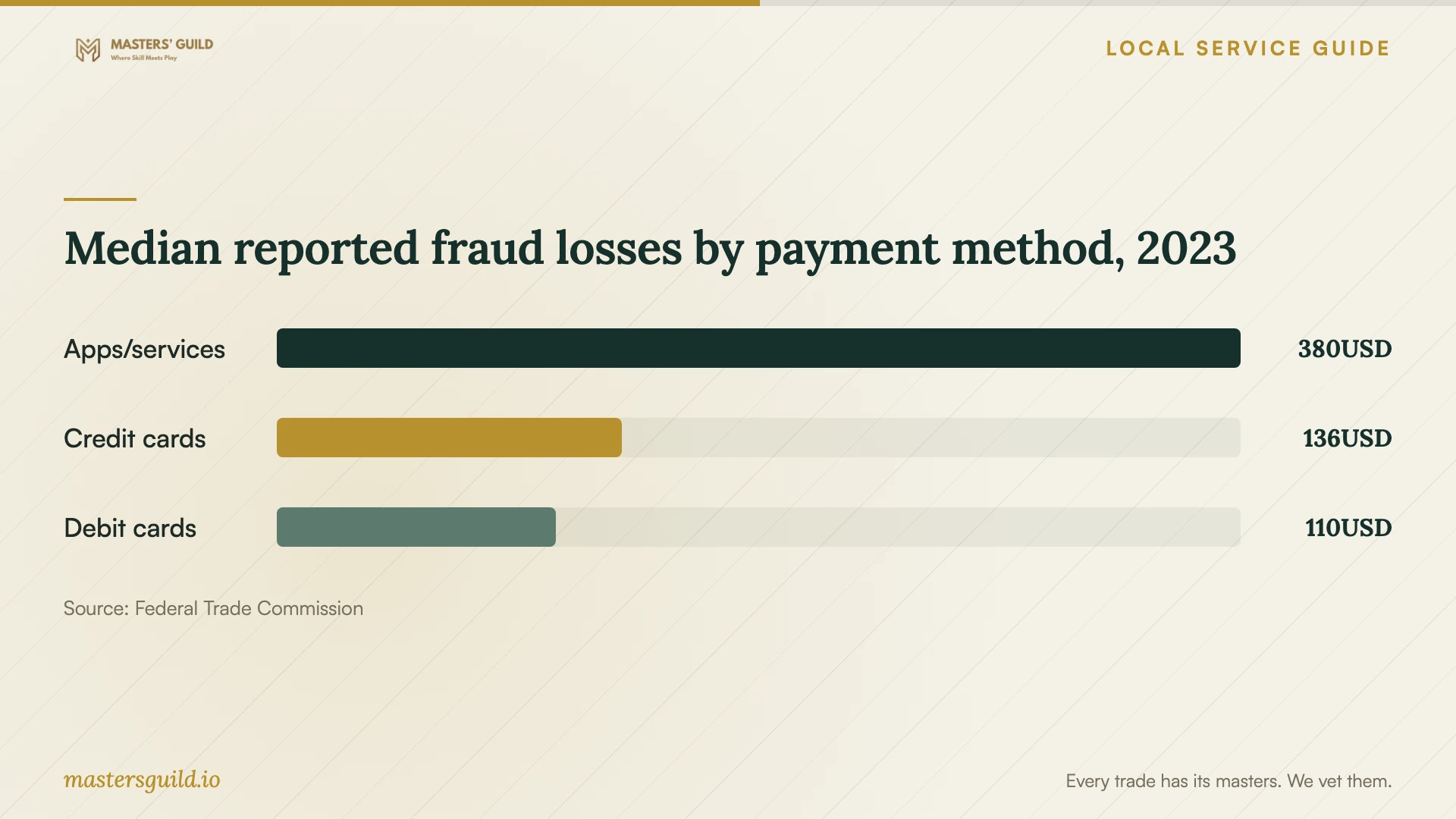
Median reported fraud losses by payment method, 2023
Local details that affect your job
Document a repair dispute for Miami-Dade mediation
Miami-Dade County's Consumer and Neighborhood Protection Division offers mediation for disputes with businesses and service providers in the county. Complete the complaint affidavit, retain a copy and include supporting documents such as invoices, contracts, warranties and a timeline. The mediation hotline is 786-469-2333. The county sends complaint materials to the business for a response and identifies them as public records. Before submitting screenshots containing passwords, financial details or private files, consult the office about handling sensitive material. County staff attempt to resolve the dispute; do not plan on a guaranteed refund. [1]
Plan household computer disposal through West Dade
If you replace household equipment, Miami-Dade's Home Chemical Collection Centers accept personal computers, hard drives, keyboards, monitors and printers. The West Dade center is at 8801 NW 58 Street in Doral. The county lists Wednesday through Sunday hours of 9 a.m. to 5 p.m. Check current arrangements before making the trip from Hialeah. Have your repair provider complete the agreed file-preservation and data-erasure work before you surrender a drive. The centers exclude business and commercial use, and the county directs businesses to use a private disposal company. Identify household versus business equipment before arranging collection or transport. [2]
Choose the next step for your situation
| Situation | Next step | Booking condition |
|---|---|---|
| A warning supplies a help number | Find a contact outside the warning; the FTC describes fake-warning impersonation scams. | Verify the provider before granting remote access. |
| Important files have no other copy | Request diagnosis with a file-preservation plan. | Require written approval before erasure or drive replacement. |
| The technician proposes a reinstall | Request a separate price and restoration scope. | Name the files and applications to restore. |
| You dispute the repair bill | Collect repair records and consider Miami-Dade consumer mediation. | Consult the office about sensitive material before submitting documents. |
| You will dispose of household equipment | Consider Miami-Dade's residential electronics collection centers. | Complete data handling first; the county directs businesses to private disposal companies. |
Your hiring checklist
- Record the symptoms, warning wording and any payment or remote access you authorized.
- Verify the provider's contact details outside the warning message.
- Compare itemized quotes with the same repair scope and diagnostic terms.
- List files to preserve and describe existing backups.
- Write one authorization covering spending, file copying, erasure and equipment transfers.
- Set the service format, handover record and diagnostic update time.
- Review files and applications, remove unwanted remote access and retain completion records.
Frequently Asked Questions
How much should I budget for virus removal?
Request an itemized written quote with the diagnostic fee and separate charges for cleanup, reinstallation and file recovery. Compare providers using the same repair scope. Set a spending limit and require approval before additional work.
Should I call the number in a computer security warning?
Find a contact through a source you trust. The FTC describes fake Microsoft security pop-ups with numbers for supposed help and advises contacting companies through phone numbers or websites you know are real. [3]
How do I protect files before authorizing repair?
List the files you need, describe any existing backups and put preservation requirements in the written scope. Require approval before erasure or drive replacement. Include permission for copying files and terms for deleting temporary copies.
Where can I take a computer I decide to replace?
Miami-Dade accepts residential computers and hard drives at its Home Chemical Collection Centers, including West Dade in Doral. Complete data handling before disposal. The centers exclude business equipment; the county directs businesses to use a private disposal company. [2]
Sources and scope
This guide combines the sources below with practical planning guidance. Figures apply to the stated geography and period; request a written quote for your property.