
Local service guide
Cloud Service Setup in Hialeah, FL
Arrange Cloud Service Setup in Hialeah by asking for a written scope that covers the files you need, staff access, backup settings, and a demonstrated file recovery. Before booking, identify your devices and accounts, check upload performance at your premises, and separate setup labor from subscription charges. For storm preparation, include an off-premises copy of critical business data, as Miami-Dade County recommends. [1]
Choose the result you want before choosing a plan
Write down the business problem first: staff need shared documents, you want copies of accounting records away from the office, or you need to move files from an old computer. Ask the technician to quote each task you need. Avoid approving a broad description such as cloud setup without a list of accounts, devices, folders, and completion checks.
Ask the technician to explain how the proposed service handles deleted files, older versions, and recovery after losing a device. Request a demonstration using a disposable test file. Specify which folders need backup and which staff members may view, edit, or share them. Keep approval of access permissions with the business owner.
For storm planning, follow the regional emphasis on keeping records away from the premises. Miami-Dade County recommends off-premises backup of critical computer data. FPL also advises businesses to make multiple backups of necessary files and store records off-premises. Ask the technician to describe how the proposed arrangement addresses those goals. [1] [4]
Check the connection and agree on upload follow-up
Check upload performance from the location and connection you intend to use. Give the technician the approximate amount of data and ask for a transfer plan before scheduling. Miami-Dade County publishes broadband analysis and a Wi-Fi locator through its digital equity plan; use those resources as starting points, then confirm service options at your own address. [3]
Ask whether the quoted appointment includes completing the transfer or configuring it and returning to verify it. Agree on who checks failed files, interrupted transfers, and storage limits. Request a written list of anything still pending when the technician leaves, along with the next check-in and any additional charge.
Choose remote or on-site help based on the work you need demonstrated. For remote work, agree on how you will authorize access and end the session. For an on-site visit, gather the computers, phones, and storage devices included in the quote so the technician can check the complete arrangement.
Compare quotes by scope and account ownership
Request separate amounts for setup labor, migration, subscriptions, and continuing support. Ask whether the quote includes follow-up after the first upload, permission changes, or recovery help. Compare offers against the same device and folder list. Require written approval before the technician adds paid storage or another recurring service.
Create the business account under an address you control and enter your own payment details. Ask the technician to help configure account recovery and available sign-in protections while you retain control of recovery information. Specify whether the technician may keep administrative access after the job and how you will remove that access when support ends.
Ask for instructions in the language you and your staff use for daily work. Include the steps for signing in, locating files, requesting access changes, and reporting a failed backup. Have a staff member follow those instructions during handover rather than accepting an explanation that only the technician has tested.
Accept the job after a recovery check
Choose a small set of representative documents and ask the technician to open the uploaded copies. Check an authorized staff account and an account that should have restricted access. Then recover a test file to a separate folder and inspect it. Record the result and identify any folders or devices the technician excluded.
Add an outage procedure to the handover. FPL advises businesses to prepare alternate communications and power and to consider an alternate site when they depend on data processing. Decide which essential documents you want available away from the office, who may access them, and how staff should communicate during a disruption. [4]
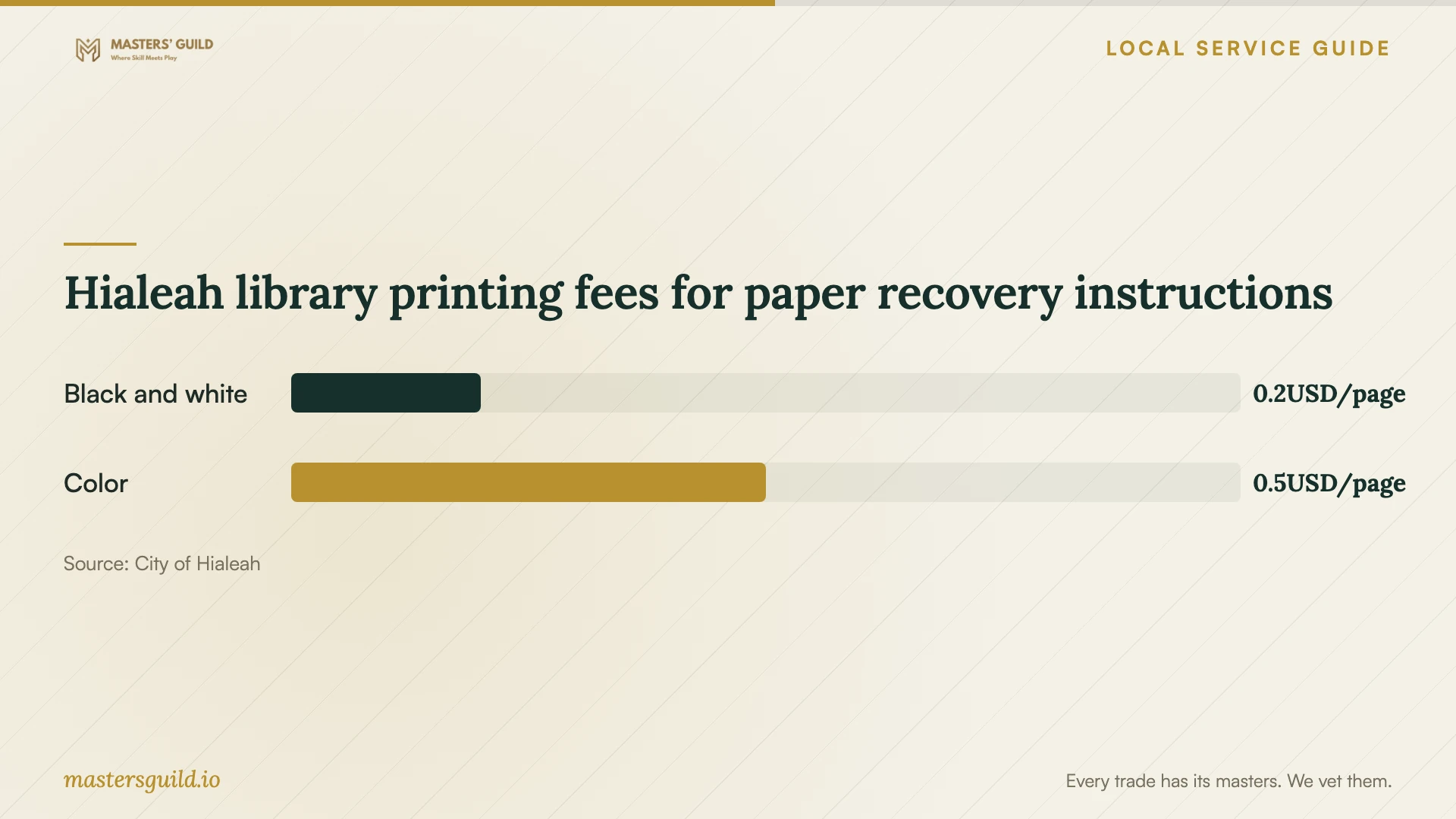
Hialeah library printing fees for paper recovery instructions
Local details that affect your job
Prepare paper records through Hialeah libraries
The city offers scanning at all library locations without a charge, but you must bring a USB device to save your items. If your migration includes paper invoices or business records, scan and review them before the setup appointment. The city also offers library Wi-Fi and limits computer use by availability; arrange the main migration around a connection and device you control. [2]
Schedule a readiness check during hurricane season
Hialeah identifies June 1 through November 30 as hurricane season. Its preparedness guidance asks residents to protect important documents and, if possible, keep a copy at a second location. For your business setup, schedule the initial transfer and recovery check before a storm threatens, and keep essential recovery instructions accessible away from the premises. [5]
Use county connectivity resources without assuming address coverage
Miami-Dade County provides broadband availability analysis and a public Wi-Fi locator. Consult these if connectivity limits your setup options, then ask providers about service at your exact premises. Treat the county resources as regional planning aids rather than confirmation that a particular connection will support your migration. [3]
Match the appointment to the work
| Your situation | Scope to request | Acceptance check |
|---|---|---|
| You need shared staff folders | Account setup, folder organization, and access permissions | Staff demonstrate the access you approved |
| You need storm preparation | Off-premises backup and written recovery instructions | Recover a sample file away from its original folder |
| You have paper records | Document preparation before migration; city library scanning requires a USB device | Review scans before approving upload |
| Your connection needs investigation | An address-specific connection check and an agreed upload follow-up | Confirm transfer completion and document outstanding files |
Your hiring checklist
- List the devices, accounts, folders, and staff members included in the job.
- Identify essential records and decide who may view, edit, and share them.
- Check upload performance at the premises and disclose the approximate data volume.
- Separate labor, subscriptions, upload follow-up, and ongoing support in the quote.
- Keep business account ownership, billing, and recovery information under your control.
- Require a sample recovery and permission check before accepting the setup.
- Collect written instructions and a list of pending transfers or excluded files.
Frequently Asked Questions
How much should I budget for setup?
Request an itemized quote based on your devices, data, permissions, and recovery requirements. The sources here do not establish local technician rates. Keep subscription charges separate from labor and ask what the technician charges for upload follow-up or a later recovery request.
Should I include email migration?
Include email only if you need it, and request a separate scope. Ask the technician to identify the accounts, messages, contacts, and calendars involved, explain any planned interruption, and describe how you will check the result before closing the old service.
Can I prepare documents at a city library?
Hialeah provides scanning at all library locations without a charge. Bring a USB device to save your scans. Library computer use depends on availability. Review the files and choose which documents belong in the business account before the migration appointment. [2]
What should I ask about storm recovery?
Ask where your off-premises copies will reside, who controls access, and how you will recover essential records from another device. Miami-Dade County recommends off-premises backup, while FPL recommends multiple backups and planning for alternate communications and power. [1] [4]
Sources and scope
This guide combines the sources below with practical planning guidance. Figures apply to the stated geography and period; request a written quote for your property.