
Local service guide
Technical Skills Training in Hartford, CT
Arrange Technical Skills Training in Hartford by defining the task you or your staff must complete, then comparing a focused private lesson with local classroom options. For office software, CT State lists a 12-week Microsoft Office Specialist program with Capital among its campuses. For basic computer confidence, Hartford Public Library describes beginner-friendly adult instruction. Before paying an instructor, agree on the software version, practice task, total fee and a way to check that the learner can repeat the work without help. [1] [2]
Choose the task before the course
Write a short training brief using work your business needs to complete. For example: create an invoice template, sort a customer list, build a monthly sales summary or update a website page. Include the application, device, current skill level and deadline. Ask the instructor to explain what the learner will practice and what they should finish during the lesson.
Separate basic device use from application training. If a learner needs practice opening files, managing folders or joining an online meeting, address those tasks before scheduling advanced spreadsheet or coding work. Ask for a short assessment using sample files. For a mixed team, request separate starting exercises so beginners can practice without holding up colleagues who know the basics.
Compare private instruction with local programs
Consider private instruction when you need someone to teach a specific workflow using your chosen software. Request a lesson outline before buying a package. Ask the instructor to demonstrate how they would teach a representative task, then have the learner perform it. Agree on whether preparation, written notes and follow-up questions fall within the quoted fee.
For broader Office training, CT State describes hands-on instruction in Word, Excel, Access, PowerPoint and Outlook over 12 weeks. It lists online and on-ground study and names Capital and Manchester among participating campuses. Confirm the actual section, delivery format and schedule before arranging staff coverage; the program page directs readers to its course finder for those details. [2]
For employment-focused IT development, Capital Workforce Partners describes work with training providers, Career ConneCT and the Capital Area Tech Partnership on cybersecurity, IT and data systems. Use the regional workforce board as a route for investigating current credential-based training. Ask about eligibility, intake dates and employer participation before treating a program as part of your staffing plan. [3]
Compare complete costs and access requirements
Request an itemized private-training quote covering teaching time, preparation, travel, software subscriptions, materials and any assessment. Specify whether the fee covers one learner or a group. Agree on cancellation terms and the charge for extra sessions. Compare proposals against the same task and scope so you can see what each instructor promises to deliver.
CT State publishes a $660 price for Microsoft Office Specialist. Its summary excludes exams and textbooks, while its program description says exam costs are included. Ask the Capital workforce office for a written statement of tuition, books, exam vouchers and retake charges before enrolling. The page lists Capital's contact number as 860-906-5130. [2]
CT State lists WIOA and SNAP among funding options for the Office program. It also states that students in its non-credit career programs do not qualify for federal financial aid or free college funding. Ask about your learner's eligibility and approval timing before counting on assistance. [2]
Prepare a lesson that protects business information
Give the instructor a practice copy of the task with customer names, payroll details and account credentials removed. Use a training account where possible. Ask which applications need installation and whether the lesson requires administrator access. Keep control of passwords and sign-ins while the instructor explains each step.
Before booking remote instruction, confirm device compatibility, application version, audio and screen-sharing requirements. CT State's employee-program intermediate Excel listing, for example, specifies Office 365, reliable internet, audio and video capability, and PC format. Check the requirements for the exact course you choose rather than assuming a tablet or another operating system will work. [4]
End the lesson with an independent attempt at the agreed task. Ask for a reusable example and concise instructions, then schedule time for practice. For a team, record who can complete the workflow and who needs another exercise before assigning live business work.
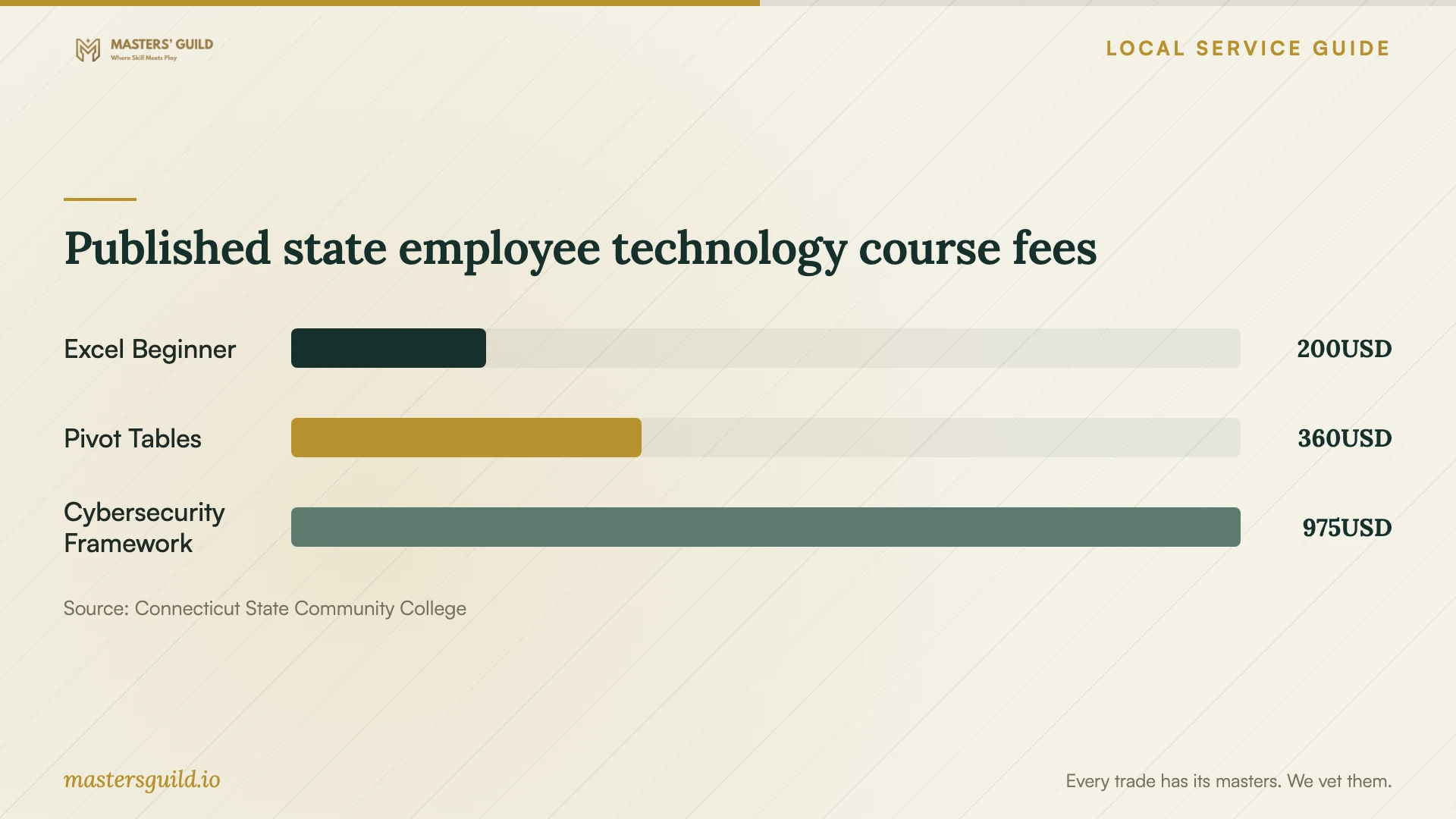
Published state employee technology course fees
Local details that affect your job
Downtown library instruction offers a beginner starting point
Hartford Public Library's Adult Tech Class description welcomes beginners to hands-on computer basics without registration. The linked event itself took place on August 27, 2026, so use it as a program lead and confirm the next session. The page identifies the Downtown location at 500 Main Street and lists 860-695-6300. Ask about the lesson topic and device arrangements before sending a staff member. [1]
Capital's Office program requires enrollment checks
CT State names Capital in Hartford among campuses offering Microsoft Office Specialist and requires basic computer skills plus a GED or high school diploma. Ask Capital which upcoming section fits the learner and whether it meets online or on campus. Resolve the page's conflicting exam-cost statements before comparing its tuition with private coaching. [2]
State employees have a separate registration route
CT State's Connecticut State Employee Training Program serves state agencies and employees. Agency-funded participants must work through their Training Approval Officer; the page directs private-pay or reimbursement participants to a coordinator. It also requires registration at least two weeks before Asnuntuck and Northwestern classes. A small-business owner should confirm eligibility before relying on these listings. [4]
Choose a training route for your goal
| Your goal | Route to consider | Check before committing |
|---|---|---|
| Basic computer confidence | Hartford Public Library adult tech instruction | Confirm the next session, topic and device arrangements. |
| Broad Office skills and certification preparation | CT State Microsoft Office Specialist | Check prerequisites, the Capital section and exam-cost inclusions. |
| One business workflow | Private instruction scoped to a sample task | Agree on the deliverable, total fee and follow-up support. |
| Employment-focused IT credentials | Capital Workforce Partners training pathways | Ask about current programs, eligibility and intake dates. |
| Technology training as a state employee | Connecticut State Employee Training Program | Confirm registration approval and the applicable deadline. |
Your hiring checklist
- Name the work task and define what successful completion looks like.
- List each learner's starting skills and request an assessment.
- Confirm the software edition, device and remote-access requirements.
- Request a written scope with teaching, preparation and follow-up charges.
- Confirm eligibility, funding approval and course availability before paying.
- Prepare sample files without customer information or credentials.
- Agree on cancellation terms and an independent final practice task.
Frequently Asked Questions
How much should I budget for private technical training?
Request a quote for your specific task, learner count and delivery format. The supplied local sources do not establish a private-instructor hourly rate. Compare the complete fee, including preparation, travel, materials and follow-up, before purchasing a package.
Does the $660 Office program include certification exams?
Confirm this with CT State before paying. The program summary says exams and textbooks are excluded, while the description says exam costs are included. Request written confirmation of the current section's charges and vouchers. [2]
Can I use the state employee course prices for my staff?
Check eligibility with the program coordinator first. CT State presents these courses through its Connecticut State Employee Training Program and gives registration instructions for state employees. Do not assume that private payment opens enrollment to a private business. [4]
How can I check that a lesson worked?
Ask the learner to complete the agreed task without instructor prompts using a fresh sample file. Check accuracy and have the learner explain the steps. Use any errors to plan the next practice exercise.
Sources and scope
This guide combines the sources below with practical planning guidance. Figures apply to the stated geography and period; request a written quote for your property.