
Local service guide
Software installation in Hartford, CT
Software installation in Hartford starts with a written scope: name the programs and devices, decide whether you want remote or in-home help, and request separate charges for labor, software, backup, and tax. Before granting remote access, verify the provider through contact information you found yourself. Connecticut consumer officials warn that unsolicited support callers can misuse remote access and compromise personal information. [3]
Define the work before comparing quotes
Give each technician the same short description: device model, operating system version, software name, and the task you want to complete. Include any error message word for word. Say whether you already own the software and whether the job includes moving files, connecting a printer, or setting up email.
Ask the provider to separate installation from troubleshooting and instruction. For example, request installation and activation of an office application, a test using one of your documents, and a walkthrough of saving files. Ask what happens to the quote if the technician discovers an account problem or an incompatible device.
Compare the total scope rather than an hourly rate alone. Request the minimum charge, any travel charge, software subscription costs, and the approval process for extra work. Agree on a spending limit before the technician starts, and ask whether a return visit to correct incomplete work carries another charge.
Choose remote help or an in-home appointment
Choose the format after discussing what you can do at the computer yourself. For remote help, ask how you will approve access, watch the session, and end it. For an in-home visit, identify the devices and accessories the technician should test together, and agree on who will remain present.
Connecticut’s Department of Consumer Protection issued an archived advisory in 2013 warning about unsolicited callers who claim to detect viruses and then seek payment and remote control. The agency advises consumers to verify the claimed company through a legitimate phone number and withhold sensitive financial information and passwords over the phone. [3]
Use that identity check before arranging remote installation. Ask for the technician’s name and business contact details in advance. Enter account credentials yourself, stay present during the session, and ask the technician to explain whether any remote-access application will remain installed afterward.
Separate Connecticut tax from installation charges
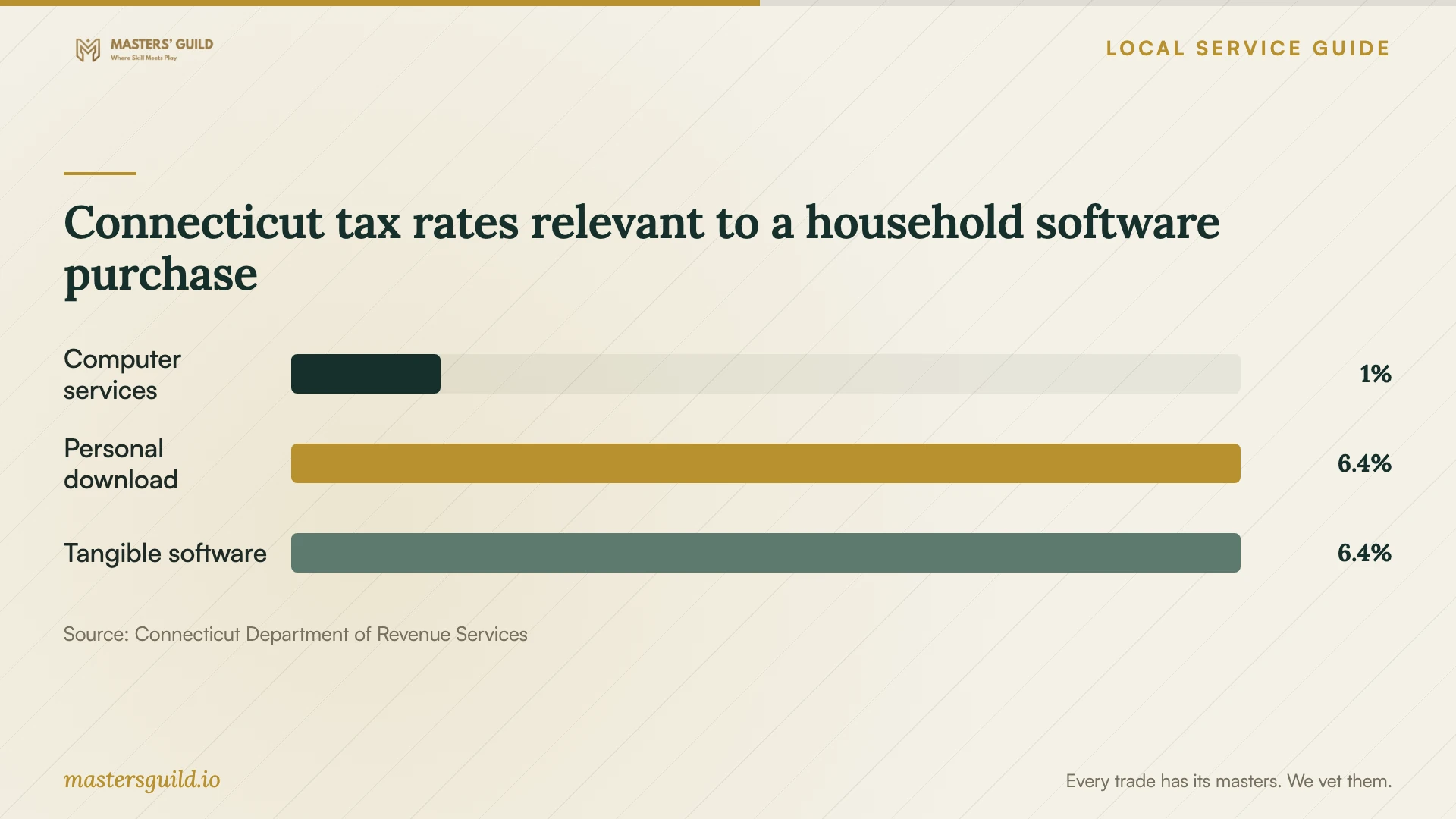
Connecticut’s Department of Revenue Services lists a 1% rate for computer and data processing services. It lists 6.35% for canned software accessed or transferred electronically for personal use. The department also states that Connecticut municipalities impose no additional sales tax. [2]
Ask the provider to identify the tax treatment of each charge instead of applying one assumed rate to the whole job. For a household installation, request separate lines for the software purchase, installation service, and any equipment. Ask the seller to explain the classification of a bundled package before you accept it.
The supplied sources do not establish a Hartford installation labor price range. Use written quotes for your actual devices and programs to set a budget. Treat the tax chart as a guide to questions for the seller, rather than a forecast of the final bill.
Prepare your files and test the result
Before the appointment, back up the files you want to keep and confirm that you can open a few copies. Gather purchase receipts, license details, and account recovery information. Ask the technician whether the proposed work includes deleting applications, resetting the device, or replacing the operating system; approve those steps by name.
Finish with a test based on your own use. Open the application, save and reopen a sample file, and test any agreed email or printer connection. Request a written list of installed programs, recurring charges you approved, unresolved problems, and instructions for getting help if the same issue returns.
Connecticut tax rates relevant to a household software purchase
Local details that affect your job
Use Hartford’s library guide for learning needs
Hartford Public Library’s Computer Classes and Digital Literacy Resources guide lists introductory computer learning and community computer-help resources. If your main need is learning to use a program, review those options before paying for installation and instruction together. Ask library staff about current classes and whether they address your task; the guide does not promise installation service on your personal device. [1]
Check the state tax categories on a Hartford quote
Connecticut’s statewide rules apply here without an added Hartford sales tax. DRS distinguishes the 1% computer and data processing service rate from the 6.35% rate for personal-use software delivered electronically. Request separate software and service amounts so you can ask the seller how it calculated the tax. [2]
Match the appointment to your task
| Your situation | Next step | Question to settle |
|---|---|---|
| You want help learning basic computer tasks | Review Hartford Public Library’s digital literacy guide | Does a current class address the task you want to learn? |
| You want an application installed on a working device | Request an installation and activation scope | Does the quote include testing with your files? |
| You want email, printing, and file transfer included | Name each task in the quote | Which connections and files will the technician test? |
| An unsolicited caller wants remote control | Verify the claimed company through an independently found number | Did you arrange this support, and can you confirm the provider’s identity? |
| The quote combines software and services | Request an itemized tax explanation | Which Connecticut tax category did the seller use for each charge? |
Your hiring checklist
- List each device, operating system version, program, and error message.
- Choose the tasks you will use to accept the finished job.
- Request separate labor, software, travel, backup, and tax charges.
- Confirm a spending limit and require approval for added work.
- Back up important files and test that you can open the copies.
- Verify the provider’s identity before allowing remote control.
- Keep account sign-in and recovery information under your control.
- Collect the installation summary and test the agreed functions before ending the appointment.
Frequently Asked Questions
How much should I budget for installation?
Request a written total for your named programs and devices. Ask about minimum charges, travel, subscriptions, backup, and troubleshooting before comparing offers. The supplied evidence does not establish a local labor price range, so a Hartford average would be misleading.
Does Connecticut charge the same tax on software and installation?
DRS lists computer and data processing services at 1% and electronically delivered personal-use canned software at 6.35%. Ask the seller to classify each part of your purchase. Connecticut imposes no additional municipal sales tax. [2]
Can I use library resources instead of hiring someone?
Hartford Public Library’s guide covers digital literacy programs and computer learning resources. Review it if you need instruction, then ask staff whether a current offering fits your task. Confirm personal-device assistance before assuming a class includes installation. [1]
Should I give a remote technician my password?
Plan to enter credentials yourself during an arranged session. Connecticut’s consumer advisory cautions against disclosing passwords over the phone and granting remote control without confirming that the person represents a legitimate company. [3]
Sources and scope
This guide combines the sources below with practical planning guidance. Figures apply to the stated geography and period; request a written quote for your property.