
Local service guide
Computer Virus Removal in Hartford, CT
Arrange Computer Virus Removal in Hartford with a written diagnosis, file-preservation instructions and a spending limit before cleanup begins. Discuss remote diagnosis if you can supervise access, or drop-off diagnosis if the computer will not start. Require your approval before drive erasure, operating-system reinstallation or paid subscriptions.
Describe the problem before choosing service
Record the symptoms you want the technician to investigate: unwanted browser pages, unfamiliar programs, security messages or startup trouble. Photograph messages and note recent downloads or changes. Request diagnosis before committing to a removal package. Tell the provider which files you need to preserve.
For remote work, agree on how you will verify the technician, supervise access and end the session. For drop-off service, obtain a receipt identifying the computer and accessories. For a home visit, confirm the arrival window, travel charge and arrangements if the technician proposes taking the device away.
If you see a ransom demand or suspect access to financial accounts, stop using the computer for sensitive activity. Contact the account providers from another trusted device. Describe the suspected access when arranging service, and discuss whether specialist investigation should precede routine cleanup.
Set the price and approval limits
Request a written quote after diagnosis. Ask for separate charges for diagnosis, cleanup, operating-system repair and file recovery. Establish what you owe if you decline the repair or the technician cannot complete it. Set a maximum authorized total and require approval before additional work.
Ask for an update deadline and expected collection date. Distinguish the technician's work time from the period the shop expects to keep your computer. Explain any deadline for schoolwork or household administration before handoff, and decide whether the proposed schedule works for you.
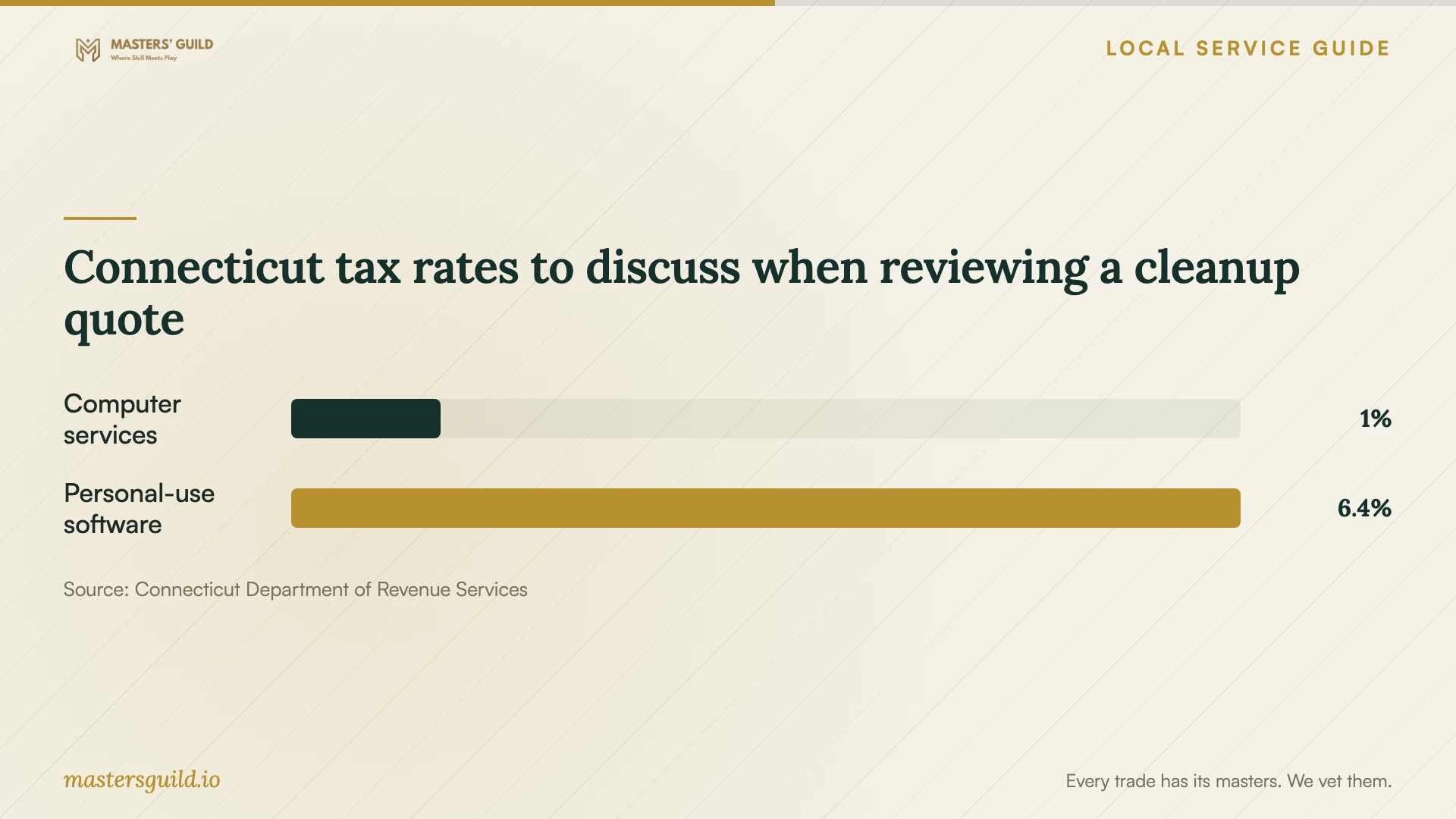
Connecticut lists computer and data processing services at 1%, a general sales tax rate of 6.35%, and electronically delivered prewritten software for personal use at 6.35%. Ask the provider to itemize services, software, parts and tax, then explain the classification of each charge. [1]
Agree on file handling before cleanup
List the folders and files to preserve, including photos and documents outside your usual folders. Identify your existing backups. Agree on whether the technician may copy files to shop storage, who may access those copies and when the shop must delete them.
Before authorizing a reinstall, have the technician explain the backup and restoration plan, application setup and treatment of saved settings. Arrange to enter sensitive credentials yourself where practical. Ask the technician to explain any account access they need and record your permission in the work order.
Review the repair before collecting the computer
Review a written summary of findings, completed work and checks. Test the symptoms you reported, open agreed sample files and try your usual applications. Obtain the recurrence policy, including the reporting deadline, what follow-up covers and any further charges.
Discuss ongoing protection without choosing software from a single test score. AV-Comparatives recommends considering multiple recent tests alongside price, ease of use, compatibility and support. Its malware testing distinguishes file detection from protection during execution and includes false-alarm assessment. [4]
Ask the technician to review security updates and the chosen product's connection to any cloud service it uses. AV-Comparatives cautions that internet access alone does not establish that the security product can reach its cloud service. [4]
Compare repair with replacement
Compare the proposed repair total with replacement, file transfer, application setup and secure handling of the old drive. Keep the old computer until you have checked the transferred files. Specify who will handle the drive and what confirmation you want before authorizing disposal.
Connecticut requires recycling of covered household electronics, including computers. DEEP warns that someone can recover deleted files and advises residents to erase their data or ask the recycler about erasure procedures. Arrange suitable drive sanitization or destruction with technical help if needed. [3]
Connecticut tax rates to discuss when reviewing a cleanup quote
Local details that affect your job
Confirm Hartford's collection route before travelling
DEEP's directory, last updated November 10, 2025, lists Hartford's Bulky Waste & Recycling Transfer Station at 180 Leibert Road, with hours of Tuesday through Saturday, 9:00 a.m. to 2:00 p.m. Confirm current hours, residency requirements and access conditions with the local recycling coordinator before loading the computer. [2]
Check the tax lines on your repair quote
Connecticut imposes no additional local sales taxes. Its tax page, reviewed September 25, 2026, lists a 1% computer and data processing services rate alongside the 6.35% general rate. For a Hartford cleanup involving software purchases or other work, request an explanation of each tax line before approving the total. Do not assume the provider should apply one rate to the entire invoice. [1]
Check household recycling eligibility and access fees
Connecticut provides no-cost collection opportunities for covered household electronics through designated sites. DEEP specifies seven or fewer covered devices per drop-off. Municipalities may charge facility access fees when another approved free location exists. Confirm the route and charges for your visit rather than assuming access to a particular facility is free. [3]
Choose a service arrangement
| Your situation | Option to discuss | Agree before work |
|---|---|---|
| Computer starts and you can supervise access | Remote diagnosis | Technician verification, session control and spending limit |
| Computer will not start | Drop-off diagnosis | Intake receipt, file priorities and update deadline |
| Ransom demand or suspected account access | Specialist investigation | Whether to delay routine cleanup |
| You are considering replacement | Repair versus transfer and setup | File checks and secure handling of the old drive |
Your hiring checklist
- Record symptoms, messages and recent changes.
- List priority files and available backups.
- Get an itemized quote, tax explanation and spending limit.
- Agree on access, file copying and deletion of shop-held copies.
- Require approval before erasure, reinstallation or subscriptions.
- Set an update deadline and collection plan.
- Review the repair summary and recurrence terms at handoff.
- Check transferred files and arrange secure drive handling before recycling.
Frequently Asked Questions
How much should I budget?
Request a written quote after diagnosis. Include diagnosis, cleanup, file handling, tax and any application setup. Confirm what you owe if you decline the repair and require approval before the technician exceeds your spending limit.
Should I authorize an operating-system reinstall?
Ask the technician to explain the reason, which files and settings they propose preserving, and which applications you would need to restore. Approve that scope and its total cost before authorizing erasure or reinstallation.
How should I choose protection after cleanup?
AV-Comparatives recommends reviewing multiple recent tests and considering price, ease of use, compatibility and support. Ask the technician to explain the proposed product, subscription cost and renewal terms before approving a purchase. [4]
Can I put a replaced computer in the trash?
Connecticut bans covered electronic devices from disposal at solid-waste facilities and requires recycling. DEEP lists Hartford's collection location at 180 Leibert Road. Confirm current access and arrange secure drive handling before taking it there. [2] [3]
Sources and scope
This guide combines the sources below with practical planning guidance. Figures apply to the stated geography and period; request a written quote for your property.