
Local service guide
Halifax computer virus removal: plan your repair
For computer virus removal in Halifax, choose a technician who will assess your device, explain the proposed work and give you a written quote before starting repairs. Describe the symptoms and your priorities, then agree on data access, permission for destructive changes and an update schedule. Compare offers using the same scope.
Describe what happened before requesting a remedy
Write a short timeline: what you were doing, what appeared on screen and what you did next. Include any software you installed, remote access you granted or account details you entered. Copy the wording of an error message when you can. Ask the technician to assess the cause rather than requesting a particular fix from the outset.
Tell the technician what you need the computer to do after the repair. Name the applications you use and any deadline that affects the handover. If you also need help with an account or a payment concern, raise that separately and ask whether the technician's proposed service covers it.
Compare the total charge and proposed work
Request a quote for your device and symptoms. Ask for the assessment charge, proposed repair charge, optional services and total payable, including applicable taxes. Check what you would owe if you decline the repair or the technician cannot resolve the problem. Ask whether the assessment charge counts toward further work.
Set a spending limit for work the technician may undertake without contacting you. Keep permission for a reset, reinstall or file deletion separate from that limit. For scheduling, request an assessment date and a progress-update time. Compare those commitments alongside the price, and ask how you can retrieve the device if you decide to stop.
Set privacy and file-handling boundaries
Identify the folders you need to keep and any copies you already have. Ask the technician to explain the proposed preservation steps before making changes. Treat missing or unreadable files as a separate concern: request an explanation of any recovery work and its charge before including it in the repair.
Ask which account access the technician needs and whether you can enter credentials yourself. Discuss who may view personal material, where they will store any copied files and when they will delete working copies. Put those boundaries in the job instructions so both of you can refer to the same agreement.
Choose the service format and check the return
For remote service, ask how you will identify the technician, start the session, watch the work and end access. For drop-off service, request a receipt listing the device and accessories. For a home visit, confirm the appointment window, visit charge and what happens if the technician proposes taking the computer away.
At collection, ask what the technician found, what they changed and what remains unresolved. Open the applications you named at intake and check the documents you need. Request an itemized receipt, any setup instructions and written follow-up terms. Ask how the technician will handle a return of the same symptoms and whether another assessment would carry a charge.
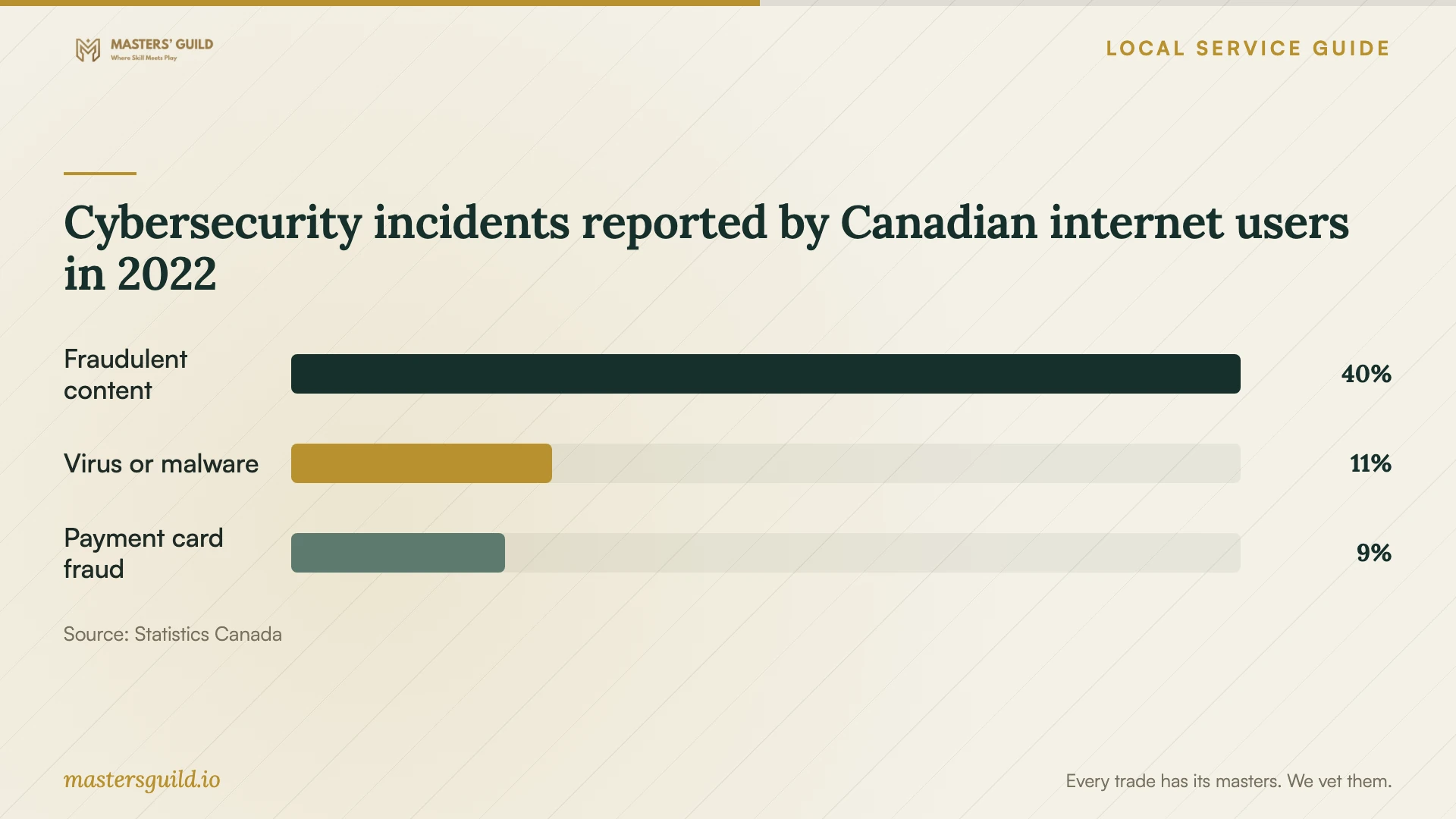
Cybersecurity incidents reported by Canadian internet users in 2022
Local details that affect your job
Reserve a public computer for essential tasks
Halifax Public Libraries provides free public computer use to members, with computers and printing at all branches. You need a library card to book and sign on. Some locations apply daily limits or restrict access during planned events. Before choosing a repair handover date, check your branch's arrangements and call to confirm any software or accessibility features you need. [1]
Use device loans within the branch
Every library branch has a Tech Kiosk for in-library device loans. With a library card, you can borrow an iPad, or a Chromebook at some locations, for up to two hours. Choose this option for tasks you can complete during a branch visit; arrange another solution if you need a computer at home. [1]
Arrange learning support separately
Many library locations offer personalized technology sessions covering basic computer skills, email and other learning topics. Call your nearest branch to ask about availability and your intended topic. The published service description does not promise malware removal, so confirm the scope before bringing a device for repair help. [2]
Match the next step to your immediate need
| Your situation | Suggested next step | Question to resolve |
|---|---|---|
| You do not know the cause | Request an assessment before choosing a remedy | What will I owe if I decline further work? |
| You cannot open important files | Request a separate discussion of recovery | What work and charges would recovery involve? |
| You need occasional computer access | Check library bookings and branch restrictions | Does the available software suit my task? |
| You need help using email | Ask about library technology sessions | Can the branch cover my learning topic? |
| You prefer remote service | Agree on session supervision | How will I end the technician's access? |
Your hiring checklist
- Record the symptoms and the actions you took before seeking help.
- Note your device model, operating system and essential applications.
- Identify irreplaceable files and any existing copies.
- Get the repair scope, total payable and approval boundaries in writing.
- Agree on credentials, personal-data access and copied-file handling.
- Confirm the handover receipt and progress-update arrangements.
- Test your priority tasks and obtain written follow-up terms.
Frequently Asked Questions
How much should I budget?
Request a quote for your device and symptoms. Ask the technician to distinguish required work from optional software or support. Before accepting, check the total payable and any charge for an unsuccessful repair attempt.
Should I approve an operating-system reinstall?
Ask why the technician recommends it and what you would need to set up afterward. Request a list of applications, settings and files they plan to retain, then decide whether the proposed result meets your needs.
What should I ask about follow-up support?
Ask how to report recurring symptoms, what information to provide and whether follow-up carries a charge. Request the terms in writing, including any deadline for reporting a concern.
Do national malware figures tell me whether my computer is infected?
No. Statistics Canada's 2022 figures describe survey respondents' reported experiences across Canada's ten provinces. They do not diagnose your device or establish a current Halifax infection rate. Ask for an assessment of the symptoms on your computer. [3]
Sources and scope
This guide combines the sources below with practical planning guidance. Figures apply to the stated geography and period; request a written quote for your property.