
Local service guide
Cloud service setup in Halifax: a hiring guide
Arrange Cloud service setup in Halifax by asking for a written scope covering the files you want to move, staff access, account ownership and a demonstrated restore from backup. Before approving migration, check your connection at the business address and identify any public-sector or patient-information obligations. The Canadian Centre for Cyber Security recommends encrypted off-site backups, restricted access and regular recovery testing. Ask the technician to include those tasks in the handover. [1] [2] [3] [4]
Define the job before asking for offers
Write down what you want the technician to accomplish: shared working folders, an off-site backup, a move from an existing service, or staff access across several devices. Name the folders and accounts in scope. Ask the technician to explain how they will check the result for each task, including who will approve permissions and confirm that migrated files open.
Prepare a device list, staff list and approximate amount of data to move. Identify the person who will own the business account and approve changes. Specify any folders that must stay out of shared staff access. Keep passwords out of the job description; agree on an access method during the appointment.
Ask for a migration plan that includes a trial with a small set of files, a cutover window and a way to return to the original arrangement if you reject the result. Keep the original files until you have checked the destination and accepted the handover.
Make backup recovery part of completion
The Canadian Centre for Cyber Security advises organizations to back up essential business information to a secure external location, encrypt backups and restrict access to people responsible for testing and restoring them. It also recommends clear recovery procedures and regular checks that restoration works. Use that guidance to specify the backup portion of your job. [4]
Ask the technician to restore a sample file into a separate test folder and open it with you. Request written instructions naming the backup administrator, the files covered and the recovery steps. Agree on who will check future backup results and what they should do after a failed attempt.
For shared working folders, ask the technician to demonstrate access using an ordinary staff account. Check that the staff member can reach the intended files and cannot open a restricted folder. Include removal of temporary technician access in your completion checklist.
Check connectivity before setting a migration date
Build Nova Scotia offers a community or postal-area search and identifies an HRM and Eastern Shore project zone. Its guidance directs readers to providers for address-level availability. Use those routes if service availability at your premises is uncertain, then ask your provider to confirm the connection you can order. [1]
Ask the technician to measure upload performance from the device and network they intend to use. Have them explain their proposed upload schedule, whether staff can keep working during it and how they will confirm completion. Avoid agreeing to a completion time based on a download-speed headline alone.
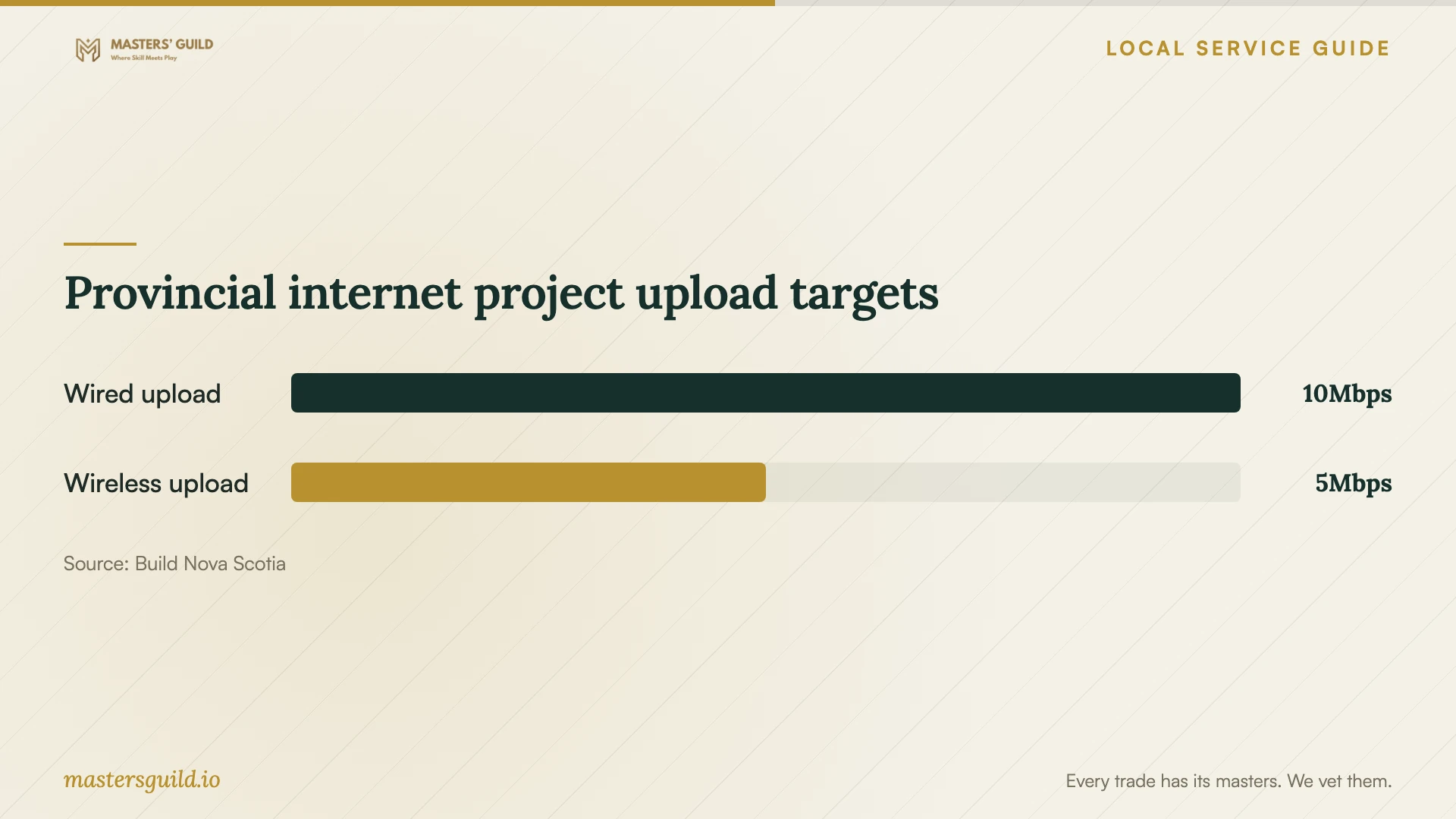
The chart compares upload targets for projects funded through the provincial initiative. Use it to frame a question about upload capacity when discussing an internet upgrade. Ask for a migration estimate based on your own connection and file set rather than treating these program targets as a measurement of your premises. [1]
Compare quotes and agree on the handover
Request itemized quotes using the same scope. Separate account configuration, file migration, backup setup, staff training and follow-up support. Ask each provider to list recurring subscriptions, taxes, travel charges and exclusions. Set a written approval process for extra work before the appointment.
Ask candidates to describe a restore test and a permissions check they would perform for your job. Request relevant platform credentials if they claim them, and ask who will handle problems after handover. For patient records or public-sector work, require a written explanation of how they will meet the requirements identified by your privacy lead.
At handover, collect the account ownership details, recovery contacts, folder map and backup instructions. Ask the technician to record unresolved issues and any transfer still underway. Approve completion after you have performed the agreed checks, and set a date to review the setup with your staff.
Provincial internet project upload targets
Local details that affect your job
HRM and Eastern Shore address checks
Build Nova Scotia's provincial search accepts a community name or the first three characters of a postal code and includes an HRM and Eastern Shore project zone. It advises confirming availability through providers as addresses enter their service systems. For premises outside central Halifax, check the community information and then give the provider your full civic address before booking a migration that depends on a new connection. [1]
Public-sector contracts change storage and access decisions
Nova Scotia's Justice FAQ says PIIDPA covers personal information held by provincial public bodies and municipalities, including service providers acting for them. It requires Canadian storage, access and disclosure unless specified circumstances permit otherwise. The FAQ excludes ordinary private-sector holdings unless the organization works on behalf of a public body or municipality. If your business performs that work, have the client's privacy lead confirm the storage region and technician access arrangements before migration. [2]
Patient-information setup needs a defined compliance scope
Nova Scotia's Personal Health Information Regulations require custodians to protect electronic-system networks, hardware and software authentication, maintain supporting written policies and record security breaches that they reasonably determine pose a risk to personal health information. They also require retention of information used to produce user-activity records for at least one year after each access. If your practice is a custodian, involve its privacy lead and ask the technician how the proposed setup will support these requirements before uploading patient records. [3]
Choose the scope before booking
| Your situation | Work to request | Approval check |
|---|---|---|
| Shared staff files | Folder structure and individual access permissions | Test staff access and a restricted folder |
| Essential business records | Encrypted off-site backup and documented recovery | Witness a restore and assign future recovery checks |
| Uncertain internet availability | Address-level provider confirmation before migration | Confirm the available service before setting the upload date |
| Personal information for a public body or municipality | Storage and access review against PIIDPA requirements | Obtain the client's privacy approval for the arrangement |
| Patient records held by a custodian | Safeguards, written policies and support for access records | Have the privacy lead review the proposed configuration |
Your hiring checklist
- List the devices, staff accounts, folders and approximate data volume in scope.
- Choose the business account owner and recovery contact before the appointment.
- Ask the technician to check upload performance at the premises.
- Get separate written charges for setup, migration, subscriptions and support.
- Have your privacy lead approve arrangements for public-sector or patient information.
- Keep the original files until you accept the migration.
- Witness a sample restore and test an ordinary staff account's permissions.
- Collect recovery instructions and remove temporary technician access at handover.
Frequently Asked Questions
How much should I budget for setup?
Ask for an itemized quote based on your file inventory, migration scope and acceptance checks. Ask providers to separate labour, subscriptions, travel and continuing support so you can compare the total commitment.
Must every Halifax business store its files in Canada?
The Nova Scotia Justice FAQ says PIIDPA does not cover ordinary private-sector personal information unless the business works on behalf of a public body or municipality. For covered information, it describes Canadian storage and access requirements with exceptions. Ask your privacy lead to identify the obligations that apply to your work. [2]
What should the technician demonstrate before I approve completion?
Ask for a sample restore, a staff permissions check and written recovery instructions. The Canadian Centre for Cyber Security recommends clear restoration procedures and regular verification that recovery mechanisms work. [4]
Can I schedule migration before an internet upgrade?
Ask the technician to assess your current connection and propose a schedule. If you depend on a new service, confirm availability at your address with the provider first. Build Nova Scotia supplies community information and provider routes for checking availability. [1]
Sources and scope
This guide combines the sources below with practical planning guidance. Figures apply to the stated geography and period; request a written quote for your property.