
Local service guide
Software Installation in Greensboro, NC
For Software Installation in Greensboro, choose a technician who provides a written scope covering your devices, programs, account setup, and completion checks. Compare written quotes for your device and requested work. Before booking, settle the service location, backup responsibilities, access arrangements, and total cost, including software purchases and applicable tax.
Define the result you want
Give prospective technicians the device model, operating system version, software name, and intended use. Mention whether you own the software, need a license, or want to move files from another computer. Include the wording of any error message without sharing passwords or private documents.
Separate installation from troubleshooting, account recovery, and file transfer in the requested scope. For an operating system change, include a backup and recovery plan. Name the files and settings you want preserved and decide who will check the backup before work begins.
Use a concrete completion example: open a household budget, save an edited document, or send and receive email. Have the technician include activation, updates, configuration, and that demonstration in the estimate where needed.
Choose the appointment and access arrangements
Discuss remote service, a home visit, or drop-off with the technician. For remote work, settle which access tool they will use, whether you can watch, and how access will end. For a visit, confirm the arrival window and travel charge. For drop-off, establish collection arrangements and a way to approve changes.
NCDOJ warns that scammers with remote access can reach information on the computer and connected network, including password-protected information. The department recommends choosing support you know and trust instead of responding to unsolicited offers or warning pop-ups. [3]
Keep sign-in under your control. Enter credentials yourself where practical and have the technician pause while you do so. Decide whether any remote access software should remain after the appointment and review that arrangement before ending the session.
Compare the complete cost
Compare written quotes for your device and requested work. Look for labor, software licenses, subscriptions, backup or transfer work, travel, and applicable tax. Clarify whether the technician charges a fixed amount or bills for time, and what you would owe for diagnosis or an unsuccessful attempt.
North Carolina taxes retail repair, maintenance, and installation services within NCDOR’s stated scope unless a statutory exemption applies. NCDOR also says that installation charges remain subject to sales and use tax when the retailer lists them separately. Confirm the treatment of your purchase with the seller. [1]
Set a spending limit for unexpected work. Require approval before extra troubleshooting, software purchases, or recurring subscriptions. For an incomplete job, agree on the condition in which the technician will return the device and whether further work needs a new estimate.
Prepare and check the finished work
Gather the charger, purchase records, and installation media you already have. Back up files you want to keep, then open a sample from the backup to check it. Have your account recovery method available without putting passwords in the booking message.
Before accepting the work, restart the device and complete the task agreed in the scope. Open and save your chosen file, or send and receive a test message. Review activation with the technician and note any unresolved errors.
Keep a handover record of installed programs, purchases, renewal terms, and unresolved problems. Confirm who owns the software account and how to obtain follow-up help. Review remote access settings together before the appointment ends.
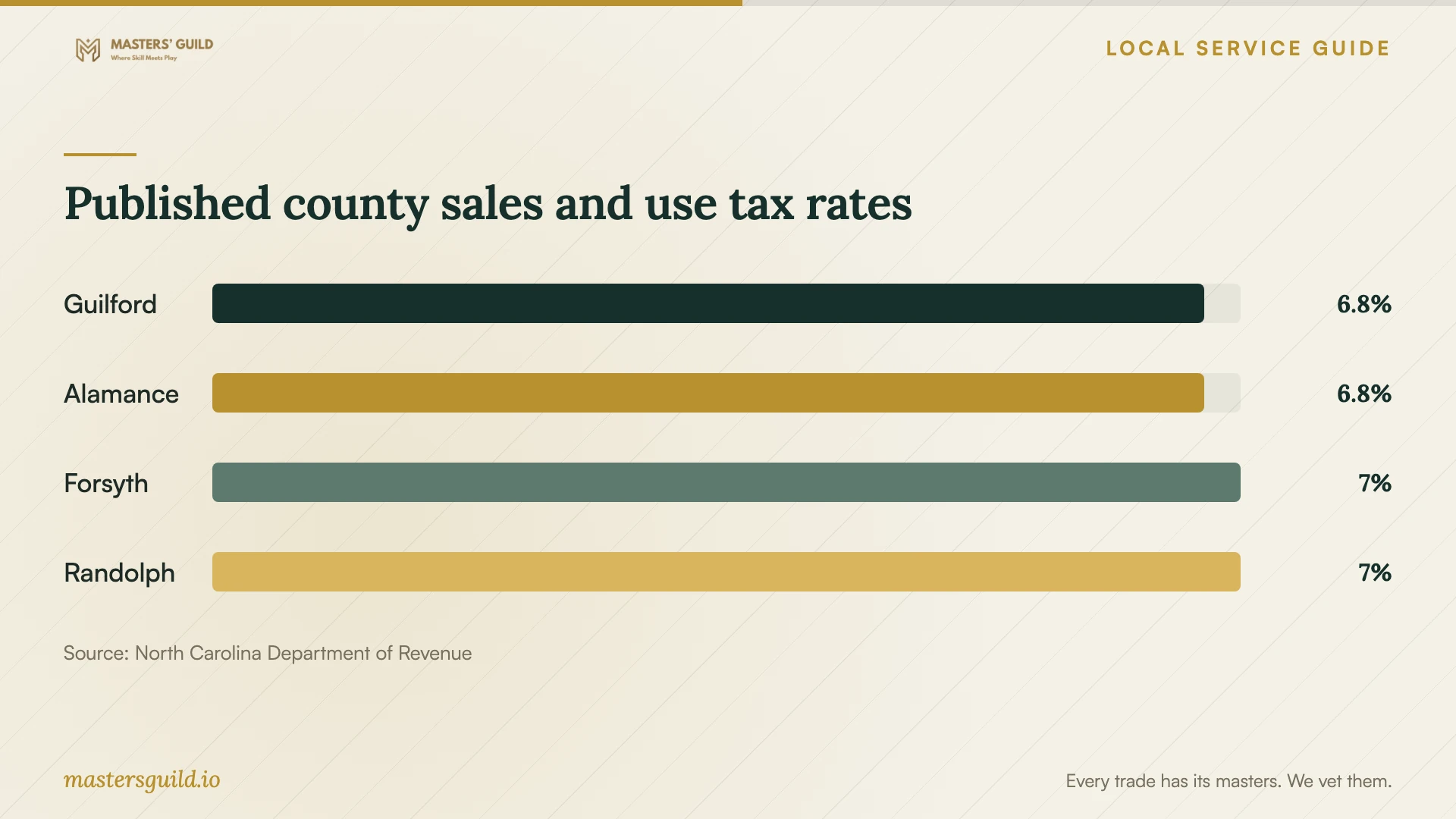
Published county sales and use tax rates
Local details that affect your job
Check Guilford County tax in the quote
NCDOR’s current table lists Guilford County at 6.75%, combining state and applicable local taxes, as retrieved October 15, 2026. For a purchase sourced to Guilford, confirm the taxable charges and tax-inclusive total. If you arrange remote service or collect the device elsewhere, have the seller confirm the transaction’s sourcing and tax treatment. [1] [2]
Use North Carolina’s scam reporting and recovery guidance
North Carolina residents can report suspected scams to NCDOJ at 1-877-5-NO-SCAM. Its statewide guidance says to update security software, scan, and delete identified threats after giving a scammer remote access. Change any disclosed password, including on other accounts where you reused it. When arranging help here, disclose the incident so the technician can assess security concerns before routine installation. [3]
Match the requested scope to your situation
| Your situation | Scope to discuss | Key agreement |
|---|---|---|
| You own the software and account | Installation and configuration | Activation and a working-task demonstration |
| You are replacing a computer | Setup plus a defined file transfer | Which files to move and who checks the backup |
| You want an operating system change | Compatibility review and installation plan | Backup, recovery, and permission for changes |
| You granted access after a suspicious message | Security assessment before installation | Disclose remote access and any shared passwords |
Your hiring checklist
- Send a device and software list with your intended result and any error messages.
- Obtain an itemized scope, total, and approval limit for extra work.
- Check your backup and gather purchase records, charger, and recovery access.
- Settle appointment logistics and how the technician will access the device.
- Restart and perform the agreed task before accepting completion.
- Retain the invoice and handover notes, including renewal and follow-up terms.
Frequently Asked Questions
Does the installation price include the software?
Confirm this in the quote. Have the technician identify each license purchase or subscription, its renewal terms, and the account owner. Keep purchase records in an account you control.
Can I use remote help after receiving a warning pop-up?
Choose support through contact information you find yourself. NCDOJ advises against calling numbers or clicking links in computer warning pop-ups. Tell your chosen technician what appeared and whether you granted access. [3]
Does a separate labor line mean the work is tax-free?
NCDOR says separately stated installation charges remain subject to sales and use tax. Covered services have statutory exemptions, so have the seller confirm the treatment of your specific transaction. [1]
Sources and scope
This guide combines the sources below with practical planning guidance. Figures apply to the stated geography and period; request a written quote for your property.