
Local service guide
Data Recovery and Backup in Greensboro, NC
For Data Recovery and Backup in Greensboro, choose a provider around your immediate task: restoring a known backup, assessing inaccessible storage, or responding to suspected ransomware. Ask for a written diagnostic scope, spending limit, data-handling terms, and a demonstration that you can open the returned files. For ongoing backup work, require a documented restore test; CISA recommends offline, encrypted backups and regular recovery testing. [1]
Choose the scope before handing over equipment
Start with a short incident history: the device involved, the last time you accessed the files, error messages, and anything you tried afterward. List the folders, accounts, or applications you need first. Tell the provider whether you need individual documents or a working business application with its settings and records.
For inaccessible storage, ask the provider to explain the proposed assessment before you authorize repair attempts. Request an approval checkpoint before additional work, shipment to another facility, or disposal. Identify who will hold the equipment and who will answer questions if a subcontractor handles it.
For suspected ransomware, disconnect affected devices from the network and contact your incident-response provider. CISA recommends isolating impacted systems and prioritizing recovery on a clean network. Its guidance reserves powering down devices for situations where network disconnection is not possible because shutdown loses potential evidence in memory. [1]
Compare written quotes and define successful recovery
Ask each provider to separate assessment, recovery work, replacement storage, transport, and backup setup in the quote. Request the amount due if you decline further work or receive only part of the requested data. Set a spending ceiling and require approval before the provider exceeds it.
Define success by the files you need to use. Ask whether you can review a recovered-file list and open representative documents before accepting delivery. For accounting or other application data, arrange a test with the person who operates that software. Specify the destination device and who will help reconnect the restored data to your workflow.
Request separate estimates for assessment and delivery, plus an update schedule. State your deadline without treating it as a guaranteed completion date. If you can resume essential work with a limited set of records, ask the provider to quote that priority alongside the complete job.
Specify backup work you can verify
CISA recommends offline, encrypted backups of critical data and regular tests of backup availability and integrity. It warns that ransomware can delete or encrypt accessible backups. Ask the provider to explain how you would retrieve a protected copy if your normal computers and administrator accounts became unavailable. [1]
Write down how much recent work you can afford to lose and how long you can operate without each system. Ask the provider to propose a backup schedule and restoration order against those limits. Include shared files, application records, and cloud accounts in the scope discussion rather than assuming the computer backup covers them.
Before accepting the setup, watch the provider restore a sample to a separate destination. Open the files and record the test date, backup date, and steps you followed. Assign someone to review failed-backup alerts, schedule future tests, and maintain recovery access when staff leave. CISA also recommends putting security requirements into contracts with managed service providers. [1]
Agree on privacy, return, and retirement terms
Ask who can access your files, where the provider will store working copies, and whether another company will receive them. Put the retention period, deletion process, equipment return, and incident contact in writing. Arrange a secure method for sharing any necessary credentials and limit the access you authorize.
North Carolina DOJ advises businesses to back up and transfer data before sanitizing an old hard drive. Ask the provider to identify a sanitization method appropriate to your storage device and document completion. Keep the original equipment until you have checked the transferred files and accepted the recovery. [3]
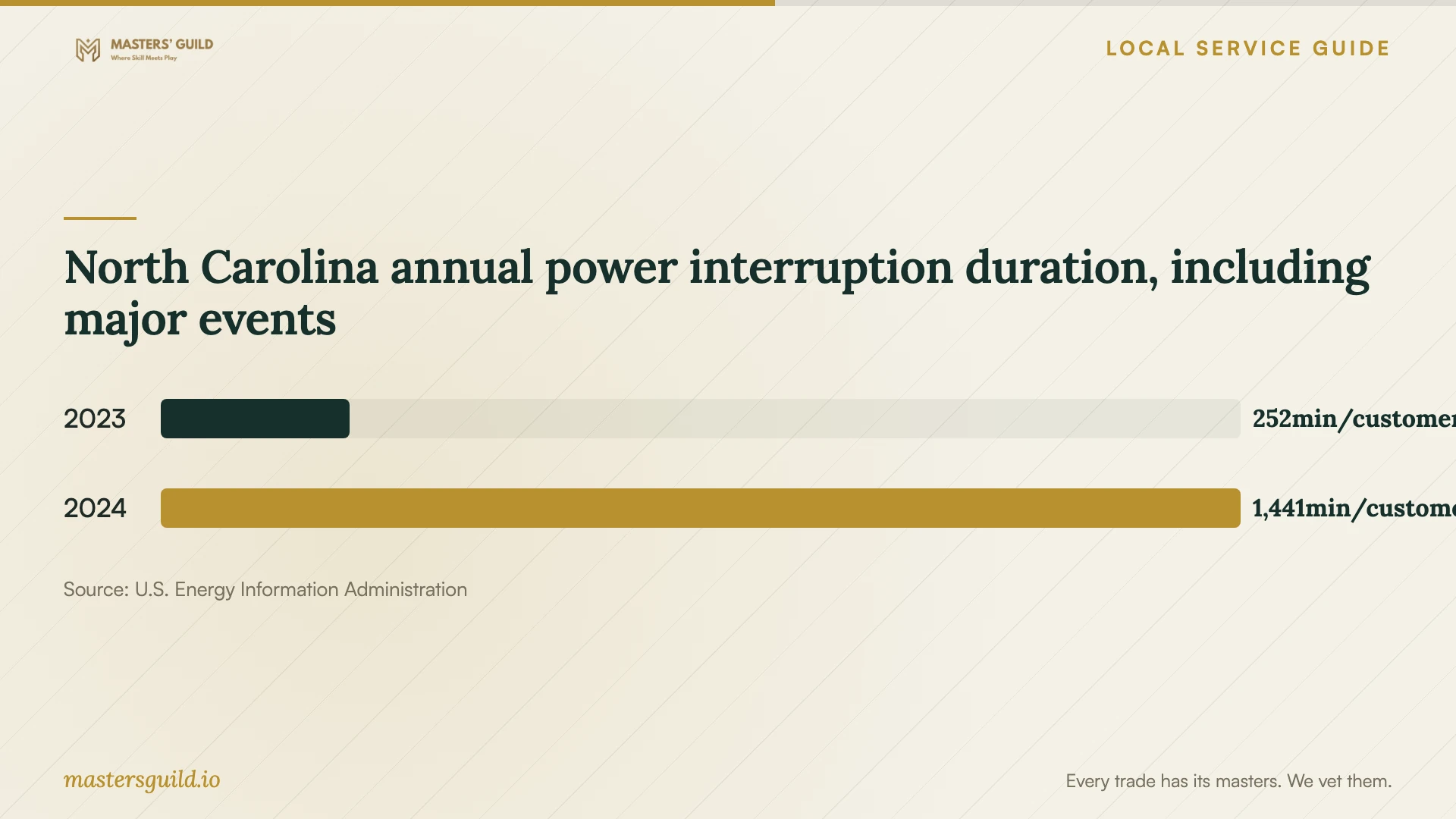
Include power interruptions in the backup planning discussion. Ask whether the proposed equipment needs battery support, a controlled shutdown procedure, and a check that backup jobs resume afterward. The statewide interruption figures below provide planning context; they do not describe the reliability of your particular premises. [5]
North Carolina annual power interruption duration, including major events
Local details that affect your job
North Carolina breach duties affect the provider you choose
North Carolina DOJ says businesses that own or license personal information subject to a security breach must notify affected people without unreasonable delay. Businesses holding that information for another company must notify the owner or licensee immediately after discovering a breach. If you suspect unauthorized access, ask for incident-response capability and legal coordination alongside file restoration. Recovery alone does not resolve the notification question; use the state's breach definition to assess the incident with qualified counsel. [2]
Plan a Greensboro drop-off after securing the data
Guilford County lists electronics drop-off at 2138 Bishop Road, Greensboro, Monday through Friday from 8 a.m. to 4 p.m., with arrival at least 30 minutes before closing. It also lists 2750 Patterson Street, Monday through Friday from 10 a.m. to 6 p.m. and Saturday from 8 a.m. to 2 p.m. The county accepts batteries only at the Patterson Street Household Hazardous Waste Facility. Because the page describes household electronics, confirm business-equipment eligibility before transporting office devices. The listing does not establish certified data destruction, so arrange sanitization separately. [4]
Match the provider's scope to your situation
| Your situation | Scope to request | Acceptance question |
|---|---|---|
| You have a backup to evaluate | A supervised restore to a separate destination | Can I open the priority files and use the required application? |
| Storage is inaccessible | Assessment with an approval checkpoint | What work and charges require my next authorization? |
| You suspect ransomware | Incident response, isolation, and clean recovery | Who will investigate the compromise before reconnecting systems? |
| You need ongoing backups | Offline, encrypted protection and recurring restore tests | Can we demonstrate recovery without access to the normal system? |
| You are retiring equipment | Verified transfer, sanitization, and disposal planning | Who documents sanitization and confirms drop-off eligibility? |
Your hiring checklist
- Record device details, symptoms, previous attempts, and the last known usable backup.
- List priority files and the business tasks they support.
- Get assessment charges, a spending ceiling, and approval checkpoints in writing.
- Confirm who handles equipment, transport, and subcontracted work.
- Agree on access permissions, working-copy retention, and deletion terms.
- Open returned files and test the business application before accepting completion.
- Document a backup restore test and assign responsibility for alerts.
- Confirm disposal eligibility and data sanitization before retiring equipment.
Frequently Asked Questions
How much should I budget for recovery?
Get a device-specific assessment and written quote. Ask about assessment charges, partial recovery, declined work, return shipping, and replacement storage before approving the job.
What should I request from a backup provider?
Request a documented scope, protected recovery copies, a restore demonstration, and responsibility for reviewing failures. CISA recommends offline, encrypted backups and regular testing of their availability and integrity. [1]
Does recovering files resolve a suspected breach?
Arrange a separate assessment of unauthorized access and notification duties. North Carolina DOJ defines qualifying breaches and describes notification obligations for businesses that own or hold personal information. [2]
Can I recycle the old computer after recovery?
Check the returned files and arrange drive sanitization first. Guilford County lists local electronics drop-off options, but its disposal page does not establish certified data destruction or confirm eligibility for your specific business equipment. [3] [4]
Sources and scope
This guide combines the sources below with practical planning guidance. Figures apply to the stated geography and period; request a written quote for your property.