
Local service guide
Computer Virus Removal in Greensboro, NC
Arrange Computer Virus Removal in Greensboro by asking a technician for a written scope covering diagnosis, file preservation, cleanup, and any proposed system reinstall. Request a total that includes applicable tax and an approval step before extra work. Choose support you have checked yourself; North Carolina’s Department of Justice warns against calling numbers or following links in computer-warning pop-ups. [4]
Choose support without following a fake alert
Treat a pop-up that tells you to call a number or click a repair link as a reason to pause. NCDOJ advises readers to avoid those calls and links, update their security software, and run a scan if they suspect a problem. Find support through a company you know and trust. [4]
Describe what you saw before requesting a repair: the warning text, changes to the browser, any scan results, and whether you installed software or granted remote access. Ask the technician to investigate the symptoms before authorizing a cleanup package. Do not purchase a repair based only on the wording of a warning.
Tell the technician if someone already controlled the computer remotely. NCDOJ warns that scammers with access can reach information on the computer and connected network, including password-protected information. Its guidance calls for updating security software, scanning, and changing passwords shared with the scammer, including reused passwords on other accounts. [4]
Set the repair scope and protect your files
Ask for separate descriptions of diagnosis, malware cleanup, operating-system repair, and file backup. Require the technician to explain any proposed reinstall and obtain your approval before erasing data. Name the folders you need preserved, such as family photos, tax documents, and schoolwork.
Discuss access before the appointment. Ask whether you can enter passwords yourself, what files the technician expects to open, where any backup will be stored, and when the technician will delete temporary copies. Keep account recovery information available without putting passwords in the job description.
Ask about remote, drop-off, and home-visit options rather than assuming the technician offers all three. Describe whether the computer starts and whether you can use it. For a drop-off, confirm which accessories to bring. For a home visit, confirm the arrival window, travel charge, and access needed to other devices.
Set a completion standard before work begins. Request a written account of what the technician found, what they removed or changed, which checks they performed, and what remains unresolved. Agree on how you will check your important files and what follow-up applies if the same symptoms return.
Compare the full quote
Request an itemized estimate covering diagnosis, cleanup, backup, system repair, travel, and any software purchase. Ask whether the diagnostic charge counts toward the repair and whether the provider charges if you decline further work. Set a spending limit that requires your approval before the technician continues.
North Carolina’s Department of Revenue states that retail repair, maintenance, and installation services are subject to applicable sales and use tax unless a statutory exemption applies. Its definition includes troubleshooting to identify a problem and work to restore property to working order. Ask the provider to show the tax treatment on the estimate. [2]
Compare providers using the same requested work. Ask each to state whether the quote includes preserving files, reinstalling applications, checking browser settings, and explaining any account-security steps. Keep repair completion separate from your own password and account-recovery tasks when reviewing the handover.
Plan for replacement before approving more work
If the technician proposes extensive work, ask for separate totals for repairing the computer and preserving your files for a replacement. Decide how much you want to spend before approving either option. Require an explanation of any files the technician cannot recover or verify.
Guilford County provides free electronics-recycling drop-offs and states that North Carolina prohibits computer equipment and televisions in the trash. If you retire the computer, arrange file transfer and data removal before recycling it. Ask the technician to document the data-removal work rather than assuming drop-off includes that service. [3]
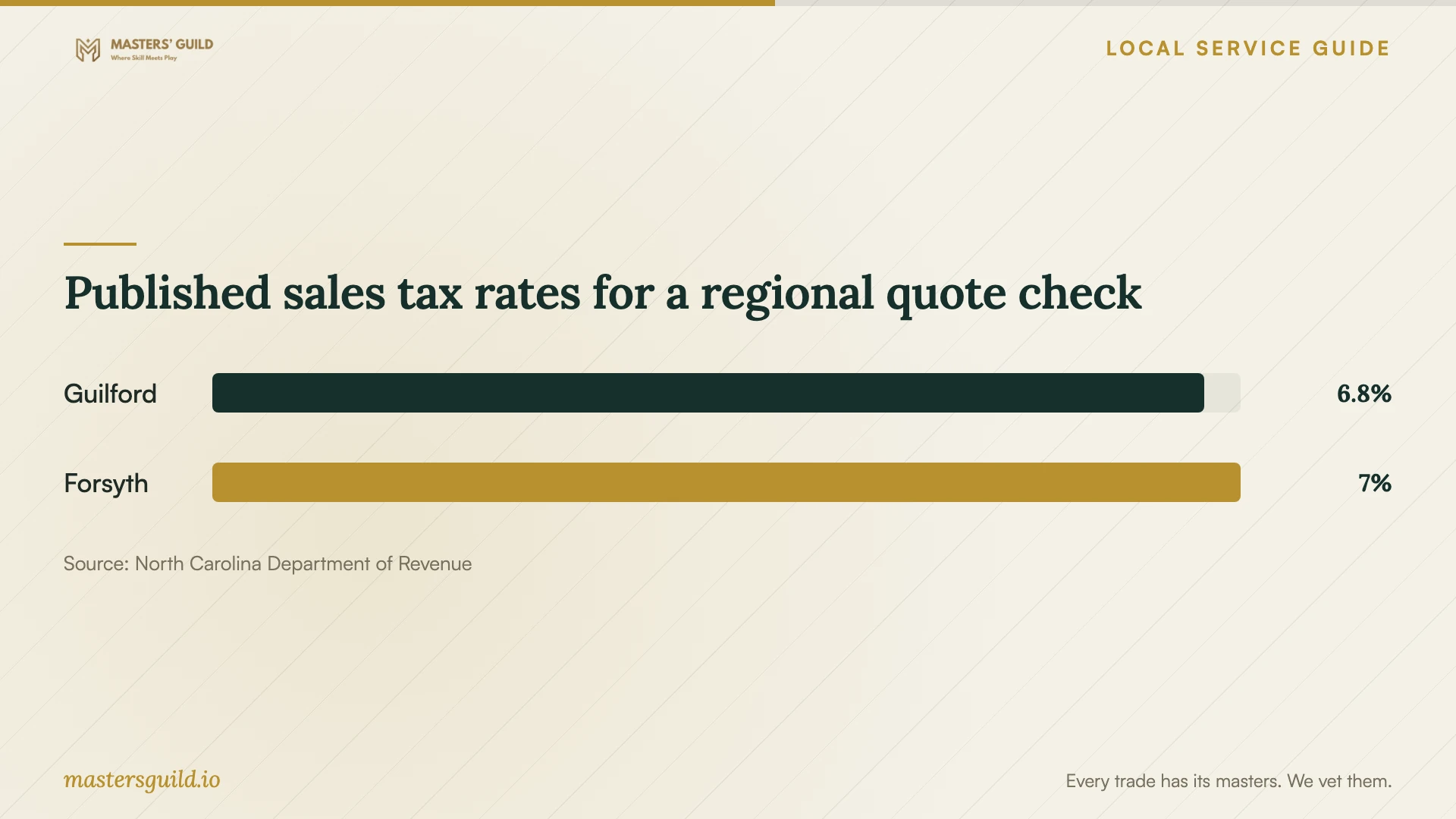
Published sales tax rates for a regional quote check
Local details that affect your job
Check the Guilford County tax line
NCDOR’s current table lists Guilford County at 6.75% combined sales and use tax. For a repair sourced to Guilford County, ask the provider whether that rate applies and whether the quoted total includes it. If you compare a shop outside the county with a home visit, have each provider explain the applicable rate rather than choosing it from the business address alone. [1] [2]
Choose the right recycling stop
Guilford County lists free electronics drop-off at 2750 Patterson Street in Greensboro, Monday through Friday from 10 a.m. to 6 p.m. and Saturday from 8 a.m. to 2 p.m. It also lists 2138 Bishop Road, weekdays from 8 a.m. to 4 p.m., with arrival at least 30 minutes before closing. The county accepts batteries only at the Patterson Street Household Hazardous Waste Facility. Confirm hours and battery handling before taking a retired laptop. [3]
Choose the next step for your situation
| Situation | Next step | Point to settle |
|---|---|---|
| A warning tells you to call for help | Avoid the number or link and choose trusted support yourself. | Describe the warning before authorizing work. |
| You gave a stranger remote access | Follow NCDOJ guidance to update security software and scan; change passwords you shared. | Tell the technician what access you granted. |
| You need files preserved | Request a file-preservation plan before cleanup. | Require permission before erasure or reinstall. |
| The repair proposal exceeds your budget | Request separate repair and file-transfer quotes. | Set an approval limit for further work. |
| You decide to retire the computer | Arrange data removal, then use a county-listed electronics drop-off. | Use Patterson Street for battery acceptance. |
Your hiring checklist
- Record symptoms, warning text, and any remote access you granted.
- List essential files and tell the technician which backups you have.
- Agree on file access, backup storage, and deletion of temporary copies.
- Require approval before drive erasure, a reinstall, or additional charges.
- Request an itemized total with applicable tax and appointment charges.
- Confirm the service method, accessories needed, and expected handover time.
- Request a repair summary and check your important files before accepting completion.
Frequently Asked Questions
Can I try a scan before hiring someone?
NCDOJ recommends updating security software and running a scan if you think something is wrong. If you seek help afterward, share the scan results and describe any symptoms that remain. Avoid repair links in warning pop-ups. [4]
Will the technician need to erase my computer?
Ask the technician to explain the proposed method before authorizing work. Require separate approval for erasing the drive or reinstalling the operating system, and agree on file preservation first.
Does a cleanup quote include sales tax?
Ask the provider to state that in writing. North Carolina generally taxes retail repair services unless exempt, and NCDOR lists Guilford County’s combined rate as 6.75%. Have the provider confirm the applicable treatment for your job. [1] [2]
Where can I take an old computer after replacing it?
Guilford County lists free electronics drop-offs at Patterson Street and Bishop Road in Greensboro. Arrange data removal first. The county specifies Patterson Street’s Household Hazardous Waste Facility for batteries, so confirm handling before bringing a laptop or loose battery. [3]
Sources and scope
This guide combines the sources below with practical planning guidance. Figures apply to the stated geography and period; request a written quote for your property.