
Local service guide
Technical Skills Training in Grand Rapids, MI
For Technical Skills Training in Grand Rapids, start with library help for basic computer or Office tasks, request a private lesson plan for your business workflow, and consider GRCC for structured IT career preparation. Grand Rapids Public Library offers free computer classes and individual technology help; Kent District Library covers basic skills and appointments for topics including Canva and AI tools. Choose your route around a task you need to complete, such as maintaining a spreadsheet, creating an advertisement, or troubleshooting a computer. [1] [2] [3]
Choose training around a business task
Write down what you want to do without help after training. For spreadsheet instruction, specify the result: enter sales, calculate totals, and produce a weekly report. For website coaching, name the platform and the changes you want to make. Ask the instructor to build the lesson around a sample with sensitive information removed.
Separate learning from implementation in your request. Decide whether you want an instructor to teach you, configure a tool for you, or provide both services. Ask for separate deliverables and charges if you want both. For staff training, identify who will attend, their starting skills, and whether everyone uses the same software.
KDL lists walk-in assistance for MS Office, email, online navigation, and document handling. It lists appointments for design help, accessibility, device setup, and deeper exploration of AI tools. Use those categories to describe your question when you contact a branch; ask whether staff can cover your particular business task. [2]
Compare costs with matching scope
GRPL offers free computer classes. Check whether a class covers your intended skill before paying for instruction. [1]
For private lessons, request an itemized written quote covering lesson time, preparation, travel, software subscriptions, cancellation terms, and any support between sessions.
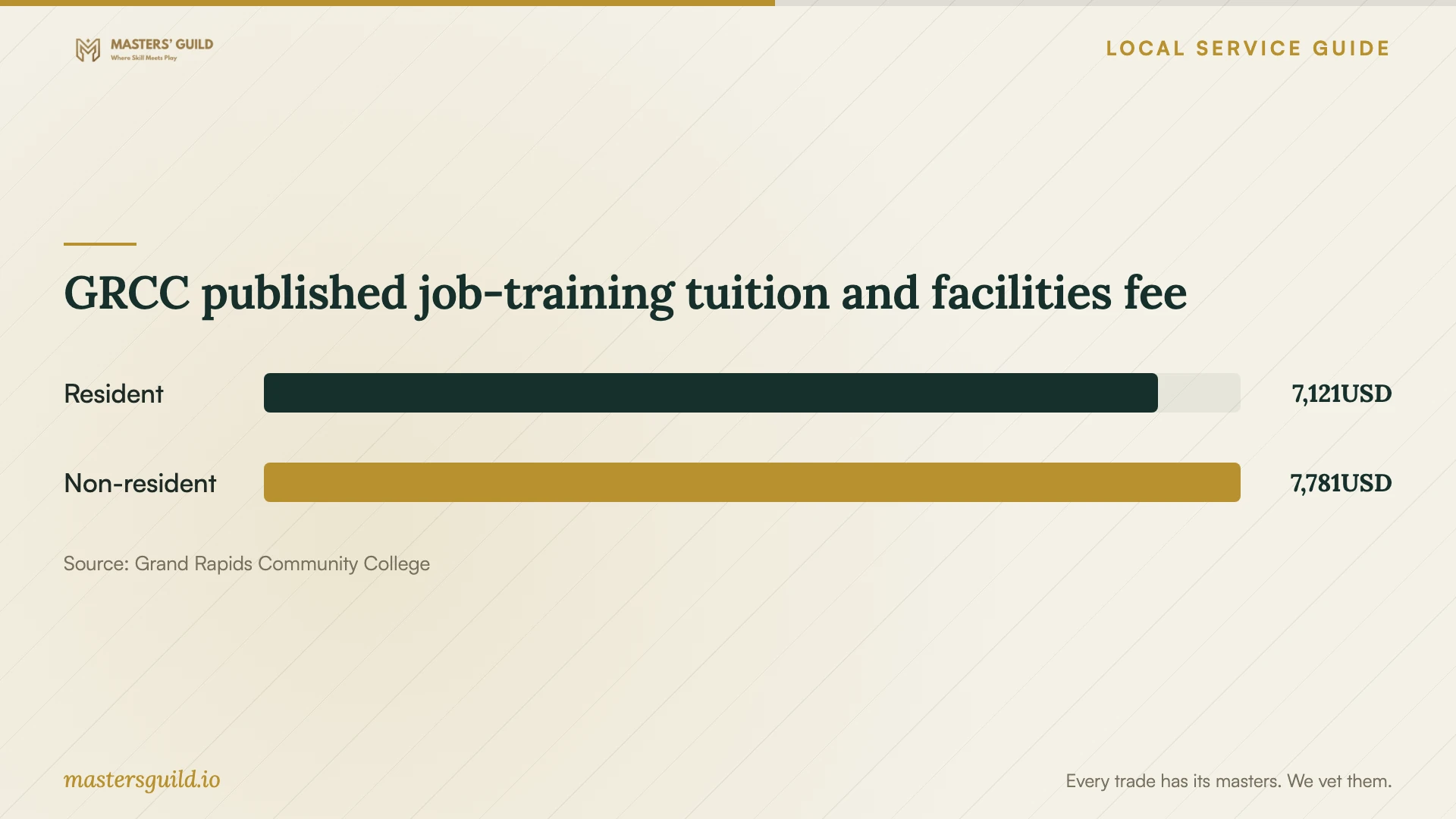
GRCC lists 2026–27 job-training tuition plus facilities maintenance totals of $7,121 for residents and $7,781 for non-residents. These are published job-training category charges. Ask Workforce Training to confirm the Computer Support Technician program's applicable charges, required materials, exam costs, and other fees before treating either amount as your complete budget. [5] [3]
Compare proposals by the work each learner should complete afterward. Ask whether the instructor includes exercises, written instructions, and a review of your practice work. For a longer package, request a first-session review point before committing to the remaining lessons.
Check the instructor's fit before booking
Ask prospective instructors to explain how they would teach your sample task. Request relevant teaching examples and confirm that they know your operating system, software edition, and accessibility needs. Ask who will teach the session if you are arranging training through a company.
Agree on a practical completion check. You might create an invoice template, adjust a spreadsheet formula, or repeat a website update without prompts. Ask the instructor to leave instructions your staff can follow and identify which questions fall outside the agreed scope.
Use demonstration accounts or copies of files with customer and employee details removed. Keep control of passwords and account recovery. For remote lessons, agree on screen-sharing permissions and whether anyone will record the session. For AI instruction, specify which business information learners may enter into the tools.
Use a college program for an IT career goal
GRCC's Computer Support Technician Certificate of Completion targets entry-level computer support work. The college describes an intensive hybrid course with coursework, hands-on labs, and exercises in installations, configurations, diagnosis, preventive maintenance, and basic networking. It also prepares learners for two CompTIA A+ certification tests. [3]
Consider that route if you or an employee want broad computer-support preparation. Before enrolling, ask about the next intake, attendance requirements, prerequisites, weekly workload, and exam arrangements. GRCC lists Workforce Training at 616-234-3800 for program questions. [3]
GRCC published job-training tuition and facilities fee
Local details that affect your job
Plan library practice around computer time limits
GRPL provides public computers with Word, Excel, and PowerPoint. Branch sessions last up to one hour; Main Library sessions last up to two hours. A library card or temporary guest pass provides access. If you need a computer for practice, plan the exercise around that limit and ask about software compatibility before bringing files. [1]
Arrange regional help by topic
Kent District Library distinguishes walk-in help from appointment topics. For Canva advertisements, accessibility tools, or AI beyond the basics, call 616-784-2007 or visit a branch to arrange an appointment at your preferred branch. Describe the intended task before making the trip. [2]
Confirm GRCC residency before accepting a tuition estimate
GRCC bases resident status on its taxing district and residency rules, including a general six-month requirement with exceptions. A change of address does not change the classification by itself. If you believe your classification is wrong, submit a Residency Review Form with supporting documents; the college generally requires it by the end of the semester's first week. [4]
Choose a starting route
| Your goal | Starting route | Confirm before arranging |
|---|---|---|
| Learn email, word processing, or spreadsheets | GRPL individual technology help or free classes | Branch appointment or current class schedule |
| Get help with Canva advertisements or AI tools | KDL appointment | Whether staff can cover the specific task |
| Learn a workflow using your business files | Request a private instructor's lesson proposal | Deliverables, confidentiality, and full quoted cost |
| Prepare for entry-level computer support work | GRCC Computer Support Technician program | Intake, workload, residency, and program-specific charges |
Your hiring checklist
- Name the task you want to complete without assistance.
- List learners, starting skills, devices, and software versions.
- Ask the library whether its help covers your task.
- Request an itemized quote and cancellation terms for private lessons.
- Prepare sample files with sensitive information removed.
- Agree on practice exercises, completion checks, and follow-up support.
- Confirm college program charges and residency status before enrolling.
Frequently Asked Questions
Can I get free computer training locally?
GRPL offers free classes from September through May, covering novice through advanced levels. It also offers individual help with computers, email, word processing, spreadsheets, and other listed topics by branch appointment. Check the current schedule and describe your needs before attending. [1]
Can a library help with a business advertisement?
KDL lists appointment-based design help for getting started in Canva and creating advertisements for small businesses. Ask whether your request fits that assistance and what files or devices to bring. [2]
Does GRCC's certificate include CompTIA certification?
GRCC describes preparation for two CompTIA A+ tests. Before enrolling, ask the program office whether your quoted charges include exam registration or vouchers, and confirm the requirements for earning certification. [3]
What should a private training quote include?
Request the learning goal, instructor, session format, lesson time, preparation charges, travel, required subscriptions, and cancellation terms. Ask how the instructor will check progress and what support you can request after the lesson.
Sources and scope
This guide combines the sources below with practical planning guidance. Figures apply to the stated geography and period; request a written quote for your property.