
Local service guide
Home Office Setup in Grand Rapids, MI
For Home Office Setup in Grand Rapids, choose a provider around your furniture, mounting, equipment connections, and cable work. Send model details and room photos for an itemized quote. Identify proposed wiring changes and client visits before booking so you can resolve the city's electrical permit or home-business requirements before installation. [1] [2] [3]
Define the work before choosing help
Write a task list that describes what you want to use when the installer leaves. Include desk assembly, monitor placement, dock connections, peripherals, and cable organization. Specify whether you want help with network connections or software configuration, then ask each provider to confirm which tasks they include.
Send furniture model numbers, monitor sizes and weights, mount details, and computer connections with your request. Photograph the desk edge and underside if you want a clamp-mounted arm. For wall mounting, ask the installer how they will check wall construction and choose fasteners before they drill.
Consider assembling a desk yourself if you can follow the instructions and handle its parts. Arrange help for lifting or mounting that exceeds what you can manage. Ask prospective providers to explain how they would handle your particular desk or mount rather than accepting a broad promise to set up the room.
Choose the desk position before installation
Mark the desk footprint on the floor. Check the door swing, drawer access, chair movement, and delivery route into the room. Sit in the proposed position at your usual working time and look for screen reflections. Plan power and network connections without loose cables across a walkway.
Compare the monitor arm's stated weight limits and attachment requirements with your screen and desk specifications before ordering. Choose places for the dock, adapters, printer, and spare cables. Ask the installer to leave access to connections you expect to unplug.
For a standing desk, ask the installer to test cable movement through its full height range before securing cables. Check that you can reach controls and move the chair without catching a lead. Keep the equipment you plan to use in the room for the final test.
Coordinate construction before furniture delivery
If the office involves adding drywall or removing a wall, address the remodel before arranging assembly. Grand Rapids requires a building permit for these changes. The city also requires inspection before a remodeler covers insulation, wiring, or piping with drywall. [3]
Ask the remodeler to confirm the inspection sequence and when you can bring furniture into the room. Keep drilling, wall repairs, and finishing work ahead of equipment installation in your schedule. Agree on who will protect furniture if you need to overlap visits.
Compare quotes and test the finished setup
Get an itemized quote for furniture assembly, mounting, equipment connections, and cable work. Ask who supplies brackets, fasteners, cable channels, and other materials. Confirm whether the provider charges a fixed amount or by time, and how they price missing parts or a return visit.
For wiring changes, ask an electrical contractor to assess the proposed outlet locations before you finalize the desk position. Grand Rapids requires an electrical permit for additions or alterations involving home wiring. When you hire a contractor for permitted work, the city says that contractor should apply. [3]
Before the provider leaves, test desk controls, screens, keyboard, mouse, camera, microphone, and network access using your equipment. Sit at the desk to check positioning. Ask the installer to demonstrate mount adjustments, then keep the instructions and spare hardware together.
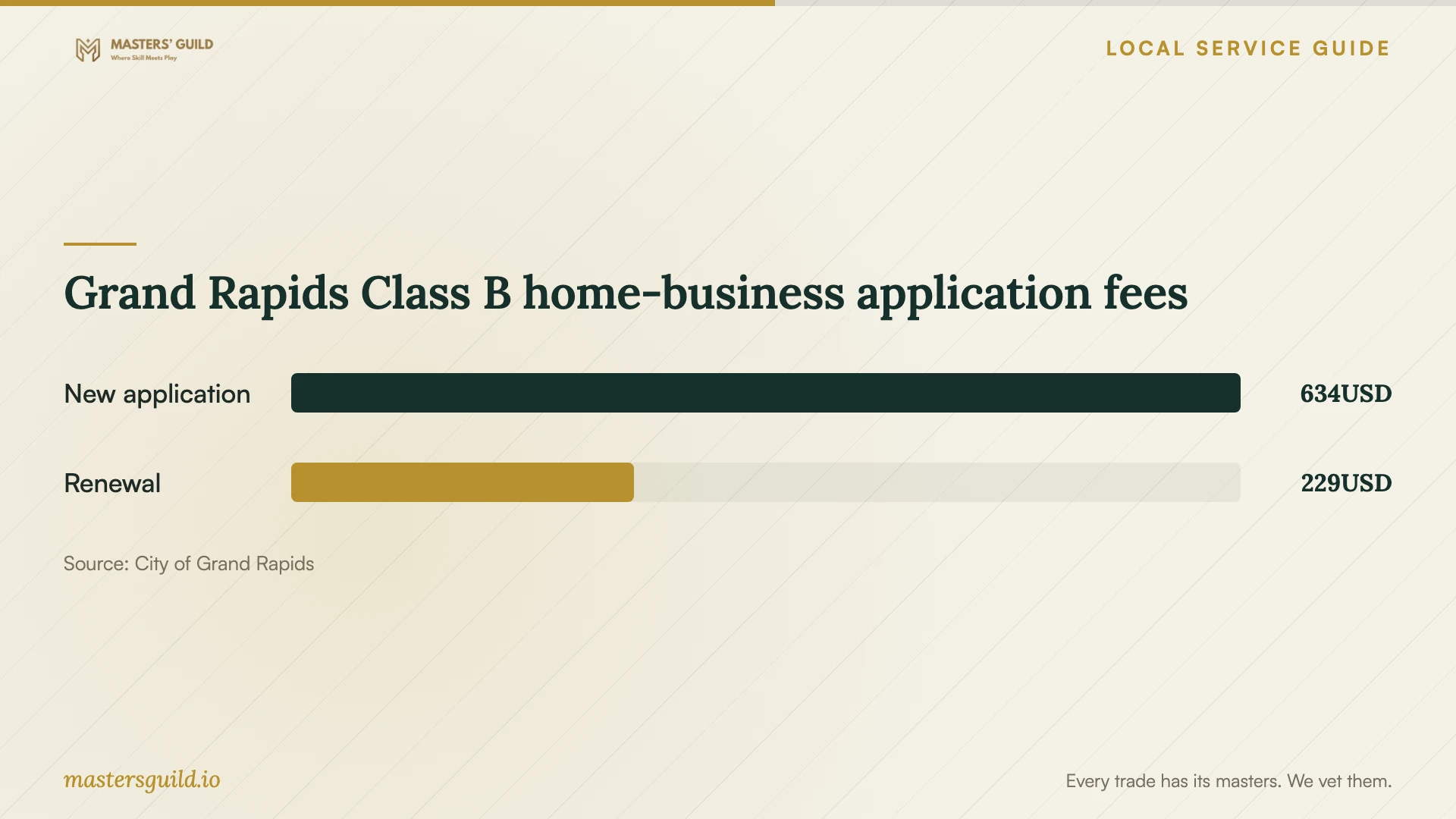
Grand Rapids Class B home-business application fees
Local details that affect your job
Electrical applications depend on property type
For electrical permit work, Grand Rapids requires a licensed contractor at properties with two or more units. A single-family homeowner may apply in person for their primary residence at the Development Center, 1120 Monroe Ave. NW, third floor. Electrical contractors need license activation before applying online through Citizen Access. Call 616-456-4100 to clarify the application route. The city lists an expected application response within one to two business days, with revisions possible; this does not establish an installation completion date. [1]
Resolve visiting-client business use before furnishing
Grand Rapids requires a Home Occupation Class B license for a business receiving customers or clients at home. The city exempts businesses whose customers are all online or that take products or services to customers from this particular license. For applicants, the city limits attendance to two adult customers, clients, students, or patients at once. Confirm zoning with Planning at 616-456-4100, prepare a whole-home floor plan identifying the business area, and obtain condominium association approval if applicable. The process includes a Fire Department inspection. The city lists five to ten business days for processing, with delays possible when changes are necessary. Resolve eligibility before buying client seating or setting appointment dates. [2]
Choose the scope to request
| Your planned result | Include in the request |
|---|---|
| Assembled desk | Model number, delivery location, lifting help, and packaging removal. |
| Adjustable screens | Screen and mount specifications, desk or wall photos, and adjustment demonstration. |
| Connected workstation | Computer, dock, peripherals, network needs, and a final equipment test. |
| Organized cables | Supply responsibility, access to plugs, and movement checks for an adjustable desk. |
Your hiring checklist
- Measure the room, delivery route, desk footprint, and chair clearance.
- Send furniture, monitor, mount, and dock model details with photos.
- List the connections and equipment you expect the provider to test.
- Flag proposed wiring or wall changes before requesting installation dates.
- Confirm who supplies mounting hardware and cable materials.
- Describe any planned client visits before committing to the room layout.
- Agree on itemized pricing, cleanup, missing parts, and the handover test.
Frequently Asked Questions
How should I budget for the installation?
Get an itemized quote for your furniture, mounting, equipment connections, and cable work. Keep equipment purchases and installation labor separate, and ask for a distinct amount for any electrical or construction work. Confirm how the provider handles extra materials and return visits.
What should I do if parts are missing?
Check the delivered parts against the manufacturer's list before the appointment. If something is missing, send the provider a photo and part reference. Agree whether to postpone, complete the available tasks, or arrange a return visit, including any additional charge.
Should I choose a wall mount or a desk arm?
Compare your screen specifications, desk attachment options, and preferred adjustment range. Ask the installer to assess the proposed attachment surface before you buy. If you expect to rearrange the room, discuss how each option would affect that move.
How can I prepare for equipment configuration?
Gather the devices, adapters, and cables you want connected. Check with your employer's IT team before requesting changes to a work computer. Keep account access under your control and arrange to enter passwords yourself during testing.
Sources and scope
This guide combines the sources below with practical planning guidance. Figures apply to the stated geography and period; request a written quote for your property.