
Local service guide
Data Recovery and Backup in Grand Rapids, MI
Arrange Data Recovery and backup in Grand Rapids by asking a provider to assess the failure, identify your priority files and give you written approval terms before recovery work begins. For backup installation, require a demonstrated restore and a plan for equipment placement and power interruptions. If you suspect ransomware, isolate affected devices from the network and engage someone who can coordinate incident response before restoring business systems. [2]
Choose the scope before handing over equipment
Tell prospective providers whether you need missing files recovered, an existing backup restored or a new backup system installed. Describe the device, the symptoms, when you noticed the problem and any actions you have taken. Ask who will perform the work, where they will do it and whether they will send the device to another company.
For a recovery assessment, request written instructions before further troubleshooting. Ask the provider to define the diagnostic charge, the point at which you approve recovery work and what you owe if they cannot recover your priority files. Request separate line items for transport, replacement storage, return media and urgent service. Agree on how you will inspect the recovered files before accepting the result.
Prepare a short priority list: the accounting file needed for payroll, current customer jobs, shared documents or other records you need to reopen. CISA recommends identifying critical assets and their dependencies to establish restoration priorities. Ask the provider to distinguish recovering a file from returning the application that uses it to working order. [2]
Treat suspected ransomware as an incident
If you find a ransom note or suspect malicious encryption, disconnect affected devices from Ethernet and Wi-Fi and contact your IT or incident-response provider. CISA recommends isolating impacted systems first. It recommends powering devices down only if you cannot disconnect them, because shutdown loses potential evidence held in memory. [2]
Ask who will preserve evidence, investigate the compromise and authorize restoration onto a clean network. CISA warns that a ransomware event can follow an earlier unresolved compromise and calls for care to avoid reinfecting clean systems during recovery. Include your insurer and designated business contact in the response arrangements where applicable. [2]
Keep the response conversation focused on responsibilities. Request a named contact, an update schedule and a record of each device the provider takes into custody. Agree on access permissions, subcontractor disclosure, recovered-data delivery and deletion of working copies. Avoid handing over unrelated account credentials without an explanation of the access the provider needs.
Specify a backup you can restore
Ask the installer to document which devices, applications and cloud accounts the contract covers. Set your acceptable amount of lost work and your target time to resume operations. Have the provider explain how the backup schedule and restoration procedure address those targets, including who receives failure alerts and who follows up.
CISA recommends keeping critical backups offline and encrypted because ransomware can delete or encrypt accessible backups. It also recommends testing backup availability and integrity in a disaster recovery scenario. Ask the installer to restore representative files into a separate location, open them with you and record the result. [2]
For cloud storage, ask about retained versions, deletion protection and administrator permissions. CISA discusses version control and deletion protection as recovery safeguards, while warning that misconfigured immutable storage can impose significant cost. Require the provider to explain retention charges, restore charges and the process for exporting your data if you end the contract. [2]
Make the handover usable by your staff. Request account ownership details, a secure arrangement for recovery keys, written restore instructions and a scheduled test. If an outside provider maintains your backups, CISA recommends formalizing security requirements through contract language and limiting third-party access to the responsibilities assigned. [2]
Compare quotes by deliverables
Ask providers to quote against the same device list, priority files and recovery objectives. For recovery work, compare diagnostic terms and the definition of a successful result. For backup work, compare setup, hardware, subscriptions, monitoring, testing and support. Request an estimated completion window and an explanation of what could change it.
Before approving a backup installation, ask the provider to review basement equipment placement and the power-loss procedure with you. Use the local flood context and statewide interruption figures below to prompt that discussion. Keep site-specific decisions tied to your premises, equipment and operating needs. [1] [3]
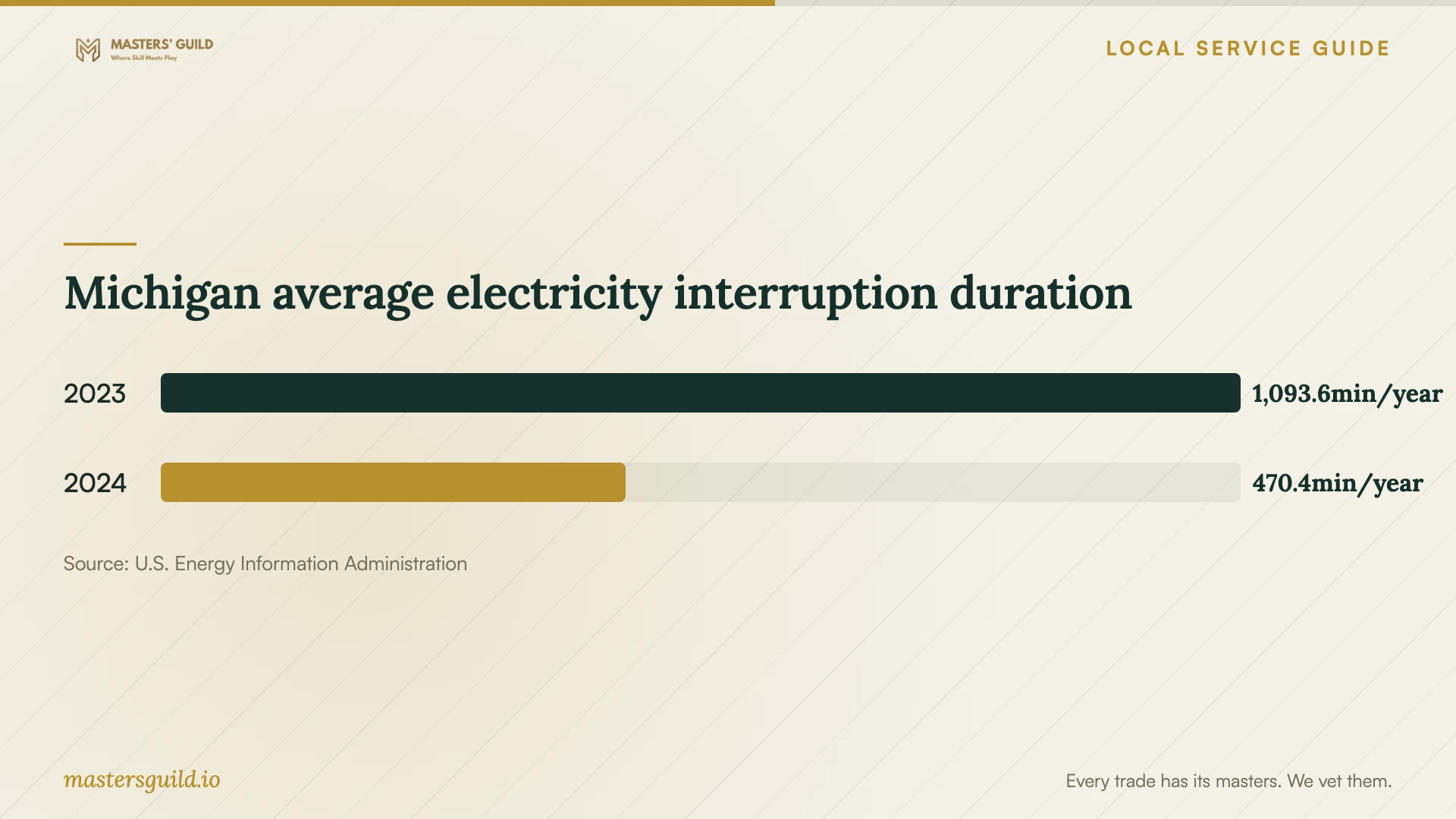
Michigan average electricity interruption duration
Local details that affect your job
Review basement storage against local flood context
On April 17, 2026, Kent County forecast a Grand River crest of approximately 19.0 feet at Grand Rapids and described possible minor basement flooding in low-lying city areas. This was a historical forecast, not a current warning or proof that your property flooded. If you keep a server or backup drive in a basement, ask the installer to review a location above that space and arrange an off-site copy. Identify which equipment and records you would need if you could not enter the premises. [1]
Include a power-loss procedure in the installation
EIA reports Michigan average non-momentary electricity interruption durations of 470.4 minutes in 2024 and 1,093.6 minutes in 2023, including major events. These are statewide utility metrics, not Grand Rapids measurements. Ask your installer whether a battery backup should support controlled shutdown of your storage equipment, what equipment it would cover and how staff should confirm that scheduled backups resume after power returns. Request a demonstration appropriate to your equipment. [3]
Match the job to the help you need
| Situation | Requested scope | Approval or acceptance point |
|---|---|---|
| Missing files with no confirmed cause | Assessment and a written recovery proposal | Approve further work after reviewing the diagnosis and charges |
| An existing backup may contain the files | Inspect the backup and demonstrate a restore | Open priority files and check the needed application |
| Ransom note or suspected malicious encryption | Incident response, isolation and coordinated recovery | Restore onto a clean network after the response team addresses the compromise |
| New or replacement business backup | Document coverage, offline encrypted protection and restore testing | Witness a restore and receive ownership and operating instructions |
| Storage equipment in a basement | Review placement and an off-site copy using local flood context | Approve the proposed locations and premises-access plan |
Your hiring checklist
- Record the device model, symptoms, discovery time and troubleshooting already attempted.
- List the priority files and applications you need to resume business.
- Obtain written diagnostic charges, approval limits and unsuccessful-recovery terms.
- Confirm the work location, subcontractors, custody record and data-deletion terms.
- Agree on a file inspection or application restore test before accepting the job.
- Review basement equipment placement, an off-site copy and power-loss procedures.
- Assign backup alerts, account ownership, recovery-key storage and future restore tests.
Frequently Asked Questions
How much should I budget for recovery?
Get a device-specific quote before setting your recovery budget. Give the provider your priority-file list and ask for written diagnostic charges, unsuccessful-recovery terms and an approval limit. Confirm whether urgent service, transport and returned storage cost extra before authorizing work.
Should I turn off a computer after finding a ransom note?
CISA recommends disconnecting affected devices from the network first. It recommends powering down only when disconnection is not possible, since shutdown loses potential evidence in memory. Contact an incident-response provider to coordinate the next steps. [2]
How do I check that a backup installation works?
Ask the provider to restore representative business files into a separate location and open them with you. Record the test and assign future checks. CISA recommends regular tests of backup availability and integrity in a disaster recovery scenario. [2]
Do Michigan outage figures tell me how long my office will lose power?
No. EIA reports statewide averages across reporting utilities, including major events in the chart shown here. Use them to discuss power-loss procedures with an installer. They do not predict an outage at your address or measure data loss. [3]
Sources and scope
This guide combines the sources below with practical planning guidance. Figures apply to the stated geography and period; request a written quote for your property.