
Local service guide
Smart Appliance Setup in Gatineau, QC
Arrange Smart Appliance Setup in Gatineau by separating app pairing and household training from physical installation. Ask for a quote that names each appliance, connection and test. For construction work, Québec requires contractors to hold the appropriate licence. Before paying for thermostat installation, compare Hydro-Québec’s conditional Hilo offer, which includes installation. [2] [4]
Define the visit before comparing quotes
Send the provider the appliance brand, full model number and a description of its current state. Say whether someone has installed it, whether you can operate it from its controls, and where app setup fails. Include your phone type and the name of any hub or voice assistant you want to use.
Ask for separate prices for physical installation, app setup and network troubleshooting. Have the provider identify who will handle each part and whether the visit includes parts, travel, account recovery or a return appointment. Agree on a spending limit before authorizing troubleshooting beyond the quoted scope.
Treat appliance placement, utility connections and building changes as separate questions from account setup. The RBQ says contractors offering construction work in Québec need a valid licence, subject to statutory exceptions, and must hold the subclasses needed for their work. Ask a contractor proposing construction work for the licence details that match that scope. [2]
Check compatibility before buying more equipment
Give the provider a written list of the functions you expect. Distinguish controlling a device in its own app from adding it to another platform or including it in a household routine. Ask the provider to confirm those functions for your exact model before you buy a replacement or hub.
For Québec homeowners considering Hilo, the company lists selected Honeywell Home, Mysa and Sinopé products among its compatible devices. Compatibility does not mean access to every feature: Hilo says scene customization is unavailable for those compatible thermostat integrations, apart from the Sinopé ZigBee floor-heating thermostat paired with the Hilo gateway. [3]
Ask the provider to name any feature they cannot demonstrate before you approve equipment purchases. For a refrigerator, washer or dishwasher, specify the useful outcome in your request, such as receiving an alert or checking status. Avoid paying for an integration based only on a brand name.
Compare the Québec thermostat routes
Compare the utility route before commissioning private thermostat replacement. Hydro-Québec advertises Hilo thermostats at no purchase charge with installation included, subject to conditions and Flex D participation. Its page also describes a 12-month agreement and repayment obligations for early termination. Review those terms before accepting the offer. [4]
Connecting compatible equipment you own follows a different route. Hilo’s compatible-device page tells customers buying replacements to arrange installation because Hilo does not install those devices through that route. It then directs customers to obtain a gateway, download the app and connect their equipment. Confirm which route applies before booking a separate installer. [3]
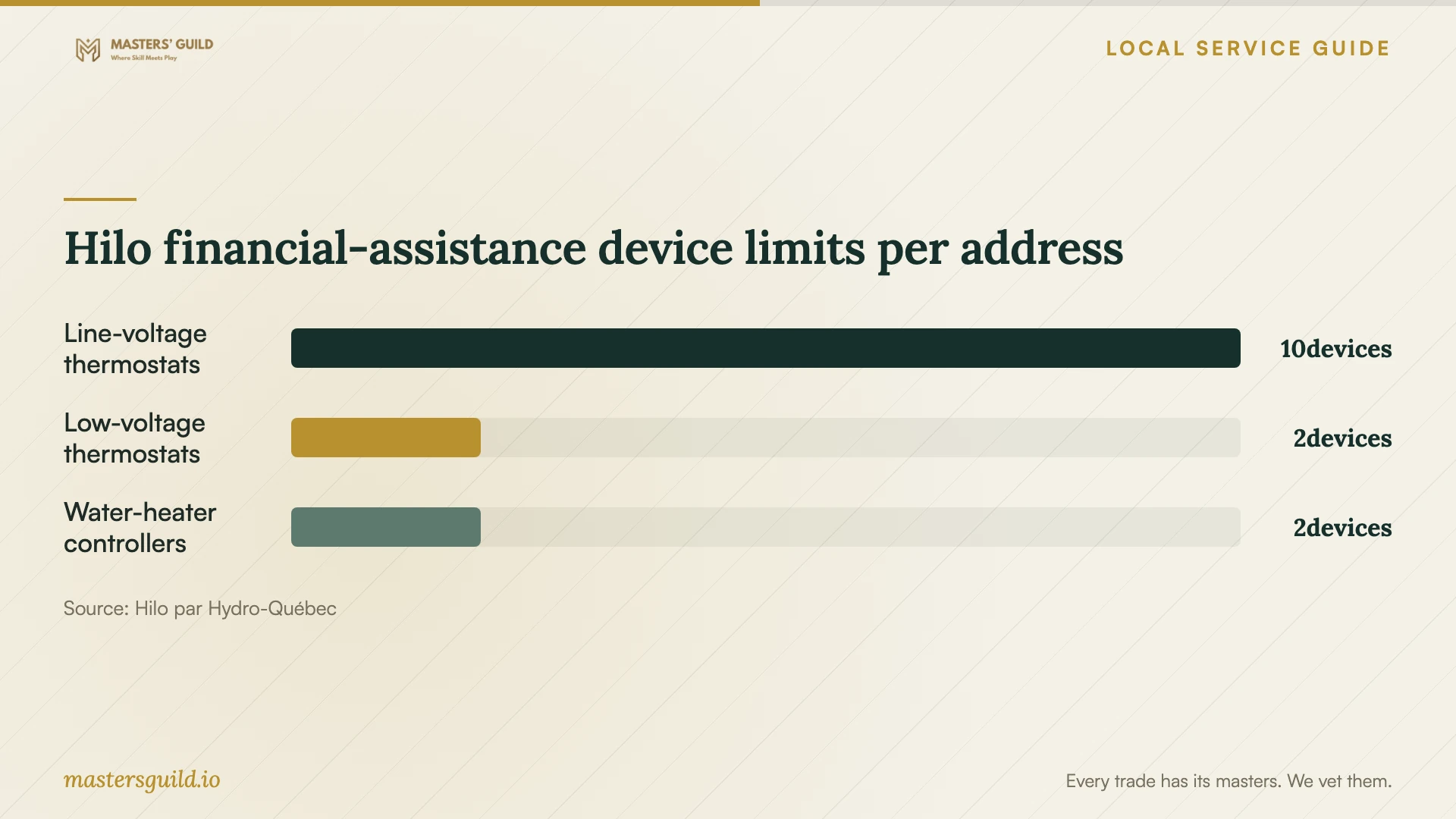
Hilo’s published financial-assistance conditions require eligible compatible equipment, acceptance of the assistance agreement and a 12-month commitment to peak-event automation. Assistance has device limits and can change or end. Ask about eligibility before treating a potential payment as part of your budget. [3]
Agree on tests and account handover
Keep the appliance account under your own email address and enter passwords yourself. Arrange access to account-recovery messages during the visit. Ask the provider to explain household permissions and remove any temporary access before leaving.
Write the acceptance tests into the scope: operate the appliance from its controls, demonstrate the requested app function, check an agreed notification and show you how to change a schedule. Request a short handover note naming the connected devices, unresolved faults and next steps.
If you choose Flex D, review appliance schedules against actual peak-event notices. Hydro-Québec defines winter as December 1 through March 31, with possible events between 6 a.m. and 10 a.m. and between 4 p.m. and 8 p.m. Ask the provider to demonstrate how you can move nonessential appliance use outside an announced event. [5]
Hilo financial-assistance device limits per address
Local details that affect your job
Gatineau permit checks depend on the building work
Gatineau exempts certain work on existing buildings costing less than $26,000 before taxes, including labour and materials, but lists exceptions. Work involving interior walls or structure requires a permit regardless of cost; heritage and PIIA rules can also affect requirements. If installation expands into building alterations, describe the work to the City before proceeding. Use its online services for permit questions and applications, and consult the required-document list before submitting. [1]
Check Flex D eligibility before requesting Hilo automation
Hydro-Québec’s Québec-wide Flex D conditions apply to eligible residential subscriptions in Gatineau. The utility lists eligibility for Rate D, no tariff option, an electrical installation outside an autonomous grid and a customer account with a valid email address, plus other conditions. Confirm your subscription qualifies before paying someone to configure a setup around Flex D. [5]
Choose the scope before arranging a visit
| Your situation | Next step | Confirm before approval |
|---|---|---|
| Installed appliance needs app setup | Request pairing, settings and a demonstration | Exact model, desired functions and troubleshooting limit |
| Provider proposes construction work | Ask for the appropriate contractor licence | Licence subclasses match the proposed work |
| Installation changes interior walls | Check Gatineau’s permit requirements | The City requires a permit regardless of project cost |
| You want replacement Hilo thermostats | Compare Hydro-Québec’s conditional installation-included offer | Eligibility, Flex D terms and early-termination obligations |
| You own compatible thermostats | Check Hilo’s exact model and feature support | Gateway needs, scene limitations and assistance eligibility |
Your hiring checklist
- Send full model numbers and describe the app functions you want demonstrated.
- Separate physical installation, account setup and network work in the quote.
- Photograph the appliance location and existing connections for the provider.
- Have your phone, account-recovery access and network credentials available.
- Ask who will supply parts and approve extra work before it begins.
- Agree on demonstrations, household access and a written handover.
Frequently Asked Questions
How much should I budget for setup?
Request an itemized quote for your device list and desired functions. The cited sources do not establish a Gatineau market price for private setup visits. Ask the provider to separate installation, app pairing, parts and extra troubleshooting so you can compare offers against the same scope.
Does a permit exemption remove the contractor licence requirement?
Assess the two requirements separately. Gatineau describes municipal permit exemptions and exceptions. The RBQ requires contractors performing construction work to hold the appropriate licence, subject to the law’s exceptions. A small project budget alone does not resolve both questions. [1] [2]
Can I get Hilo installation included?
Hydro-Québec advertises a conditional Hilo thermostat offer with installation included. Hilo’s separate compatible-device route tells customers to arrange replacement installation themselves. Confirm which offer covers your equipment and read the participation terms before hiring. [3] [4]
Will connecting smart appliances guarantee lower electricity bills?
Do not budget on a guaranteed saving. Hydro-Québec explains that Flex D offers lower winter energy prices outside peak events and higher prices during them. Customers need to reduce or shift consumption during those events. Review the tariff and your household’s ability to adjust before enrolling. [5]
Sources and scope
This guide combines the sources below with practical planning guidance. Figures apply to the stated geography and period; request a written quote for your property.