
Local service guide
Network Setup and Support in Gatineau
Arrange Network Setup and Support in Gatineau by asking for a diagnosis before approving equipment purchases or cabling. Describe the rooms and devices that need service, confirm your incoming Internet connection with the provider, and request separate prices for troubleshooting, hardware and installation. For concealed cable routes, settle municipal requirements before authorizing work on walls or fire separations. [1] [2]
Define the problem before choosing equipment
Give the technician a short description of the failure: a bedroom loses Wi-Fi, video calls disconnect, a printer disappears, or all devices lose Internet together. Record the affected devices, rooms and times. Include your Internet plan and the model numbers of the modem, router and any existing mesh units.
Request a diagnostic scope that includes testing near the router and in the rooms where you need service. Ask the technician to explain the results before quoting a router replacement, mesh system or Ethernet installation. For a home office, name the desk location and ask to test a call or other task you depend on.
Arrange the incoming Internet connection first
Use Québec’s high-speed Internet map as an address-checking starting point. The government defines a served address as one with high-speed service accessible in the street. It warns that updates can lag network extensions and new construction, excludes resellers from the map, and says the provider’s information takes precedence. [2]
Before scheduling internal setup, ask the provider to confirm availability, activation timing, supplied equipment and the planned entry location. Give those details to the network technician. Ask who will handle provider contact if the incoming connection fails during the visit, and agree on charges if the technician cannot complete testing.
Compare written scopes and total charges
Request a written quote that separates diagnosis, configuration, equipment, cable installation and finishing work. For each proposed Ethernet outlet, specify the room, cable route, termination, label and test record. Ask whether the installer includes patching, painting, cleanup, travel, taxes and a return visit.
Ask for an approval limit for extra work discovered during installation. Confirm who owns purchased equipment and whether any management or support subscription continues after the visit. For ongoing support, request the response window, available contact methods and charges for remote help versus another visit.
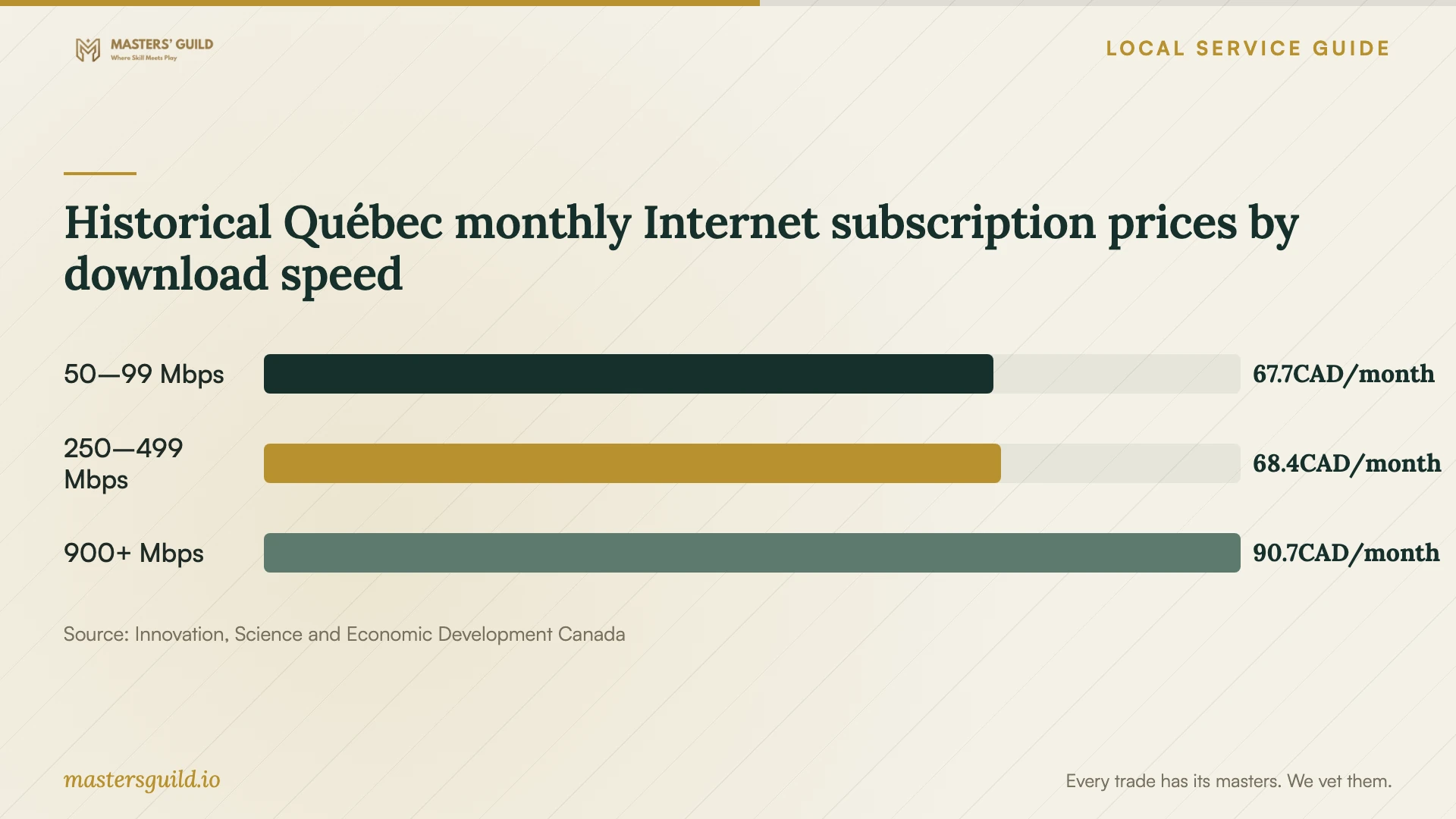
Keep your Internet subscription budget separate from the installation quote. ISED’s 2024 research reports monthly broadband subscription prices by provincial speed category. Those figures offer historical subscription context; they do not establish current Gatineau installation labour or hardware prices. [5]
Settle cable routes before opening walls
Gatineau exempts many projects on existing buildings costing less than $26,000 before taxes, including labour and materials. It also lists exceptions requiring a permit regardless of cost, including work concerning interior walls and specified fire-protection elements. Do not use a low quote as the sole reason to skip a permit check. [1]
The municipal guidance does not classify each type of Ethernet penetration. Ask the installer to describe the route, openings and any affected fire separation, then submit that scope to urban planning if the requirement is unclear. Ask who will obtain any required permit and restore affected assemblies. [1] [3]
Plan testing and the handover
Before booking a powered test session, check Hydro-Québec’s upcoming interruptions for your address. Its Info-pannes service includes current outages, planned interruptions and address-level service checks. Use that information when investigating a connection failure that coincides with a power interruption. [4]
At handover, test your own devices in the agreed rooms. Ask the technician to demonstrate the network names, guest access if requested, labelled wired outlets and a restart procedure. Keep administrative accounts under your control, enter passwords yourself where possible, and agree whether the technician will retain any remote access.
Historical Québec monthly Internet subscription prices by download speed
Local details that affect your job
Use URBAIN with the actual cable scope
Gatineau’s URBAIN tool uses the property address, lot or assessment number to identify applicable rules. Its results provide guidance and do not replace a formal permit application. For an unusual route or unclear wall alteration, the City directs residents to 311 for an information request. Prepare the installer’s route description before making that inquiry. [3]
Check municipal authorization for an Ottawa-based installer
Gatineau says it issues business permits to companies without an establishment in the city. If you hire an installer based in Ottawa, ask them to confirm their Gatineau business-permit arrangements before booking. Their office location alone does not settle municipal authorization to operate here. [3]
Choose the next step for your situation
| Situation | First step | Ask before approving work |
|---|---|---|
| Moving into a home | Confirm the provider’s address-level availability and activation | What equipment and entry location will the provider supply? |
| Wi-Fi fails in selected rooms | Request diagnosis in those rooms | What measurements support the proposed equipment or cable route? |
| You want a wired home office | Request a route and outlet scope | Who handles municipal checks, restoration and testing? |
| Connection failed during a power interruption | Check address-level electricity status | Can testing proceed with the equipment powered? |
| Installer operates from outside Gatineau | Ask about Gatineau business-permit arrangements | Have you confirmed municipal authorization for this work? |
Your hiring checklist
- List problem rooms, affected devices and the tasks you need to complete.
- Photograph equipment labels and accessible cable entry points.
- Confirm provider activation and supplied equipment before the setup visit.
- Request separate charges for diagnosis, hardware, configuration and cabling.
- Agree on cable routes, wall repairs and responsibility for municipal inquiries.
- Set an approval limit for additional work.
- Keep account recovery details and administrative access under your control.
- Require testing in the agreed rooms and written follow-up terms.
Frequently Asked Questions
How much should I budget for installation?
Get a quote for your equipment and proposed cable routes. The supplied government price research covers recurring Internet subscriptions, so it cannot establish an installation rate. Ask the technician to separate the diagnostic fee, labour, materials, equipment and follow-up charges. [5]
Does an Ethernet installation need a permit?
Confirm the scope with Gatineau if it involves wall alterations or fire separations. The City lists permit triggers that apply regardless of cost, but its general guidance does not decide every cable-penetration case. Provide the proposed route and affected building elements when asking. [1]
Does the Québec coverage map guarantee I can order service?
A served address means high-speed Internet is accessible in the street. Confirm availability and installation details with the provider. Québec warns that its map may omit recent network changes and says provider information takes precedence. [2]
What should I receive when setup finishes?
Request equipment details, outlet labels, agreed test results, account access and restart instructions. Confirm the follow-up period and charges. Ask the technician to demonstrate the tasks you specified, using your devices in the rooms where you need them.
Sources and scope
This guide combines the sources below with practical planning guidance. Figures apply to the stated geography and period; request a written quote for your property.