
Local service guide
Data recovery and backup in Gatineau, QC
Data recovery and backup in Gatineau should start with a written scope: identify the files you need, ask whether the provider will restore an existing backup or attempt recovery from the device, and approve charges before work begins. For business records containing personal information, confirm where the provider will process and store them. Quebec privacy guidance adds obligations when you entrust those records to an organization outside Quebec, including one in Ottawa. [2]
Define the recovery job before handing over equipment
Write down the device model, the symptoms, the last time you accessed the files and any steps you have already tried. List the folders or applications you need first, such as bookkeeping records, appointment schedules or current customer orders. Give the provider a priority list so you can assess the result against your business needs.
Ask the technician to explain the proposed first step and obtain your approval before changing the device or its contents. If you have a backup, request a separate assessment of whether it contains the required files. Specify that any restore demonstration should use a separate destination and preserve the original material.
Agree on how you will verify recovered files. Ask to open representative documents and check the date range of the recovered records. For a business application, define whether the job includes making the application usable or only returning its underlying files. Do not accept a folder count as your sole acceptance test.
Compare quotes by scope and approval points
Request an itemized quote for assessment, recovery work, return storage, transport and any priority service. Ask what you owe if the provider finds no usable data, if only some priority files return, or if you decline the proposed work after diagnosis. Set a spending limit and require written approval for changes.
For backup work, separate the setup charge from recurring storage, monitoring and support. Ask whether the quote includes application data, account configuration, encryption, a restore test and a written handover. These sources do not establish a Gatineau recovery price range, so compare provider quotes for the same device and scope rather than relying on a citywide estimate.
Request an assessment date and an update schedule. Ask the provider to explain what remains uncertain before promising completion. For essential business records, agree on the order of delivery and identify who in your business can approve additional work.
Put privacy terms in the service agreement
Quebec's Commission d'accès à l'information describes an exception that permits necessary disclosure of personal information for a service contract without the individuals' consent. The business must put the mandate or contract in writing and specify confidentiality measures, use limited to the contract and no retention after the contract ends. The guidance also requires prompt notice to the privacy officer after a confidentiality breach and provision for confidentiality checks. [2]
Ask the provider to name everyone who may handle the records and explain how they will return recovered files. Have your privacy lead review access, subcontracting, incident reporting and deletion terms before you hand over customer or employee information. Keep a record of the device handoff and the agreed return arrangements.
Specify a backup you can restore
The Canadian Centre for Cyber Security recommends the 3-2-1 approach: three copies of information, including the original and two backups, across two media types, with one copy off site. It also recommends an offline backup, encryption of sensitive data and testing the recovery process. Ask the installer to show how the proposed setup meets each requirement. [3]
A network-attached storage device, or NAS, connects to your network. The Cyber Centre warns that attackers or ransomware can compromise backups on it. For removable backup media, it advises disconnecting the media after backup. Ask your provider which copy remains disconnected and who will manage the rotation. [3]
Choose a backup schedule by deciding how much recent work you can afford to recreate. Then ask the provider to demonstrate a restore of representative files to a separate destination. Record the steps, access requirements and person responsible for checking completion. Repeat recovery tests as part of your verification routine, as the Cyber Centre recommends. [3]
Use national incident figures as planning context
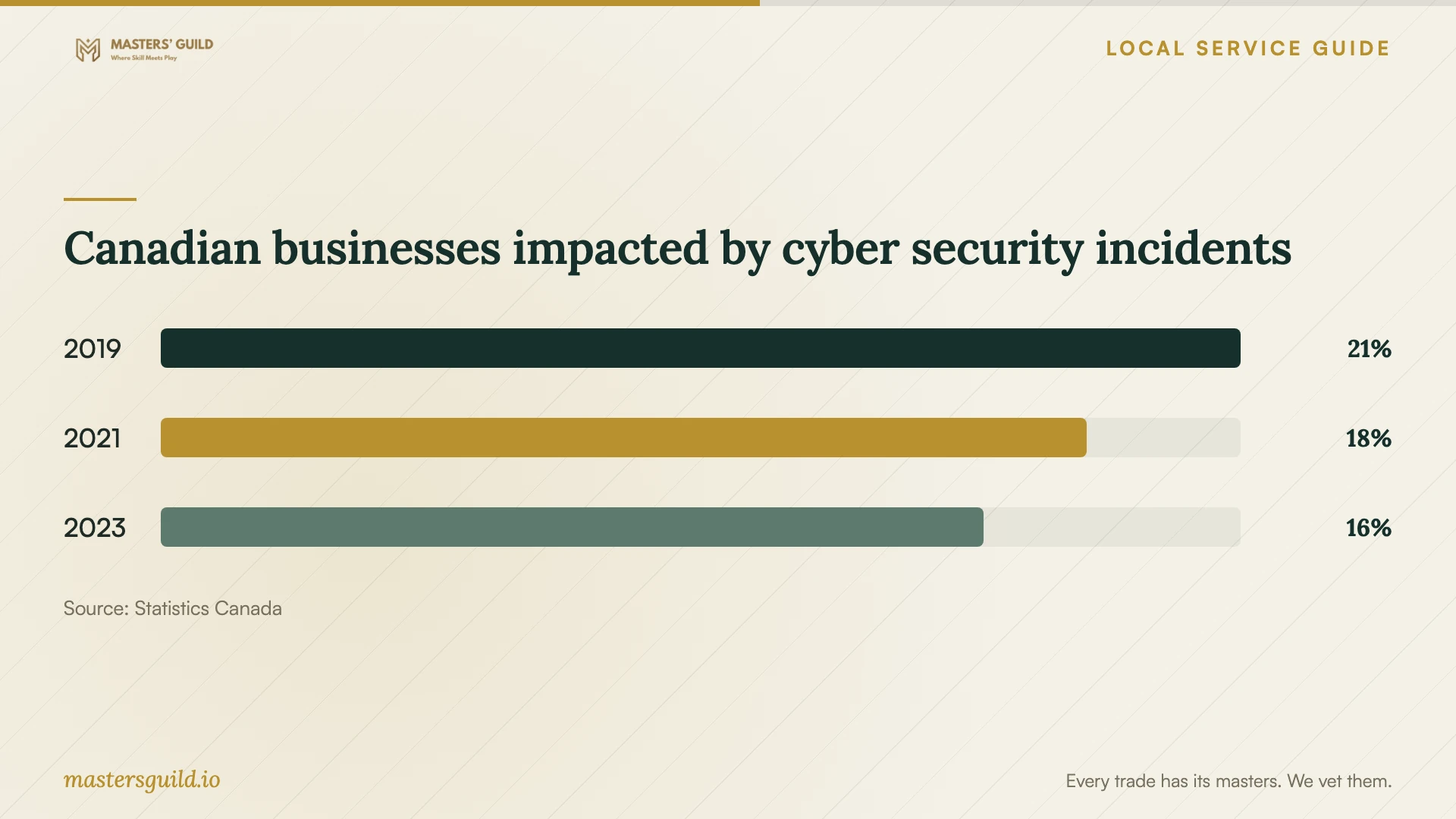
Statistics Canada reported that 21% of Canadian businesses experienced impactful cyber security incidents in 2019, compared with 18% in 2021 and 16% in 2023. These are national survey results, not Gatineau failure rates or data-recovery prices. The 2023 survey covered enterprises with at least 10 employees across most sectors and excluded public administration. [4]
Use this context to discuss recovery responsibilities before an incident. Ask who will check the backup, approve a restore and contact the provider. The Cyber Centre cautions that backups can support recovery after ransomware but cannot prevent an attacker from leaking or selling stolen data. [3]
Canadian businesses impacted by cyber security incidents
Local details that affect your job
Review an Ottawa handoff before transferring records
For a Gatineau business, choosing an Ottawa laboratory means considering Quebec's rules for personal information entrusted outside the province. The Commission's guidance calls for a privacy impact assessment before an outside-Quebec organization collects, uses, communicates or stores such information on your behalf, and a written agreement for communication outside Quebec. It also describes information and consent obligations. Ask your privacy lead to review the arrangement before transfer, including any applicable service-contract exception. Confirm the laboratory and backup-storage locations rather than relying on the provider's storefront address. [2]
Plan equipment placement around Gatineau flood precautions
During a flood alert, Gatineau advises moving belongings from the basement or ground floor higher or upstairs. It also warns residents against cutting power at a panel with water nearby. Apply those precautions when planning your installation: ask for a safer location for computers and backup devices, and keep a separate off-site copy as the Cyber Centre recommends. This equipment-placement advice applies the city's general precautions; the city does not prescribe an IT backup design. Do not enter a flooded area to retrieve equipment. [1] [3]
Choose the scope that matches your situation
| Situation | Work to request | Before approving |
|---|---|---|
| You have a backup but have not tested it | A restore demonstration to a separate destination | Identify required files and agree on an acceptance test |
| You need files from an inaccessible device | An assessment with a separate recovery proposal | Set charges, approval limits and priority files in writing |
| A provider will handle personal information outside Quebec | Privacy review of processing and storage arrangements | Address the assessment and written-agreement requirements in Quebec guidance |
| Your backups all stay on the premises | An off-site copy plus an offline backup | Confirm locations, access and recovery testing |
| Equipment sits in a basement subject to a flood alert | A safer equipment location and independent off-site copy | Follow municipal precautions and avoid electrical equipment near water |
Your hiring checklist
- List priority folders, applications and the latest acceptable date of recovered records.
- Record device symptoms and previous recovery attempts before the handoff.
- Request written assessment charges, a spending cap and terms for partial or unsuccessful recovery.
- Confirm laboratory, subcontractor and storage locations with your privacy lead.
- Agree on secure file delivery, retention limits and device return arrangements.
- Require a restore demonstration to a separate destination and a written backup handover.
- Assign responsibility for checking backup completion and scheduling recovery tests.
Frequently Asked Questions
Can I use an Ottawa recovery provider?
Evaluate the provider's scope and data-handling arrangements. If your business entrusts personal information outside Quebec, the Commission describes additional privacy obligations, including a privacy impact assessment and a written agreement. Have your privacy lead review the proposed transfer and any applicable exceptions before sending the device. [2]
Does a backup on a NAS cover ransomware recovery?
The Cyber Centre warns that ransomware can spread to a NAS and compromise its backups. It recommends an offline backup. Ask your installer to identify the disconnected copy and demonstrate how you would restore from it. [3]
What should I receive when backup installation finishes?
Request a successful restore demonstration, a list of covered files and applications, the backup schedule and written recovery instructions. Name the person who will check completion and keep the account-access arrangements available to authorized staff.
How should I compare recovery prices?
Ask providers to quote the same device, priority files and acceptance criteria. Compare assessment charges, recovery work, delivery media and terms for partial results. Obtain written approval points before work begins; the supplied evidence does not establish local market prices.
Sources and scope
This guide combines the sources below with practical planning guidance. Figures apply to the stated geography and period; request a written quote for your property.