
Local service guide
Computer virus removal in Gatineau, QC
For computer virus removal in Gatineau, choose a technician who agrees in writing on diagnosis, file preservation, cleanup and any operating-system reinstall before starting. Ask for separate approval before erasing data or adding recovery work. Québec’s consumer protection office says computer repairers must provide a written estimate when the expected repair exceeds $50, unless you validly waive it. [2]
Define the job before choosing a technician
Describe what you see: the alert wording, browser changes, inaccessible files or a demand for payment. Tell the technician when it started and whether you opened an attachment, installed software or gave someone remote access. Ask for diagnosis before approving a cleanup or reinstall.
Specify which files you need to preserve and whether you have a backup from before the problem began. Ask the technician to explain what they intend to copy, where they will store it, who can access it and when they will delete their copy. Put permission to erase or reinstall the computer on a separate approval line.
For a home visit or drop-off, confirm the handover arrangements, required charger and expected return date. If you consider remote help, initiate contact yourself and verify the business before discussing access. The SPVG describes a scam in which an unsolicited caller claims to represent a recognized computer company, obtains remote access and then requests payment. [1]
Compare estimates without inventing a local price
Use a written scope to compare offers. Ask each provider to list diagnosis, cleanup, backup, reinstall, software charges, travel and taxes where applicable. Request a total for the approved work and a price for any proposed alternative. The evidence available here does not establish a current local market price.
Québec’s Office de la protection du consommateur says an estimate must identify you and the repairer, describe the device, state the nature and total price of the repair, and include its date and validity period. The repairer must disclose the exact estimate fee beforehand if they intend to charge one. [2]
The repairer must obtain your authorization before starting and before doing work outside the estimate. They cannot add charges beyond the estimated total except for repairs you authorize afterward. Ask them to contact you with the revised scope before proceeding. [2]
Treat ransomware as a recovery job
If you see a ransom demand or files you can no longer access, disconnect the affected device from the Internet and internal network. Use a separate, unaffected device to arrange help. The Canadian Centre for Cyber Security advises isolation and an alternative communication method during ransomware response. [4]
Ask the provider to discuss evidence preservation before wiping anything. The Cyber Centre includes documenting the incident, credential changes, wiping and reinstalling infected devices, checking backups and addressing the entry point in its response guidance. Ask which of those tasks the quote includes and who will handle the rest. [4]
Separate the question of removing malware from the question of recovering files. The Cyber Centre advises checking backups before restoring them and warns that paying a ransom does not guarantee access to encrypted data. Request an explanation of the recovery options before authorizing destructive work. [4]
Check the result before closing the repair
Ask the technician to demonstrate startup, the browser and access to the files you agreed to preserve. Request a written account of what they found, what they removed or reinstalled, and which follow-up tasks you must complete. Confirm whether they removed temporary remote access and retained any copies of your files.
For covered consumer computer repairs, the OPC requires a detailed invoice showing the repair, labour, parts where applicable, taxes, total and warranty characteristics. It states that computer and tablet repairs carry a three-month warranty. Keep the dated invoice and ask how the repairer will assess a recurrence of the reported problem. [2]
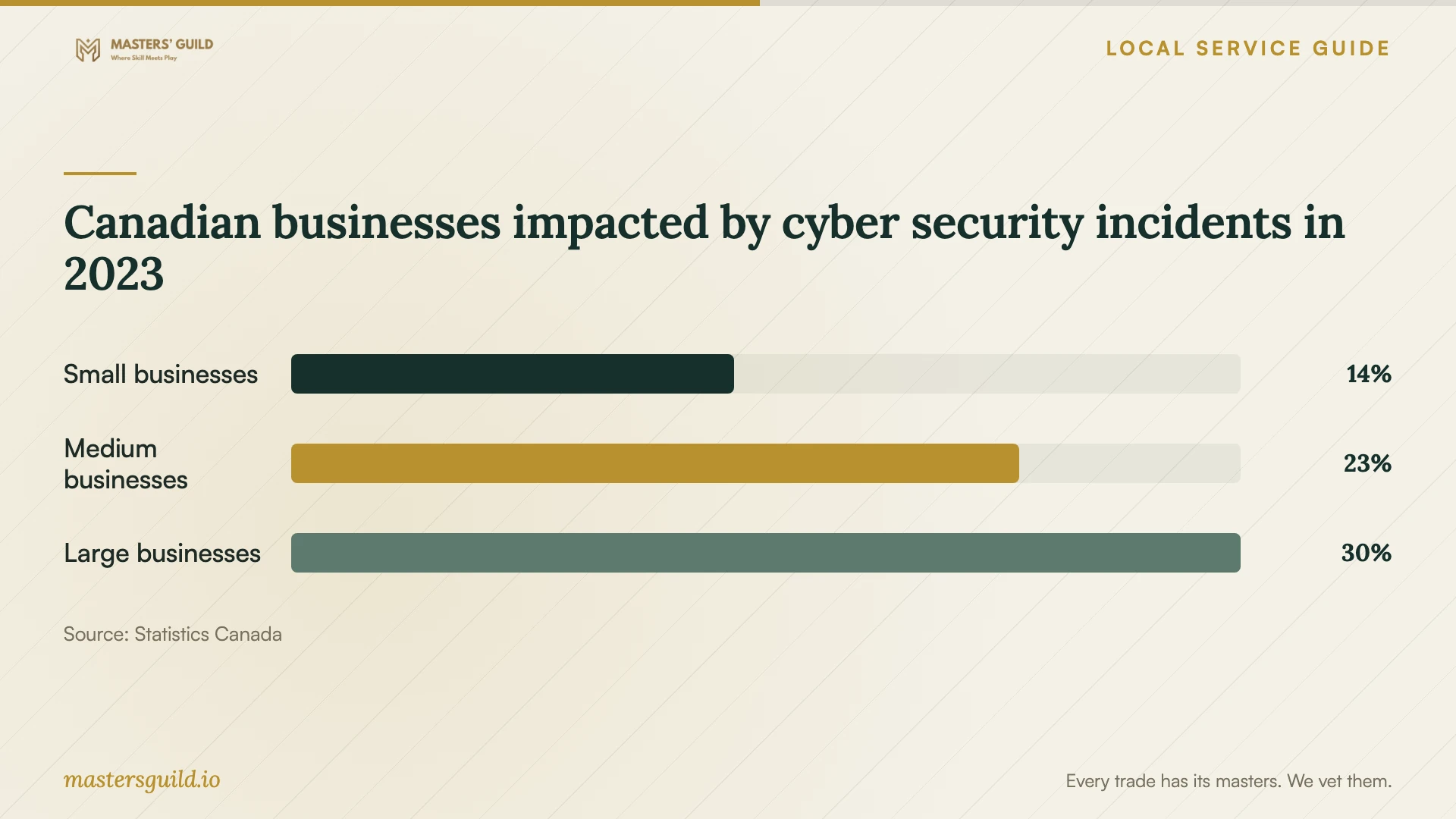
Canadian businesses impacted by cyber security incidents in 2023
Local details that affect your job
Report suspected fraud through Gatineau police
If an unknown caller obtained access or payment, arrange both technical help and fraud reporting. The SPVG gives 819 246-0222 as its non-emergency contact for suspected fraud. If you disclosed banking information, its guidance says to contact your financial institution without delay to cancel affected cards. Keep the caller’s messages and payment records for your report. [1]
Plan secure retirement before an écocentre trip
If you decide to replace the computer, arrange secure data sanitization before disposal, as the Cyber Centre advises for retired devices. Gatineau lists free electronic-product drop-off at its écocentres, with a limit of two pallets, or 2 m³, per visit. Locations include 26, rue Pierre-Ménard and 860, boulevard de la Carrière. Bring accepted proof of residence and identification, and check the municipal schedule before travelling. [3] [4]
Match the repair request to what happened
| Situation | Next step | Question for the provider |
|---|---|---|
| Alerts or browser changes | Request diagnosis and a defined cleanup scope. | What evidence will you use to identify the problem? |
| Unknown caller obtained remote access | Verify a repair provider yourself and contact SPVG about suspected fraud. | Will you review remote access and explain any account follow-up? |
| Ransom demand or inaccessible files | Disconnect the affected device from networks and arrange recovery assessment. | How will you preserve evidence and check backups before restoring? |
| Technician proposes extra repairs | Review and authorize the added scope before work proceeds. | What is the revised total and what happens to my files? |
| You choose replacement | Arrange secure sanitization before municipal electronic-product drop-off. | How will you confirm the storage device is safe to dispose of? |
Your hiring checklist
- Record the exact warning and when the problem began.
- List essential files and identify your last known clean backup.
- Verify the provider’s identity and contact details yourself.
- Agree on file access, storage and deletion before handing over the device.
- Request a written scope and total, including any estimate fee.
- Require approval before erasure, reinstall or additional recovery work.
- Check the agreed functions and files at handover, then keep the repair record.
Frequently Asked Questions
Can a technician guarantee recovery of ransomware-encrypted files?
Treat a recovery promise with caution. The Cyber Centre says even ransom payment does not guarantee access to encrypted data. Ask the technician to assess available backups and explain what they can attempt before you approve the work. [4]
Must I accept a preprinted estimate waiver?
No. The OPC says a preprinted waiver has no value. To waive the written estimate required for a consumer computer repair exceeding $50, you must write and sign the waiver yourself. Retaining the estimate gives you a record of the approved scope and price. [2]
Should I connect my backup drive to copy files now?
For suspected ransomware, keep offline backups disconnected while arranging assessment. The Cyber Centre warns that ransomware can infect or delete connected backups and advises checking backups before restoration. [4]
Sources and scope
This guide combines the sources below with practical planning guidance. Figures apply to the stated geography and period; request a written quote for your property.