
Local service guide
Software Installation in Garland, TX
Arrange Software Installation by defining the application, device, and task you need working, then requesting a written scope and total price. Choose remote help if you can connect and approve access; consider an in-home visit for work involving connected equipment. For learning help, Garland lists software application classes at Central and South libraries. [1]
Define the installation before comparing offers
Give the technician your computer model, operating system version, application name, and intended use. Include the exact error message if an installation has failed. Remove personal information from any screenshot you share. Ask the technician to check the application's requirements before you authorize a purchase.
Name the files and connected devices you expect to use with the application. Request separate approval for troubleshooting, transferring files, replacing the operating system, or removing existing programs. Agree on a stopping point if the technician discovers work beyond your original request.
Choose remote, in-home, or drop-off help
Consider remote service when you can start the computer, get online, and follow access instructions. Ask which remote access tool the technician proposes, how you approve the session, and how you remove access afterward. Stay present during the session.
Request an in-home scope when you want someone to check the application with equipment in place, such as your printer. For drop-off work, record the accessories you leave and agree on collection arrangements. Choose the service format around the work you need demonstrated at handover.
Decide whether you need installation or instruction
Garland lists computer classes for internet and software applications at Central and South libraries. Staff also help patrons use library computers and online resources. If you can open the program but need help using it, ask about a class before paying for an installation appointment. [1]
Describe your question when checking the class schedule: creating a document, finding a downloaded file, or using an online resource. Ask whether you should bring anything. Keep personal-device installation requests separate from the library assistance described by the city. [1]
Compare the complete cost and support terms
Request an itemized total showing labor, software purchases, recurring subscriptions, travel, and any file transfer. Ask whether the technician charges a fixed amount or bills for time, and clarify minimum charges. Agree on what you owe if the technician cannot complete the installation.
Ask the seller to show applicable tax on the quote and explain which charges it covers. Tax Foundation's research distinguishes tax rates from tax bases and notes that states vary in their taxation of services. Its city-rate table does not establish the tax treatment of your installation job. [3]
Set follow-up terms before work starts. Ask how to report a failed installation, what the technician will revisit, and whether a return session carries a charge. For subscriptions, identify the account owner, renewal amount, and cancellation process before approving payment.
Prepare your files and verify the result
Back up the files you want to keep and check that you can open the backup. Keep account recovery information under your control and enter passwords yourself. Identify any folders the technician should avoid, and require your approval before deletion or system replacement.
At handover, restart the computer and perform the task you agreed on. Open a relevant file and check printing or email if those functions formed part of the scope. Request a short record of the installed application, unresolved issues, and support arrangements.
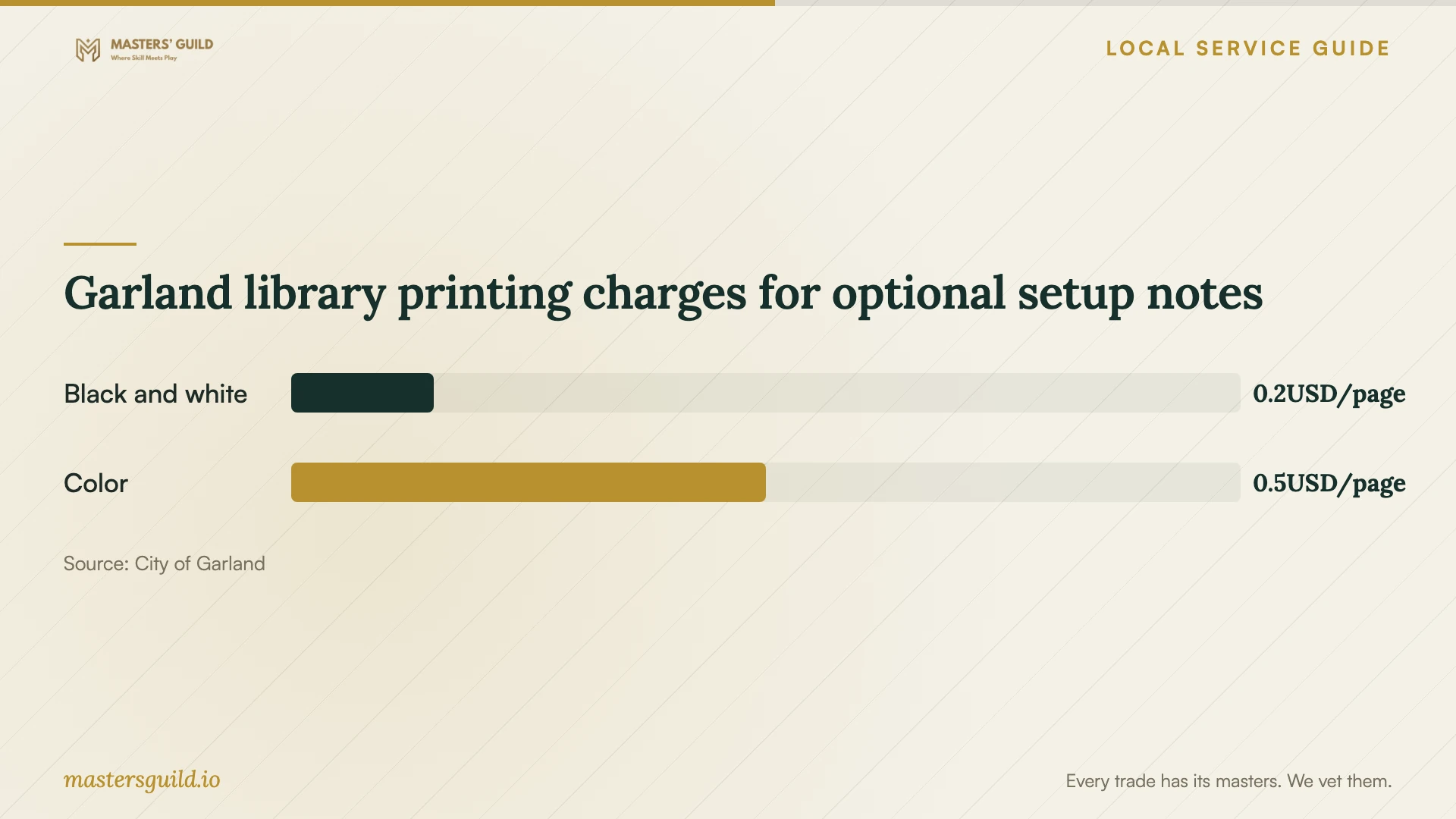
Garland library printing charges for optional setup notes
Local details that affect your job
Check access before a library learning visit
Garland requires a current library card in good standing for public computer use. To obtain a card, the city directs applicants to bring an unexpired Texas driver's license or Texas State ID showing their current address. Call 972-205-2500 about access or learning options before traveling. [1]
Secure a hotspot before scheduling remote work
Garland residents age 18 or older with library accounts in good standing may borrow one hotspot per adult card for one week. The library offers unlimited data at no charge but cannot guarantee availability for a specific date. Renewal depends on whether another borrower is waiting. Return the hotspot to the Circulation Desk. Call 972-205-2501 about borrowing, and test your connection before committing to remote work. [2]
Choose a next step
| Your situation | Suggested route | Resolve before booking |
|---|---|---|
| You need help learning an application | Ask about Central or South library classes | Whether the current class covers your question |
| You lack home internet | Check library hotspot borrowing | Eligibility, availability, and a tested connection |
| You can get online and approve access | Consider a remote appointment | How the technician will start and end access |
| You need the application checked with home equipment | Consider an in-home visit | Which equipment the technician will include |
Your hiring checklist
- Prepare a device and application list for the technician.
- Remove private information from screenshots of errors.
- Identify the files and connected equipment included in the job.
- Have your charger and any required cables available.
- Set aside time to attend the session and review the result.
- Record unresolved issues and the agreed follow-up contact method.
Frequently Asked Questions
Can I get a reliable installation price from this guide?
The supplied sources do not establish local installation prices. Request a quote for your application and device rather than using an unrelated repair price as your budget.
Does the library offer accessibility software?
The city lists Fusion, including screen reading and magnification software, on public computers. Ask staff about using it during a library visit. This listing does not establish installation or licensing assistance for your home computer. [1]
What should I do if I cannot sign in to my software account?
Describe the access problem before booking. Ask the technician to scope account recovery separately and agree on the next step if you cannot regain access. Avoid purchasing another subscription until you have reviewed your existing account.
Sources and scope
This guide combines the sources below with practical planning guidance. Figures apply to the stated geography and period; request a written quote for your property.