
Local service guide
Network Setup and Support in Garland, TX
For Network Setup and Support in Garland, hire around a written scope: troubleshooting, router or mesh configuration, or installed Ethernet cabling. Ask the installer to test the connection before recommending equipment, separate cabling from added electrical power work, and define the handover. For installed wiring, confirm the applicable city permit exemption or permit requirement before work starts; Garland lists specific exemptions rather than a blanket exemption for network work. [1]
Define the problem before buying equipment
Give prospective installers a short description of what fails: video calls in the office, streaming in a bedroom, or connections across the house. Record whether the problem affects one device or several, where it happens, and whether a wired connection shows the same symptom. Ask the technician to compare wired and wireless results before proposing a shopping list.
For a move or new internet connection, confirm the service installation date and equipment responsibilities with the internet provider. Use the FCC’s address lookup to review reported providers, technologies, and advertised download and upload speeds, then confirm the offer with the provider. The FCC accepts availability challenges when its map contains incorrect service information. [4]
Request a quote with defined deliverables
Ask each candidate to price the same scope. List the rooms that need coverage, devices that need wired ports, and equipment you want to retain. Request separate amounts for diagnosis, labor, hardware, cable installation, and wall repair. For troubleshooting, agree on a spending limit and require approval before the technician adds equipment or extends the visit.
For mesh equipment, request a proposed placement plan and ask whether the installer intends to connect the units by cable or wirelessly. For Ethernet, specify port locations, cable routes, labeling, termination, and testing. Ask who supplies patch cables and who patches or paints any openings. Compare the completed scope and support terms alongside the total.
Ask candidates for evidence of similar residential cabling work and liability insurance. Treat licensing and permit questions as separate checks: TDLR’s state licensing exemptions cover specified communications circuits, while Garland’s code sets its own permit provisions and requires city registration for people providing services as electrical contractors. [1] [2]
Resolve cabling and power requirements before installation
Garland includes communications conductors, equipment, raceways, and optical fiber within its electrical-system definition. Section 30.52 lists permit exemptions that include Class II and III low-energy power, control, and signal circuits, plus equipment operating below 25 volts that cannot supply more than 50 watts. The city states that a permit exemption does not authorize work that violates other code provisions. [1]
Send the proposed cable type, powered equipment, route, and any new receptacle work to the installer before accepting the quote. Ask the installer to confirm the applicable requirements with Garland Building Inspection if the classification is unclear. Request a separate scope for electrical power changes rather than accepting a broad assurance that all network work qualifies for an exemption. [1]
For work requiring a permit, Garland requires inspection and approval before the installer conceals the wiring, followed by a final inspection when installation is complete. Have the contractor identify who obtains the permit, requests inspections, and coordinates wall closure before you agree to the schedule. [1]
Plan downtime and agree on acceptance tests
Choose a maintenance window that avoids important calls or household tasks requiring connectivity. Keep account recovery details available and enter passwords yourself where practical. Ask the installer to preserve your access to the router administrator account and document any changed network names, device settings, or subscriptions.
Before paying for the completed scope, walk through the agreed rooms with the technician. Test the activities you identified at booking, check each installed Ethernet port, and request the test results and cable labels. Agree in advance on how the installer will handle unresolved symptoms and follow-up visits.
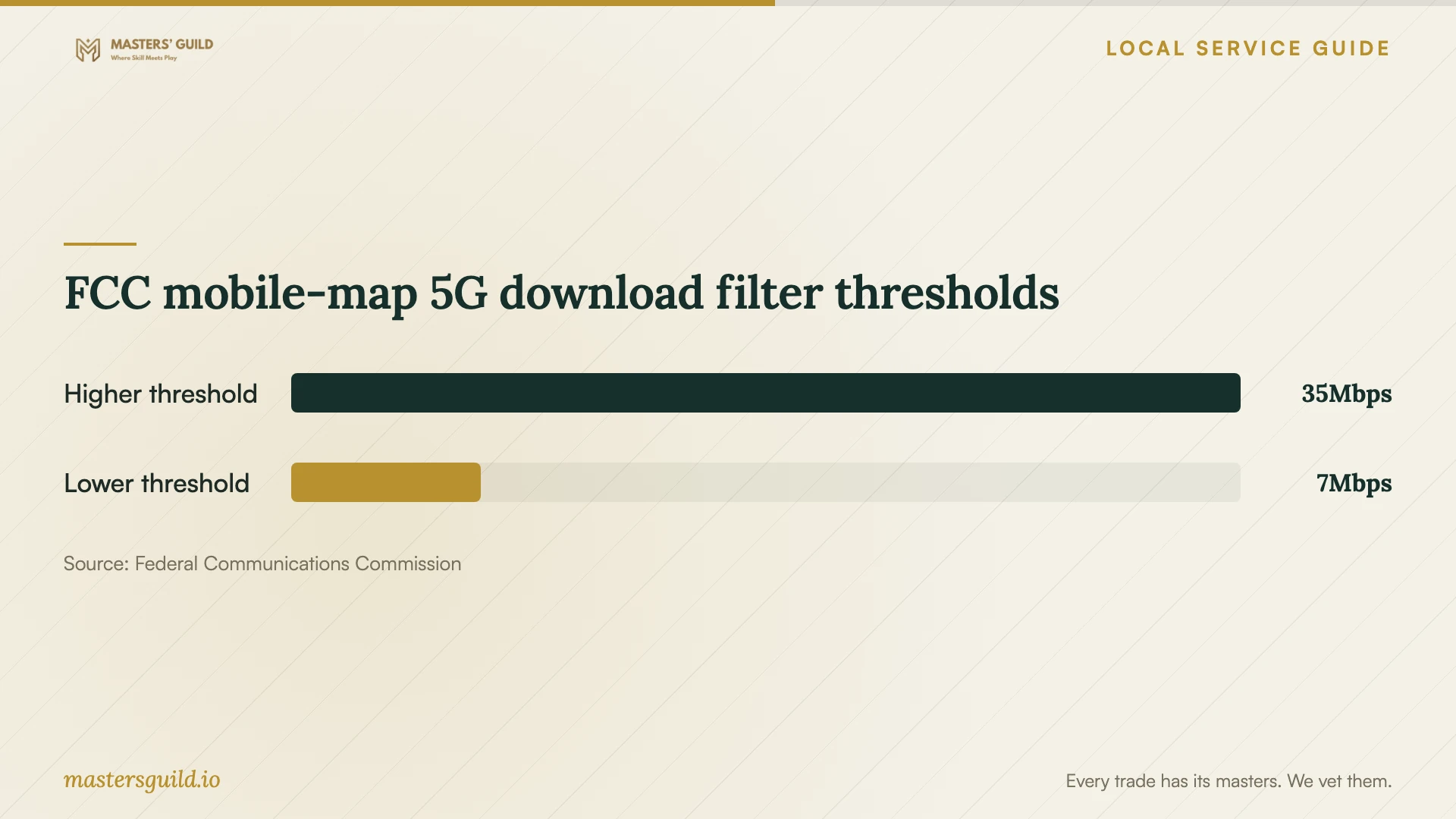
If you intend to use cellular data during downtime, test your device inside the home beforehand. The FCC explains that its mobile coverage map describes outdoor or moving-vehicle coverage and does not show indoor coverage. Use the chart’s map thresholds to interpret coverage filters, without treating them as a promised household backup speed. [4]
FCC mobile-map 5G download filter thresholds
Local details that affect your job
Keep permitted wiring accessible for inspection
For a Garland project that requires an electrical permit, arrange inspection before wall closure. The city prohibits concealing relevant wiring before inspection and approval. It also allows the Building Official to require inspection requests at least one working day ahead, so ask the contractor to include inspection coordination in the schedule. [1]
Use city Wi-Fi only within its stated terms
Garland lists public Wi-Fi at Central Library, 625 Austin St., and North Garland Branch Library, 3845 N Garland Ave., among other sites. Its terms limit use to lawful personal internet access, warn that communications are not private or protected, and state that city staff cannot provide connection support. For an installation-day fallback, check access arrangements and plan sensitive work around those restrictions. [3]
Choose the scope to request
| Your situation | Scope to request | Condition before approval |
|---|---|---|
| Connection problems with an uncertain cause | A diagnostic visit before equipment replacement | Agree on tests, a spending limit, and approval for additional work |
| You want coverage in additional rooms | A router or mesh placement proposal | Specify the rooms and activities to test at completion |
| You want installed Ethernet ports | A cabling plan with routes, labels, and test results | Confirm the applicable Garland permit requirement or exemption |
| The equipment location needs new electrical power | A separate electrical scope | Confirm contractor credentials, city registration, and permit requirements |
| You are changing internet providers | Address-level service confirmation and coordinated setup | Confirm the provider’s offer after reviewing FCC-reported availability |
Your hiring checklist
- List the affected rooms, devices, and activities, with examples of connection failures.
- Record your internet plan and the model numbers of equipment you want to keep.
- Mark proposed Ethernet ports and identify access restrictions before the site visit.
- Request itemized labor, equipment, wall repair, and follow-up terms.
- Ask the installer to document permit responsibility or the applicable exemption.
- Agree on downtime, room-by-room tests, cable testing, and administrator access at handover.
Frequently Asked Questions
Does an Ethernet installer need a Texas electrician license?
TDLR exempts work on specified communications circuits, optical fiber, and other listed low-voltage circuits from state electrician licensing. It also warns that municipal regulations may override those exemptions. Describe the exact work and confirm local requirements rather than assuming the exemption covers added power wiring. [2]
Does Garland require a permit for network cabling?
The answer depends on the installation. Garland lists exemptions for specified low-energy circuits and qualifying equipment, alongside its general permit requirement. Ask the installer to identify the applicable classification and confirm unclear cases with Building Inspection before installation. [1]
How should I compare network setup prices?
Compare written quotes for the same rooms, ports, equipment, and testing. Ask whether diagnosis, hardware, wall repairs, and follow-up support appear in the total. For an unresolved fault, agree on an initial diagnostic budget before authorizing replacement equipment.
Can the FCC map confirm the speed I will get at home?
The fixed broadband map displays provider-reported availability and maximum advertised speeds at an address. Confirm the service offer with the provider and request on-site testing for your installation. The mobile map describes outdoor or in-vehicle coverage, not indoor coverage. [4]
Sources and scope
This guide combines the sources below with practical planning guidance. Figures apply to the stated geography and period; request a written quote for your property.