
Local service guide
Data Recovery and Backup in Garland, TX
For Data Recovery and Backup in Garland, choose a provider by the work you need: retrieving missing files, restoring a backup, or responding to a suspected security incident. Before handing over equipment, request written diagnostic charges, an approval limit, privacy terms, and a definition of successful recovery based on your priority files. For ongoing backup service, require a demonstrated restore and agree who checks failures. CISA recommends offline, encrypted backups and regular restoration testing. [4]
Match the provider to the problem
Describe what happened before requesting a price: accidental deletion, an unreadable device, physical damage, or a ransom message. Include the device model, storage capacity if known, and any recovery attempts. Ask the provider whether it will perform the work itself or send the device to another facility. Get the receiving facility and shipping arrangements in writing.
Treat suspected ransomware as an incident-response job. CISA advises organizations to isolate affected systems from the network, prioritize recovery on a clean network, and investigate the compromise before rebuilding from backups. Ask who will handle containment and investigation alongside file restoration. [4]
Agree on recovery charges and acceptance
Request separate charges for diagnosis, recovery work, return storage, shipping, and any urgent service. Ask what you owe if you decline the diagnosis, if the provider finds no usable files, or if it recovers only part of your priority list. Require approval before the provider exceeds your spending limit or transfers the device to another company.
Give the technician a short priority list, such as the current bookkeeping file, customer orders, or project folders. Specify the date range and application needed to open each item. Agree to inspect representative files before accepting completion. Ask for a diagnosis date and a separate completion estimate rather than treating an initial appointment as a delivery promise.
Set handling terms for customer and employee records. Ask who can access recovered files, how the provider transfers them, how long it keeps working copies, and when it deletes those copies. Request a receipt identifying the device and record each transfer of custody.
Buy a backup service you can restore
Set two targets in plain language: how much recent work you could afford to lose and how long you could operate without the affected system. Ask the provider to propose a backup schedule and a restore procedure against those targets. Include application data and the accounts needed to retrieve it.
CISA recommends offline, encrypted backups of critical data and tests of backup availability and integrity. Its guide warns that ransomware can delete or encrypt accessible backups. Ask the provider to explain which copies remain isolated, who controls access, and how you would recover if the normal administrator account became unavailable. [4]
Make a witnessed restore part of acceptance. Choose a representative folder or application dataset, restore it to an agreed destination, and check that you can use it. Put monitoring, failed-job alerts, retention, restore assistance, and cancellation arrangements into the service agreement. CISA recommends using contract language to formalize security requirements for managed providers. [4]
Plan for regional weather without guessing failure rates
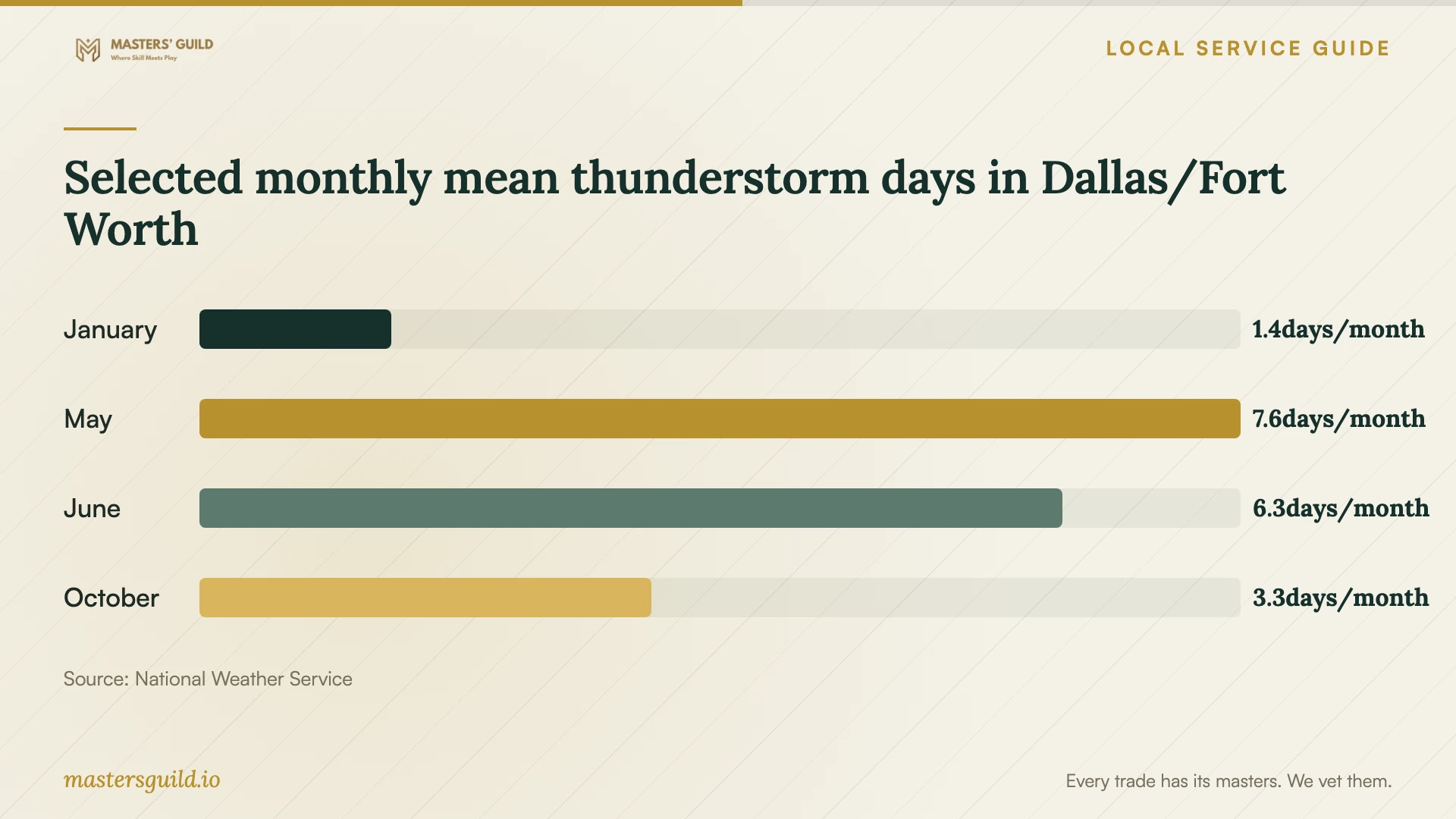
The National Weather Service reports mean thunderstorm days for Dallas/Fort Worth, including 7.6 in May and 6.3 in June, using a 73-year period of record for that measure. Use this regional context to ask about power protection and recovering after loss of access to your premises. Keep the backup design focused on your equipment and operations. [3]
Ask the provider to walk through a premises-loss scenario: who retrieves the offsite copy, where you restore it, and which credentials you need. Do the same for an account compromise. CISA discusses cloud-to-cloud backup options and deletion protection, but cautions that immutable storage needs careful configuration and may not meet some regulatory requirements. [4]
Selected monthly mean thunderstorm days in Dallas/Fort Worth
Local details that affect your job
Texas backup taxes affect quote comparisons
The Texas Comptroller classifies data storage, including offsite backup of electronic files, as taxable data processing. It exempts 20 percent of the data-processing charge. Ask each bidder to separate recurring backup service, recovery work, equipment, and tax, and explain the classification used for each charge. This guidance does not establish identical tax treatment for every recovery task. [2]
Garland drop-off rules affect equipment disposal
Garland lists electronics recycling at eRecycler, 3902 Cavalier Dr, and an appointment-based Transfer Station option for residents. The Transfer Station refuses monitors, televisions, and alkaline batteries. For business equipment, confirm acceptance and eligibility before scheduling a pickup or drop-off. Ask your recovery provider to return old drives unless you have authorized a documented data-destruction process; the city's recycling information does not establish secure erasure. [1]
Choose the scope before comparing offers
| Your situation | Scope to request | Acceptance question |
|---|---|---|
| Missing files without suspected compromise | Diagnostic assessment and recovery proposal | Can I check the priority files before accepting completion? |
| You want help restoring an existing backup | Restore assistance to an agreed destination | Can we open the restored files in the required application? |
| Ransom message or suspected network compromise | Incident response, isolation, investigation, and recovery on a clean network | Who confirms the environment is ready for restoration? |
| You need ongoing backup management | Offline encrypted backup protection, monitoring, and regular restore testing | Who receives alerts and demonstrates a usable restore? |
Your hiring checklist
- Record the symptoms, last successful access, and recovery attempts.
- List priority files, required dates, and applications needed to open them.
- Request diagnostic charges, decline fees, and a written spending limit.
- Identify the facility doing the work and document device custody.
- Agree on secure delivery, working-copy retention, and deletion terms.
- Schedule a restore demonstration and assign responsibility for backup alerts.
- Separate backup service, equipment, recovery work, and tax in the quote.
- Confirm disposal eligibility and authorize drive destruction in writing.
Frequently Asked Questions
Can a provider guarantee recovery before examining the device?
Ask for an assessment and a written definition of success before relying on a promise. Tie approval to your priority files and ask how the provider handles partial results, unusable files, and an unsuccessful attempt.
Should I shut down a computer showing a ransom message?
CISA prioritizes disconnecting affected systems from the network. It recommends powering down only when network isolation is impossible, because shutdown loses potential evidence in volatile memory. Contact your incident-response provider through a separate communication channel and follow your response plan. [4]
Does Texas tax offsite backup service?
The Comptroller includes offsite electronic-file backup in taxable data processing, with 20 percent of the charge exempt. Ask for an itemized invoice and the provider's explanation of the tax treatment of recovery work and other charges. [2]
Can I use Garland's Transfer Station for old office electronics?
The city describes this appointment-based electronics service as available to residents. Confirm business eligibility before bringing office equipment. The Transfer Station refuses monitors, televisions, and alkaline batteries. Arrange data handling separately before surrendering storage devices. [1]
Sources and scope
This guide combines the sources below with practical planning guidance. Figures apply to the stated geography and period; request a written quote for your property.