
Local service guide
Cloud Service Setup in Garland, TX
For Cloud Service Setup in Garland, hire a technician with a written scope covering your accounts, devices, file transfers and a recovery demonstration. Agree on completion checks and follow-up charges before booking. Arrange sensitive account work on a connection you control: Garland warns that users should consider no communication on its public Wi-Fi private or protected. [1]
Define the work before comparing quotes
Describe the outcome you want: access to household documents across devices, organized scanned records, or a backup you can recover. Ask the technician to explain their proposed tasks. Request separate scope items for file organization, account configuration, migration and recovery testing so you can compare offers.
Prepare an inventory of computers, phones, existing accounts and folders. Choose who should own each account and which family members should receive access. Ask the technician to record what they will copy, what they will leave in place and whether they propose deleting anything. Require your approval before deletion.
Request a written quote that separates labor from subscription charges. Ask who will purchase any subscription, which account will hold it and how you will approve renewals. Set a limit on additional labor and require approval before the technician exceeds it.
Choose where the technician will work
For remote help, ask how you will approve access, observe the work and end the session. For an in-home visit, have the devices charged and available. Enter your own passwords and recovery information. Ask the technician to explain any access they want to retain after the appointment.
Avoid choosing a public access point for sensitive account setup. The City of Garland warns that public Wi-Fi communications may face monitoring or interception and provides no security or availability warranty. City staff cannot provide technical support to connect your device. Arrange technical help and a suitable connection before the appointment. [1]
Check the connection before setting a deadline
Use the FCC National Broadband Map to investigate connection options at your home address. The FCC displays providers that report service at that location, their connection technologies and maximum advertised upload and download speeds. Treat those figures as reported service information, rather than a measurement of your home connection. [3]
Ask the technician to assess your actual upload connection before promising a completion time. Agree on whether the appointment ends after configuration or after the transfer and checks finish. Specify who will monitor progress, handle interruptions and confirm that the intended files arrived. Keep your original copies until you review the results.
Prepare paper records before paying for organization
Garland libraries list scanners at all locations with free scanning to USB, email or Google Drive. For a paper-to-cloud project, consider scanning the records yourself, then hiring help to organize folders and set access. Ask library staff about the scanning workflow before bringing sensitive records. [2]
Sort documents into categories before scanning and choose a naming pattern you can maintain. Ask the technician to organize a small sample folder first. Review document readability, file names and access before approving the same approach for the remaining records.
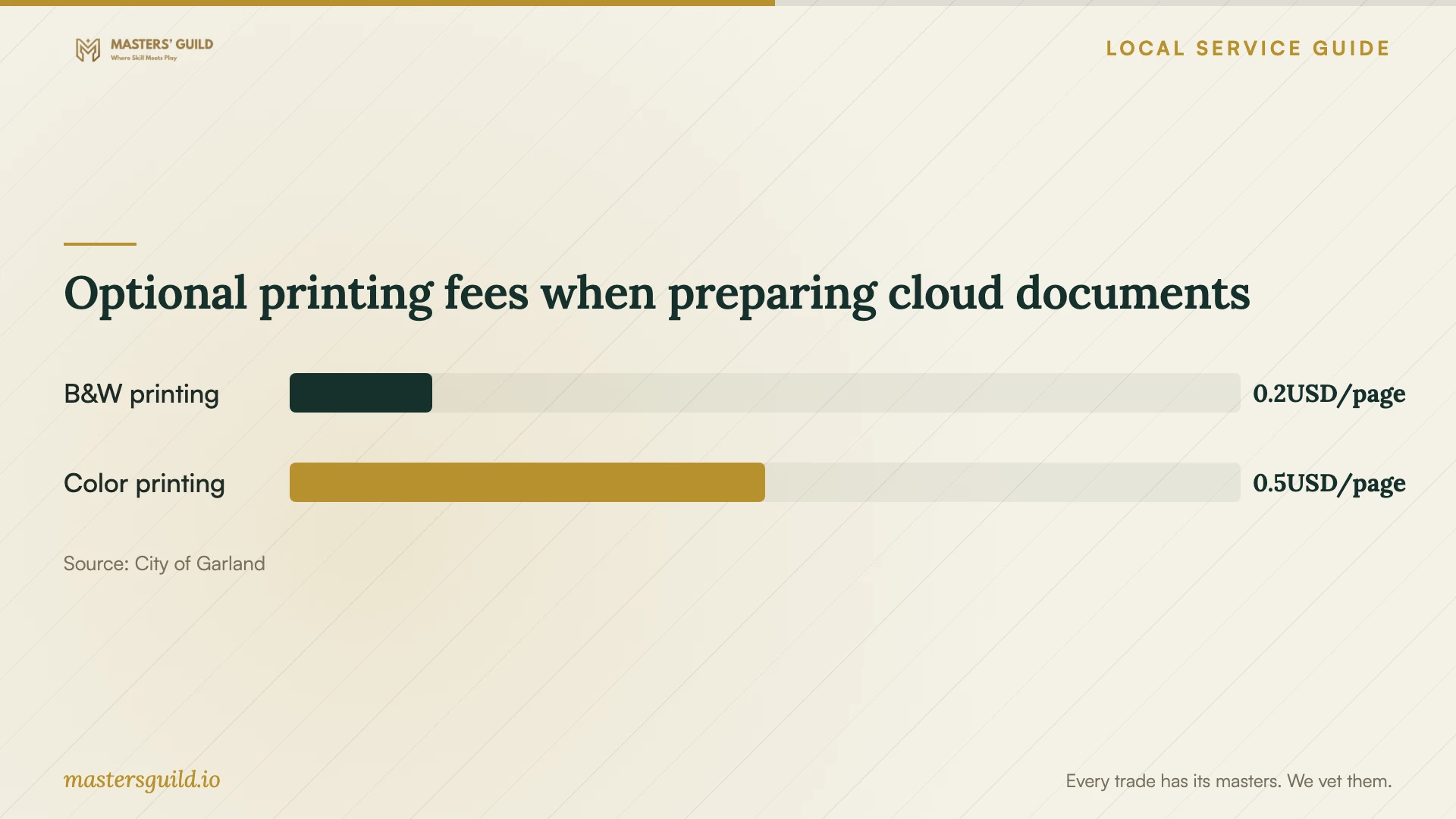
Use the published printing fees below only if you want paper copies during preparation. The city lists free scanning, black-and-white printing at 0.15 USD per page and color printing at 0.50 USD per page. Keep optional printing separate from the technician's quote. [2]
Require a handover you can repeat
Have the technician demonstrate how to open your files, add a document, change a sharing permission and recover a test file using the proposed backup arrangement. Ask them to explain what happens when you delete a file under your chosen setup. Practice the steps yourself before accepting the work.
Request written instructions covering account ownership, recovery methods, selected folders, subscription commitments and support terms. Keep passwords out of that document. Check that you control recovery access, review any technician permissions and agree on how to report missing files or unfinished transfers after the appointment.
Optional printing fees when preparing cloud documents
Local details that affect your job
Library scanning can narrow the paid scope
The city lists free scanning to USB, email or Google Drive at all Garland library locations. Prepare scans yourself if you want the technician to focus on organization and access. The library requires a current card in good standing for public computers and many other services; confirm what you need for your planned visit. [2]
Public Wi-Fi does not include connection support
Garland provides public Wi-Fi at municipal locations, but city staff cannot help connect your device. The city also warns that users should consider no network communication private or protected. Arrange your connection and technical support in advance instead of planning an appointment around help from municipal staff. [1]
Choose the scope that matches your project
| Your situation | Suggested scope | Question to settle before booking |
|---|---|---|
| You want files accessible on several devices | Request account configuration and a sample folder test | Which folders and devices will you configure? |
| You want help protecting household records | Request backup configuration and a recovery demonstration | Can I recover a test file myself before handover? |
| You have paper records to digitize | Consider free Garland library scanning, then paid organization | Will you accept my scans and organize a sample first? |
| You need to move a large collection | Request connection assessment, migration and completion checks | Who monitors the upload after the appointment? |
Your hiring checklist
- List the devices, accounts and folders included in the job.
- Choose who will own each account and control recovery access.
- Request separate labor, subscription and follow-up charges.
- Ask the technician to assess the connection before committing to an upload deadline.
- Approve a sample folder structure before the main migration.
- Keep original files until you review the transferred copies.
- Practice file recovery and review technician access at handover.
Frequently Asked Questions
How should I compare setup prices?
Compare written scopes covering the same devices, accounts and files. Ask whether each quote includes migration, recovery testing, subscriptions and follow-up. Request a limit on additional labor and an approval step before the technician exceeds it.
Can I scan documents into the cloud at a Garland library?
The city lists free scanning to Google Drive, email or USB at all library locations. Confirm the workflow before your visit, especially for sensitive documents. Ask how to end your session and remove any temporary files. [2]
Can the FCC map tell me how long my upload will take?
The FCC map provides provider-reported availability and maximum advertised speeds, rather than a measurement of your connection during the job. Ask the technician to assess your connection and transfer progress before committing to a completion window. [3]
What should I receive when the work finishes?
Request access on the agreed devices, a review of the selected files, a recovery demonstration and written operating instructions. Check account ownership and recovery access yourself. Agree beforehand on how the technician will address missing files or unfinished transfers.
Sources and scope
This guide combines the sources below with practical planning guidance. Figures apply to the stated geography and period; request a written quote for your property.