
Local service guide
Fresno software installation: hiring and setup
For software installation in Fresno, ask a technician to quote the named programs, device setup, activation, and a working test before you book. Agree on backup responsibilities and enter your own passwords during the appointment. If someone in your household attends Fresno State, check campus software access and installation assistance before paying for outside help. [2]
Define the installation before comparing quotes
Send each technician the same description: computer model, operating system version, program names, and what you want to do after setup. Include any error message and say whether you already own a license. Ask the technician to check compatibility before you authorize a purchase or removal of existing software.
Separate a single application install from an operating system change or a move to another computer. For a new computer, list the files, email accounts, browser settings, and connected equipment you want included. Ask which tasks the quoted fee covers and which require separate approval.
Choose a completion test that reflects your use. For office software, ask to open and save a document. For email, send and receive a test message. For a program that works with a printer or scanner, include that connection in the agreed scope.
Choose how the technician will help
Before choosing remote help, ask whether the technician can complete the work with your current internet connection and whether you must stay at the computer. Ask how they will reconnect after a restart, how you can end access, and whether they plan to leave a remote access program installed.
For an in-home appointment, identify the equipment you want tested at home and confirm any visit charge. For a drop-off job, agree on what to bring, who will handle account sign-ins, and how you will approve extra work. Request a plan for testing home equipment that you cannot bring.
If you need a download connection, Fresno County Public Library offers free WiFi for personal laptops and mobile devices at its locations. The library says it cannot guarantee availability or reliability and requires you to configure your equipment. Ask the technician whether that setting suits the proposed work before arranging an appointment there. [1]
Compare the full charge and software ownership
Request a written quote that distinguishes installation labor, software purchases, subscriptions, data transfer, and any visit or diagnostic charge. Ask whether the technician charges a fixed fee or bills for time, what triggers an additional charge, and whether follow-up help costs extra. The cited sources do not establish a Fresno installation price range.
California’s Regulation 1502 treats remote delivery of prewritten software without tangible property as nontaxable. It also describes seller-installed software as nontaxable, with exceptions involving storage media or installation as part of a computer sale. Ask the vendor to explain the tax treatment of your specific invoice rather than applying one rule to the whole job. [4]
Ask the technician to place purchases and subscriptions under an account you control. Confirm the renewal terms and retain the receipt. If you already have access through school or another household subscription, ask the relevant provider to confirm your entitlement before purchasing another license.
Protect your files and agree on the handoff
Before the appointment, back up the files you want to keep and check that you can open the backup. Tell the technician which folders matter and ask them to obtain permission before deleting files, removing programs, or resetting the computer. For an operating system change, request a recovery plan before work begins.
Keep account recovery methods available and enter passwords and verification codes yourself. Ask the technician to explain requests for administrator access. If you use library WiFi, follow the library’s warning that wireless communication is not secure and its recommendation to maintain antivirus protection and a personal firewall. [1]
At handoff, perform the agreed test yourself. Confirm that you can sign in, find your files, and open the installed programs after a restart. Request a short record of what the technician installed or removed, any remaining issue, and how to obtain the follow-up support included in your quote.
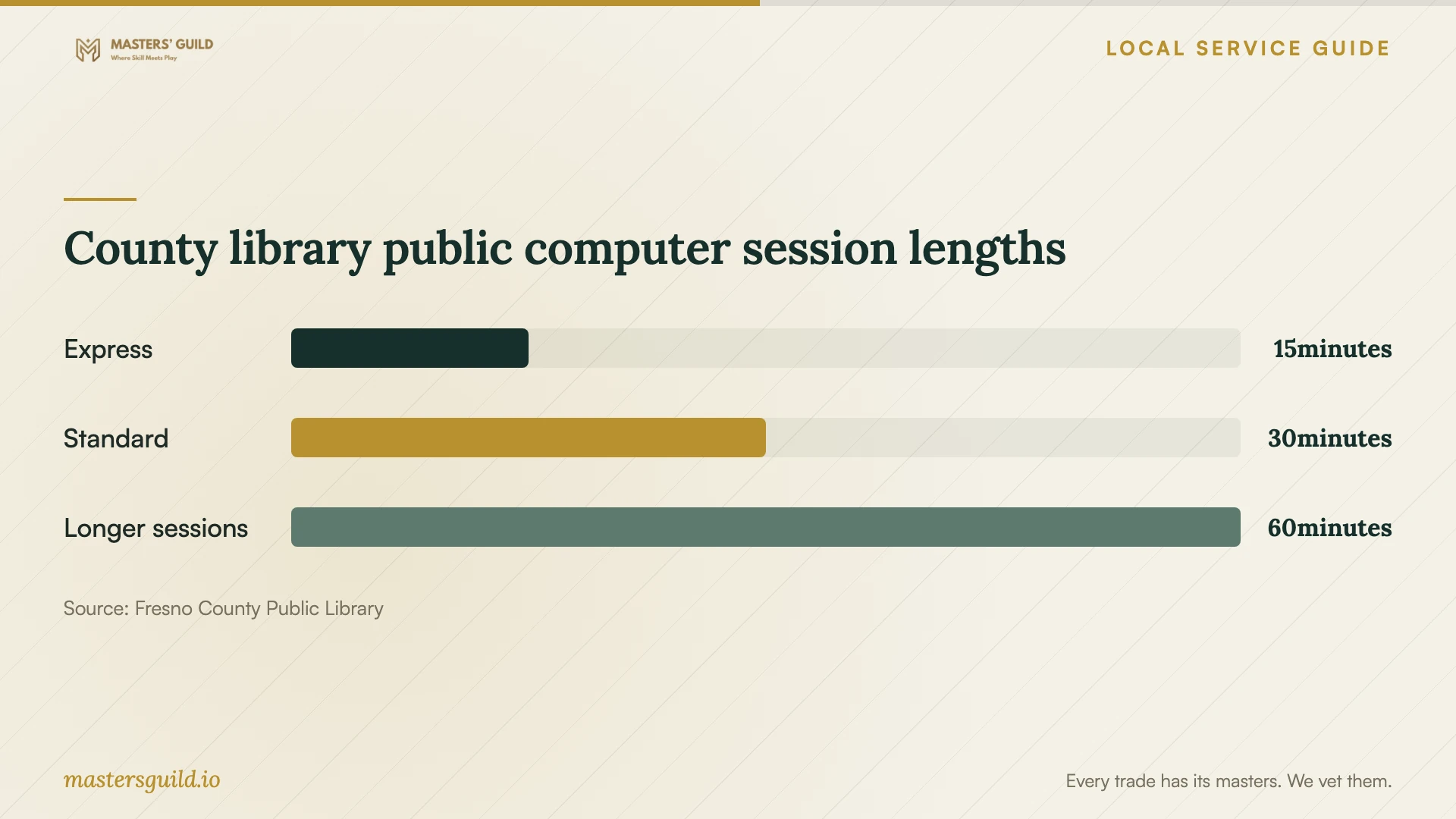
County library public computer session lengths
Local details that affect your job
Check Fresno State support before buying software
For a household member who attends Fresno State, contact Technology Services at 559-278-5000 before purchasing Microsoft 365 or Adobe Creative Cloud access. The university lists these student resources and says its desk assists with software installation and password resets. Confirm eligibility and whether the desk can help with your particular device and program. [2]
Use county library access with a separate installation plan
Bring your own device if you plan to use Fresno County Public Library WiFi for downloads. Public computer rules prohibit running personal software, and staff offer basic assistance rather than extended individual help. The library also purges documents on public computers at session end and/or daily reboot, so avoid treating a public workstation as storage for installation files or records. [1] [3]
Choose the next step for your setup
| Your situation | Recommended next step | Confirm before proceeding |
|---|---|---|
| You know the program and own a license | Request a quote for installation, activation, and testing | Compatibility and the tasks included |
| Your household includes a Fresno State student | Check campus software access and Technology Services assistance | Eligibility and support for the requested program |
| You need internet access for your own laptop | Consider county library WiFi and arrange technical help separately | Connection availability and suitability for the work |
| You planned to use a library public computer | Arrange installation on your own device | Library rules prohibit running personal software |
| You need an operating system change or file transfer | Request a backup and recovery plan within the quote | Permission before deletion or reset, plus a handoff test |
Your hiring checklist
- List the device, operating system, programs, and exact setup tasks.
- Check existing licenses and any school software entitlement.
- Back up important files and open a sample from the backup.
- Prepare account recovery access and enter credentials yourself.
- Confirm service format, fees, exclusions, and approval for extra work.
- Agree on a practical completion test before installation begins.
- Keep receipts, installation notes, and follow-up support terms.
Frequently Asked Questions
How much should I budget for installation?
Obtain a quote for your specific device and programs. The cited sources do not provide a verified local labor rate. Ask for the total including software, subscriptions, data transfer, and any visit charge, along with the conditions that allow the technician to charge more.
Can library staff install software on my laptop?
Plan for separate technical assistance. Fresno County Public Library says customers must configure their own wireless equipment and staff cannot troubleshoot it. Its public computer policy also limits staff to basic assistance rather than in-depth individual help. [1] [3]
Can a Fresno State student get installation help?
Fresno State lists software installation among the services available through Technology Services. Its campus resource page also lists student access to Microsoft 365 and Adobe Creative Cloud. Ask the desk to confirm eligibility and the scope of help for your device. [2]
Should I give the technician my account password?
Arrange to enter it yourself, including any verification code. For remote work, remain available for sign-ins and ask how to end the session. Agree in advance whether the technician will remove remote access software after the job.
Sources and scope
This guide combines the sources below with practical planning guidance. Figures apply to the stated geography and period; request a written quote for your property.