
Local service guide
Data Recovery and Backup in Fresno, CA
For Data Recovery and Backup in Fresno, choose a provider for the work you need: recovering missing files, restoring a backup, or installing ongoing protection. Get diagnostic charges, approval limits, custody terms, and a file acceptance test in writing. If you suspect unauthorized access, include an incident-response assessment before authorizing cleanup.
Define the recovery job before comparing quotes
Give the provider the device model, symptoms, priority folders, and the last time you opened the files. Describe drops, liquid exposure, unusual sounds, encryption, and previous repair attempts. For an irreplaceable device, stop using it while you arrange assessment. Avoid approving formatting or reinstallation before discussing recovery.
Find out where the provider will perform the work. If a local shop sends devices elsewhere, request the receiving facility's name, a custody receipt, and one person responsible for updates. For shipping, obtain packing instructions and written responsibility for delivery and return. Keep your existing backups separate from the affected device.
Agree on charges and usable-file acceptance
Request separate prices for assessment, recovery, replacement storage, shipping, and expedited handling. Have the provider state what you owe if they recover nothing or return only part of the requested data. Compare quotes against the same priority folders and file types. Set a spending limit that requires your approval before further work.
Define completion before handing over the device. Request estimates for assessment and delivery as separate stages, then plan temporary access to essential records. Before accepting recovery, open a selection of returned documents and business files on a working device. Include the files you need for current operations, rather than checking filenames alone.
Set privacy and incident-response terms
Record the device serial number and obtain a handoff receipt. Agree on who may view files, where technicians may keep working copies, whether subcontractors receive data, and when the provider must delete retained copies. Arrange a secure way to share credentials or encryption keys. Specify the return method for both your device and recovered files.
The California Attorney General states that businesses must notify California residents when an unauthorized person acquired, or is reasonably believed to have acquired, their unencrypted personal information as defined by law. If you suspect unauthorized access, seek legal assessment and ask the recovery provider how they will preserve relevant records before cleanup. [3]
The Attorney General also requires a sample notification when a person or business must notify more than 500 California residents about a single breach. Ask your adviser to assess resident notification and sample submission separately; the sample-submission threshold does not replace the resident-notification trigger. [3]
Specify a backup you can restore
Tell the installer how much recent work you could afford to lose and how long you could operate without access. Identify the applications, shared folders, and accounts to include. Request written backup frequency, retention, storage locations, recurring charges, account ownership, and responsibility for responding to failed jobs.
Include a separate or offsite copy in the requested design. Discuss how the provider will protect that copy from changes through a compromised account. Require a restore test to a separate destination, and keep recovery instructions somewhere you can reach without the backed-up computer. For onsite storage, have the installer check ventilation and manufacturer operating limits at the proposed location.
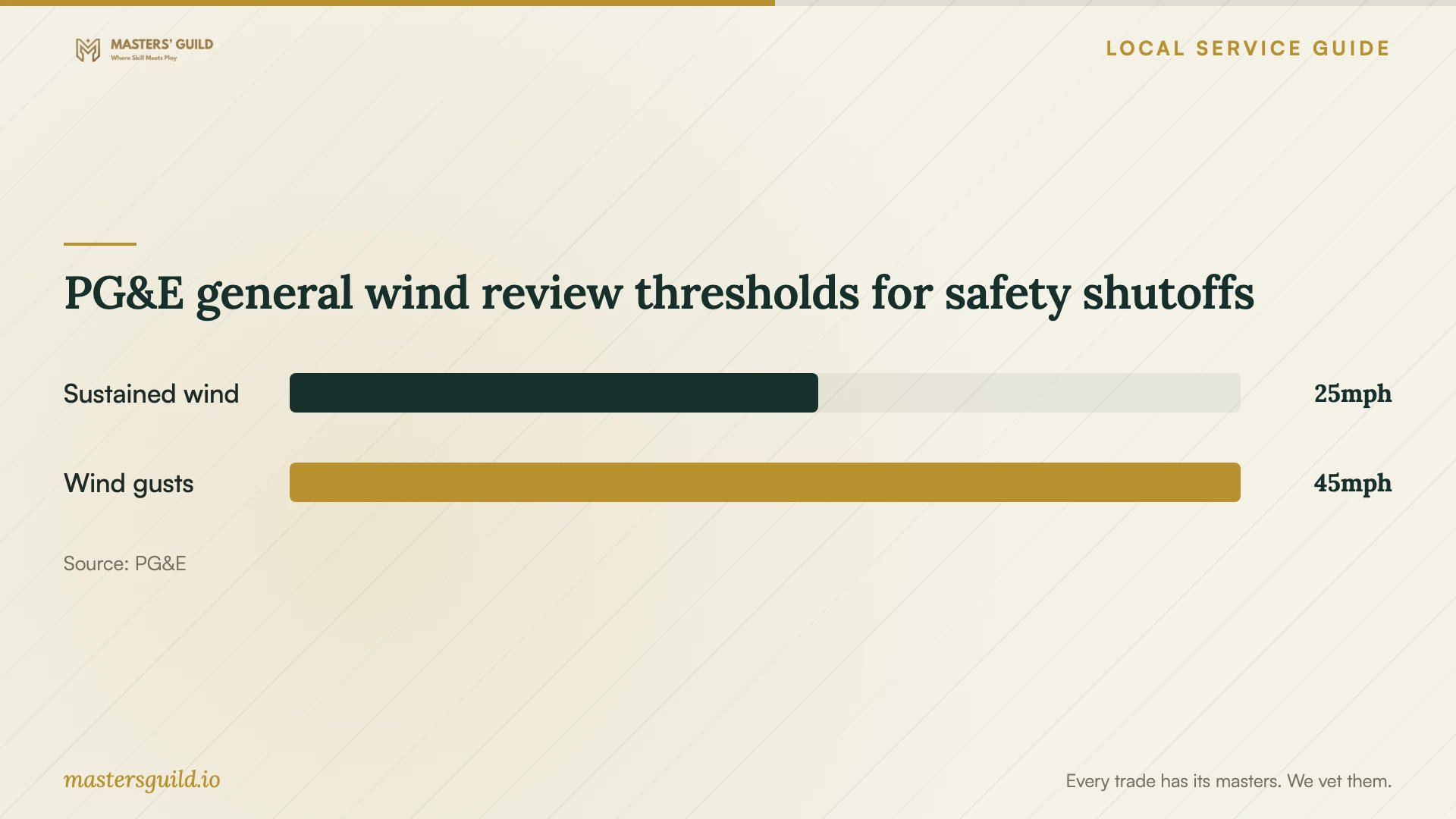
For a PG&E-served site, include battery backup runtime, shutdown arrangements, and checks after power returns in the installation scope. PG&E considers several factors when reviewing safety shutoffs and says a Red Flag Warning does not automatically trigger one. Use address-specific utility updates when preparing for an event rather than treating the wind figures below as a prediction. [1]
PG&E general wind review thresholds for safety shutoffs
Local details that affect your job
Check outage exposure at your service address
PG&E says it provides advance shutoff notifications when possible and publishes address-specific impact and estimated restoration information. A customer outside a high fire-threat area can still face a shutoff through their supply line. For premises PG&E serves, check the address and agree with the installer on shutdown and restart procedures. PG&E advises unplugging or turning off electronics during outages to avoid damage when power returns. [1]
Arrange a business electronics disposal route
Fresno limits Free Dump Events to eligible residential solid-waste customers and excludes electronic waste and batteries. Plan a separate disposal route for business equipment. The city lists its Recycling Hotline at 559-621-1111; confirm whether any suggested destination accepts commercial equipment. In the recovery agreement, reserve erasure or destruction for your written approval after you accept the returned files and address any need to retain evidence. [2]
Choose the scope to request
| Your situation | Requested scope | Approval question |
|---|---|---|
| You have a backup available | Backup assessment and test restore | Can you restore priority files to a separate destination? |
| Files are missing from a device | Recovery assessment with an approval stage | What will I owe for unsuccessful or partial recovery? |
| You suspect unauthorized access | Incident-response assessment alongside recovery | Who will preserve records and coordinate with my adviser? |
| You need ongoing protection | Backup design, installation, and handover | Who checks failures, and can I restore using the written instructions? |
Your hiring checklist
- List device models, symptoms, priority files, and previous repair attempts.
- Identify existing backups and encryption keys without altering the affected device.
- Get assessment fees, approval limits, and partial-recovery terms in writing.
- Confirm the work location, custody receipt, subcontractors, and deletion terms.
- Define acceptable lost work and downtime for the backup design.
- Complete a restore demonstration and collect account and recovery instructions.
- Authorize disposal after file acceptance and any incident-response review.
Frequently Asked Questions
How should I compare recovery prices?
Give each provider the same device information and priority-file list. Compare assessment charges, recovery scope, return storage, shipping, and unsuccessful-recovery terms. Require approval after diagnosis before committing to further charges.
Should I hand over the whole computer?
Ask the provider what they need for assessment before removing components. Discuss encryption and account access, then document each item you hand over. Obtain a receipt with device identifiers and agreed handling terms.
How do I sign off on backup installation?
Have the installer demonstrate a restore to a separate destination. Check priority files, confirm account ownership and recurring charges, and identify who receives failure alerts. Keep a copy of the recovery instructions outside the backed-up computer.
Sources and scope
This guide combines the sources below with practical planning guidance. Figures apply to the stated geography and period; request a written quote for your property.