
Local service guide
Computer Virus Removal in Fresno, CA
For Computer Virus Removal in Fresno, choose a technician who gives you a written estimate and agrees on which files to preserve before you approve repairs. California requires service dealers to provide a total-price written estimate before repairs to personal computers used at home or in a home office. Ask for separate approval before a reset, operating-system reinstall, or disposal of the computer. [1]
Describe the problem before choosing the service
Give the technician a short account of what happened: the message you saw, what you clicked or installed, and whether you can still sign in. Describe the symptoms without deciding that a virus caused them. Ask the technician to explain the diagnosis before proposing cleanup, hardware work, or a reinstall.
Tell the technician which documents, photos, and other files you need to keep. Mention any existing backup and ask how they will check it before restoring files. If you cannot open important files, request a file-preservation assessment before approving changes to the drive.
Choose remote help, drop-off service, or a home visit after describing the computer's condition. Ask whether the provider can handle a device that will not start or cannot connect. Request an appointment window and an expected return date in writing rather than relying on an assumed same-day repair.
Compare estimates with the same scope
California's Bureau of Household Goods and Services regulates repair of personal computers used for personal or home-office purposes. Its consumer guide says service dealers must give a written estimate that includes the total price before repairs. Use that requirement to request a defined scope before authorizing the work. [1]
Ask each provider to distinguish diagnosis, malware cleanup, file backup, operating-system repair, and reinstall work. Request the amount you would owe if you decline the repair after diagnosis. BHGS says dealers may charge a reasonable diagnostic fee and must quote any trip charge before the visit. [1]
Set an approval boundary: ask the technician to contact you with a revised total before adding work. BHGS says a dealer can charge for additional parts or labor when it states the total repair charge and obtains your approval, including the guide's condition concerning additional parts. [1]
Compare the total for the work you need. Ask whether the quote includes checking preserved files, reinstalling your applications, and testing the computer with you at handover. Request a separate quote for any continuing support or security subscription so you can decide whether to buy it.
Agree on file handling and verify the handover
Write down what the technician may access and copy. Ask where any backup will stay, who can access it, and when the provider will delete its copy. Set a separate approval step for erasing the drive or reinstalling the operating system. Ask how you should provide access without handing over passwords for unrelated accounts.
At collection, ask the technician to explain what they found and what they changed. Try opening the files you asked them to preserve and the applications you need. Request written instructions for any remaining work, along with the provider's terms for reporting a recurring problem.
Keep the estimate, approvals, and final invoice. If you are unhappy with the initial repair, BHGS says you may file a complaint. If another dealer examines the computer, ask that dealer to put its findings about the first dealer's work on the invoice, as the bureau recommends. [1]
Plan replacement and recycling before discarding the device
Ask for a replacement option if you do not want to approve the proposed repair. Include file transfer, application setup, and handling of the old drive in that comparison. Decide whether you want to retain the drive or authorize erasure before the technician sends the computer for recycling.
Fresno's Free Dump Events exclude electronic waste. Call the City's Recycling Hotline at 559-621-1111 to ask about recycling options before transporting a discarded computer. Ask any recycler about accepted devices and data handling before drop-off. [2]
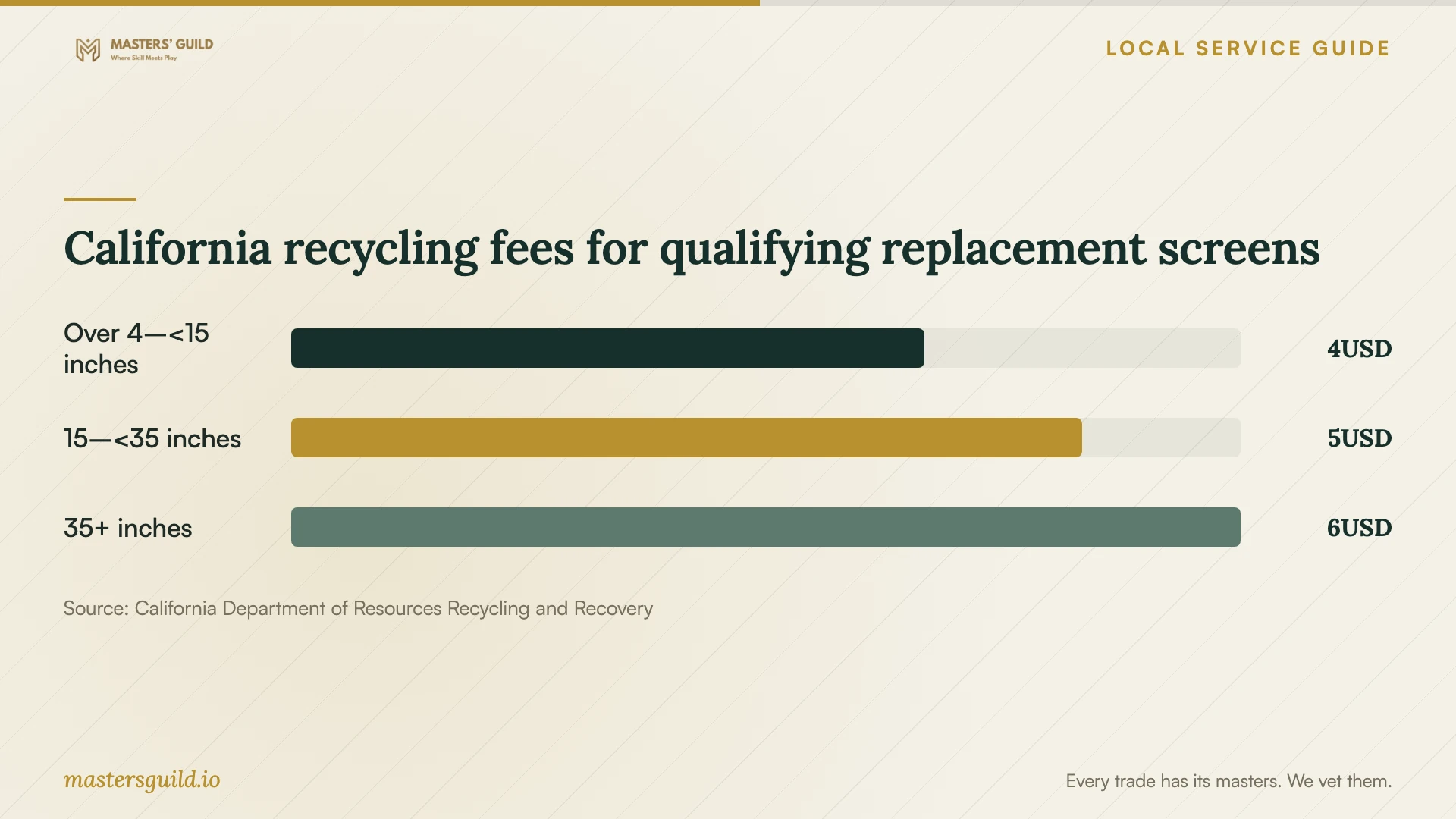
For a replacement with a qualifying screen, allow for California's published video-display recycling fee: $4, $5, or $6 according to screen size. CalRecycle includes most computer monitors and laptops with screens larger than four inches. The chart covers this purchase fee; ask for the separate repair quote and replacement-device price. [3]
California recycling fees for qualifying replacement screens
Local details that affect your job
California repair-estimate protections apply to home computers
For a personal or home-office computer repair here, request the written total-price estimate required by California's service-dealer rules. BHGS names personal computers among the electronics it regulates. Use the bureau's License Search to check the provider's registration information before handing over the device. [1]
Fresno Free Dump Events exclude electronic waste
Do not plan to leave a replaced computer at a City Free Dump Event. Fresno lists electronic waste among excluded items, even though it accepts other bulky household items. Ask the City's Recycling Hotline at 559-621-1111 about recycling options and confirm acceptance before loading the computer. [2]
California charges a screen-based fee on qualifying replacements
If you buy a qualifying replacement laptop or monitor in Fresno, budget for the statewide video-display recycling fee shown below. CalRecycle says this fee has no redemption value. Do not count it as money you will recover when you turn in the old device. [3]
Choose the next step before authorizing work
| Your situation | Next step | Approval question |
|---|---|---|
| The computer starts and you can describe the symptoms | Ask for diagnosis and a defined cleanup scope. | Does the quote include checking the computer with me afterward? |
| Important files are inaccessible or lack a backup | Request a file-preservation assessment before changes to the drive. | Will you seek my approval before erasing or reinstalling? |
| The technician proposes additional work | Request the revised total and approve the added scope; BHGS requires disclosure and approval for additional charges under its stated conditions. | What will the complete repair cost now? |
| You want to compare repair with replacement | Request separate totals including file transfer and setup. | Which applications and files will you help me move? |
| You plan to discard the old computer | Arrange electronics recycling; Fresno Free Dump Events exclude electronic waste. | Who will handle the drive, and does the recycler accept this device? |
Your hiring checklist
- Record the symptoms and any recent downloads or installations.
- List the files to preserve and describe your existing backup.
- Request a written estimate separating diagnosis and repair work.
- Confirm what you owe if you decline repairs after diagnosis.
- Set approval requirements for added work, drive erasure, and reinstalling the operating system.
- Agree on access permissions, backup storage, and deletion of provider-held copies.
- Test your required files and applications with the technician at handover.
- Confirm electronics-recycling acceptance and drive handling before discarding a replaced computer.
Frequently Asked Questions
How much does virus removal cost in Fresno?
These sources do not establish a local repair price. Request a written total-price estimate for your computer and ask which backup, cleanup, and operating-system work it covers. California permits reasonable diagnostic fees and requires dealers to quote trip charges before service calls. [1]
Can the technician erase my computer as part of cleanup?
Set your instructions before approving work. Require a separate approval step for drive erasure or an operating-system reinstall, and ask the technician to explain how they will preserve the files you need.
What can I do if the first repair does not resolve the problem?
Keep your paperwork and describe the remaining symptoms to the provider. BHGS says you may file a complaint if you are unhappy with the initial repair. If you use another dealer, ask it to record what it found wrong with the first dealer's work on its invoice. [1]
Can I take a replaced computer to a Fresno Free Dump Event?
Fresno excludes electronic waste from these events. Contact the City's Recycling Hotline at 559-621-1111 for recycling options, then confirm device acceptance and agree on handling of the old drive before drop-off. [2]
Sources and scope
This guide combines the sources below with practical planning guidance. Figures apply to the stated geography and period; request a written quote for your property.