
Local service guide
Software Installation in Fremont, CA
For Software Installation in Fremont, hire help around a defined result: name the applications, identify the computer and operating system, and ask for a written quote covering installation, activation, configuration, and a test you can watch. Decide whether you need work on your own device or temporary access to an application. Fremont Library offers computer access, while county library staff provide limited help with library equipment. [1] [2]
Define the finished job before comparing quotes
Give each technician the same description: computer model, operating system version, application names, and what you want to do after setup. Mention an existing error message, an earlier failed installation, or files you need to preserve. Ask the technician to flag compatibility questions before you purchase software.
Describe completion through a task you can check. For an office application, ask to open and save a sample document. For email setup, ask to send and receive a test message. Include printing or access to an existing folder if you need those functions. Ask whether the quote covers these checks and a demonstration.
For an operating system reinstall or upgrade, agree on the backup and recovery plan before work begins. Identify which files and applications you expect to keep. Require separate approval before the technician erases a drive, removes an application, or adds paid software.
Choose how the technician will work
Ask a remote technician what access they need, whether you must stay at the computer, and how they will end access after the session. Request an explanation before approving remote-control software. Enter passwords and verification codes yourself, and agree on which folders the technician may open.
For a home visit, include any printer or other device you want tested in the job description. For drop-off service, ask for a receipt identifying the computer and accessories, the agreed work, and the return arrangements. Keep a copy of the scope and record any changes you approve.
Compare the complete quote
Request a total for the agreed scope and ask what would trigger an extra charge. Separate the technician’s work from software licenses and recurring subscriptions. Ask who will own the software account and where you will find purchase receipts, renewal settings, and recovery information after setup.
Compare written quotes for the same device, applications, and completion checks. Ask whether the provider charges if an installation cannot proceed, and set an approval limit for troubleshooting beyond the original scope.
Handle a change from installation to repair
California’s Bureau of Household Goods and Services regulates service dealers repairing electronic equipment for personal or home-office use and names personal computers among its examples. Its guide says service dealers must provide a written total estimate before repairs and quote any trip charge before the service call. [3]
If the technician proposes repair work, pause and ask for the revised scope and total. The bureau says dealers can charge for additional parts or labor when they state the total repair charge and obtain the consumer’s approval under the conditions described in its guide. Use that repair guidance when relevant; it does not establish a registration requirement for every software-only installation. [3]
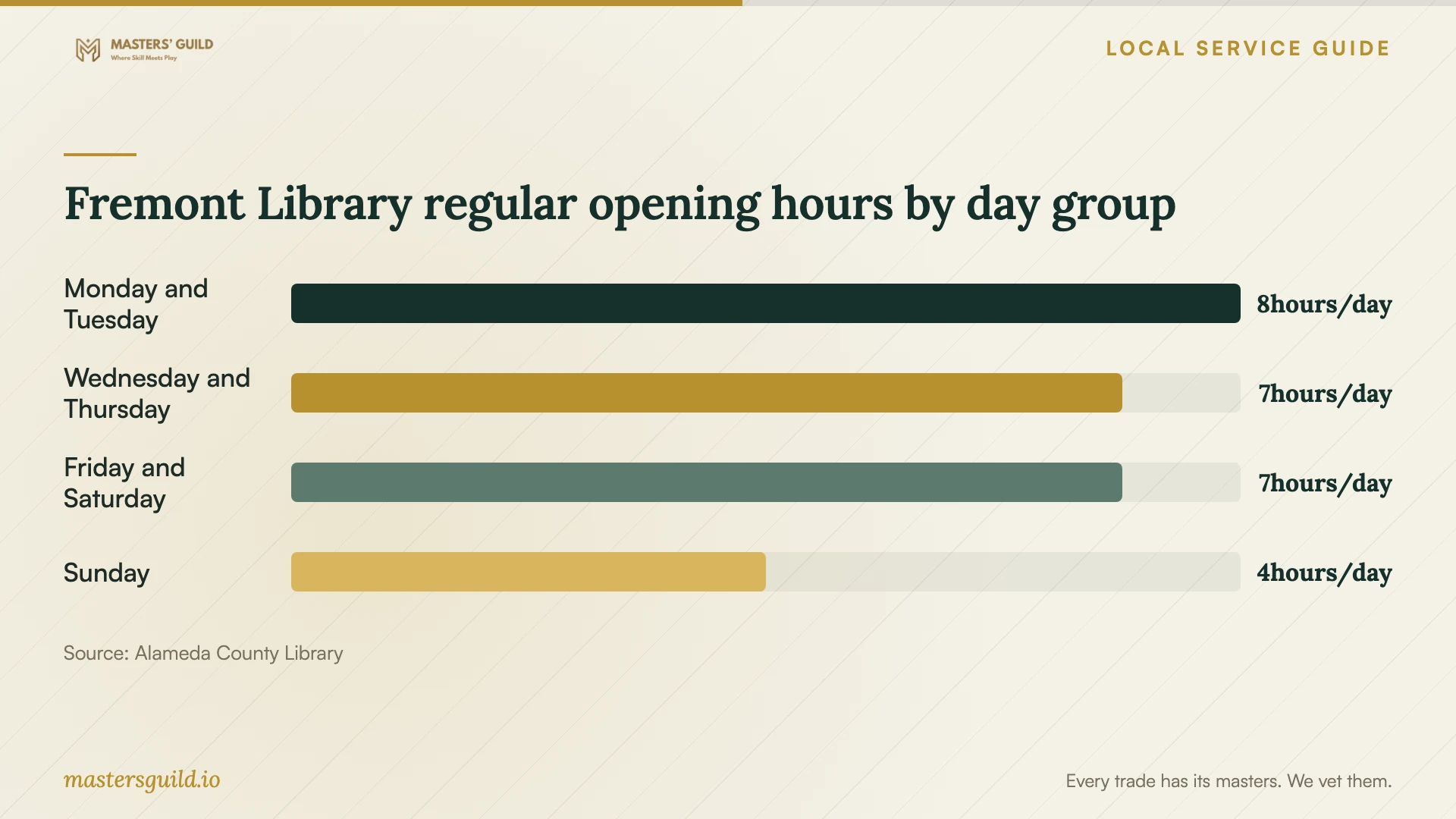
Fremont Library regular opening hours by day group
Local details that affect your job
Use Fremont Library for temporary application access
Fremont Library at 2400 Stevenson Blvd lists desktop and laptop computer access and free Wi-Fi. The county’s computer FAQ lists MS Office Suite, PDF Reader, VLC Media Player, Chrome, Firefox, and Edge on its computers. If you need to complete a document or use one of those applications, consider library access before buying software or arranging installation. The county limits computer sessions to two hours per day, keeps loan laptops inside the library, and wipes user-added data after each session. Save your work elsewhere before your session ends. [1] [2]
Confirm assistance and closures before traveling
Call the Fremont branch at (510) 745-1400 to ask about suitable help and current opening arrangements. County staff offer limited assistance with library equipment, and some locations have volunteer tech tutors at designated times. Ask whether Fremont has a tutor for your question before planning a visit. The branch lists an all-day staff-training closure on October 15, 2026, so its regular Thursday hours do not apply that day. [1] [2]
Choose the next step for your situation
| Your need | Next step | Boundary to confirm |
|---|---|---|
| Install an application on your own computer | Request a quote naming the application, activation, and completion test. | Ask whether the price includes troubleshooting and software purchases. |
| Use an office application for a temporary task | Consider library computer access; the county lists MS Office Suite. | Plan around the two-hour daily computer-session limit and save work before the session ends. |
| Get basic help using a library computer | Ask Fremont Library about staff assistance or a tech tutor. | Staff assistance is limited; the county offers tutors at some locations. |
| Address a computer fault discovered during setup | Ask for a separate repair scope and written total estimate. | BHGS repair guidance covers personal and home-office electronic equipment. |
Your hiring checklist
- List the computer model, operating system version, applications, and error messages.
- Back up files you want to preserve and check that you can open the backup.
- Locate purchase receipts, license information, and account recovery details.
- Get a written scope separating labor, software, subscriptions, travel, and troubleshooting.
- Agree on remote access or device handover arrangements and enter passwords yourself.
- Require approval before erasing data, buying software, or expanding the work.
- Test the agreed tasks and collect receipts and setup notes before closing the job.
Frequently Asked Questions
Can the library install software on my home computer?
Library staff provide limited help with library equipment. The library does not promise installation on personal computers. Ask the branch about your question before visiting, or arrange a technician for a defined installation job. [1]
Do I need a library card to use a computer?
Alameda County Library allows guests to use desktop computers and print. You need a library card to use a Tech It Out Laptop, and the laptop must stay inside the library. [1]
What should I ask if the technician finds another problem?
Ask them to stop, explain the fault, and quote the revised work before continuing. For covered repair work, BHGS requires a written estimate before repairs and describes approval requirements for additional charges. [3]
How should I check the installation before paying?
Open the application, check activation, and perform the task you agreed on. Ask the technician to show you where to find receipts and setup notes. Review any remaining errors and agree in writing on follow-up work.
Sources and scope
This guide combines the sources below with practical planning guidance. Figures apply to the stated geography and period; request a written quote for your property.