
Local service guide
Smart Appliance Setup in Fremont, CA
Arrange Smart Appliance Setup in Fremont by requesting a written scope for your appliance models and the features you want to use. Include app pairing, connection troubleshooting, and a working handover on your phone. Identify physical installation or utility connections as separate work. For delayed starts, have your household’s actual electricity rate schedule available.
Choose the work you need
Send providers your model numbers, installation status, and a description of the task. Distinguish first-time setup from reconnecting after a router change or adding another household user. Name the feature you want and ask the provider to confirm its availability in your model’s instructions before booking.
Separate phone and network configuration from placement, mounting, and electrical, water, or gas connections. If the appliance still needs installation, ask who will complete that work before app setup begins. Have each provider identify their responsibilities in writing.
For a failed connection, describe where the process stops and copy the error message. Ask whether the proposed visit covers diagnosis alone or includes reconnection and testing. Agree on a stopping point if the provider cannot resolve the problem within the quoted scope.
Compare quotes and prepare access
Request an itemized quote covering the named appliances, account work, network troubleshooting, and follow-up terms. Ask whether the provider charges a fixed amount or bills for time. Clarify any charge for an unsuccessful visit and whether new equipment requires your approval.
Gather the manufacturer’s instructions and setup codes. Install the specified app on your phone, confirm that you can sign in, and check access to verification messages. Keep recovery details under your control. Ask the provider to explain permissions before you authorize remote control, voice-assistant links, or household sharing.
Note your network name, recent router changes, and existing hubs or automations. Ask the provider to check the appliance’s stated connection requirements before recommending equipment. If they suggest a router or hub, request an explanation of the problem it would address and a separate equipment price.
Plan delayed starts around your household
Check your current rate schedule before choosing an appliance start time. PG&E lists peak pricing from 4 to 9 p.m. every day for E-TOU-C and from 5 to 8 p.m. weekdays for E-TOU-D. These are examples, not a complete list of household schedules. Ava also identifies E-ELEC, EV, and solar-related rate arrangements. [2] [3]
PG&E recommends shifting laundry and dishwasher use to lower-priced off-peak periods. For setup, ask the provider to use your actual schedule and the appliance’s operating instructions. Review the intended start time, cycle length, and any steps you must repeat before the next load. Choose times that fit your household routine. [2]
Finish with settings you can use
Try the agreed controls yourself before the visit ends. Check access from the intended household accounts and test any notification included in the scope. Request a short record of chosen settings, unresolved issues, and follow-up arrangements. Include reconnection instructions if you asked for them.
For a dishwasher, consider drying settings alongside scheduling. The Department of Energy recommends Air Dry to reduce energy use during drying. If your model offers it, review how to select it and whether you want it for your usual loads. [4]
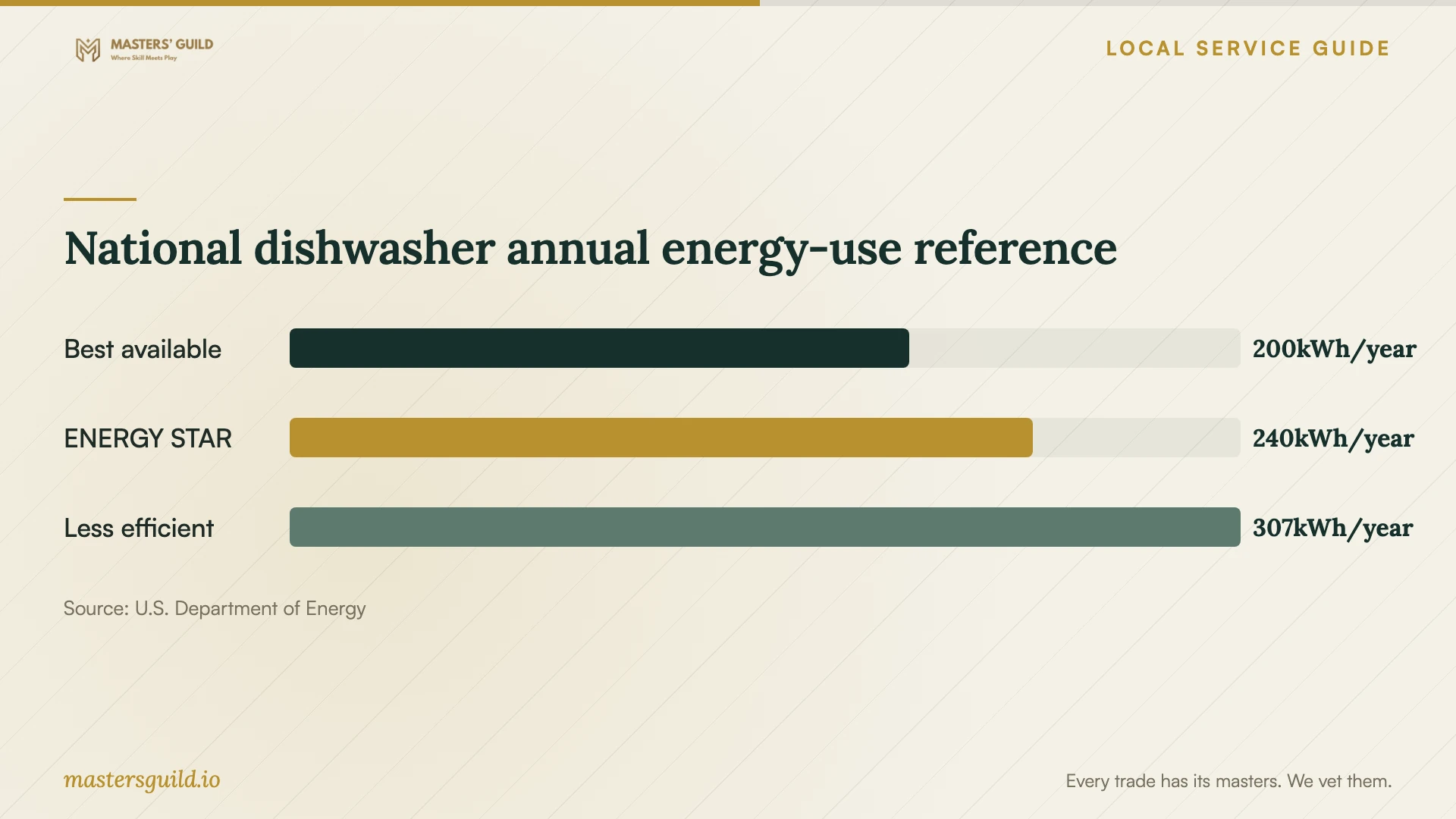
DOE’s October 2023 dishwasher comparison provides a national appliance-efficiency reference. Use the chart when considering equipment choices, while keeping purchase decisions separate from the setup service. The figures describe reference dishwasher categories; they do not measure savings from connecting an appliance to an app. [4]
National dishwasher annual energy-use reference
Local details that affect your job
Check the Fremont generation-plan exception
Ava reports that Fremont residents transitioned to the Renewable 100 default in August 2025. CARE, FERA, and Medical Baseline customers have Bright Choice as their default. Before discussing electricity costs, find your actual plan under Details of Ava Community Energy on your PG&E bill. Do not assume the community default applies to your account. [1]
Use PG&E’s plan-specific peak windows
For Fremont households on E-TOU-C, PG&E’s peak window runs from 4 to 9 p.m. every day. On E-TOU-D, it runs from 5 to 8 p.m. weekdays. This regional rate difference changes the delayed-start setting to discuss. Confirm your schedule before the visit, including whether you use another tariff, rather than requesting a generic evening start. [2] [3]
Match the booking scope to your task
| Your situation | Work to request | Question before booking |
|---|---|---|
| Installed appliance needs pairing | Model-specific app and account setup | Can you confirm the requested feature for this model? |
| Connection fails after a router change | Diagnosis, reconnection, and testing | What happens if troubleshooting exceeds the quote? |
| You want off-peak delayed starts | Scheduling against your actual tariff | Which rate schedule does my household use, for example E-TOU-C or E-TOU-D? |
| Appliance needs utility connections | Separate installation scope | Who completes the connection work before configuration? |
| Another household member needs access | Permission review and access testing | Can each intended user try the agreed controls? |
Your hiring checklist
- Send model numbers, installation status, and the feature you want.
- Record pairing errors and recent network changes.
- Identify physical installation and connection work separately.
- Confirm account access and gather setup codes.
- Have your current electricity bill available for scheduling work.
- Agree on extra-charge approval and unresolved-problem terms.
- Try the agreed features and retain the handover notes.
Frequently Asked Questions
How much should I budget?
Request an itemized quote for your appliance models and requested work. Compare the total alongside troubleshooting limits, equipment charges, and follow-up terms. Ask providers to explain any price difference through the work they include.
Can I try setup myself?
Follow the manufacturer’s instructions if you feel comfortable with the account and pairing steps. Record the error message if you get stuck. Consider hiring help for diagnosis or for configuring features you do not want to tackle yourself.
Does choosing Ava replace my PG&E rate schedule?
Ava’s generation service plans exist alongside your chosen PG&E rate schedule. Use the schedule to discuss appliance timing and the Ava plan to identify your generation-service choice. [3]
Will app pairing guarantee a lower electricity bill?
Do not budget on that assumption. PG&E recommends shifting use to lower-priced periods on time-of-use plans. Ask for supported scheduling that fits your tariff, then review your own usage and bills. [2]
Sources and scope
This guide combines the sources below with practical planning guidance. Figures apply to the stated geography and period; request a written quote for your property.