
Local service guide
Network Setup and Support in Fremont, CA
Arrange Network Setup and Support in Fremont by requesting a diagnostic visit, a written scope and tests in the rooms where you need internet access. Describe whether you want router configuration, coverage troubleshooting or installed Ethernet cabling before accepting a quote. Check provider-reported service at your street address through the FCC broadband map, then confirm your options with the provider before buying equipment. [2]
Define the problem before booking
Write down the rooms, devices and tasks that need attention. Include dropped video calls, a printer that will not connect, or a connection that fails at a particular time. Tell the technician whether the problem affects one device or several, and whether you have tried a wired connection. Request diagnosis as a separate quote item so you can review the proposed fix before approving hardware purchases.
Send photos of the current router, modem or provider equipment, along with model names and a simple floor plan. Mark the rooms where you want testing. Keep account passwords out of the initial job description; arrange how you will enter credentials during the appointment. Ask whether the technician needs you present for provider account changes.
Check service at your address before changing equipment
The FCC National Broadband Map lets you search a street address and review the providers, connection technologies and maximum advertised download and upload speeds that providers report for that location. Use the address lookup rather than treating a citywide result as confirmation for your home. Ask the provider to confirm the service and installation arrangements you can order. [2]
California residents can use the CPUC broadband mapping program to review availability and subscription information, test internet speeds and submit feedback. In its published update, the CPUC identifies its map data as end-of-year 2024. Treat those records as background for a conversation with your provider, and bring your own test results to the diagnostic visit. [4]
Ask the technician to record the test location, connection method and time alongside each result. Request a wired baseline and checks at your desk or other problem areas, where feasible. Agree on the tasks you want to demonstrate at handover, such as joining a call or connecting a printer. Ask for an explanation tied to those tests before approving an equipment package.
Separate equipment configuration from cabling work
Ask bidders to distinguish configuration of existing equipment from installation of cables, outlets or mounted equipment. For a cabling proposal, request the route, termination locations, cable specification, testing and responsibility for patching finished surfaces. Tell the installer about access restrictions before they quote, and obtain permission for alterations if you rent.
California’s Contractors State License Board defines C-7 work as installation, service and maintenance of energy-limited communications and low-voltage systems that do not exceed 91 volts. The definition excludes low-voltage fire alarms. Use this classification to question a cabling bidder about the proposed work and their qualifications. The classification page alone does not establish the licensing or permit requirement for your particular project. [1]
Before authorizing installed cabling, ask the bidder to identify any licensing and permit requirements for the exact scope and explain how they will verify them. Request a revised scope if the proposal adds electrical work or other alterations. Keep configuration, installed cabling and any separate trade work distinct in the written quote.
Compare the complete quote and handover
Request separate amounts for diagnosis, labor, equipment and installed cabling. Ask whether the quote includes device setup, cable testing, cleanup and a return visit if an agreed test fails. For hourly work, set an approval point before the technician exceeds the initial allowance. Ask who owns purchased equipment and who handles warranty claims.
Agree on an interruption window and a way to restore the previous setup if the change fails. At handover, ask for equipment locations, cable labels, configuration notes and instructions for routine restarts. Enter your own administrator credentials, confirm that you can access the settings, and ask the technician to remove any temporary access they used. Keep the final test record with the invoice.
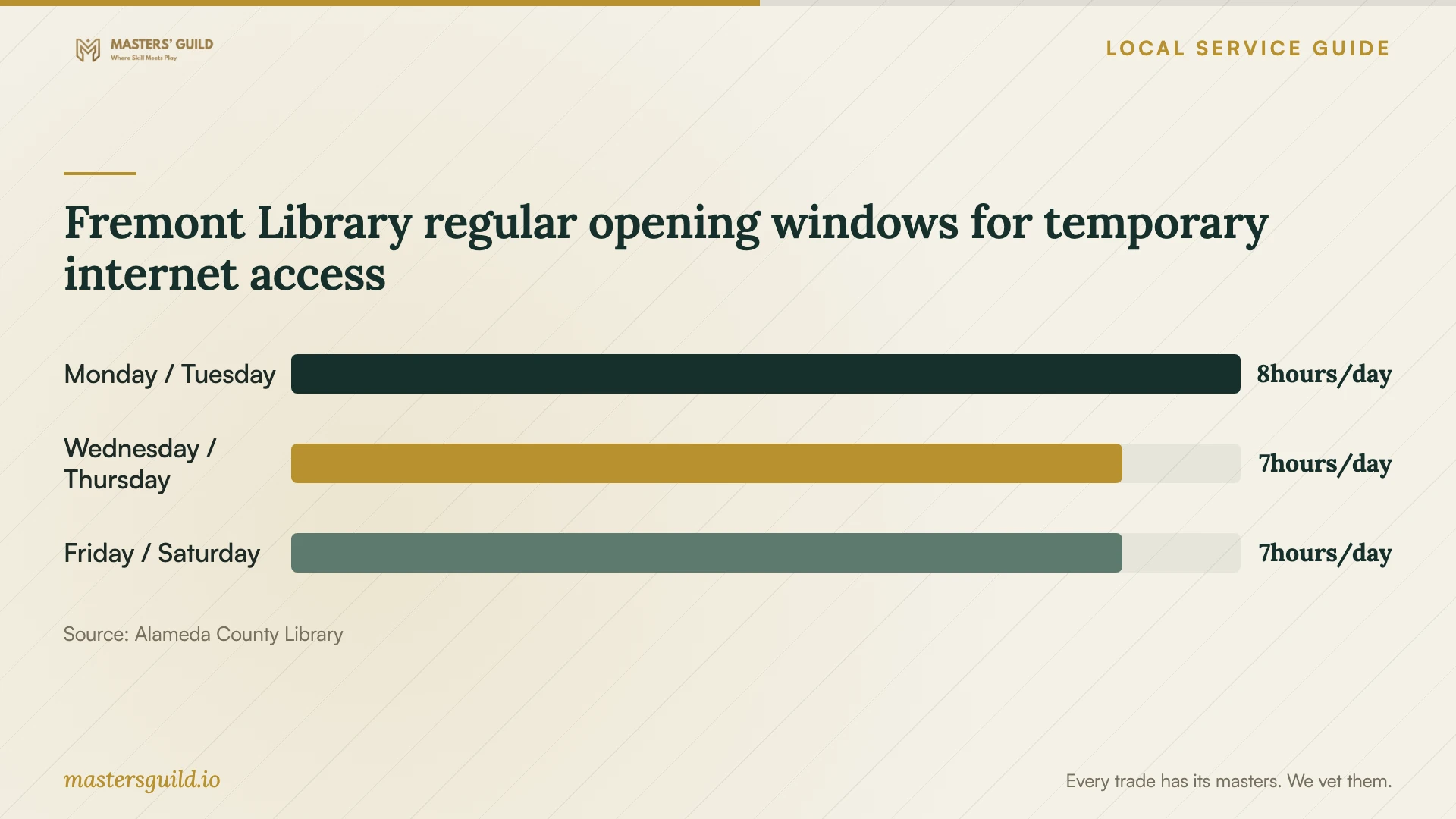
Fremont Library regular opening windows for temporary internet access
Local details that affect your job
Temporary access at Fremont Library
Alameda County Library lists free Wi-Fi and laptop and desktop computer access at its Fremont branch, 2400 Stevenson Boulevard. Its regular hours include Monday and Tuesday noon to 8 p.m., Wednesday and Thursday 11 a.m. to 6 p.m., and Friday and Saturday 10 a.m. to 5 p.m. The branch lists an all-day closure on October 15, 2026 for staff training. If you need a place to get online during an installation, check the branch schedule before choosing the appointment date. [3]
California speed-test feedback before a paid redesign
The CPUC’s statewide broadband mapping program includes tools for testing internet speeds and submitting feedback, alongside availability and subscription data. Its published map update uses end-of-year 2024 data. For a Fremont home, use this regional resource to document the service concern and prepare questions for your provider before authorizing a network redesign. Confirm current service options with the provider rather than relying on the map’s historical records. [4]
Correct an address-level availability record
The FCC lets consumers submit an Availability Challenge when service information for their location is incorrect, or a Location Challenge when a home’s location information is incorrect or missing. If a provider cannot supply the service shown for your address, use the relevant challenge process as well as contacting the provider. Describe that service-availability issue in your brief to the home-network technician. [2]
Choose the next step for your network job
| Your situation | Next step | Ask before approving work |
|---|---|---|
| You are considering a different internet service | Review FCC address-level provider reports, then confirm with the provider | Which service can I order at this address, and what equipment will it require? |
| You want speed-test records for a provider conversation | Use the CPUC mapping program’s testing and feedback tools | Can the technician include connection method, room and time with each test? |
| You need troubleshooting or router configuration | Book diagnosis with an approval point for additional work | Which tests will support the recommended changes? |
| You want installed communications cabling | Discuss the C-7 classification and verification of project requirements | Who handles routes, terminations, testing and surface repairs? |
| You need temporary access during the appointment | Check Fremont Library’s hours and closures; it lists free Wi-Fi | Can I schedule the interruption when I have somewhere else to get online? |
Your hiring checklist
- Describe the affected rooms, devices and tasks, including when each problem occurs.
- Gather equipment model names, photos and a floor plan without sharing account passwords.
- Confirm service options with the provider before approving equipment for a service change.
- Request a diagnostic scope and written approval before additional purchases or work.
- For cabling, agree on routes, testing, surface repairs and verification of project requirements.
- Choose an interruption window and arrange temporary internet access if needed.
- Review agreed tests, administrator access and configuration notes before closing the job.
Frequently Asked Questions
Should I buy a new router before booking support?
Ask for diagnosis first. Give the technician your equipment models, affected rooms and provider plan, then request tests and an explanation for any purchase. Confirm compatibility and return arrangements before approving equipment.
Does the broadband map confirm the speed I will receive?
The FCC map reports provider availability and maximum advertised speeds at a location. Use those records to compare reported options, then confirm service with the provider and request connection tests during troubleshooting. [2]
Does the C-7 definition establish whether my job needs a license?
The cited CSLB page defines the C-7 classification’s scope. It does not establish the licensing requirement for your specific job. Ask the cabling bidder to verify applicable requirements before you authorize installation. [1]
Where can I get online during a home-network interruption?
Fremont Library lists free Wi-Fi and computer access at 2400 Stevenson Boulevard. Check its current hours and closures before planning your visit, and ask the branch about any facilities you need. [3]
Sources and scope
This guide combines the sources below with practical planning guidance. Figures apply to the stated geography and period; request a written quote for your property.