
Local service guide
Data Recovery and Backup in Fremont, CA
For Data Recovery and backup in Fremont, hire against a written scope: identify the missing files, agree on diagnostic charges and recovery approval, and require a demonstration that you can open the returned files. For ongoing backup, ask the provider to include encrypted offline copies and restore testing, as CISA recommends. Confirm business equipment disposal arrangements before handing over retired devices; Alameda County’s household hazardous waste facilities exclude business waste. [1] [3]
Define the recovery job before approving work
Prepare a short intake note with the device model, storage type if known, symptoms, and what happened before you lost access. List the folders or applications you need first, such as invoices, customer records, or project files. Tell the provider about previous repair attempts and any encryption. Ask how to supply necessary credentials through a secure process.
Ask the provider to distinguish assessment from recovery work. Set an approval point after diagnosis, then request a written explanation of the proposed work, expected delivery, and remaining uncertainty. If someone else will handle the device, ask for the receiving company’s name and location before authorizing that transfer.
For a device that clicks, has liquid damage, or no longer starts, pause further attempts while you arrange assessment. Ask a specialist how to package it and whether to send the whole computer or only its storage device. Avoid approving erasure or recycling while you still need files from the original.
Compare quotes by charges and usable results
Request separate amounts for diagnosis, recovery, replacement storage, shipping, and urgent handling. Ask which charges remain due if you decline the work or the provider cannot return the files you need. For any no-recovery, no-fee offer, get the definition of recovery and the exceptions in writing.
Agree on how you will accept the result. Ask for a file listing and a chance to open representative documents, photos, or business exports. Name your essential files before work starts so you can assess a partial recovery against your actual needs. For application data, ask whether the scope includes importing it into a working application.
Set privacy terms alongside the price. Ask who can access the files, how the provider protects transfers and temporary copies, and when they delete those copies. Request a device receipt that records the serial number and each handoff. Specify whether the provider must return the original storage device.
Buy a backup service you can restore from
CISA recommends maintaining offline, encrypted backups of critical data and testing their availability and integrity in a disaster recovery scenario. The agency explains that ransomware can delete or encrypt accessible backups. Ask a prospective provider to identify which copy stays offline and show you how they test restoration. [3]
Write down how much recent work you could afford to lose and how long you could operate without each system. Use those answers to request a backup schedule, retention period, and restoration target. Have the provider name the person who checks failures and contacts you when a backup needs attention.
CISA also recommends considering cloud deletion protection, object locking, and version control. Ask the provider to explain the settings they propose, who can change them, and their costs. CISA cautions that misconfigured immutable storage can impose significant costs, so request an explanation of retention settings before approval. [3]
Handle ransomware before reconnecting systems
If you suspect ransomware, CISA recommends isolating affected systems from the network. Disconnect affected devices from Ethernet and Wi-Fi where feasible, and contact your IT or incident-response lead through a separate channel such as a phone call. CISA reserves powering down for situations where network isolation is impossible because shutdown loses potential evidence in memory. [3]
Ask whether the proposed service includes incident investigation and containment. CISA warns that ransomware can follow an earlier unresolved compromise and advises restoring critical services on clean systems. Require the responsible specialist to explain when you can reconnect devices and use restored data. [3]
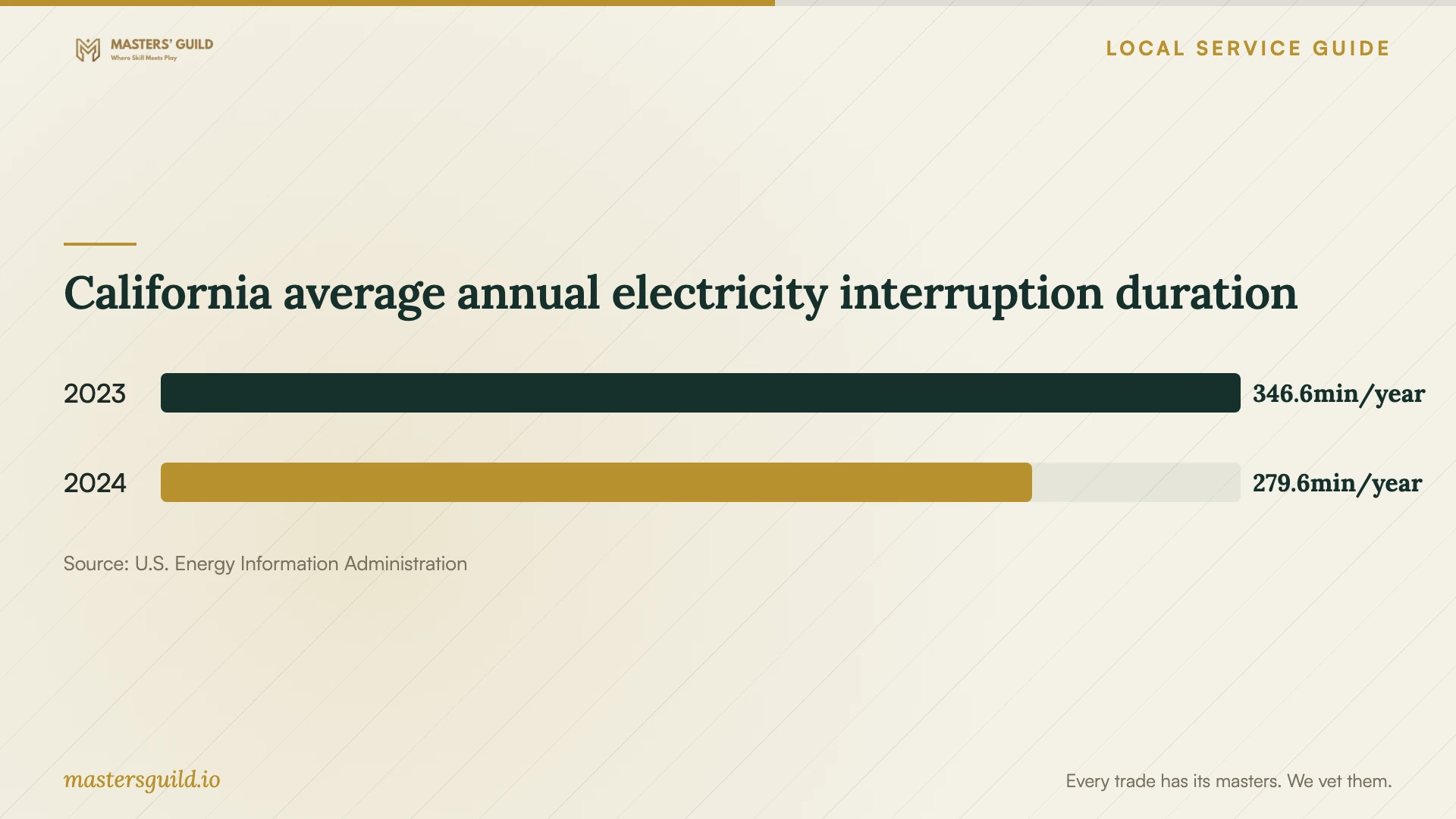
California average annual electricity interruption duration
Local details that affect your job
Arrange a business disposal route
StopWaste excludes business waste from Alameda County’s household hazardous waste facilities. It directs qualifying small businesses to a separate hazardous waste program, including an express drop-in service. Before adding disposal to a recovery contract, ask the provider to confirm a suitable route for your office equipment and itemize any handling charge. Household drop-off eligibility does not establish business eligibility. [1]
Use the Fremont household facility only for eligible household items
For personal household electronics, StopWaste lists the Fremont facility at 41149 Boyce Road. Alameda County residents can use household drop-off without an appointment and must bring proof of their county address. Listed hours are Wednesday through Friday, 8:30 AM to 2:30 PM, and Saturday, 8:30 AM to 4:30 PM, excluding major holidays. Confirm hours before transporting a device. [1]
Finish data handling before electronics recycling
StopWaste’s Alameda County electronics guidance asks users to back up important files, sign out of accounts, factory reset devices, and remove SIM and memory cards before disposal. If your device cannot complete those steps, ask the recovery provider for a separate data sanitization or destruction plan after you accept the recovered files. Keep disposal authorization separate from recovery authorization. [2]
Choose the scope that matches your situation
| Situation | Service to request | Approval question |
|---|---|---|
| Missing files with an available backup | Assessment and a supervised restore | Can you demonstrate the required files before replacing anything? |
| Unreadable or damaged storage | Specialist recovery assessment | What will diagnosis cost, and when can I approve further work? |
| Ransom note or suspected network compromise | Incident response and recovery planning | Who will contain the incident and confirm a clean restoration environment? |
| Ongoing protection for business records | Backup setup with offline encrypted copies and restore tests | Who checks failures and proves the restore works? |
| Retiring office equipment | Data handling and business-appropriate disposal | Which disposal route will you use, given the household program’s business-waste exclusion? |
Your hiring checklist
- Record the device serial number, symptoms, and previous repair attempts.
- List the essential files and the deadline for getting them back.
- Agree on diagnostic charges and a written approval point.
- Confirm who will handle the device and any subcontracted work.
- Define acceptance through file checks and any required application restore.
- Set temporary-copy retention, deletion, and original-device return terms.
- Request a backup restore demonstration and a named failure contact.
- Authorize disposal only after accepting the files and agreeing on data handling.
Frequently Asked Questions
How much should I budget for recovery?
Request a device-specific written assessment. The supplied sources do not establish Fremont recovery prices. Compare diagnostic fees, approved recovery work, return storage, shipping, and urgent handling. Ask what you owe if the provider returns only some of your priority files.
What should a backup provider demonstrate?
Ask the provider to restore agreed files and show how you access them. CISA recommends offline, encrypted backups and regular testing of availability and integrity. Include test responsibility, failure alerts, and retention settings in your agreement. [3]
Can I take an old office computer to Boyce Road?
Do not assume household drop-off applies to office waste. StopWaste excludes business waste from household facilities and directs qualifying small businesses to a separate program. Confirm the applicable route before transporting equipment. [1]
Do California outage figures predict my office downtime?
No. EIA’s figures describe statewide customer averages for reported non-momentary interruptions. They do not establish the outage history of your Fremont address or predict data loss. Ask your provider to address interrupted power in the recovery plan alongside backup restoration. [4]
Sources and scope
This guide combines the sources below with practical planning guidance. Figures apply to the stated geography and period; request a written quote for your property.