
Local service guide
Computer Virus Removal in Fremont, CA
For Computer Virus Removal in Fremont, choose a technician who explains the proposed repair, provides a written total-price estimate, and agrees on a return date. Identify the files you need preserved before work begins. California’s repair regulator includes personal computers in its consumer guidance and requires service dealers to provide that estimate before repairs. [1]
Choose how the technician will assess the computer
Describe what you saw without deciding which infection you have. Record warning text, affected applications, and whether the computer starts. Mention any unexpected caller who requested payment or gained remote access. Ask the technician to explain what they need to inspect before recommending cleanup, system repair, or replacement.
For remote assistance, identify the provider before granting access and ask how you will supervise and end the session. For drop-off service, request an intake receipt recording the serial number, accessories, and condition. For a home visit, name the devices you want assessed so the technician can define the visit.
Compare the full cost and collection date
Request a device-specific estimate and a proposed return date. Ask the technician to distinguish the time they expect to spend working from the date you can use or collect the computer. Agree on how they will contact you if they need more time.
Ask for itemized amounts for diagnosis, cleanup, operating-system repair, backup, and software purchases. Clarify what you owe if you decline repair or the technician recommends replacement. Check whether the provider credits the diagnostic charge toward approved work, and set a spending limit.
For additional parts or labor, BHGS says the dealer can charge more if they state the total repair charge and obtain your approval under the conditions in its guidance. Ask the dealer to record any revised scope and price before proceeding. [1]
Agree on access to files and accounts
List the folders you need and identify any existing backup. Tell the technician which files they may open for testing and ask how they will handle temporary copies. Require your approval before drive erasure or operating-system reinstallation. Keep these instructions on the work order so you and the technician share the same expectations.
If you suspect access to email or financial accounts, use a separate device you trust to contact those account providers. Enter your own passwords during supervised work where possible. Ask how the technician will remove access tools they install and whether they need any continuing access after handover.
Distinguish a suspected scam from the device diagnosis
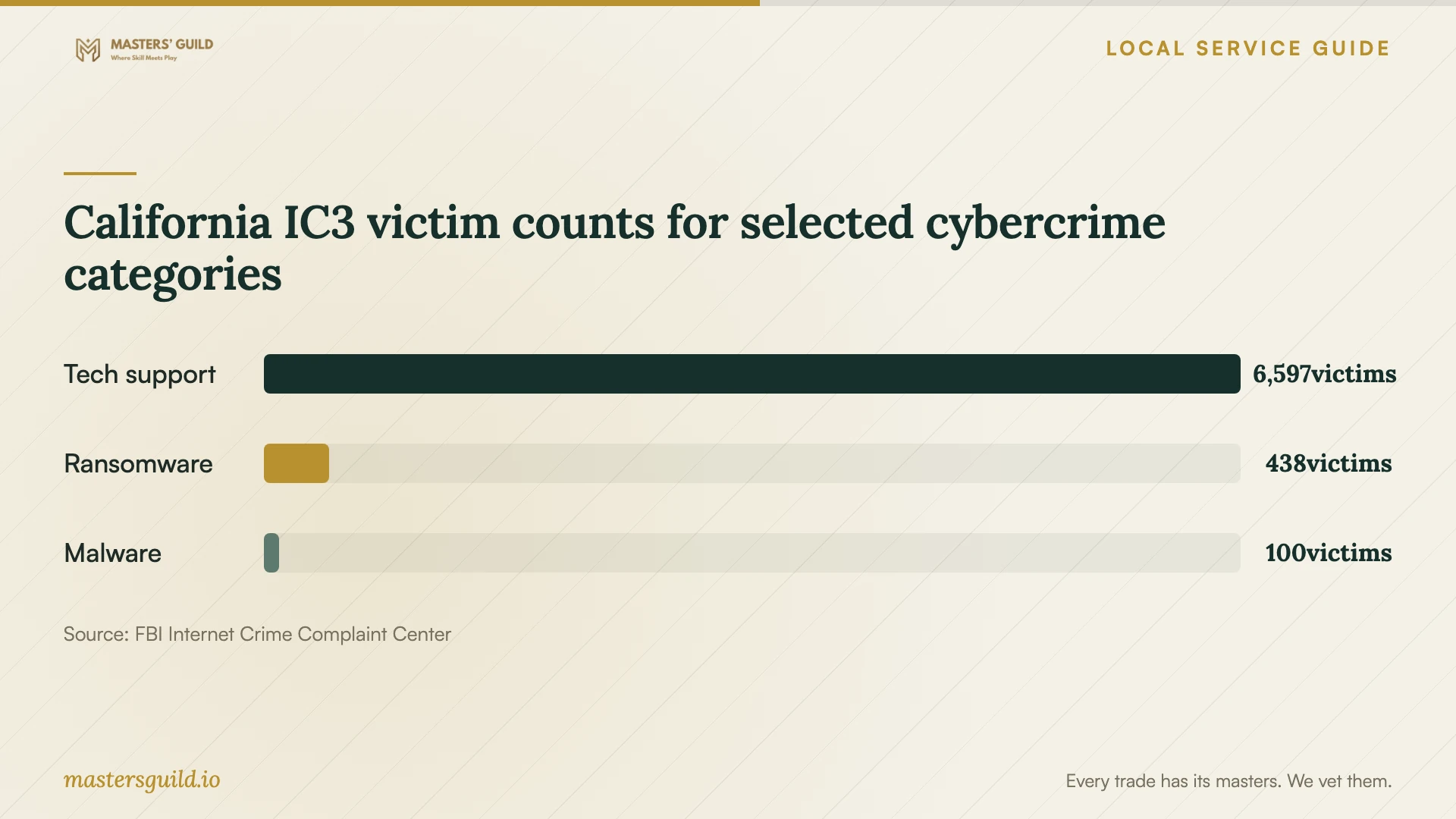
The FBI’s 2025 California IC3 report lists 6,597 tech-support victims, 438 ransomware victims, and 100 malware victims. These statewide reported counts cover different complaint categories. They do not establish the cause of your computer’s symptoms or measure Fremont repair demand. [3]
Tell the technician whether you want a device assessment, a review of remote access, or help documenting a suspected scam. Describe any payments or account changes separately. Ask who will handle each task rather than assuming the computer repair covers the whole incident.
Check the result before arranging replacement
At handover, ask for a written account of the work, software changes, and unresolved concerns. Open the applications and files you named at intake. Have the technician explain any remaining warnings and confirm what follow-up the price includes if the same symptoms return.
If you choose replacement, keep the old computer until you have checked the files you need on the replacement. Agree on who will retain the old drive and how they will document its return or destruction. Ask about data handling before handing equipment over for disposal.
California IC3 victim counts for selected cybercrime categories
Local details that affect your job
California repair-estimate protections apply to household computers
BHGS includes personal computers used for personal or home-office purposes in its repair guidance. Service dealers must provide a written total-price estimate before repairs. Use that requirement when arranging household service, and have the dealer identify any diagnostic or travel charge before you commit. [1]
Plan a Boyce Road visit around the facility schedule
StopWaste lists the Fremont household hazardous waste facility at 41149 Boyce Road. Its published hours are Wednesday through Friday, 8:30 AM to 2:30 PM, and Saturday, 8:30 AM to 4:30 PM; it closes Sunday through Tuesday. Confirm that the facility accepts your exact equipment before visiting. Check holiday closures and bring documentation showing your Alameda County address. [2]
Resident drop-off does not cover technician haul-away
StopWaste restricts this household program to Alameda County residents and requires the resident to transport the waste. Businesses and third-party transport do not qualify. If you purchase haul-away with the repair, ask the technician to identify a separate eligible disposal route. [2]
Match the service arrangement to your needs
| Your situation | Arrangement to discuss | Question to resolve |
|---|---|---|
| You can show the symptoms on screen | An initial assessment | Can you demonstrate the problem during intake? |
| You prefer to stay with the computer | Supervised remote assistance or a home visit | How will you observe the work and end access? |
| The computer will stay with the technician | Drop-off service | Who will hold it, and when can you collect it? |
| You need help with several devices | A scope naming each device | Does the proposed price cover the whole household job? |
Your hiring checklist
- Record symptoms and the events that preceded them.
- Bring the charger and identify accessories on the intake receipt.
- Decide how the technician should contact you during repair.
- Ask what you owe if you decline the proposed work.
- Confirm whether replacement software requires a subscription.
- Test your priority applications and documents at handover.
Frequently Asked Questions
Can a technician charge for diagnosis if I decline repair?
BHGS permits a reasonable diagnostic fee. Ask for the amount before handing over the computer and clarify whether you owe it if you decline the proposed repair. [1]
How should I compare cleanup with replacement?
Ask for the proposed repair scope, total cost, and expected return date. Compare that with the cost and effort of setting up a replacement, including transferring your files and applications. Tell the technician which outcome matters most to you.
What can I do if I am dissatisfied with the initial repair?
BHGS says you may file a complaint. If another dealer repairs the computer, the bureau advises asking that dealer to record on the invoice what they found wrong with the first dealer’s work. Keep the original estimate, invoice, and correspondence. [1]
Sources and scope
This guide combines the sources below with practical planning guidance. Figures apply to the stated geography and period; request a written quote for your property.