
Local service guide
Technical Skills Training in Fredericton
For Technical Skills Training in Fredericton, start by defining the task your staff must complete without help. For basic digital skills, check New Brunswick’s free adult training before paying for instruction; employers can arrange workplace delivery with activities adapted to occupational tasks. For Excel, SQL or cybersecurity, compare UNB’s listed courses with a trainer’s proposed lesson plan. Ask for a written scope, total cost and a practical exercise that demonstrates the skill you need. [1] [3]
Choose a skill your staff can demonstrate
Write your training brief around an observable result: prepare a monthly spreadsheet, retrieve records with a SQL query, or build a report from sample data. Describe the learner’s starting point, the software involved and the deadline. Avoid asking for general computer training when you need help with a specific workflow.
Separate the learners who need basic device and file skills from those ready for a subject course. New Brunswick’s Digital Literacy Services covers basic adult digital literacy. UNB’s catalogue includes Excel basics and advanced skills, introductory and intermediate SQL, and introductory through advanced Power BI. Ask the provider to assess the starting level before you choose a class. [1] [3]
Give a prospective trainer a fictional example of the task and ask how they would teach it. Request an outline that names the exercises, practice between lessons and completion criteria. For a spreadsheet lesson, you might ask the learner to produce the report from a fresh sample file without step-by-step prompts.
Compare public training, courses and tailored coaching
Check the public option first when adults need basic digital skills. The provincial service offers free instruction, supplies laptops and allows employers to arrange training within the workplace. Employers can adapt learning activities to workplace materials or occupational tasks. Ask the Regional Adult Learning Consultant through WorkingNB about arrangements for your staff. [1]
For a defined subject, use UNB’s Marketing and Technology catalogue to build a shortlist. It includes a Certificate in Computer Skills for the Office, coding and SQL courses, cybersecurity topics and data analytics certificates. Confirm the selected course’s price, schedule and delivery location with UNB. [3]
Consider tailored coaching when you want instruction built around your own process. Ask the trainer to explain which parts they will teach and which parts they propose to configure or complete for you. Keep training and implementation separate in the quote so you can assess what your staff will learn.
Compare the whole budget
Request a quote that states the number of learners, teaching time, preparation, materials, software subscriptions, travel and any applicable tax. Ask whether the provider charges for follow-up questions or a repeat session. Decide how much staff time you can allocate to practice before agreeing to a package.
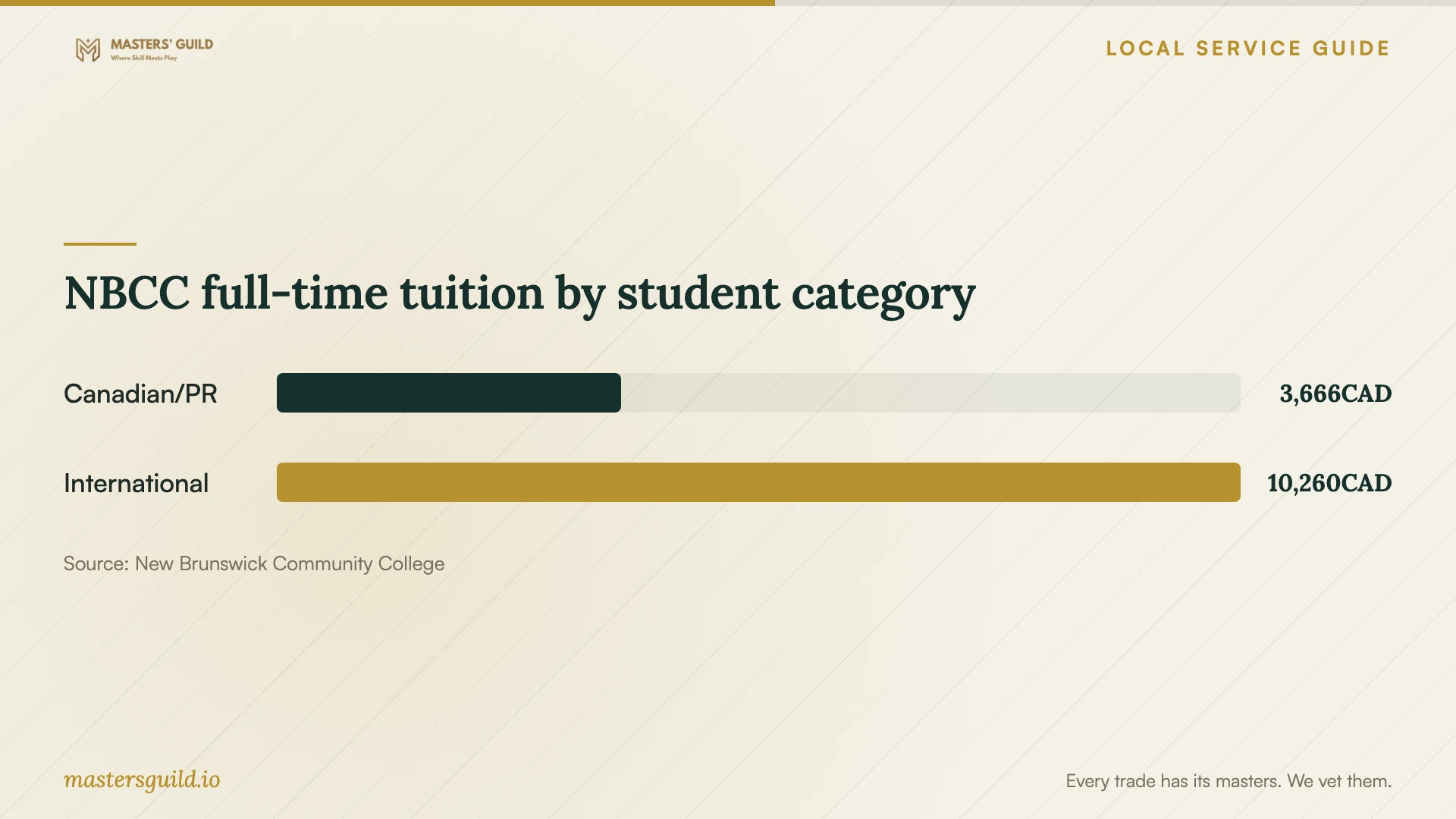
For formal retraining, NBCC publishes 2026–27 full-time tuition of CAD 3,666 for Canadian and permanent resident students and CAD 10,260 for international students across fall and winter terms. NBCC lists mandatory fees in addition to tuition and warns that costs can change. These figures describe full-time college tuition; they do not establish a budget for an office workshop. [4]
If you want help exploring training support, speak with WorkingNB before committing to a provider. WorkingNB says employers of any size can seek support for training challenges through a workforce consultant. Ask what assistance applies to your situation, what information you must supply and whether any timing conditions affect your booking. Do not budget for funding until you have confirmed it. [2]
Prepare the session and agree on completion
Prepare a sample file that contains the problem you want staff to solve. Remove customer names, financial identifiers and confidential business information. Ask the instructor to work with demonstration accounts where possible, and have each learner enter their own passwords.
Confirm the software version, device requirements and account permissions before the session. For workplace instruction, name the person who will prepare the room and resolve access problems. For remote lessons, agree on screen sharing, recording consent and who will retain any recording.
Agree on a final practice task and the support you will receive after teaching ends. Ask for concise notes your staff can use during the next work cycle. Review whether learners can repeat the task with a different example before purchasing further sessions.
NBCC full-time tuition by student category
Local details that affect your job
A local contact for employer training support
WorkingNB lists its Fredericton office at 300 St. Mary’s Street, with telephone 506-453-2377 and email [email protected]. Employers can seek training support through a workforce consultant. Prepare your learner count, skill gaps and proposed outcome before contacting the office, and confirm arrangements before visiting. [2]
Basic training can come to the workplace
New Brunswick’s Digital Literacy Services is a provincial mobile service for adult learners, with supplied laptops and free basic instruction. Employers can arrange workplace delivery and adapt activities to occupational tasks. For a Fredericton team struggling with basic digital work, check this option before buying equipment or booking private introductory lessons; confirm scheduling and suitability through WorkingNB. [1]
Choose a training route by the task
| Your need | Route to assess | Confirm before booking |
|---|---|---|
| Adults need basic digital skills | New Brunswick Digital Literacy Services offers free basic training | Learner suitability, scheduling and the tasks the service can cover |
| Basic skills across a workplace team | Provincial mobile training supplies laptops and supports workplace activities | Delivery arrangements, group needs and suitable practice materials |
| Excel, SQL, Power BI or cybersecurity study | UNB lists courses in these subjects | Prerequisites, current availability, format and course price |
| Instruction for your own business workflow | Assess a trainer’s tailored proposal | Teaching scope, sample exercises, total fee and completion criteria |
| Formal full-time retraining | Use NBCC’s full-time tuition schedule as a budget reference | Program availability, student category and costs beyond tuition |
Your hiring checklist
- Name the work task each learner should complete after training.
- Record starting skills, software versions and accessibility or language needs.
- Check whether provincial basic digital literacy training fits the learners.
- Ask for prerequisites, teaching format and an exercise outline.
- Request a total quote covering preparation, materials, travel and follow-up.
- Prepare fictional or sanitized practice files and test account access.
- Agree on cancellation terms, completion criteria and ownership of learning materials.
Frequently Asked Questions
Can my employees get free basic computer training?
New Brunswick offers free basic digital literacy training to adult learners. Employers can arrange workplace instruction and adapt activities to occupational tasks. Confirm whether your employees’ needs fit the service and ask about scheduling through WorkingNB. [1]
Where can I ask about training support in Fredericton?
WorkingNB lists its Fredericton office at 300 St. Mary’s Street and 506-453-2377. It says employers of any size can seek help with training challenges through a workforce consultant. Bring a clear description of the skills your team needs. [2]
Does UNB offer courses beyond basic computer skills?
UNB’s Marketing and Technology catalogue lists SQL, coding, Power BI, cybersecurity and data analytics alongside office software courses. Check the selected course’s prerequisites, current syllabus, delivery format and fees before enrolling. [3]
How should I compare a private trainer’s quotes?
Give each trainer the same learner count, starting level and example task. Compare teaching time, preparation, materials, follow-up and completion criteria. Ask each trainer to explain how learners will demonstrate the skill at the end.
Sources and scope
This guide combines the sources below with practical planning guidance. Figures apply to the stated geography and period; request a written quote for your property.