
Local service guide
Smart Appliance Setup in Fredericton, NB
Arrange Smart Appliance Setup in Fredericton by defining the app and network tasks, then confirming who handles physical installation. Request a quote for your appliance model and a demonstration on your phone. Fredericton requires a permit before adding or modifying plumbing lines. For electrical construction, have an electrical contractor assess provincial permit requirements before scheduling connectivity help. [1] [2]
Define the setup before comparing quotes
Describe your appliance's current condition. Include its model number, whether someone has installed it, whether its own controls work, and the point where app setup stops. Name your intended result, such as receiving a cycle-completion alert or giving another household member access.
Have the provider confirm support for the exact model and requested features before quoting. Include account access, connection, settings, updates and a demonstration. For voice control or a shared home platform, request a compatibility check against the manufacturer's instructions before approving integration work.
Compare written quotes using the same appliance list. Request separate amounts for setup, network diagnosis, equipment and return visits. Agree on a spending limit for troubleshooting and require approval before the provider buys hardware. Decide what you would owe if an account or compatibility problem prevents completion.
Settle physical installation and permits first
Fredericton requires a plumbing permit before adding or modifying plumbing lines in a new or existing building. If your dishwasher, washer or refrigerator installation includes line changes, confirm the permit arrangements and installation sequence before booking connectivity help. The City's Building Inspections Division answers project questions at 506-460-2020. [1]
New Brunswick's guidance requires licensed electrical contractors to obtain a wiring permit for electrical construction involving more than 10 outlets or five kW of load. Have the contractor assess your proposed work and applicable requirements. Do not interpret that threshold as permission to undertake smaller wiring jobs yourself. [2]
For NB Power customers, the province requires a work order number before wiring-permit processing when NB Power must attend the project. The electrical contractor should have the customer contact NB Power for that number. Confirm this dependency before agreeing on installation and setup dates. [2]
Prepare access and choose privacy settings
Have your phone, account recovery access and network details available during the visit. Use an account email address you control and enter your own passwords. Ask the provider to explain household sharing and recovery before adding anyone else. Keep a record of which account owns each appliance.
Get Cyber Safe's guidance, last modified October 27, 2021, recommends changing default usernames, using strong passwords and enabling automatic updates where available. It also recommends separating smart devices from the main network. Discuss that arrangement with the provider and test your intended controls after configuration. [4]
The federal guidance recommends turning off unused features such as Bluetooth, geolocation, cameras and microphones. During setup, review the permissions together and choose the functions you intend to use. Request an explanation before accepting optional access. [4]
Check the connection and energy settings
Before approving new network equipment, have the provider test the connection at the appliance. Describe where pairing fails and whether you can connect other devices in that room. Agree on the diagnostic charge and the next approval point if the provider cannot resolve the problem within the quoted scope.
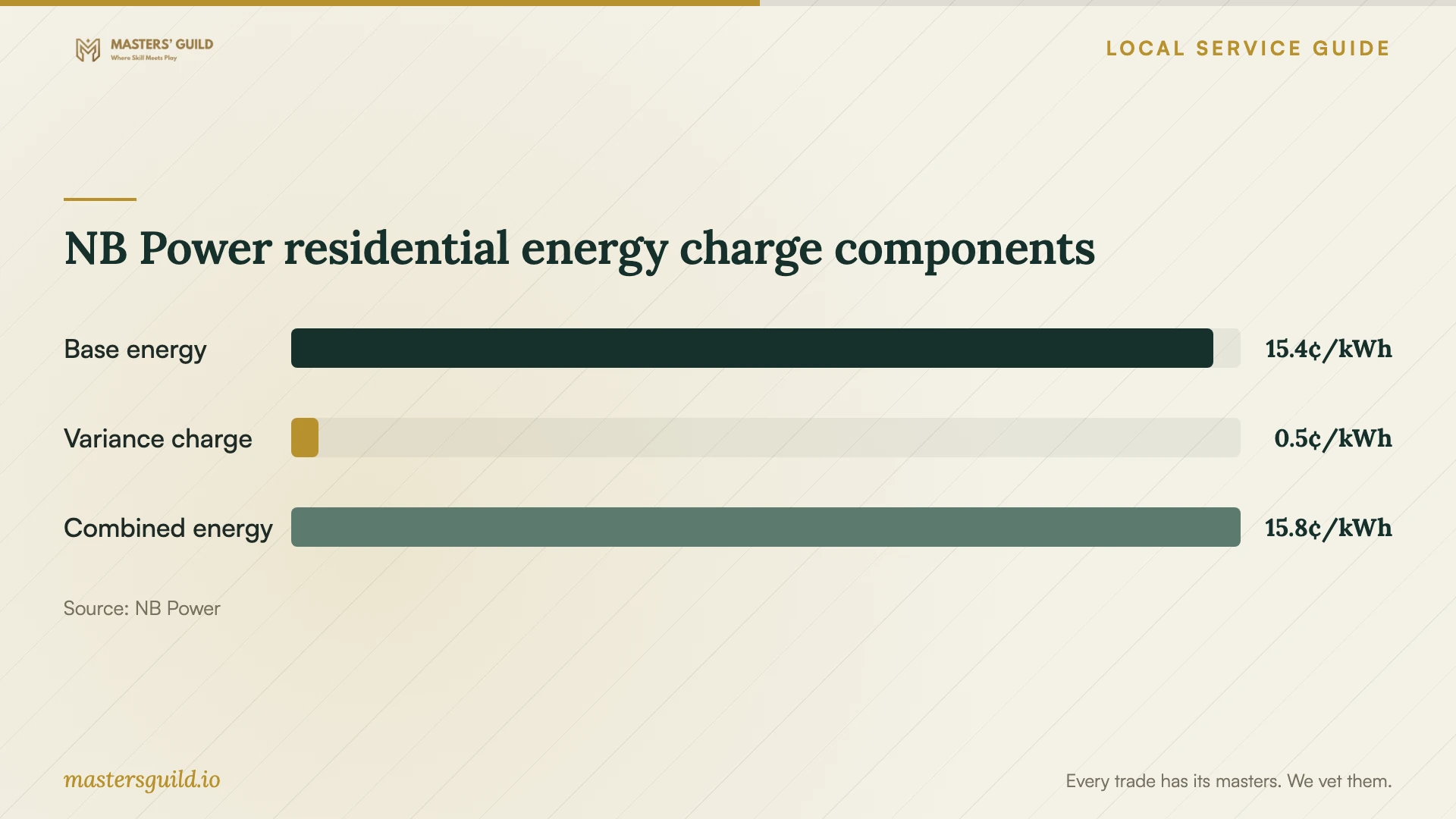
For an app that accepts an electricity price, check which charges the setting expects. NB Power's residential tariff effective April 14, 2026 lists a base energy rate of 15.39 cents plus a 0.45-cent variance account charge, totalling 15.84 cents per kWh. The utility lists service charges separately and applies HST to its rates. [3]
Use the chart to distinguish the base rate, variance charge and combined energy charge. Ask whether your app measures consumption or calculates it from information you enter. Treat its cost display as an estimate whose assumptions you should understand before using it to plan household spending.
Agree on a useful handover
Perform the agreed demonstration yourself before the provider leaves. Sign in from your phone, identify the appliance and test the selected control or notification using the manufacturer's instructions. Include another household member if shared access forms part of the job.
Collect short written notes naming the app, account owner, network used and any unresolved issue. Have the provider show you how to reconnect and explain whom to contact if the same problem returns. Confirm any follow-up charge or support period in writing.
NB Power residential energy charge components
Local details that affect your job
Fredericton plumbing-line changes
The City's permit trigger is adding or modifying plumbing lines, including in an existing building. Describe the actual line work to Building Inspections at 506-460-2020 before finalizing an appliance installation date. Include responsibility for the permit in the installation agreement. [1]
New Brunswick wiring and NB Power scheduling
Have an electrical contractor assess provincial wiring-permit requirements. For an NB Power customer's project that requires utility attendance, obtain the NB Power work order number before wiring-permit processing. Allow for that step when coordinating installation with a later app-setup visit. [2]
Choose the scope to request
| Your situation | Help to arrange | Confirm before booking |
|---|---|---|
| Appliance controls work; app setup remains | Model-specific account and connection help | Requested features and a demonstration on your phone |
| Pairing fails at the appliance | Connection diagnosis alongside setup | Diagnostic spending limit and equipment approval |
| Installation adds or modifies plumbing lines | Plumbing work with Fredericton permit arrangements | Who obtains the permit before line work |
| Project includes electrical construction | Electrical contractor assessment | Provincial permit requirements and any NB Power work order dependency |
Your hiring checklist
- Send model numbers and describe the features you want to use.
- Confirm physical installation responsibilities and any permit assessment.
- Agree on setup, diagnosis, equipment and return-visit charges.
- Prepare your phone, account recovery access and network details.
- Enter your own passwords and review optional permissions.
- Test the agreed features and collect written reconnection notes.
Frequently Asked Questions
How much should I budget for setup?
Request a written quote for your model and intended features. Compare setup charges, troubleshooting limits, equipment and return visits. Use provider quotes for labour budgeting; the electricity chart describes utility energy charges.
Does connecting an appliance to an app trigger a plumbing permit?
Fredericton states its plumbing permit requirement in terms of adding or modifying plumbing lines. Describe any proposed line changes to Building Inspections before work starts, and identify app pairing as a separate task in your quote. [1]
Should I use a separate network for appliances?
Get Cyber Safe recommends separating smart devices from your main network to limit damage from a cyber attack. Discuss the arrangement with your provider and test the controls you plan to use after setup. [4]
Does running a cycle overnight mean a cheaper electricity rate?
NB Power's published residential tariff effective April 14, 2026 lists 15.84 cents per kWh for all kWh per billing period. That tariff lists no cheaper overnight energy rate. Choose your schedule without assuming an overnight discount. [3]
Sources and scope
This guide combines the sources below with practical planning guidance. Figures apply to the stated geography and period; request a written quote for your property.