
Local service guide
Network Setup and Support in Fredericton
For Network Setup and Support in Fredericton, hire someone who will diagnose your connection, document the proposed work and test your business devices before handing over access. Describe the rooms and tasks you need to support, ask for separate hardware and labour prices, and confirm who handles cabling approvals when the job includes building alterations.
Define the problem before buying equipment
Give the technician a short fault record: which devices lose service, where they sit, when the problem occurs and whether other devices remain connected. Include your internet plan, router model and any existing switches or access points. Ask for a diagnostic visit with a written finding before authorizing an equipment purchase.
Ask the technician to test an Ethernet-connected device and then test Wi-Fi in the affected rooms. Request download and upload results, plus observations during the tasks that matter to you, such as a video meeting or sending a large file. Have them explain which part of the connection they recommend changing and what evidence supports that recommendation.
ISED's national connectivity strategy discusses speed, delay and consistency as separate aspects of connection quality. Use that distinction when describing your problem: report interrupted calls or stalled applications alongside speed-test results. A speed number alone should not be your acceptance test. [4]
Choose a scope that fits your premises
For a setup visit, specify the equipment the technician will configure and the devices they must reconnect. For a coverage project, ask them to propose access-point locations and explain how they will connect those points to the network. For cabling, request a route drawing, outlet locations and a description of any drilling or wall openings.
If you lease the premises, obtain the owner's written agreement to the proposed cable routes, drilling and equipment mounting. Ask who will restore disturbed finishes and remove abandoned equipment. Keep building alterations separate from network configuration in the quote so you can review each scope with the appropriate person.
Fredericton requires building permits for new buildings, additions and significant alterations. The City encourages applicants to discuss project details and required documents with Building Inspections before applying. For network work tied to a renovation, take the proposed route and alteration details to that discussion rather than assuming a permit requirement for each Ethernet outlet. [1]
Compare quotes and plan the interruption
Request itemized hardware, labour, cabling, travel, taxes and follow-up charges. Ask whether the technician offers a fixed scope or bills for diagnostic time, what happens if they find inaccessible cable routes, and whether they need your approval before exceeding the agreed budget. The supplied official sources do not establish a local installation-price range; compare written quotes for the same work.
Choose a work window around your business operations. List devices that must remain available, including payment terminals, phones and shared printers. Ask the technician to describe the interruption, the test procedure and the recovery plan if the change fails. Confirm compatibility and test requirements with your payment or phone provider before changing those connections.
NB Power provides current outage information, a phone- or account-number lookup and future planned outage information. Check those resources before the visit, especially if you have lost power or expect an interruption. Use your internet provider's service information as a separate troubleshooting step. [2]
Agree on testing and ownership before handover
Write an acceptance list before work starts: connect the agreed devices, complete a test call, print from the required workstations and test coverage at each agreed location. Ask the technician to record results under comparable conditions before and after the changes. Agree on how they will address an unresolved fault.
Keep the network administration account under your business's control. Arrange a secure credential handover, record equipment models and locations, and ask the technician to label installed outlets. Request a configuration backup where the equipment supports one. Decide whether the technician will retain any remote access and how you can revoke it.
Before paying the final balance, ask for the equipment list, cable-test results for the agreed scope and written support terms. Clarify who handles an internet-provider fault, a failed hardware item and a configuration problem. Set the follow-up contact method and charges so you know how to arrange help after the installation.
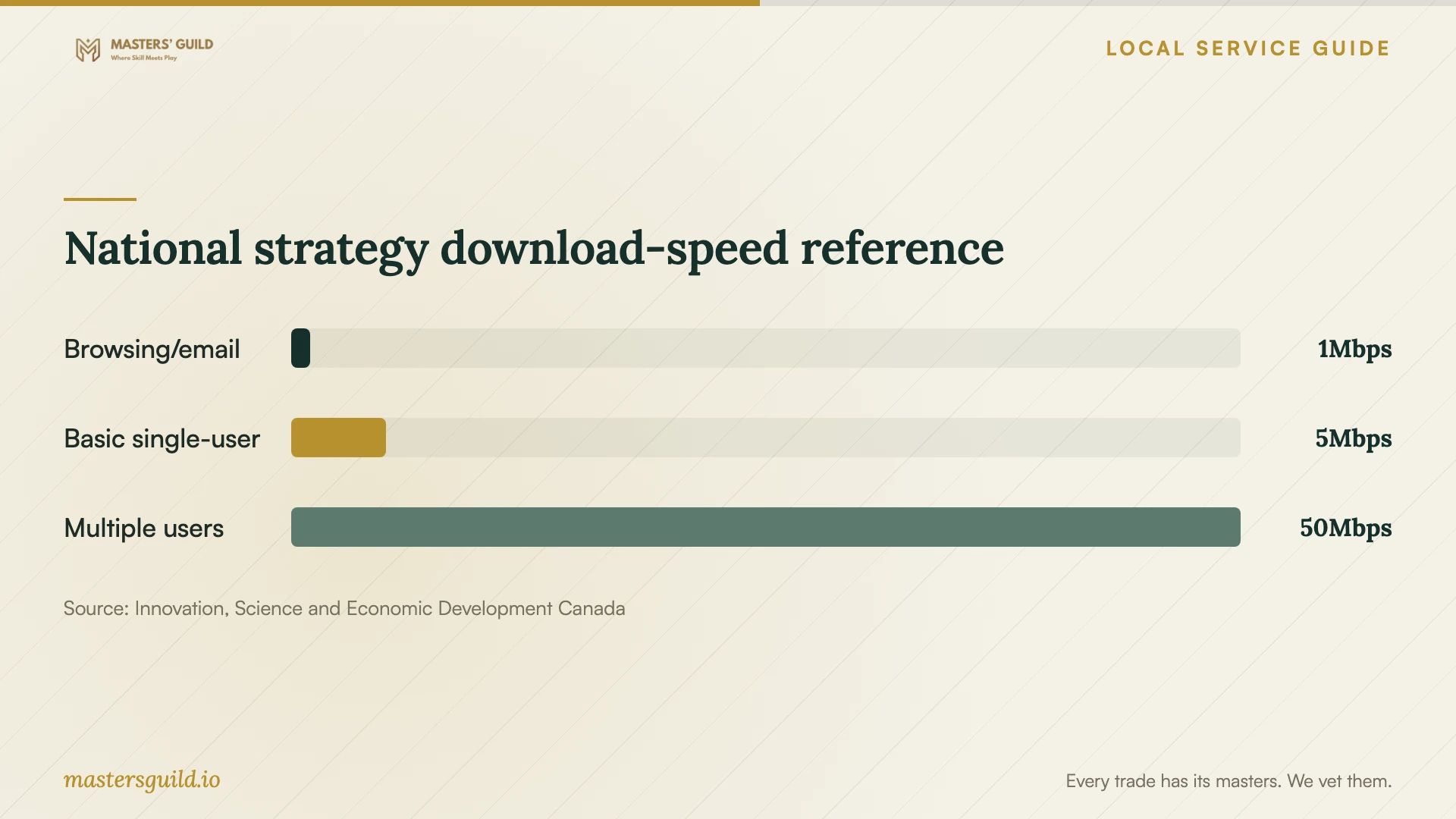
National strategy download-speed reference
Local details that affect your job
Discuss renovation-related cabling at City Hall
For significant alterations, Fredericton directs applicants to the Building Inspections Counter on City Hall's ground floor or to contact the Building Inspection Division before applying. Bring your cable route and details of proposed wall or building changes. If the City requires a building permit, the owner must request a final inspection to close it once construction finishes. Include that responsibility in the work agreement. [1]
Check preservation-area approval before exterior work
The City's Preservation Review Board requires a Certificate of Appropriateness before development within a preservation area, whether or not a building or demolition permit has been issued. If you propose exterior cable penetrations, visible cable routes or mounted equipment on such a property, ask Heritage & Urban Design how the requirement applies to your scope before setting an installation date. [3]
Check the regional power service before a troubleshooting visit
NB Power's outage page includes Central York Sunbury in its regional list and offers lookup by phone or account number. Use the lookup for your service and check future planned outages when selecting a powered testing window. Read the live page at booking time; a past outage total cannot establish whether your premises have power now. [2]
Choose the next step for your network job
| Situation | Next step | Ask before booking |
|---|---|---|
| Problems at particular workstations | Request wired and Wi-Fi diagnostic tests | Will you document findings before recommending purchases? |
| New outlets or mounted access points | Request cable routes and mounting details | Who approves drilling and restores finishes? |
| Cabling during significant alterations | Discuss the project with Building Inspections | Who handles the permit process and final inspection if required? |
| Exterior work in a preservation area | Ask Heritage & Urban Design about the scope | Does the proposed development need a Certificate of Appropriateness? |
| Power loss or a planned interruption | Check NB Power's service lookup and planned outages | Can we schedule testing when the equipment has power? |
Your hiring checklist
- Record affected devices, rooms, symptoms and times before the diagnostic visit.
- Gather your internet-plan details and existing equipment models.
- Request diagnosis, proposed changes and acceptance tests in writing.
- Obtain owner consent for drilling, cable routes and equipment mounting.
- Assign responsibility for any required municipal approval and finish repairs.
- Compare itemized quotes for identical equipment and work.
- Agree on the interruption window and a recovery plan.
- Arrange credential handover, documentation and follow-up support.
Frequently Asked Questions
Should I replace my router before booking support?
Ask for a diagnosis first. Have the technician compare wired and Wi-Fi performance, test the affected devices and explain the proposed change. Approve equipment after you understand the finding and the acceptance test.
Does installing network cabling require a building permit?
Fredericton identifies significant building alterations as permit-requiring work. Discuss your proposed cabling and associated alterations with Building Inspections before applying. The City's page does not establish a blanket permit rule for individual Ethernet outlets. [1]
Is 50 Mbps enough for my business?
ISED's national strategy uses 50 Mbps download and 10 Mbps upload as a minimum connectivity target and discusses multiple simultaneous users. Treat it as a planning reference. Ask the technician to assess your concurrent tasks and test your actual connection before recommending a plan. [4]
How should I arrange ongoing support?
Ask for written support hours, response arrangements, remote-access terms and charges. Keep ownership of administration accounts and request a current equipment list. Clarify which faults the technician handles and which you must refer to your internet or device provider.
Sources and scope
This guide combines the sources below with practical planning guidance. Figures apply to the stated geography and period; request a written quote for your property.