
Local service guide
Data recovery and backup in Fredericton
For data recovery and backup in Fredericton, ask a provider to assess your existing backups before you authorize recovery work, then agree on the files you need, a spending limit and a secure handoff. For ongoing backup service, require encrypted off-site storage, named people with access and a demonstrated restore. The Canadian Centre for Cyber Security recommends these safeguards for essential business information. [4]
Choose the scope before booking
Tell the provider whether you need missing files recovered, an existing backup restored or a new backup system installed. Describe the device, the last time you accessed the files and anything you tried after the problem began. Ask the provider for handling instructions before you run repair software or authorize changes to the original device.
Write a short priority list: customer records, accounting files, current projects and the applications you need to use them. Identify the person who can authorize access and approve spending. Ask the technician to assess the available backup copies and explain which work they propose before proceeding.
For a recovery job, request separate milestones for assessment, approval, recovery and delivery. Ask whether the person taking your device will perform the work or send it elsewhere. Obtain the receiving company's name, shipping arrangements and a receipt identifying the device.
Compare quotes by deliverables
Request an itemized quote covering assessment, recovery labour, shipping, return storage and taxes. Ask which charges you owe if the provider cannot recover your priority files. Define partial success in writing, including whether you can inspect a file list or sample before accepting the result. Set a spending ceiling that requires your approval to exceed.
For ongoing service, separate installation costs from recurring storage, monitoring and support charges. Ask about storage limits, retention periods, additional devices and the cost of restoring data. Obtain a written response target and clarify whether it refers to initial contact, starting recovery or completing the restore.
Set your own operating requirements before comparing offers. Decide how much recent work you could recreate and how long you could operate without the affected files. Ask each provider to explain how its proposed backup schedule and restoration process meet those requirements. Request any assumptions about internet access, replacement equipment and staff availability.
Require a restore demonstration
The Canadian Centre for Cyber Security recommends backing up essential business information to an external secure location, encrypting backups and restricting access to people responsible for testing and restoring them. It also recommends clear restoration procedures and regular checks that restoration works. Use those recommendations as acceptance criteria in your service agreement. [4]
At handover, choose representative files and ask the technician to restore them to a separate destination. Open the files together using the applications you need for work. Record the backup date used and the steps followed. For application data, ask the provider to demonstrate the agreed task, such as opening a restored accounting file.
Keep a written recovery procedure with the contact details, account owner and secure method for accessing required credentials. Assign someone in your business to review backup reports and arrange future restore checks. Ask how you will retrieve your data and remove the provider's access if you end the service.
Control access during the handoff
Before handing over equipment, ask who will access the files, where they will work and whether they use subcontractors. Agree on how they will deliver recovered data, how long they will retain working copies and how they will confirm deletion. Use a private channel for credentials and ask which access permissions the technician needs.
New Brunswick health-information custodians must have a written agreement with an agent or information manager before retaining their services. Ombud NB describes information managers as including organizations that store or retrieve personal health information or provide information technology services for a custodian. A clinic should resolve that agreement before arranging recovery or managed backup. [2]
Ombud NB states that the provincial Right to Information and Protection of Privacy Act does not apply to private-sector businesses and entities. Do not treat that public-sector law as a general approval standard for an ordinary shop or office. Ask your adviser which obligations apply to the information you hold, and put your handling requirements in the contract. [2]
Use national incident data with care
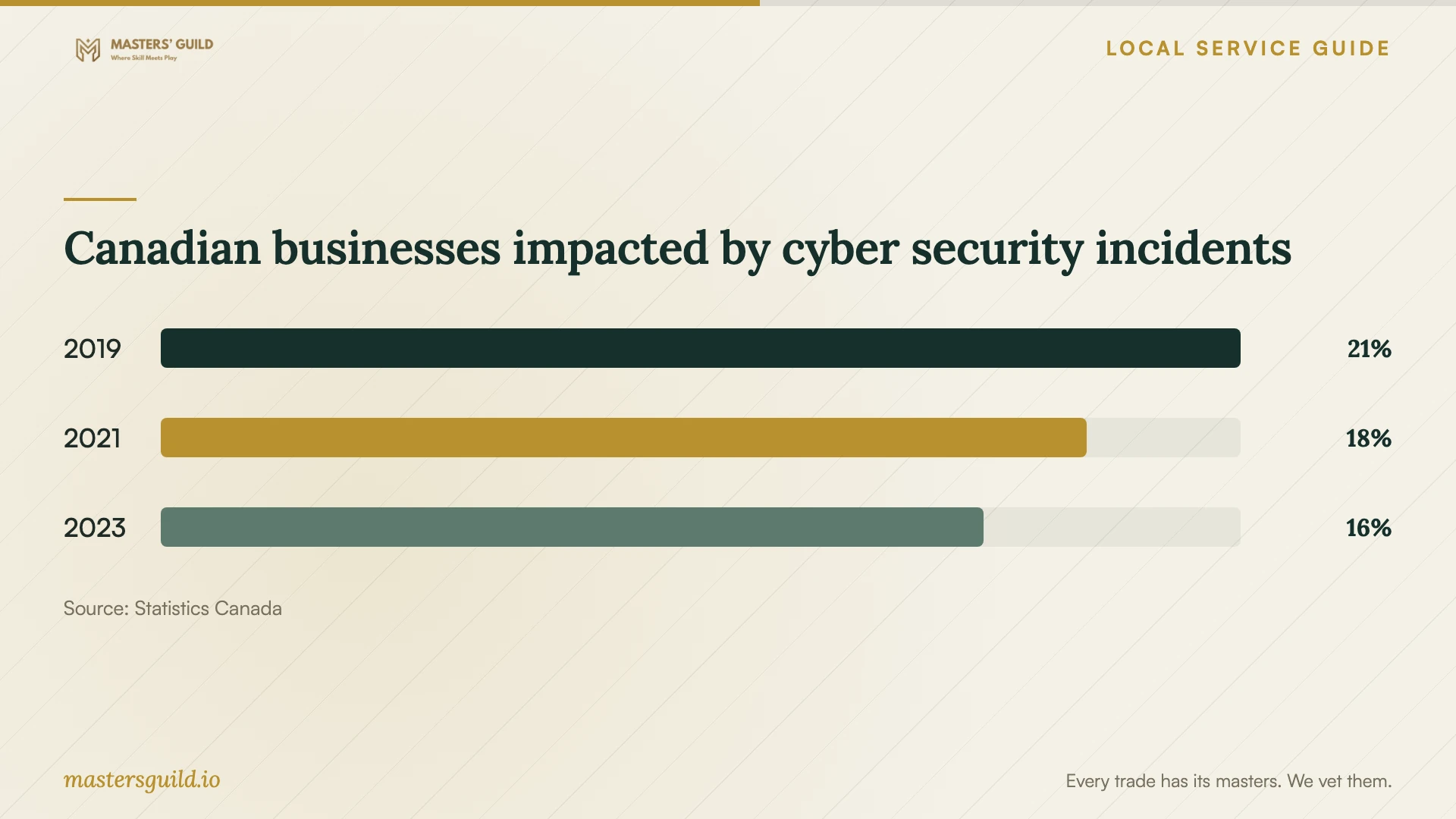
Statistics Canada reported that 21% of Canadian businesses experienced impactful cyber security incidents in 2019, 18% in 2021 and 16% in 2023. The accompanying chart provides national context for discussing business continuity. These figures do not measure Fredericton recovery demand, local service prices or the effectiveness of a particular backup product. [5]
For the 2023 survey, Statistics Canada covered enterprises with Canadian operations and at least 10 employees across most economic sectors, excluding public administration. It counted incidents that businesses considered impactful. An owner with fewer employees should use the chart as background and choose service requirements from the business's own files, responsibilities and operating needs. [5]
Canadian businesses impacted by cyber security incidents
Local details that affect your job
Fredericton flood planning: separate document copies
The City of Fredericton advises keeping important documents safe and considering backup copies of pictures and documents in another location or electronically. Before approving a backup setup, ask the provider to identify the off-site destination. For your office, plan access to essential records if you cannot enter the premises, and include that scenario in the restore demonstration. [1]
New Brunswick outage procedures: include electronics
NB Power tells customers to turn off home electronic equipment during an outage to avoid load issues when power returns. This is residential utility guidance, not a specification for your office equipment. Use it as a prompt to ask the technician for device-specific shutdown and restart instructions, including how you will confirm that scheduled backups resume after an interruption. [3]
New Brunswick clinics: agree on health-data handling first
Ombud NB requires health-information custodians to have a written agreement before retaining an agent or information manager. If your clinic needs patient records recovered or backed up, ask the proposed provider to address its role, authorized access, subcontractors and return or deletion of copies before you transfer equipment. Keep this requirement distinct from the arrangements for an ordinary retail or office business. [2]
Match the provider's task to your situation
| Your situation | Ask for | Before approving |
|---|---|---|
| You have a backup copy to assess | Assessment and a restore demonstration | Select priority files and confirm you can open the restored copies |
| Your priority files are missing | A recovery assessment with approval milestones | Set a spending limit and define acceptable partial recovery |
| You need ongoing backup service | Encrypted off-site backups and restoration procedures | Name authorized users and agree on regular restore checks |
| Your clinic holds patient records | A provider agreement covering health-information handling | Complete the required written agreement before retaining an agent or information manager |
| You need access if premises are unavailable | An off-site backup and a remote-access restore exercise | Identify the destination and demonstrate access to essential documents |
Your hiring checklist
- List the priority files, applications and devices, plus the last known usable backup.
- Describe the failure and previous recovery attempts; request device-handling instructions.
- Identify the person authorized to release equipment, grant access and approve costs.
- Get itemized charges, partial-recovery terms and a written spending limit.
- Confirm who will perform the work and obtain a device receipt for the handoff.
- Agree on off-site storage, access permissions and retention or deletion of working copies.
- Witness a restore demonstration and keep the written shutdown, restart and recovery procedures.
Frequently Asked Questions
Should I book recovery or a backup restore?
Ask the provider to assess your existing backup and demonstrate access to the files you need before you authorize separate recovery work. Give them your priority list and request an explanation of the proposed steps and charges.
How should I compare recovery prices?
Compare itemized quotes for the same device, priority files and delivery requirements. Ask about assessment fees, shipping, return storage, taxes and charges if recovery fails. Define partial success and obtain a spending limit before work begins.
What should a business backup service include?
The Canadian Centre for Cyber Security recommends encrypted backups at a secure off-site location, restricted access, clear restoration procedures and regular restoration checks. Ask the provider to demonstrate a restore and explain who in your business will review reports and arrange future tests. [4]
Does a clinic need a written provider agreement?
Yes, when a New Brunswick health-information custodian retains an agent or information manager. Ombud NB says the custodian must have a written agreement before retaining their services. Resolve the provider's role and handling terms before transferring patient data or equipment. [2]
Sources and scope
This guide combines the sources below with practical planning guidance. Figures apply to the stated geography and period; request a written quote for your property.