
Local service guide
Fredericton computer virus removal: hiring and planning
For computer virus removal in Fredericton, choose a repair business yourself and arrange diagnostics before approving cleanup. Request an itemized quote, agree on how the technician will protect essential files, and confirm the appointment format. If an unsolicited warning prompted your search, avoid granting access through that contact. FCNB’s published tech-support scam guidance describes false infection claims used to sell unnecessary repairs. [1]
Describe the incident before booking
Give the technician a short history: the warning you saw, what you clicked, anything you installed and whether someone controlled the computer. Include the symptoms you want investigated, such as repeated warnings or trouble opening files. Ask the business to assess the problem before proposing cleanup or an operating-system reinstall.
FCNB republishes a Canadian Anti-Fraud Centre bulletin dated March 11, 2019. It describes scammers impersonating Microsoft, Google or Apple, claiming security problems and requesting remote access before selling repair services or antivirus software. Use contact details you find apart from the warning when arranging an assessment. [1]
If you allowed an unknown person access, disclose that before booking a remote appointment. Ask how to contain the problem and preserve relevant messages. Contact your bank or account provider from a trusted device if you shared financial information or credentials.
Set the repair scope and spending limit
Request separate amounts for diagnostics, malware cleanup, operating-system repair, backup and proposed software purchases. Ask what you owe if you decline further work. Set a spending limit and identify changes that need your approval, including erasure, reinstallation and subscriptions. Request the full payable total, including any applicable tax or travel charge.
Give each business the same description of your device and incident. Name the documents, photographs and applications you need to retain. Ask the technician to explain the proposed work and exclusions in plain language. If they recommend replacement, request a separate quote for transferring files and preparing the old device for handover.
Explain your deadline before booking, especially if you need the computer for schoolwork or household records. Confirm a completion estimate and who will contact you if the diagnosis changes the cost or schedule. Agree on whether the technician should pause work while awaiting your decision.
Arrange access and private-file handling
Discuss remote, drop-off or home service with your chosen business. For remote work, confirm who will connect, how you will authorize the session and how they will remove access afterward. For drop-off work, request a receipt identifying the device and accessories. For a home visit, ask whether the technician might need to take the computer away.
Identify existing backups before handing over the device. Agree on which files the technician may access, how they will check copied files and when they will delete any retained copy. Prefer entering account credentials yourself where practical. Ask whether the technician can complete the assessment with a separate account.
At the end of the appointment, request a repair summary and test the original problem with the technician. Open your essential files and review installed software. Confirm the process and charge for follow-up if the symptoms return.
Plan account recovery alongside device work
Ask which device checks the technician will perform and which account tasks you should handle with the relevant provider. If you suspect account access, review recovery details and active sessions from a trusted device. Preserve transaction records and contact your financial institution if you sent money.
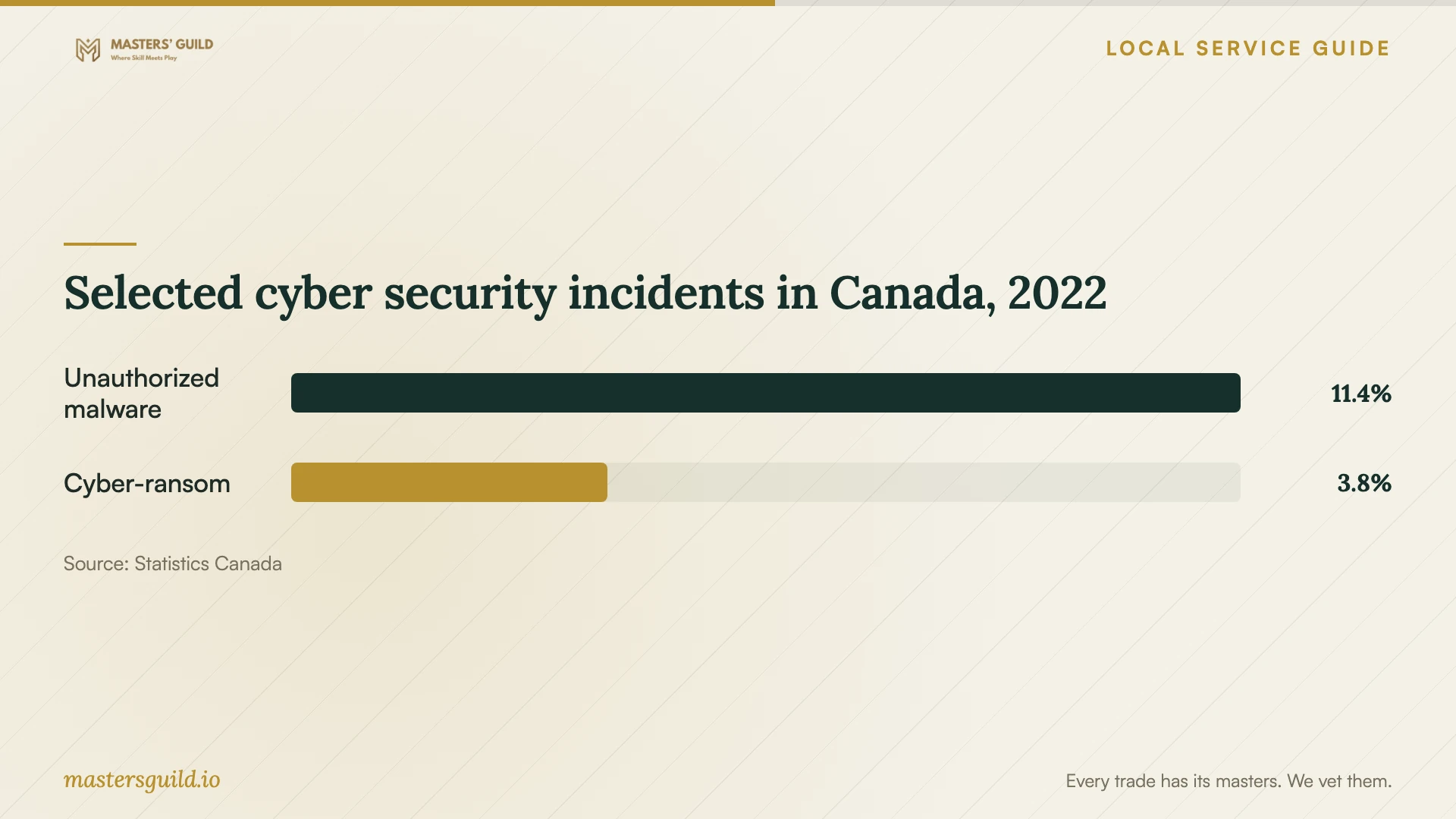
Statistics Canada’s archived Canada at a Glance, 2023 publication lists unauthorized malware installation and cyber-ransom demands as separate incident categories in its 2022 national data. The chart provides context for describing an incident. These figures do not diagnose your computer or establish current repair demand or prices in Fredericton. [4]
Selected cyber security incidents in Canada, 2022
Local details that affect your job
Use the local reporting route for IP-address threats
Fredericton Police’s November 26, 2024 alert describes scammers alleging criminal activity linked to an IP address and threatening arrest or fines. Police say their agencies will not demand immediate payment to avoid arrest. The alert directs fraud reports to the Canadian Anti-Fraud Centre and gives 506-460-2300 for reporting a crime to Fredericton Police. If this matches your incident, preserve messages and payment details and arrange reporting alongside the technical assessment. [2]
Check municipal electronics options after choosing replacement
The City of Fredericton directs residents to Electronic Products Recycling Association participating locations for old electronics and recommends checking accepted items and nearby locations. Its WasteSmart map covers repair, donation and recycling options around the city. Before taking that route, arrange file transfer and secure data removal with your technician, then confirm the receiving location’s arrangements. Ask who will perform the data work before you hand over the computer. [3]
Choose the next step for your situation
| Your situation | Next step | Question to resolve |
|---|---|---|
| An unsolicited contact claims an infection | Choose a repair business apart from that contact. | Can you investigate before proposing cleanup? |
| You allowed an unknown person remote access | Disclose the session during booking. | Which device and account tasks should we address? |
| You cannot open essential files | Identify those files before approving the scope. | Can you assess them before proposing a reinstall? |
| Someone threatens arrest over your IP address | Follow Fredericton Police’s fraud and crime-reporting guidance. | How can I preserve messages during the assessment? |
| You choose replacement | Arrange data handling, then check the City’s EPRA recycling route. | Who will transfer files and remove data before handover? |
Your hiring checklist
- Record the warning text and your actions without clicking further links.
- Disclose remote access, shared credentials and payments.
- List essential files, applications and existing backups.
- Confirm the diagnostic charge and approval limit.
- Agree on access, private-file handling and retained-copy deletion.
- Check the device and repair summary before closing the appointment.
Frequently Asked Questions
How much should I budget?
Compare itemized quotes for your device and incident. Include the diagnostic charge, proposed repair work and full payable total. Ask what you owe if you decline the repair, and keep optional software or subscriptions separate so you can decide whether to approve them.
Should I call the number in a virus warning?
Choose support through contact details you obtain elsewhere. FCNB’s published CAFC bulletin describes unsolicited calls and pop-ups leading to remote-access requests, pretend diagnostics and unnecessary repair charges. [1]
Can I recycle the computer instead of repairing it?
Ask about file preservation and secure data removal before handover. The City directs residents to EPRA participating locations and recommends checking accepted electronics and nearby locations. Its WasteSmart map also helps you explore repair and donation options. [3]
Sources and scope
This guide combines the sources below with practical planning guidance. Figures apply to the stated geography and period; request a written quote for your property.