
Local service guide
Cloud Service Setup in Fredericton, NB
Arrange Cloud Service Setup in Fredericton by hiring a technician against a written scope that identifies the accounts, files, staff permissions and migration window. Request an itemized price for the initial work and separate recurring charges. Before granting access, identify patient records or public-sector client records that need a separate privacy review.
Define the work and compare itemized prices
Write a short description of the outcome you need. For shared documents, identify who should view, edit and share each folder. For backup, name the information you need to recover and the interruption your business can tolerate. For email, list the mailboxes and addresses you want to move.
Give each candidate the same inventory of users, devices, source accounts and data. Request separate prices for assessment, configuration, transfer, staff instruction and follow-up. Ask whether the technician includes failed-transfer corrections, travel and after-hours work. Record who can approve extra charges before work starts.
Compare the continuing commitment alongside the setup fee. Ask who supplies the subscription, who receives invoices and what support costs after the initial job. Specify whether you want occasional help or an ongoing support arrangement, with a named contact and agreed response terms.
Check sensitive records before granting access
Separate ordinary working files from customer information, patient records and records held for another organization. For a New Brunswick health custodian, an information manager means a person or organization handling functions such as storage, retrieval or IT services on the custodian's behalf. Ombud NB says custodians must have a written agreement before retaining an information manager or agent. [1]
For customer personal information, review both the technician's agreement and the cloud provider's terms. Federal privacy guidance says the outsourcing organization retains accountability. It recommends reviewing permitted uses, subcontractors, access controls, breach procedures and arrangements for retrieving and deleting information when the relationship ends. [2]
Ask where the provider processes information and keeps primary copies and backups. The Office of the Privacy Commissioner of Canada explains that foreign laws can apply to information transferred abroad and that a contract cannot override those laws. Request documented locations and arrangements before deciding whether the service fits your records. [2]
Choose a technician with a clear access plan
Ask candidates to explain how they would handle your proposed move on the chosen platform. Have them identify the access they need, any temporary copies they would create and how they would resolve an incomplete transfer. Request relevant platform credentials where available, then assess whether the candidate can explain the work in language your staff understand.
Federal guidance recommends restricting access to people who need it, reviewing encryption and matching authentication to the information's sensitivity. It recommends stronger authentication methods such as multi-factor authentication, along with procedures for security incidents and outages. Ask the technician to explain the proposed settings using your staff roles and files. [2]
Create the subscription under a business-controlled account and enter payment details yourself. Agree on the purpose and duration of any continuing technician access. Keep recovery information somewhere your authorized staff can reach without depending on the person who performed the installation.
Follow a staged migration and acceptance process
1. Confirm the inventory. Identify the source folders and accounts, preserve an original copy and mark records excluded from the move. Assign one person to approve changes and answer questions during the work.
2. Plan the transfer window. Request an upload test at your premises. Agree when staff should stop editing source files, which work can continue during transfer and how the technician would return you to the previous working arrangement if needed.
3. Move a small sample. Check representative files and staff permissions before authorizing the remaining transfer. Ask the technician to record failed items and explain how they will reconcile changes made during the move.
4. Verify completion. Open selected files, check sharing settings and perform a supervised recovery using a non-sensitive test file. Have a staff member follow the operating instructions. Resolve outstanding errors before agreeing when to retire old copies and remove temporary access.
Use adoption figures as context for your decision
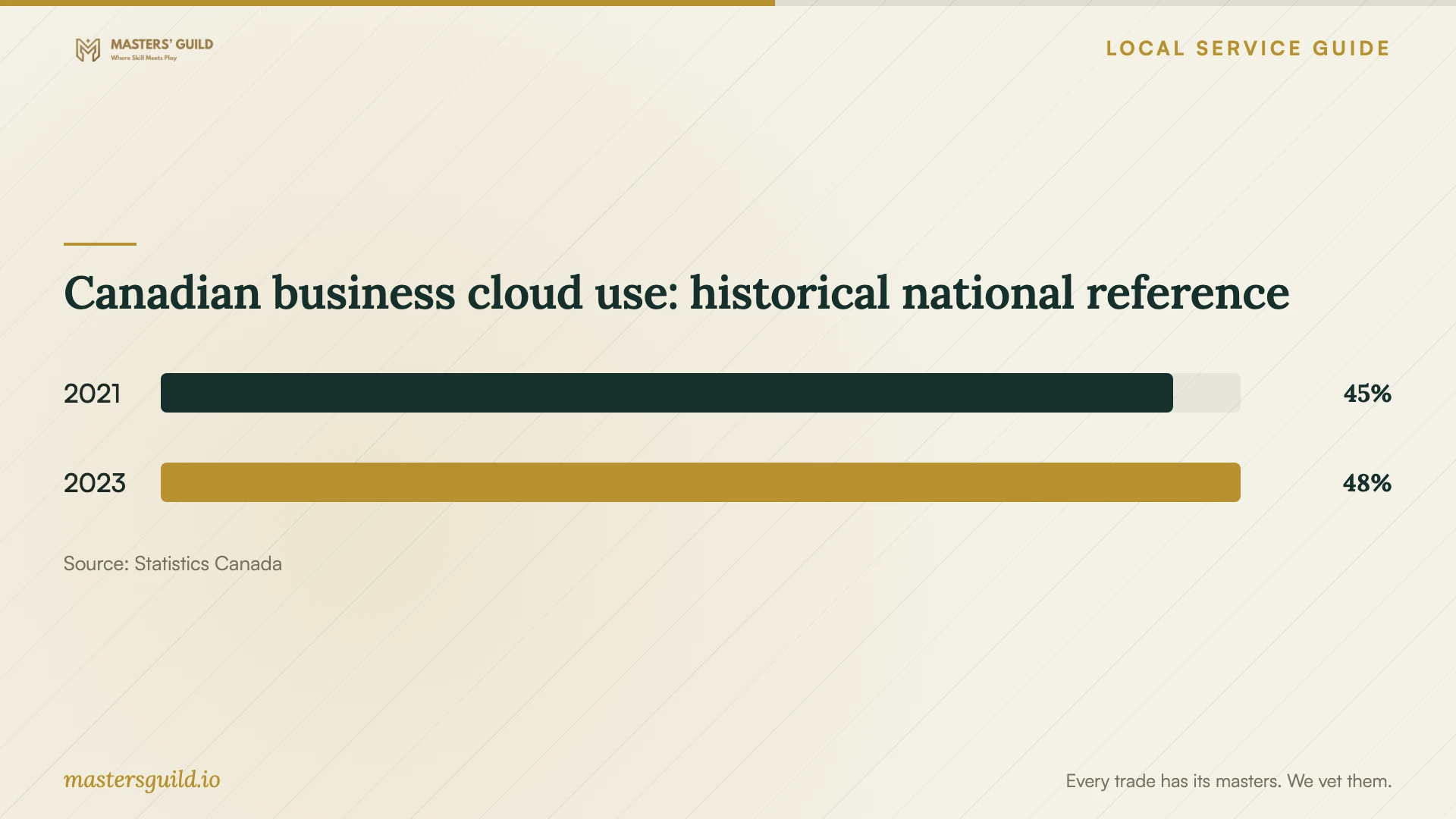
Statistics Canada reported cloud use among 48% of Canadian businesses with five or more employees in 2023. This historical national figure describes adoption, rather than the suitability of a particular provider for your business. Choose your setup around the work staff need to do and the information you must protect. [3]
Canadian business cloud use: historical national reference
Local details that affect your job
New Brunswick health practices need an agreement first
If your Fredericton practice qualifies as a health-information custodian, arrange the required written agreement before retaining an agent or information manager. Ombud NB includes storage and IT services within its information-manager description. Ask your privacy lead to review the proposed access, handling and service terms before you provide patient records. [1]
Public-sector client records need their own review
Ombud NB says New Brunswick's public-body privacy law covers municipalities, public schools and public universities, while excluding private-sector businesses. If your business holds records for one of these clients, ask its designated contact to review the proposed storage and sharing arrangements before migration. Keep those records outside the transfer until the client confirms the scope. Treat this as a preparation step, rather than assuming your ordinary business account meets the client's requirements. [1]
Match the requested work to your records
| Your situation | Scope to request | Decision before work starts |
|---|---|---|
| Shared working documents | Named users, folder permissions and staff instruction | Decide who may view, edit and share |
| Customer personal information | Provider terms and safeguard review | Review permitted uses, access, storage locations and exit arrangements |
| New Brunswick health custodian | Written agent or information-manager agreement | Put the required agreement in place before retaining the service |
| Public-sector client records | Separate client review of storage and sharing | Ask the client to confirm the permitted migration scope |
| Replacing an existing service | Staged transfer and export instructions | Agree on acceptance criteria and retirement of old copies |
Your hiring checklist
- Name the person authorized to approve changes and added charges.
- Prepare a list of users, devices, accounts and folders.
- Mark sensitive records and records held for another organization.
- Identify files staff must access during the transfer.
- Prepare access to business email and account recovery methods.
- Choose representative files for the acceptance check.
- Assign responsibility for future backup checks and staff access changes.
Frequently Asked Questions
How should I budget for setup?
Obtain an itemized quote based on your users, devices, accounts and data. Ask the technician to distinguish the initial job from subscriptions and ongoing support, and explain what would trigger an additional charge.
Does choosing a Canadian provider settle the privacy questions?
Review the actual processing, primary-storage and backup locations, plus subcontracting and access arrangements. Federal guidance treats these as matters to assess and says your organization retains accountability when it outsources personal information. [2]
Should I arrange remote help or an on-site visit?
Describe any sign-in, device or connection problems before booking. Ask whether the technician can complete the proposed scope remotely and how you would authorize access. Request an on-site option if you want someone beside you for device checks or staff instruction.
What should I ask about leaving the cloud provider?
Ask how you can retrieve your information, which export formats you receive and when the provider deletes remaining copies. Federal guidance recommends an exit strategy with data return and secure deletion within specified timeframes. [2]
Sources and scope
This guide combines the sources below with practical planning guidance. Figures apply to the stated geography and period; request a written quote for your property.