
Local service guide
Smart Appliance Setup in Fort Wayne, IN
For Smart Appliance Setup in Fort Wayne, hire a technician against a written appliance list and completion test. Request account guidance, app pairing, configuration of your chosen features, and a demonstration on your phone. Separate physical installation, utility connections, and network upgrades in the quote so you can compare responsibilities and charges before booking.
Define the work and compare written quotes
Give each candidate the brand, complete model number, and requested outcome for each appliance. Describe whether you need first-time pairing, help with an error, shared household access, or a schedule. Include the error message and the steps you have tried. Request a quote against that same list.
Name physical installation as a separate responsibility. If the project involves water, gas, an outlet change, or fixed wiring, have the provider identify who will perform that work and confirm the applicable qualifications and permit requirements for your address. Evaluate their installation qualifications separately from their app setup experience.
Agree on a troubleshooting limit and the price of further work. Include equipment purchases, router changes, resets, and return visits in that discussion. Require your approval before the technician changes the agreed scope. Choose a completion test you can observe, such as operating a supported feature from your own phone.
Prepare accounts and check the appliance location
Have your phone, manual, model label, and Wi-Fi details ready. Sign in to the manufacturer's account and confirm access to verification messages before the appointment. Enter passwords yourself, retain the recovery details, and choose which household member will own the account.
Request a check of the model's network requirements and coverage at its installed position before authorizing new network equipment. For a router or mesh proposal, require an explanation of the problem, proposed equipment, and charge. Tell the technician about any network settings you want them to preserve.
For a used appliance, disclose whether you can contact the previous owner or access the associated account. Have the technician review the manufacturer's transfer and reset instructions before proceeding. Decide who should receive shared access and test those invitations during the visit.
Choose controls you will use
Indiana Michigan Power's June 2025 guidance describes Wi-Fi features on refrigerators, dishwashers, washers, and dryers, including smartphone controls and scheduling. Use those examples to explain your goal, then require confirmation that your exact model supports it before paying for configuration. [2]
Choose a demonstration that matches your routine. You might request a supported notification or a setting change from your phone. Have the technician explain any steps you must perform at the appliance before remote operation, and follow the manufacturer's instructions.
I&M discusses scheduling laundry or dishwasher use during off-peak hours. Confirm your actual electricity rate plan with your provider before assigning a savings goal to a schedule. Record the chosen operating times and learn how to change them; require a rate-and-usage explanation for any proposed bill reduction. [2]
Compare equipment before arranging setup
ENERGY STAR recommends using the yellow EnergyGuide label to compare energy use and estimate annual operating costs. Its washer product finder lists capacity, annual washer energy use, and annual water use, with a separate Connected filter. Check efficiency and the exact connected features you want before choosing equipment. [3]
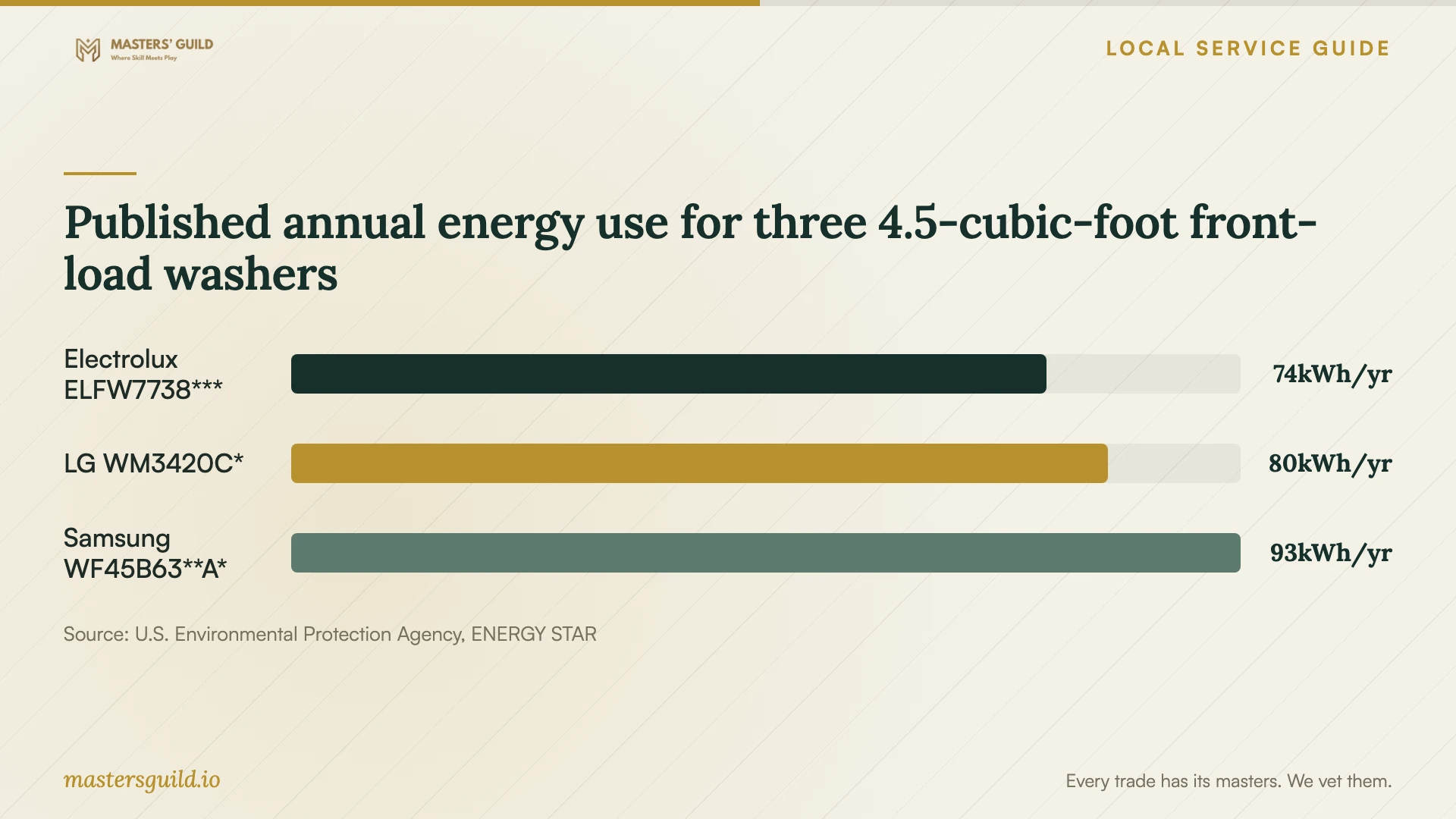
The chart compares three selected front-load washer families with a published capacity of 4.5 cubic feet. ENERGY STAR lists annual washer energy use of 74 kWh for Electrolux ELFW7738***, 80 kWh for LG WM3420C*, and 93 kWh for Samsung WF45B63**A*. Use these national reference values for equipment comparison, without treating them as local bills or savings from app pairing. [3]
Finish with a demonstration and handover
Before ending the visit, operate the agreed features from your phone. Confirm that you control the account, can change the configured settings, and understand the appliance's on-device controls. Test shared access with the other household member if you included it in the scope.
Keep a short handover note with the full model number, app name, chosen settings, and unresolved issues. Exclude passwords. Record the next troubleshooting step, the contact for follow-up help, and any agreed follow-up charge alongside the original quote.
Published annual energy use for three 4.5-cubic-foot front-load washers
Local details that affect your job
Confirm the water reaching your appliance
Fort Wayne City Utilities says it pre-softens its water to a consistent hardness. If you use its water and your appliance requires a hardness adjustment, include that setting in the setup scope. Tell the technician about any additional home treatment and confirm the applicable hardness before following the model's instructions. The utility page provides no numeric hardness setting and does not characterize private-well water. [1]
Check the utility program before adding a thermostat
If I&M supplies electricity at your address and you want thermostat setup alongside appliance work, confirm current program terms before selecting equipment or authorizing enrollment. I&M's June 2025 article describes Power Rewards Smart Thermostat enrollment for its customers who own a smart meter. Verify current eligibility and device compatibility with I&M, then decide whether to add this work. The article does not establish service coverage or current eligibility at your address. [2]
Match the booking scope to your task
| Your task | Scope to request | Before accepting the quote |
|---|---|---|
| Pair an installed appliance | Account guidance, app connection, and feature demonstration | Confirm support for your complete model number. |
| Resolve a failed connection | Model and network checks with a troubleshooting limit | Agree on approval for resets, equipment, and extra work. |
| Connect or install the appliance | Named installation responsibility alongside app setup | Confirm qualifications and permit requirements for your address. |
| Configure a preferred operating schedule | Exact-model feature check and schedule demonstration | Confirm your rate plan before setting a savings goal. |
| Add thermostat setup | Compatibility check and optional utility-program review | If I&M supplies your electricity, verify current terms and eligibility. |
Your hiring checklist
- List each appliance's full model number, requested feature, and current error.
- Separate app setup, physical installation, and network changes in the quote.
- Confirm account access and your verification method before the visit.
- Prepare Wi-Fi details and request a check at the appliance location.
- Confirm water source and home treatment for any hardness adjustment.
- Check your electricity rate before requesting a savings schedule.
- Agree on troubleshooting limits, extra charges, and a completion demonstration.
Frequently Asked Questions
How should I compare setup prices?
Request quotes for the same appliance list and completion test. Compare included troubleshooting, equipment, physical installation, and follow-up charges. Agree on approval for additional work so you can assess the total scope alongside the initial price.
Which hardness setting should I use for my dishwasher?
City Utilities describes its water as pre-softened but gives no numeric hardness value on the supplied page. Confirm your water source and any home treatment, obtain the applicable hardness, and follow the instructions for your dishwasher model. [1]
Will app pairing lower my washer's electricity bill?
Set a savings goal only after checking your model, usage, and electricity rate. I&M describes scheduling among smart-appliance features; ENERGY STAR publishes model-specific energy figures. Neither source establishes a household bill reduction from app pairing. [2] [3]
Sources and scope
This guide combines the sources below with practical planning guidance. Figures apply to the stated geography and period; request a written quote for your property.