
Local service guide
Computer Virus Removal in Fargo, ND
Arrange Computer Virus Removal in Fargo with a technician you choose outside any popup warning. Request a written quote covering diagnosis, file preservation, cleanup, and approval before a reinstall. North Dakota’s Attorney General documented a 2022 popup scam involving bank impersonation and cryptocurrency payments. Tell your technician about any access you granted, and contact your bank through a trusted number if you sent money or disclosed banking information. [1] [4]
Choose the repair contact and service format
Start by choosing a repair contact outside the warning. In the Attorney General’s 2022 North Dakota case, a victim called a popup’s assistance number and later received a call from someone posing as a bank security officer. The FBI advises contacting a claimed organization directly for verification when a caller requests personal information or demands cryptocurrency. [1] [4]
Give your chosen technician a short account of the problem: what appeared on screen, what you installed, whether someone controlled the computer, and whether it still starts. Describe symptoms without assuming they prove an infection. Request diagnosis before authorizing cleanup, recovery, or an operating-system reinstall.
Discuss remote help, drop-off, and a home visit before booking. For remote work, agree on how you will verify the technician, approve access, and end the session. For drop-off, confirm the appointment, collection arrangements, and equipment to bring. For a visit, agree on an arrival window and any travel charge. Consult your employer’s IT contact before authorizing outside access to a work device.
Define the quote, access, and file-preservation terms
Include access controls in the repair agreement. The North Dakota Attorney General warns against giving scammers access to devices. Apply that advice when arranging help: identify who will access your computer, describe what they may inspect or copy, and agree on how they will remove any temporary remote-access arrangement when the work ends. [1]
Request written inclusions for diagnosis, malware cleanup, operating-system repair, backup, and restoration. Find out what you owe if you decline the repair after diagnosis. Set a spending limit and require the technician to contact you before adding paid software, replacing parts, or starting extra recovery work.
List essential files, such as family photos and tax documents, and describe your existing backups. Require approval before formatting a drive or reinstalling the system. Agree on where the technician will hold backup copies and when they will delete them. At collection, check the files you named and request a work summary, unresolved findings, and follow-up terms if symptoms return.
Separate device repair from scam recovery
Treat suspicious payment instructions as a reason to pause and verify the contact. The Attorney General’s 2022 popup case escalated into bank impersonation, secrecy instructions, and cryptocurrency transactions. Its consumer protection division lists 800-472-2600 for advice before acting on a suspected scam. Use that resource if a warning or caller directs you to move money. [1]
If you granted access, tell the technician which program you installed and what the caller did. Request a review of that access as part of the repair scope. Use a separate trusted device to contact your bank if you shared financial information or made payments, and discuss account-security steps with the bank. Keep notes about the warning and calls for your report.
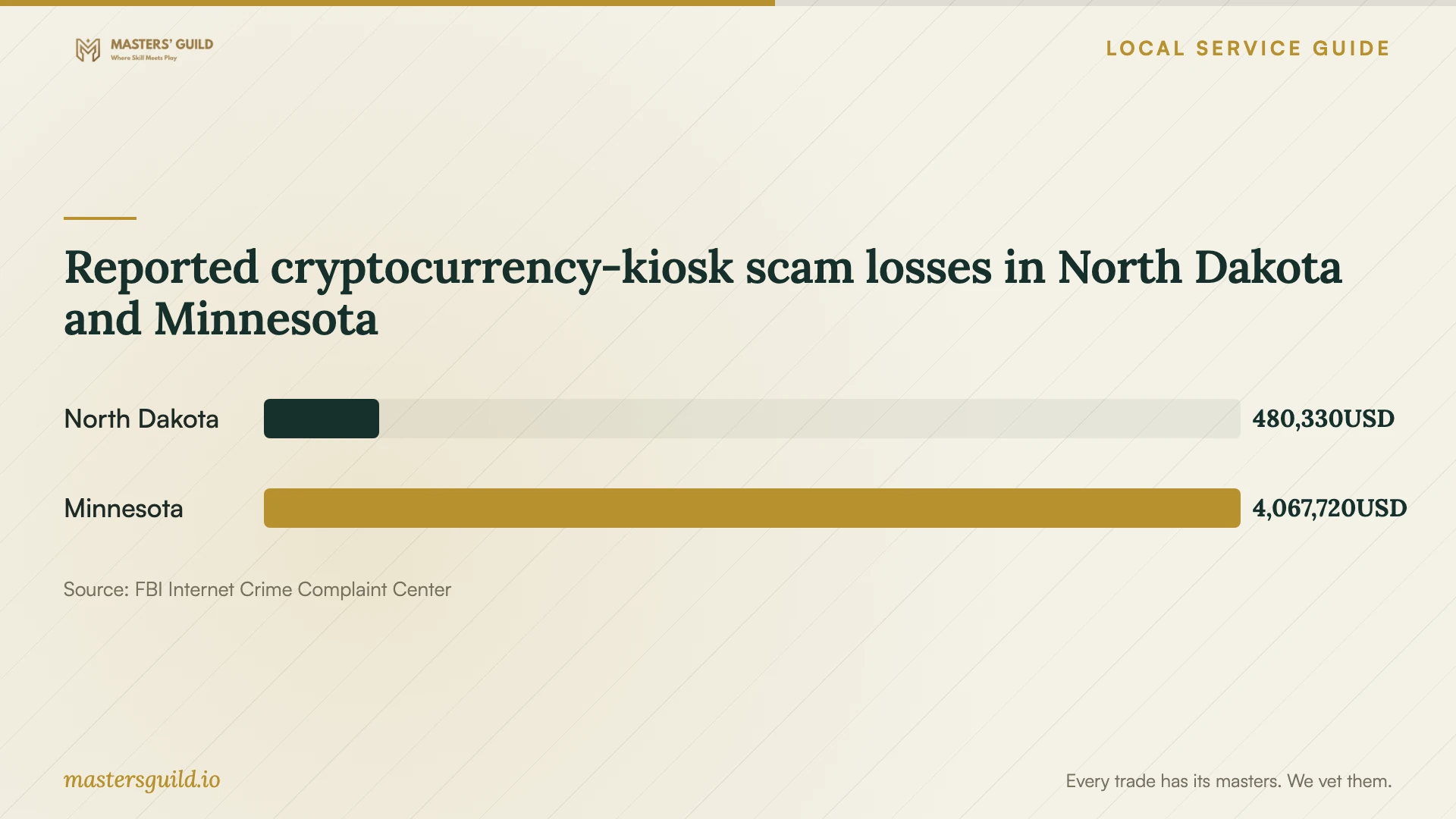
For cryptocurrency-kiosk scams, the FBI recommends reporting to local police and IC3. Retain receipts or transaction documentation. Include available transaction IDs, destination wallet addresses, kiosk locations, scammer phone numbers or email addresses, and a description of the scam. Arrange device cleanup alongside those reporting steps. [4]
Plan replacement and disposal before releasing the computer
Include Fargo’s recycling eligibility in your replacement decision. The city’s Household Hazardous Waste facility accepts one computer set per resident per month from Cass County and Valley City residents year-round. The city describes a set as a tower, monitor, and accessories. Confirm how your equipment fits that allowance before planning a drop-off. [2]
Compare a repair quote with a replacement plan that includes preserving files, restoring programs, setting up the replacement, and handling the old drive. Check your saved files before releasing the old computer. Ask the technician to explain the agreed method for handling personal data before recycling or donation. The city also suggests considering donation for working computers. [2]
Schedule file transfer and drive-data work before your recycling trip. The city lists Wednesday hours until 6 p.m. and a second-Saturday window from 8 a.m. to noon, alongside its weekday schedule. Confirm the facility location and hours before traveling; use the collection appointment to check your preserved files first. [3]
Reported cryptocurrency-kiosk scam losses in North Dakota and Minnesota
Local details that affect your job
State advice before responding to a virus warning
North Dakota’s Attorney General lists 800-472-2600 for consumer protection advice before acting on a suspected scam. Its 2022 popup case involved a phony bank security officer and cryptocurrency payments. If a caller demands secrecy or directs you to move money, pause and obtain advice before arranging repair through that contact. [1]
Resident eligibility changes the disposal plan
Fargo accepts one computer set, including a tower, monitor, and accessories, per resident per month from Cass County and Valley City residents year-round. Check this allowance when comparing repair with replacement. If you live across the state line in Moorhead, confirm eligibility rather than assuming the stated resident program covers your computer. [2]
Coordinate collection with facility hours
The city lists Household Hazardous Waste facility hours as Monday, Tuesday, Thursday, and Friday, 9 a.m. to 5 p.m.; Wednesday, 9 a.m. to 6 p.m.; and the second Saturday each month, 8 a.m. to noon. Complete file preservation and personal-data handling before disposal, then confirm hours and the facility location before your trip. [3]
Match the situation to the repair request
| Your situation | Recommended next step | Scope to discuss |
|---|---|---|
| A popup directs you to call or pay | Choose your own repair contact and verify claimed bank contacts | Diagnosis and review of any access you granted |
| You granted remote access | Describe the caller’s actions and installed software | Access review, cleanup, and account-security questions |
| You need files from a computer that will not start | Authorize diagnosis before deciding on recovery or a reinstall | Named files, recovery charges, and approval before erasure |
| You paid through a cryptocurrency kiosk | Keep transaction records and report to local police and IC3 | Device repair alongside financial reporting |
| You prefer replacement | Plan file preservation and personal-data handling before disposal | Transfer work and Fargo recycling eligibility |
Your hiring checklist
- Record the symptoms and what you did after seeing the warning.
- Note any remote access, passwords, banking information, or payments you shared.
- List essential files and describe your existing backups.
- Confirm the service format, appointment, and equipment to bring.
- Get written inclusions, diagnostic charges, and a maximum authorized price.
- Require approval before drive erasure, a reinstall, or additional paid work.
- Check preserved files and collect a written work summary before releasing the computer for disposal.
Frequently Asked Questions
How much should I budget for removal?
Request a written quote for your computer and file-preservation needs. Ask for the diagnostic charge, cleanup price, backup or recovery charges, and any visit fee. Set a maximum authorized amount and agree on when the technician must contact you before adding work.
Should I approve an operating-system reinstall?
Ask the technician why they recommend it and which files and programs they will preserve. Agree on backup handling, restoration work, and the total charge before approving a reinstall. Request a chance to check your essential files before the job ends.
What should I keep after a cryptocurrency-kiosk payment?
The FBI advises keeping receipts or transaction documentation. Include available transaction IDs, destination wallet addresses, kiosk locations, and scammer contact details in reports to local police and IC3. [4]
Can I recycle the computer after replacing it?
Fargo accepts one computer set per resident per month from Cass County and Valley City residents year-round. Arrange file preservation and personal-data handling first. Confirm how your equipment fits the allowance and check facility hours before traveling. [2] [3]
Sources and scope
This guide combines the sources below with practical planning guidance. Figures apply to the stated geography and period; request a written quote for your property.