
Local service guide
Cloud Service Setup in Fargo, ND: Hiring Guide
For Cloud Service Setup in Fargo, ND, choose help according to your task: learning an app, moving files or arranging recovery. Hire a technician with a written scope covering devices, folders, permissions and a recovery demonstration. Keep account ownership under your control. For basic learning, ask nearby West Fargo Public Library whether your question fits its technology tutoring before arranging paid work. [1]
Define the result before comparing technicians
Describe the result in household terms: open family photos on a phone and computer, move documents from an old account, or recover a deleted file. Ask the technician to explain the proposed service and settings. Request a demonstration with a sample file before authorizing the full transfer.
List each device, its owner and the folders involved. Decide who should view, edit or remove shared files. Ask how the proposed service handles deletion and how you would recover a file. Include that demonstration in the quote so you can judge completion against an agreed task.
Request separate prices for setup labor, subscriptions, equipment and follow-up work. Identify who buys the subscription, receives renewal notices and approves added charges. Ask the technician to describe relevant platform experience and explain how they would handle a failed transfer without deleting your originals.
Check the connection at your property
Search your address in the FCC National Broadband Map before changing internet service for a large upload. The FCC explains that an address lookup identifies providers reporting service there, their technologies and maximum advertised download and upload speeds. You can filter for residential locations. [2]
Confirm the available plan with the provider, then ask the technician to measure your connection. Treat advertised availability as a starting point rather than a measurement inside your home. Agree on who monitors uploads after the appointment, how they check completion and what happens if a transfer stops. [2]
The FCC offers an availability challenge when reported service availability is inaccurate. It offers a location challenge when your home is missing or its location information is wrong. Use the appropriate process if the map and the provider's answer disagree. [2]
Use nearby tutoring for a learning question
West Fargo Public Library offers in-person technology tutoring through scheduled 30-minute appointments. Its listed topics include basic computer and smartphone skills, email or social account setup, and learning apps and websites. Contact staff with the app name and one task you want to learn. [1]
Confirm eligibility, appointment availability and scope before traveling from Fargo. Ask about migration or backup configuration as separate tasks. For a household archive transfer, request paid quotes that specify file checks and recovery testing rather than assuming a tutoring appointment covers the work.
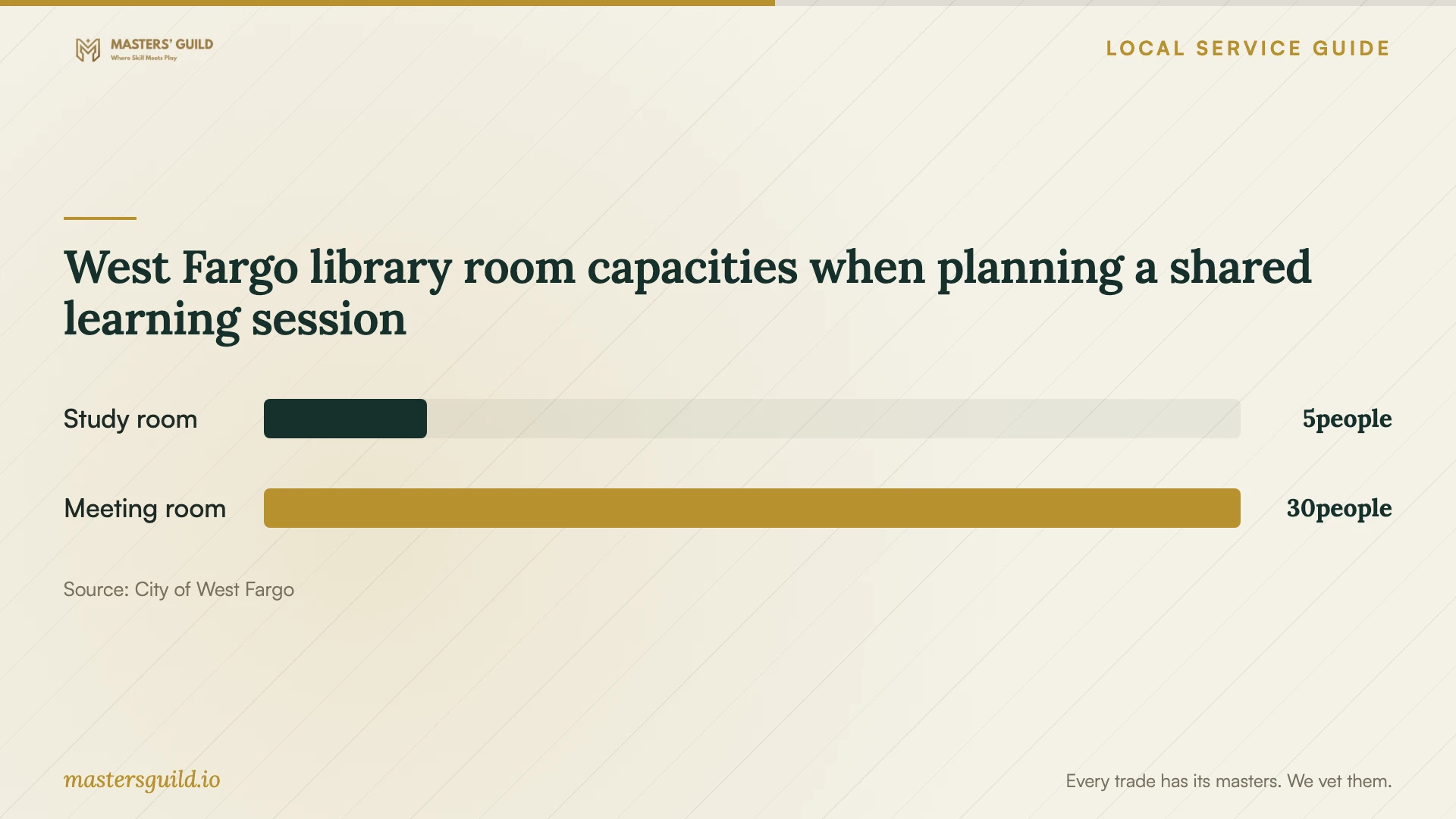
For a shared learning session, the library publishes study-room and meeting-room options. Its reservation process requires an application and staff approval; submitting the form does not complete the reservation. Ask staff whether your session qualifies under the room policy and whether fees apply. Confirm tutoring arrangements separately. [1]
Include security in the setup and handoff
North Dakota Information Technology describes Cyber SMART as an awareness campaign for North Dakotans. Its public topics include multifactor authentication, strong unique passwords, software and device updates, and care with personal information. Use these topics to ask what the technician will configure and explain. [3]
Enter your own credentials during the appointment. Keep recovery contacts and instructions under your control. Agree on any remote-access tool before installation, including its purpose, duration and removal. At handoff, review signed-in devices and sharing permissions with the technician.
If you suspect someone accessed your personal cloud account, pause routine migration and contact the account provider through its official recovery or security channel. Ask the technician to explain their role before granting access. Use NDIT's public awareness guidance for preparation; confirm service eligibility before seeking assistance from any government incident-response team.
Set a completion test you can repeat
Ask the technician to open representative files on each agreed device, demonstrate sharing permissions and recover a test file. Keep your originals until you have reviewed the transfer. Record unfinished work, who will resolve it and when you will check again.
Collect written instructions for signing in, finding files, managing access and repeating the recovery steps. Review subscription ownership, renewal responsibility and follow-up charges. Try the steps yourself before closing the appointment so you can identify questions while the technician is present.
West Fargo library room capacities when planning a shared learning session
Local details that affect your job
West Fargo's appointment-based learning option
Nearby West Fargo Public Library offers 30-minute in-person technology tutoring covering basic devices, accounts, apps and websites. Before hiring someone to teach app controls, contact library staff with your specific question and confirm eligibility. The published scope does not establish that tutors perform cloud migrations or backup installation. [1]
North Dakota's public security preparation
NDIT identifies Cyber SMART as public awareness guidance helping North Dakotans build digital habits. Its topics give households a concrete briefing for a setup appointment: ask the technician to address multifactor authentication, unique passwords, updates and personal-information protection. This public education resource is distinct from NDIT's government cybersecurity services; it does not establish support for personal cloud-account recovery. [3]
Choose help according to the task
| Your need | Next step | Confirm first |
|---|---|---|
| Learn basic app controls | Ask West Fargo Public Library about tutoring | Eligibility and whether the task fits its 30-minute appointment |
| Move files across accounts or devices | Request a written technician quote | Included folders, file checks, permissions and recovery demonstration |
| Explore internet options for an upload | Search your address in the FCC map | Provider-reported availability and advertised upload speed with the provider |
| Prepare account-security questions | Use NDIT's public Cyber SMART topics | Authentication, passwords, updates and personal-information handling |
| Suspect personal-account compromise | Contact the account provider's official recovery or security channel | The recovery steps before authorizing routine migration |
Your hiring checklist
- List included devices, accounts, folders and household users.
- Describe the desired result and recovery demonstration.
- Confirm your internet plan and ask how uploads will be monitored.
- Separate labor, subscriptions, equipment and follow-up charges.
- Keep account ownership and recovery contacts under your control.
- Agree on technician access and its removal.
- Test representative files, permissions and recovery before closing the job.
Frequently Asked Questions
How should I compare setup prices?
Give technicians the same device list, folders and completion tests. Request itemized labor and subscription charges, a spending limit, and terms for follow-up work. Require your approval before they add tasks.
Can the nearby library teach me to use a cloud app?
West Fargo Public Library lists apps and websites within its technology-tutoring topics and schedules 30-minute appointments. Ask staff whether your app and question fit, and confirm eligibility and availability. Do not assume tutoring includes a full migration. [1]
Does the FCC map predict my upload time?
The map shows provider-reported maximum advertised speeds for a location. It does not measure your home's connection. Ask the technician to check your connection and agree on how they will monitor the transfer. [2]
What should I do if my personal account may be compromised?
Pause the setup and contact your account provider through its official recovery or security channel. Keep control of recovery contacts and ask what access any technician needs. Confirm an organization's support scope before sending it account information.
Sources and scope
This guide combines the sources below with practical planning guidance. Figures apply to the stated geography and period; request a written quote for your property.