
Local service guide
Plan network setup in El Paso, TX
For network setup in El Paso, hire a technician who will diagnose the problem, quote the rooms and devices you want connected, and demonstrate the result before you accept the work. Request separate prices for diagnosis, equipment, cabling, and wall repairs. If the proposal includes building alterations or new power outlets, ask City Planning & Inspections whether your installation requires a permit before booking construction work. [2]
Define the problem before buying equipment
Prepare a short fault description: a video call drops in the study, a television disconnects, or several devices lose access together. Record the affected rooms, devices, times, and error messages. Ask the technician to compare a wired connection at the router with Wi-Fi in the affected rooms, where your equipment supports those tests.
Use the FCC's National Broadband Map to check the service providers, connection technologies, and maximum advertised download and upload speeds reported for your address. These are provider-reported availability details rather than measurements of your home's Wi-Fi. Confirm service and ordering terms with the provider before arranging a switch. [4]
Give the technician your internet-plan details and equipment model names. Request a diagnosis that explains the observations behind each recommendation. If the scope remains uncertain, agree on the diagnostic charge and ask for approval of installation costs as a separate step.
Compare written quotes for the same outcome
Specify the rooms to cover, devices to connect, and cable endpoints to install. Ask each installer to separate labor, equipment, cable materials, wall repairs, and follow-up support. Request model names, equipment ownership, warranty terms, and any recurring charges so you can compare the same scope.
For mesh Wi-Fi, request proposed node locations and an explanation of how the nodes will connect to one another. For Ethernet installation, request a cable-route description, endpoint labels, and a test record for each completed run. Identify who will patch and finish openings before accepting the quote.
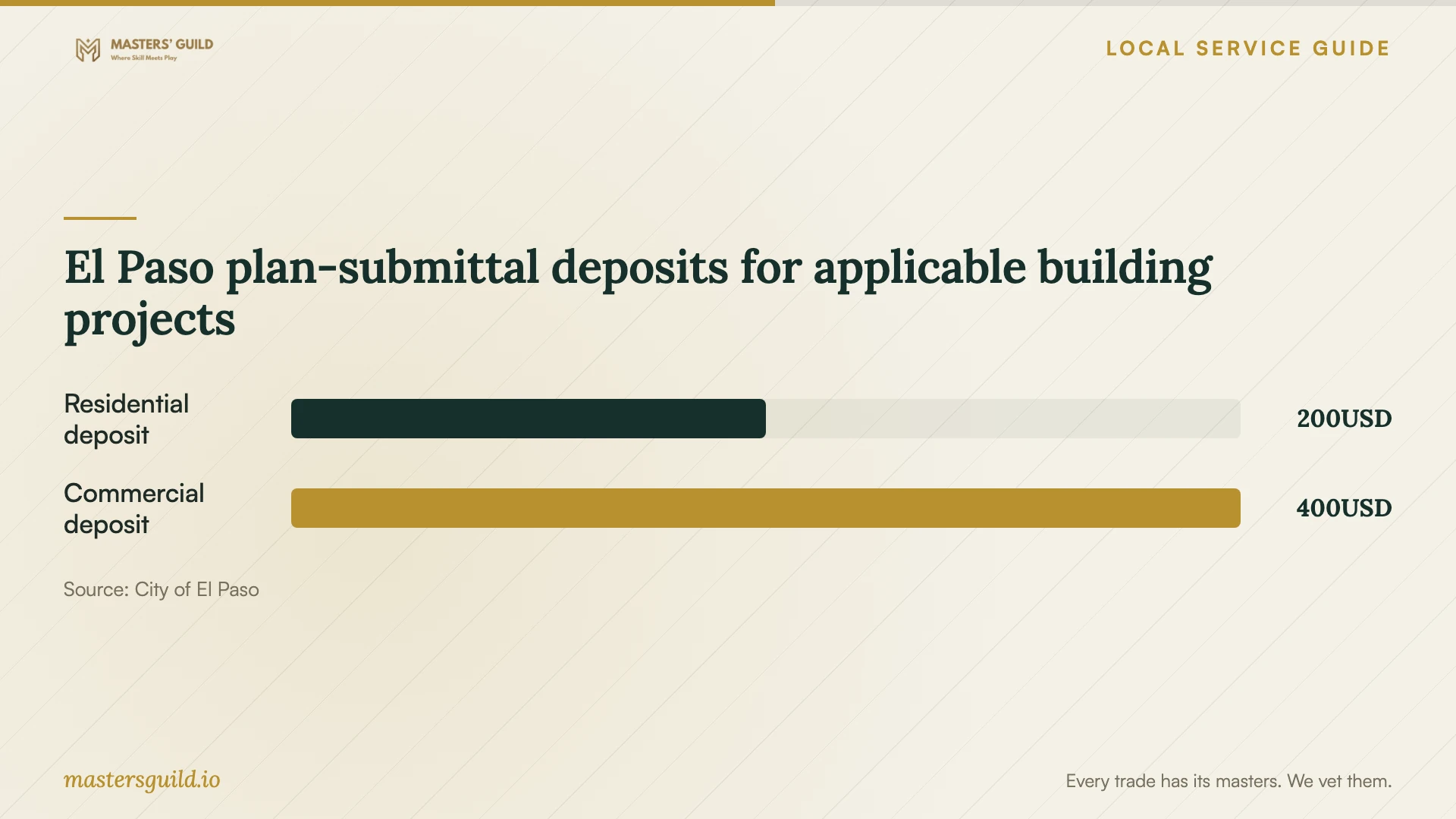
Obtain a home-specific installation quote. If an installer includes a permit allowance, ask which application it covers, how they calculated it, and who will confirm the requirement. El Paso publishes residential and commercial plan-submittal deposits that it credits toward permit fees; those deposits represent one part of an applicable building application, not the price of network installation. [2]
Resolve cabling, construction, and power work
The Texas Department of Licensing and Regulation exempts communications circuits and optical-fiber cables from state electrician licensing. It also warns that municipal or regional regulations may override exemptions. Ask the installer to identify the requirements for your scope and to separate communications cabling from proposed electrical power work. [3]
El Paso requires permits for building work that includes construction, alteration, repair, and changes of occupancy within city jurisdiction. Ask Planning & Inspections whether your installation requires a permit. Describe the cable route, wall openings, equipment mounting, and any new power outlets so staff can address the proposed work. [2]
Before booking, identify who will handle each part of the job, confirm applicable credentials and approvals, and request proof of liability insurance. If you rent, obtain the owner's written agreement for drilling, mounting, and repair responsibilities. Keep the approved route and scope with your quote.
Prepare access and a connection backup
Choose an appointment when you can accommodate an interruption. Clear access to the router and cable endpoints. Tell the technician which devices must work before departure and which equipment you want left untouched. Keep account information available, but avoid putting passwords in the job description.
El Paso provides free Wi-Fi at city locations including libraries, recreation centers, museums, BRIO stops, transfer centers, and downtown locations. The city also describes a MyFi hotspot partnership with El Paso Libraries for students, teachers, and people without broadband at home. Confirm a suitable location's access arrangements or current library hotspot availability and eligibility before relying on either option. [1]
Test a cellular backup in the room where you intend to work. The FCC's mobile map represents outdoor or in-vehicle coverage and does not show indoor coverage. Use an actual test at home to decide whether your backup meets your needs during the appointment. [4]
Accept the work through a documented handover
Agree on acceptance checks before the visit. Ask the technician to demonstrate your chosen tasks in the affected rooms, reconnect the agreed devices, and record the test conditions. For installed cables, request endpoint labels that match the test records and a description of where each run ends.
Keep administrative access under your control. Have the technician show you how to change passwords, access equipment settings, and save the configuration where supported. Agree on whether they retain remote access, how you can remove it, and the terms for follow-up help. Keep receipts, equipment details, and handover notes together.
El Paso plan-submittal deposits for applicable building projects
Local details that affect your job
Resolve permit scope through the One Stop Shop
El Paso's One Stop Shop at 811 Texas Ave. serves as the primary intake point for building permits. Call Planning & Inspections at (915) 212-0104 with your address and proposed installation description before authorizing building alterations. The city offers its Citizen Access Portal for applications and status checks. Ask staff which application process and approvals apply to your project. [2]
Arrange temporary access before disconnecting
For work you can do away from home, check the city's free Wi-Fi locations and confirm access at a suitable facility. If you need portable access, ask El Paso Libraries about the MyFi hotspot program described by the city. Confirm current availability, eligibility, and loan terms before scheduling an interruption around a borrowed hotspot. [1]
Choose the next step before committing to installation
| Situation | Next step | Deliverable to request |
|---|---|---|
| You cannot identify which connection fails | Arrange diagnosis before approving equipment | Wired and Wi-Fi comparisons with an explanation of the findings |
| You are considering a different internet provider | Check FCC address-level provider reports, then contact the provider | Confirmation of service availability and ordering terms |
| The proposal includes building alterations or new power outlets | Ask City Planning & Inspections whether your installation requires a permit | A division of cabling, construction, and power work with applicable approvals |
| You need access during the appointment | Confirm a city Wi-Fi location or library hotspot arrangements | A backup you can use during the planned interruption |
| The installer has completed the work | Run the agreed acceptance checks | Administrative access, cable labels, test records, and support terms |
Your hiring checklist
- Record the affected rooms, devices, symptoms, and times.
- Collect internet-plan details and equipment model names.
- Agree on the diagnostic charge before authorizing installation.
- Compare itemized quotes using the same rooms, devices, and endpoints.
- Confirm cable routes, repair responsibilities, and applicable approvals.
- Arrange and test temporary connectivity if you need access during the visit.
- Write acceptance checks and cable-test requirements into the scope.
- Receive administrative access, labels, receipts, and follow-up terms.
Frequently Asked Questions
Does Ethernet cabling require an electrician license in Texas?
TDLR exempts communications circuits from state electrician licensing and warns that municipal or regional regulations may override exemptions. Confirm the requirements for your installation, and ask the provider to identify any electrical power work as a separate scope. [3]
How do I check whether my installation needs an El Paso permit?
Call Planning & Inspections at (915) 212-0104. Describe your address, cable routes, wall alterations, mounting, and any new power outlets. Ask whether a permit or plan submittal applies before authorizing construction work. [2]
Can the FCC map tell me whether Wi-Fi will work in my study?
The FCC map provides provider-reported service availability and advertised speeds at an address. It does not measure your indoor Wi-Fi. Ask the technician to test the study with the devices and tasks you intend to use there. [4]
Should I choose mesh Wi-Fi or new Ethernet cabling?
Ask for a diagnosis and proposals tied to your rooms and devices. Compare equipment locations, cable routes, construction work, test requirements, and total quoted cost. Require the technician to explain how the proposed approach addresses the problem you reported.
Sources and scope
This guide combines the sources below with practical planning guidance. Figures apply to the stated geography and period; request a written quote for your property.