
Local service guide
Data recovery and backup in El Paso, TX
Data recovery and backup in El Paso starts with choosing help that matches your problem: restoring an existing backup, assessing a failed device, or responding to a suspected cyberattack. Ask for a written diagnostic scope, approval before recovery work, secure handling terms and a demonstration that restored files open. For ongoing backup service, include outage protection and restore testing in the scope. El Paso Electric recommends automatic backups and battery backup systems; CISA recommends offline, encrypted backups and regular recovery tests. [1] [4]
Choose the right recovery scope
Tell the provider whether you need a missing folder, a complete workstation or a business application restored. List priority files, the last time you could open them, the device model and any steps you have taken. Ask the provider to explain the proposed diagnostic work before you approve repairs, scans or changes to the original device.
For a failed or damaged device, ask whether the provider performs the assessment at its own facility or forwards the device to a recovery specialist. Get the destination, shipping responsibility, diagnostic fee and approval process in writing. Define success by the files you need and whether you can use them, rather than accepting a promise to recover an unspecified amount of data.
For a suspected ransomware incident, CISA recommends isolating affected systems from the network and prioritizing recovery on a clean network. Engage a provider with incident-response capability before authorizing a routine restore. Ask how the team will preserve evidence, identify the compromise and avoid infecting restored systems. [4]
Compare complete quotes
Request separate amounts for diagnostics, recovery work, replacement storage, shipping, urgent service and tax. Ask what you owe if the provider finds no usable files or you decline the recovery quote. For a time-sensitive job, distinguish the assessment deadline from the expected file-delivery date. Have the provider state both dates in the work order.
For backup service, compare setup charges and recurring charges over the same contract period. Ask providers to specify included devices, storage limits, retained versions, monitoring, restore assistance and cancellation terms. Request the cost of exporting your data and closing the account. Keep account ownership and access to recovery credentials in your business's name.
The Texas Comptroller lists offsite backup of electronic files as data processing and exempts 20 percent of data-processing charges from tax. Ask the provider to identify the taxable service and exemption on the quote. Do not assume the same treatment applies to the entire package of hardware, repair, recovery and backup services. [2]
Specify a backup you can restore
Set two practical limits before hiring: how much recent work you can afford to lose and how long you can operate without your files or applications. Give the provider examples, such as restoring today's orders or opening the accounting system on a replacement computer. Ask the provider to propose a backup schedule and recovery plan against those limits.
CISA recommends offline, encrypted backups of critical data and regular tests of their availability and integrity. Ask the provider to explain which copy remains offline, who controls encryption keys and how staff retrieve those keys during an incident. If the proposal includes immutable cloud storage, request a configuration review and clear charges; CISA cautions that misconfiguration can impose significant cost. [4]
Before accepting the installation, have the technician restore a selected folder and demonstrate the business application you identified as critical. Open the restored files yourself. Record the backup date, recovery steps, responsible contact and any missing items. Agree on who receives failure alerts and who performs future restore tests.
Include power protection in the installation
El Paso Electric recommends good-quality surge protectors for computers, automatic backup programs and battery backup systems. Ask the technician to identify which computers and storage devices need protection and to demonstrate the shutdown procedure. Have staff walk through the outage response plan, as the utility recommends. [1]
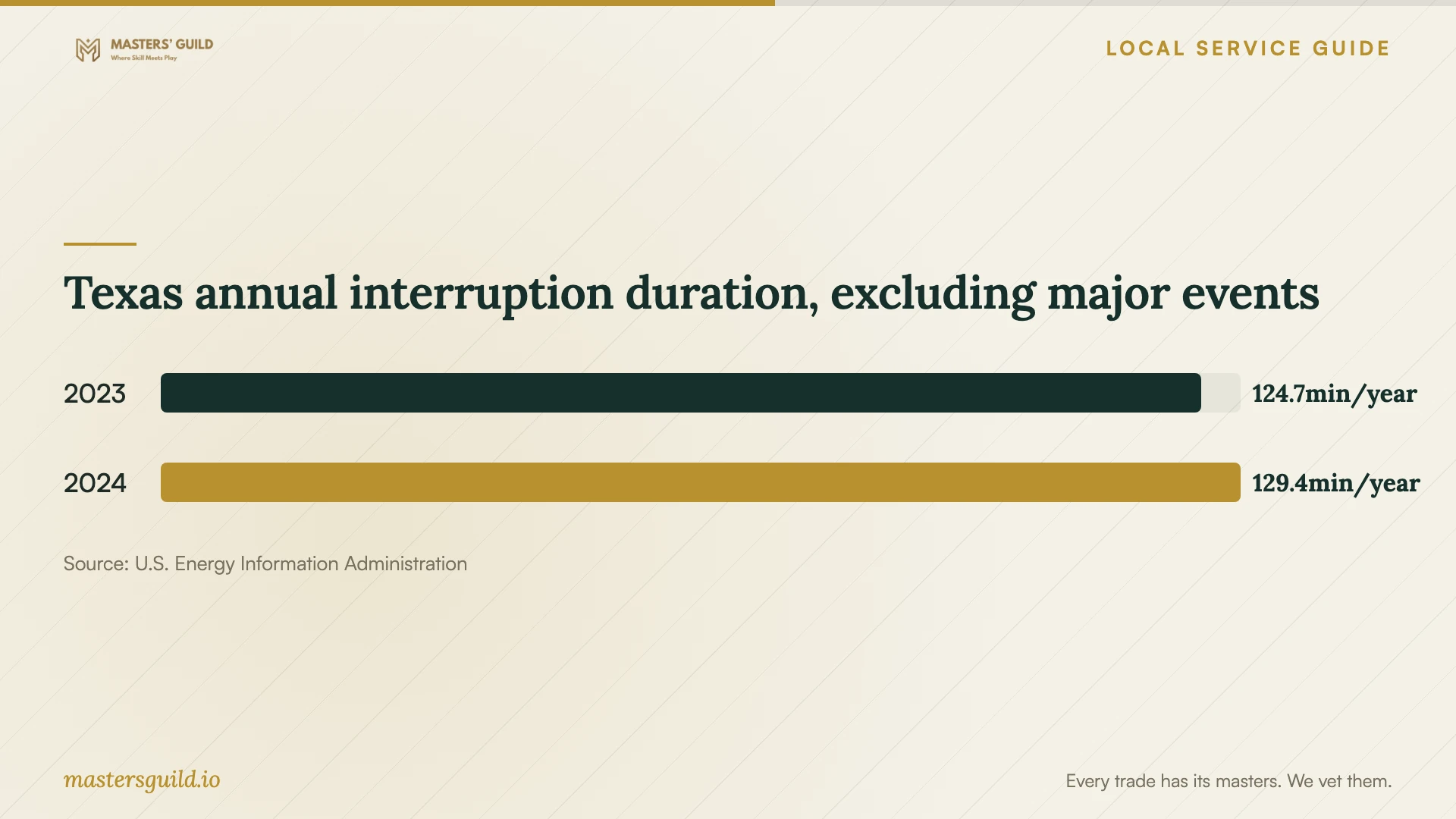
Use the chart as statewide context for power planning. EIA reports Texas average annual non-momentary interruption duration of 124.7 minutes in 2023 and 129.4 minutes in 2024 when excluding major events. These figures describe statewide reporting, not your premises or El Paso Electric's service. Ask the installer to size battery backup around your equipment and shutdown needs rather than these annual averages. [5]
Agree on access and incident responsibilities
Ask who can access recovered files, where the provider stores working copies, how it returns data and when it deletes its copies. Request a device receipt and a record of transfers between facilities. Put confidentiality, subcontractor access and data-return terms in the agreement before handing over equipment.
CISA recommends contract language that formalizes security requirements for managed service providers and limits third-party access to their responsibilities. Ask the provider to document its access permissions and the process for removing them when the engagement ends. For suspected theft of customer information, involve your incident-response contact and legal adviser alongside the recovery provider. [4]
Texas annual interruption duration, excluding major events
Local details that affect your job
El Paso Electric outage preparation
The local utility recommends automatic backups and battery backup systems for business equipment. Include both in the installation discussion rather than requesting storage alone. Add the utility's Texas Trouble and Outage Line, (915) 877-3400, to your written outage plan so staff know where to report an outage or obtain updates. [1]
Texas tax treatment of offsite backup
Texas includes offsite electronic-file backup in taxable data processing and exempts 20 percent of that service charge. Ask each provider to separate backup service from equipment and other work and show applicable tax. This gives you a consistent basis for comparing recurring quotes for your El Paso business. [2]
Texas breach reporting affects the response scope
The Texas Attorney General states that businesses and organizations experiencing a system-security breach affecting 250 or more Texans must report it as soon as practicably possible and within 30 days of discovery. The office also states that businesses and organizations must notify affected consumers. For suspected exposure of customer information, ask your legal adviser to assess notification duties and hire help that can document the incident. Do not use the Attorney General reporting threshold as a reason to dismiss consumer-notification duties. [3]
Match the provider to your immediate need
| Situation | Help to request | Before authorizing work |
|---|---|---|
| You have an existing backup | Backup verification and a scoped restore | Name the files and applications you need; require an opening and usability check. |
| A device has failed or suffered damage | Device assessment and a recovery proposal | Confirm the handling facility, diagnostic fee and approval limit. |
| You suspect ransomware | Incident response and recovery on a clean network | Follow CISA's isolation guidance; agree on evidence preservation and restoration priorities. |
| You are arranging ongoing backups | Offline encrypted backup, restore testing and power protection | Ask for a restore demonstration and an outage procedure consistent with CISA and local utility guidance. |
| You suspect customer information exposure | Incident documentation and legal assessment | Review Texas consumer-notification duties and the Attorney General reporting threshold. |
Your hiring checklist
- Record symptoms, device details, priority files and previous recovery attempts.
- Identify the newest backup and ask the provider to verify it before planning a restore.
- Get diagnostic fees, approval limits and unsuccessful-recovery charges in writing.
- Confirm the handling facility, subcontractors, device receipt and secure return method.
- Specify acceptable data loss and downtime using examples from your business.
- Request a restore demonstration, encryption-key handover and written recovery instructions.
- Include surge protection, battery backup and staff shutdown procedures in the installation discussion.
- Compare itemized setup and recurring charges, tax, cancellation and data-export terms.
Frequently Asked Questions
How much should I budget for recovery?
Ask for a device-specific diagnostic and written quote before setting your budget. Compare the same scope, including diagnostic charges, unsuccessful-recovery terms, return storage, shipping and urgent service. Set an approval limit so the provider must contact you before adding work or charges.
How do I know the backup service works?
Require the provider to restore selected files and demonstrate the application you need. CISA recommends regular tests of backup availability and integrity. Record the test results and agree on who performs the next test and responds to failed backups. [4]
Should I turn off a computer with suspected ransomware?
CISA recommends isolating affected devices from the network first. It advises powering down only when network disconnection is not possible, because shutdown loses potential evidence in volatile memory. Contact your incident-response provider for coordinated next steps. [4]
Is offsite backup subject to Texas sales tax?
The Texas Comptroller lists offsite electronic-file backup as taxable data processing and exempts 20 percent of data-processing charges. Ask the provider to itemize the service, exemption and applicable tax rather than applying one assumption to a mixed package. [2]
Sources and scope
This guide combines the sources below with practical planning guidance. Figures apply to the stated geography and period; request a written quote for your property.