
Local service guide
Cloud Service Setup in El Paso, TX: Hiring Guide
Arrange Cloud Service Setup in El Paso, TX by asking a technician for a written scope covering your devices, selected files, account ownership and a recovery demonstration. Check internet access at your address before agreeing to an upload deadline. Request separate charges for setup, migration, subscriptions and applicable tax, and agree on who checks the upload after the appointment.
Define the job before comparing quotes
Describe the result you want: access to family documents from several devices, protection for photos, or a move from an existing account. List each computer and phone, the folders you want included, and the people who need access. Ask the technician to name the service and plan they propose, explain its settings, and document what they will leave outside the scope.
For a migration, ask for a file inventory, a plan for checking copied files and an agreement about retaining the originals. Specify whether the technician will organize duplicates or transfer the folders as they stand. Request your approval before anyone deletes files, closes an account or changes a subscription.
Compare quotes using the same device list and completion requirements. Request the labor charge, subscription charge, travel charge if any, tax and follow-up terms. Ask whether the appointment ends when configuration finishes or when the technician verifies the upload. Set a spending limit for work outside the agreed scope.
Check the connection before setting a deadline
The FCC National Broadband Map lets you search a street address and inspect providers, connection technologies and maximum advertised upload and download speeds. Providers report this information to the FCC. Use the address result to identify options to investigate; it does not establish the speed your devices will achieve during the job. [4]
Ask the technician to test the connection where the devices will stay and to assess the selected data before proposing a completion time. Agree on whether you can continue using the computer during the transfer, who will monitor progress and how you will handle interruptions. If the upload continues after the visit, request a follow-up check as part of the quote.
For households without home broadband, El Paso Public Libraries describes a MyFi hotspot loan program with unlimited data capabilities and loans of up to six months. The library requires an EPPL card, a reservation with a pickup location and a signed agreement brought to pickup. Its intended users include students, teachers and people without broadband at home. [1]
Before booking work around a library hotspot, confirm that you can obtain a unit and ask the technician to test it at home. The program description does not provide an upload-speed commitment. Avoid agreeing to a large-transfer deadline based on the unlimited-data description alone. [1]
Keep control of accounts and recovery
Create or retain the cloud account under your own contact details. Enter passwords yourself during the appointment, review the recovery contact information and ask the technician to explain any access they need. Agree on when they will remove remote access and how they will handle any temporary copies of your files.
CISA recommends frequent backups to a secure external drive or a properly vetted cloud service. It also recommends backing up data and securing recovery keys and passwords before starting encryption. If the job includes encryption changes, ask the technician to follow that sequence and show you where you will keep the recovery information. [5]
Ask for a demonstration using a sample file: upload it, locate it from another intended device and recover it using the proposed procedure. Have the technician explain how the selected service handles deletion, version history and device replacement. Write down the settings and recovery steps you approve rather than accepting a verbal assurance that everything is protected.
If you choose an external drive for an additional backup, CISA advises storing it in a safe place and disconnecting it when you are not backing up data. Ask the technician to demonstrate the backup process so you can repeat it after the appointment. [5]
Ask for an itemized Texas tax explanation
The Texas Comptroller identifies storing, retrieving and manipulating customer data as taxable data processing and includes data conversion in its examples. The same bulletin distinguishes consulting services from taxable data processing. Ask the provider to explain which parts of your proposed storage, migration and support job they treat as taxable. [2]
For mixed taxable and nontaxable services, the Comptroller describes conditions for separating distinct, identifiable services and their charges. Request an itemized quote before accepting the work. Avoid assuming that the provider applies one tax treatment to every task because a technician performs them during the same visit. [2]
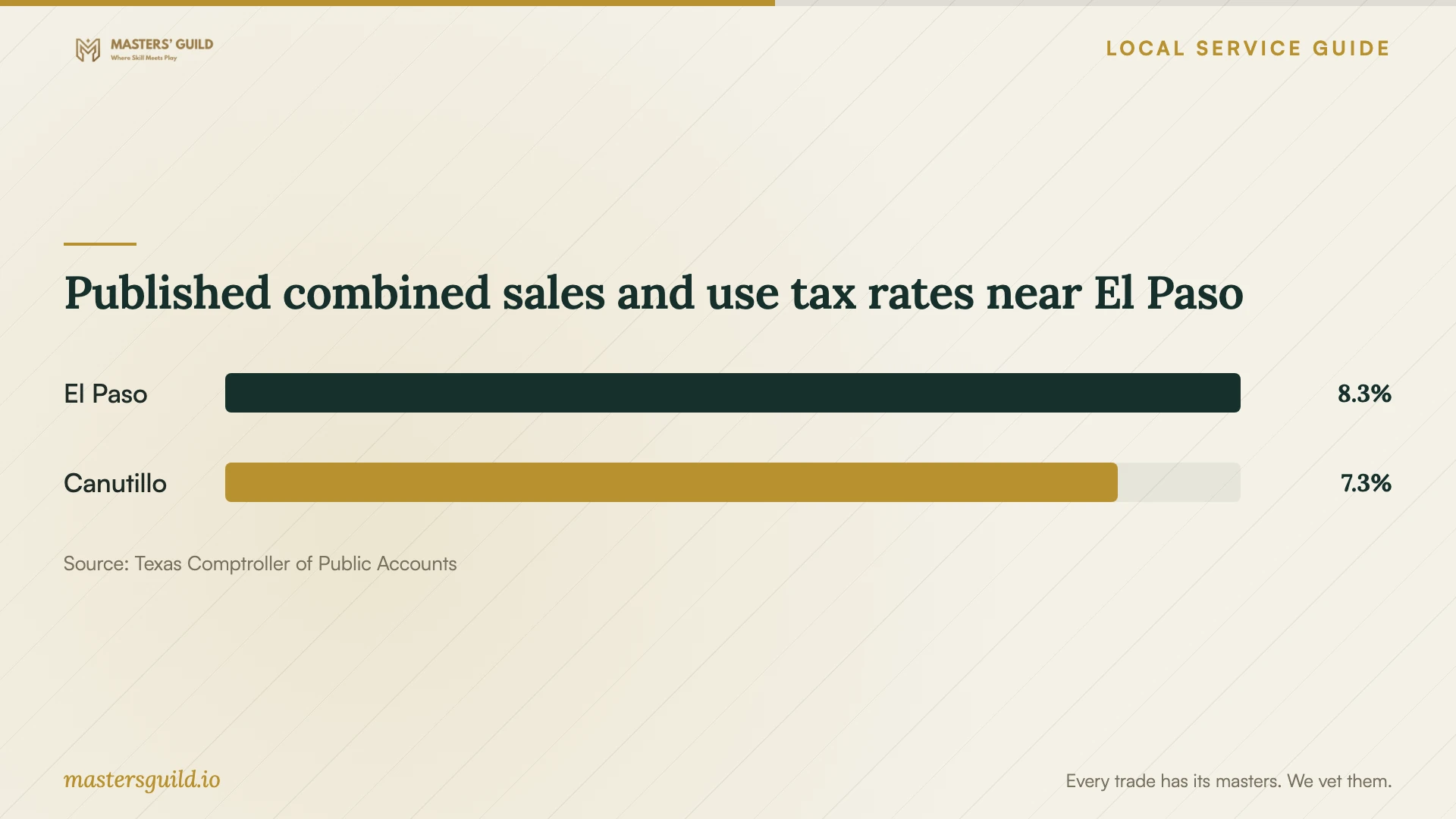
The Comptroller's city table lists a combined sales and use tax rate of 8.25% for El Paso and 7.25% for Canutillo. These published location rates help you question a quote; they do not determine whether each service charge is taxable or which sourcing rules apply to your transaction. Ask the provider to confirm the applicable rate and taxable amount. [3]
Published combined sales and use tax rates near El Paso
Local details that affect your job
Arrange library connectivity before the appointment
El Paso Public Libraries requires an EPPL card and a hotspot reservation with a pickup location. Bring the signed hotspot agreement to pickup; the page offers an agreement in Spanish as well. Confirm unit availability before scheduling the technician, then request a connection test before committing to a transfer deadline. [1]
Check the tax assumption for the service address
The Texas Comptroller lists El Paso at 8.25% combined sales and use tax and nearby Canutillo at 7.25%. If your service address is outside the city, ask the provider to confirm the applicable jurisdiction instead of carrying over an El Paso rate. Request an explanation of both the rate and the portion of the job they tax. [3] [2]
Match the appointment to your household's needs
| Your situation | What to request | Acceptance check |
|---|---|---|
| Documents across several devices | Selected-folder setup and an access review | Open a sample document on each intended device |
| Photos or documents needing backup | Backup configuration and a recovery demonstration | Recover a sample file and record the procedure |
| Moving from an existing account | A file inventory and a plan to retain originals | Review copied files before approving account closure |
| No home internet connection | Arrange connectivity before booking the transfer | Test the connection at home before agreeing to a deadline |
Your hiring checklist
- List devices, selected folders, existing accounts and everyone who needs access.
- Request a written scope and approval before deletion or subscription changes.
- Confirm internet access and arrange an upload test at the service address.
- Separate labor, migration, subscriptions, travel and tax in the quote.
- Keep account ownership and recovery contact details under your control.
- Agree on a sample-file recovery demonstration and written instructions.
- Set follow-up terms for unfinished uploads and remove technician access at handover.
Frequently Asked Questions
How much should I budget for the setup?
Request a quote based on your devices, selected data and completion requirements. The evidence for this guide does not establish a local labor-price range. Ask the provider to separate setup, migration, subscriptions, travel, tax and follow-up so you can compare offers using the same scope.
Can I use a library hotspot for the job?
El Paso Public Libraries offers MyFi hotspots with unlimited data capabilities for intended users including households without broadband. You need an EPPL card, a reservation and a signed agreement. Confirm availability and test the connection; the program page does not promise an upload speed or migration completion time. [1]
Should the technician keep my password?
Ask to enter passwords yourself and retain control of recovery contacts. Discuss any temporary access before work starts, and require its removal at handover. Have the technician give you written recovery instructions without including your password in the job notes.
Will Texas sales tax apply?
The Comptroller identifies data storage and conversion as taxable data processing and describes consulting as nontaxable in its examples. Mixed-service billing has additional conditions. Ask the provider to explain the taxable charges and applicable rate before you accept the quote. [2]
Sources and scope
This guide combines the sources below with practical planning guidance. Figures apply to the stated geography and period; request a written quote for your property.