
Local service guide
Edmonton software installation: planning and hiring
For software installation in Edmonton, request a written quote covering your devices, programs, licences, backups and completion tests. Agree on permission before any data erasure or operating system replacement. Consider remote help if you can start the computer and join the session. For learning questions, check Edmonton Public Library’s one-on-one Tech Time help before booking paid support. [1]
Define the result and request a complete quote
Describe what you want to do after the appointment: use a named application, send email, work on a new computer or recover from a failed installation. Provide the computer model, operating system version, program names and error messages. Remove personal information from screenshots before sharing them.
Ask the technician to check compatibility before you purchase software. List files and settings you want to keep, including email archives, bookmarks and documents from older programs. Specify whether the job includes transferring them and checking that you can open them afterward.
Request a quote for your devices and the work you need. Ask for separate amounts for labour, licences, subscriptions, travel, backup and follow-up support. Confirm whether the technician charges by the job or by the hour, and require approval before extra troubleshooting charges.
Choose how the technician will help
Consider remote service if you can sign in, connect to the internet and follow instructions to start the session. Ask which support tool the technician proposes, how you can watch the work and how you can end access. Agree on removal of temporary tools or unattended access at completion.
Consider an in-home appointment if you want setup and a demonstration at your desk. Confirm address coverage, travel charges and the appointment window. For drop-off service, ask what equipment to bring, how the business will secure your device and when it expects to return it.
Tell the technician before booking if the computer cannot start, you cannot access an account or you suspect malware. Request an assessment before approving installation. Set a written boundary requiring your permission before erasing files, removing programs or replacing the operating system.
Protect files and agree on account access
Back up important files and open a sample from the backup before work starts. If you want the technician to handle this, name the folders, storage destination and verification step in the quote. Ask when the business will delete temporary copies.
Alberta’s collection guidance says organizations covered by PIPA usually need consent and must give notice of their collection purposes and a contact for questions. Ask your installation business to explain what information it needs and document the access you authorize. [3] [4]
Ask whether the business uses a service provider outside Canada for your information. Alberta’s guidance describes notice requirements when an organization uses such a provider to collect information or transfers previously collected information to it. Request the relevant policies and privacy contact before approving that arrangement. [3]
Plan to enter passwords and verification codes yourself. Keep software purchases and recovery details under your own account. If you approve temporary administrator access, agree on its purpose and removal before the work begins.
Test the installation and plan any lessons
Agree on completion tests before the appointment. Create, save and reopen a document; send and receive an email if email setup forms part of the job. After a transfer, open selected files. Ask the technician to demonstrate activation and explain update settings.
Request a handover covering installed programs, renewal dates, backup locations and unresolved problems. Confirm how to report an installation fault and whether the quote includes follow-up work. Ask for demonstration time as a separate item if you want to practise with the technician present.
For further practice, EPL provides LinkedIn Learning access with a library card and PIN. It also lists Microsoft application training through LearningExpress Library. Check whether these resources cover your program before purchasing ongoing lessons. [2]
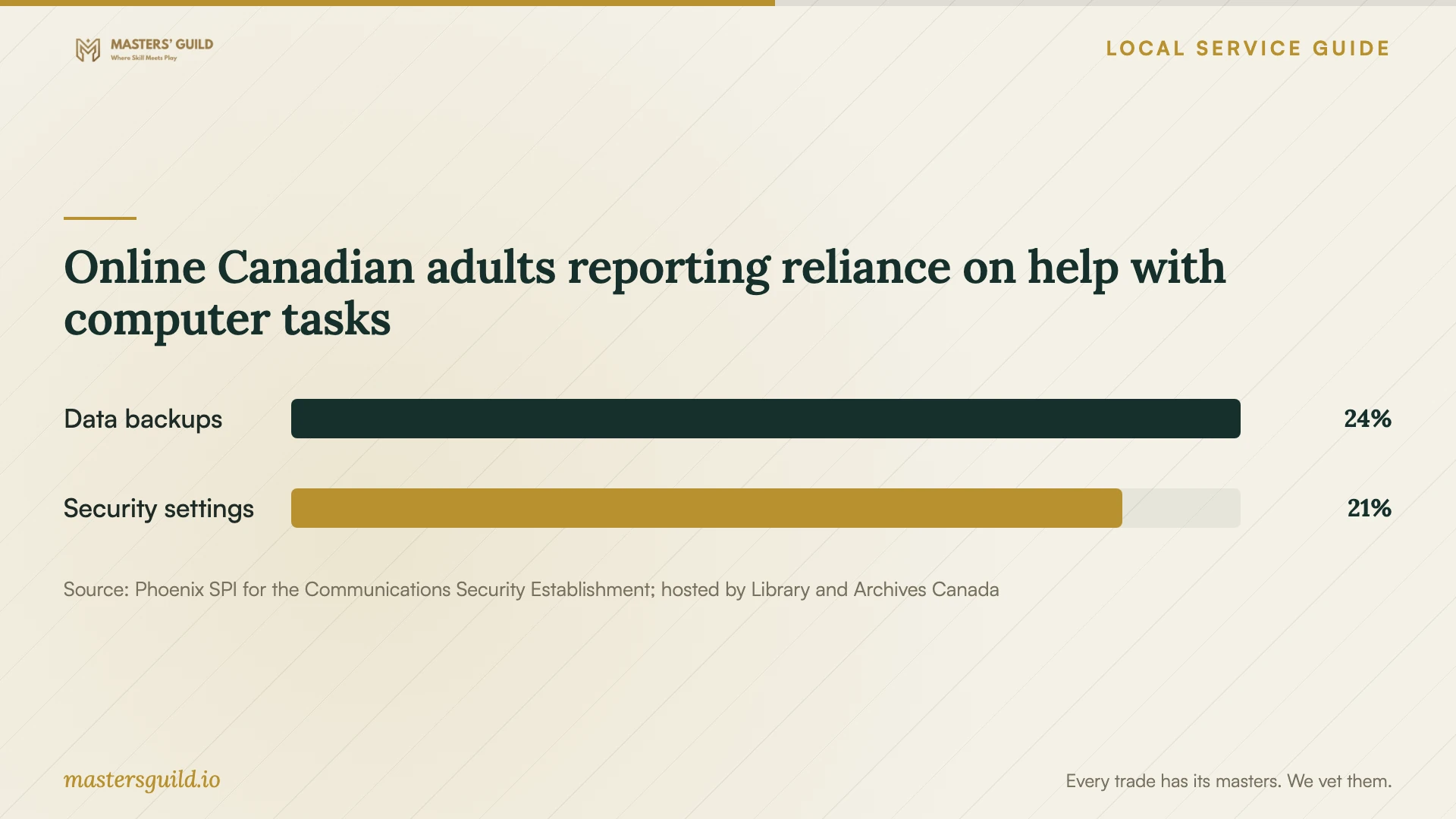
Online Canadian adults reporting reliance on help with computer tasks
Local details that affect your job
Check EPL Tech Time before paying for basic guidance
Edmonton Public Library offers one-on-one Tech Time sessions for technology questions and computer skills classes. Check current sessions or call 780-496-7000 to discuss your question. Confirm the help available before relying on a visit for installation, repair or file migration. [1]
Use library access for software practice
EPL lists LinkedIn Learning access with your library card and PIN and gives edmontonpublic as its Library ID for the mobile app. Check its courses and LearningExpress Microsoft application training when deciding how much paid instruction to include with setup. [2]
Identify the applicable privacy complaint route
Alberta PIPA covers provincially regulated private-sector organizations. Alberta identifies its Office of the Information and Privacy Commissioner as the complaint route for inappropriate collection, use or disclosure under that law. Federally regulated businesses, such as banks, airlines and telecommunications companies, fall under federal privacy law and the Privacy Commissioner of Canada. Identify the organization handling your information before choosing a complaint route. [4]
Choose help for the task you need
| Your situation | Option to consider | Confirm first |
|---|---|---|
| You want help understanding a computer task | EPL Tech Time | Ask staff whether your question fits and check current sessions. |
| You can start the computer and join a support session | Remote appointment | Agree on the tool, scope and removal of temporary access. |
| You want setup and practice at your desk | In-home appointment | Confirm address coverage, travel charges and demonstration time. |
| You need a reinstall or file migration | Technician assessment | Agree on backup verification and permission before data erasure. |
| You want lessons after setup | EPL learning resources | Check library access and course coverage for your application. |
Your hiring checklist
- List devices, program versions, error messages and the outcome you want.
- Ask for a compatibility check and confirm who purchases licences.
- Get the scope, total charges and approval process for extra work in writing.
- Back up important files and open sample copies.
- Agree on file access, temporary copies and remote support permissions.
- Prepare to enter passwords and verification codes yourself.
- Test the agreed functions and record unresolved issues and follow-up terms.
Frequently Asked Questions
How much should I budget for software installation?
Request a quote for your devices and required work. Separate labour, licences, subscriptions, travel and backup costs. Ask whether troubleshooting has a spending limit and whether you must approve additional charges.
Can Edmonton Public Library help with my software?
EPL offers Tech Time assistance, computer skills classes and software learning resources. Ask staff whether they can address your question before relying on a session to complete installation or repair work. [1] [2]
Should I give the technician my passwords?
Arrange to enter passwords yourself during sign-in and activation. Ask the technician to explain any access they need. Document the purpose of temporary access and agree how they will remove it.
What should I check before accepting completion?
Open the software, confirm activation and perform the agreed tasks. Check transferred files, test email if included and review backup and update settings. Record remaining problems and the follow-up arrangement.
Sources and scope
This guide combines the sources below with practical planning guidance. Figures apply to the stated geography and period; request a written quote for your property.