
Local service guide
Computer Virus Removal in Edmonton, AB
Arrange Computer Virus Removal in Edmonton with a written scope covering diagnosis, cleanup, file preservation and your approval before a reset or reinstall. Describe the symptoms, any remote access you allowed and the files you need. If you sent money or shared financial information with a scammer, contact the financial institution and follow Edmonton Police Service reporting guidance while arranging repair. [1]
Describe the incident before agreeing to work
Give the technician a short account of what happened: a warning appeared, you installed a program, you opened an attachment or you allowed a remote session. Explain whether the computer starts and whether you can open important files. Include any unfamiliar account activity. Request an assessment before agreeing to a proposed fix.
Include account checks in the discussion if someone accessed your email. Edmonton Police Service advises reviewing email rules and alerts for unfamiliar forwarding settings. Its technology guidance also recommends two-factor authentication. Request help checking your email settings and securing important accounts alongside the device work. [1] [3]
Get a quote with approval points
Have the provider name the device and proposed work in the quote. Confirm the diagnostic charge, whether it counts toward repair and whether the provider charges a fixed amount or hourly rate. Request a total that identifies travel, software, backup storage and taxes. Use the same requested scope when comparing offers.
Discuss cleanup, file recovery and operating-system replacement as separate tasks. List the photos, documents and applications you need to preserve. Require the technician to explain any proposed erasure and obtain your approval before proceeding. Record what they will attempt, what they can commit to and which outcomes remain uncertain.
Agree on an assessment time and the next update. For remote work, confirm how you will identify the technician, supervise the session and end access. For drop-off or a home visit, confirm the handover arrangements and any travel charge. Give the provider a way to reach you before extra work.
Define access to personal files
Alberta’s privacy commissioner’s PIPA on a Page guidance, dated May 2010, says organizations should use and disclose personal information for its collection purposes unless the individual consents or the Act permits another use or disclosure. It also addresses security and retention. Treat this as guidance for your handover questions rather than a complete statement of current law. [2]
The Government of Alberta’s Using personal information guidance explains that consent does not authorize unlimited use: organizations may use information only for the notified purposes and to the extent reasonable for those purposes. It also describes limited circumstances allowing use without consent. [5]
Record which folders the technician may access and whether they may create a backup. Confirm who can access that copy, where the provider will store it and how long they intend to retain it. Request an explanation for any password they need and discuss entering it yourself. Keep banking credentials outside the repair instructions.
Plan recovery and verify the result
For a ransom demand or encrypted files, request a recovery assessment before approving a wipe. EPS discusses restoring from offline, up-to-date backups and closing security gaps. Its guidance notes that a decryption key may exist for some ransomware. Have the technician assess those possibilities before you accept a file-recovery promise. [3]
Request a completion note describing the findings, changes and unresolved concerns. Open the files you agreed to preserve and check essential applications with the technician. Review any remote-access tools installed during repair, decide whether they should remain and confirm how to revoke access. Discuss a backup plan before accepting the work.
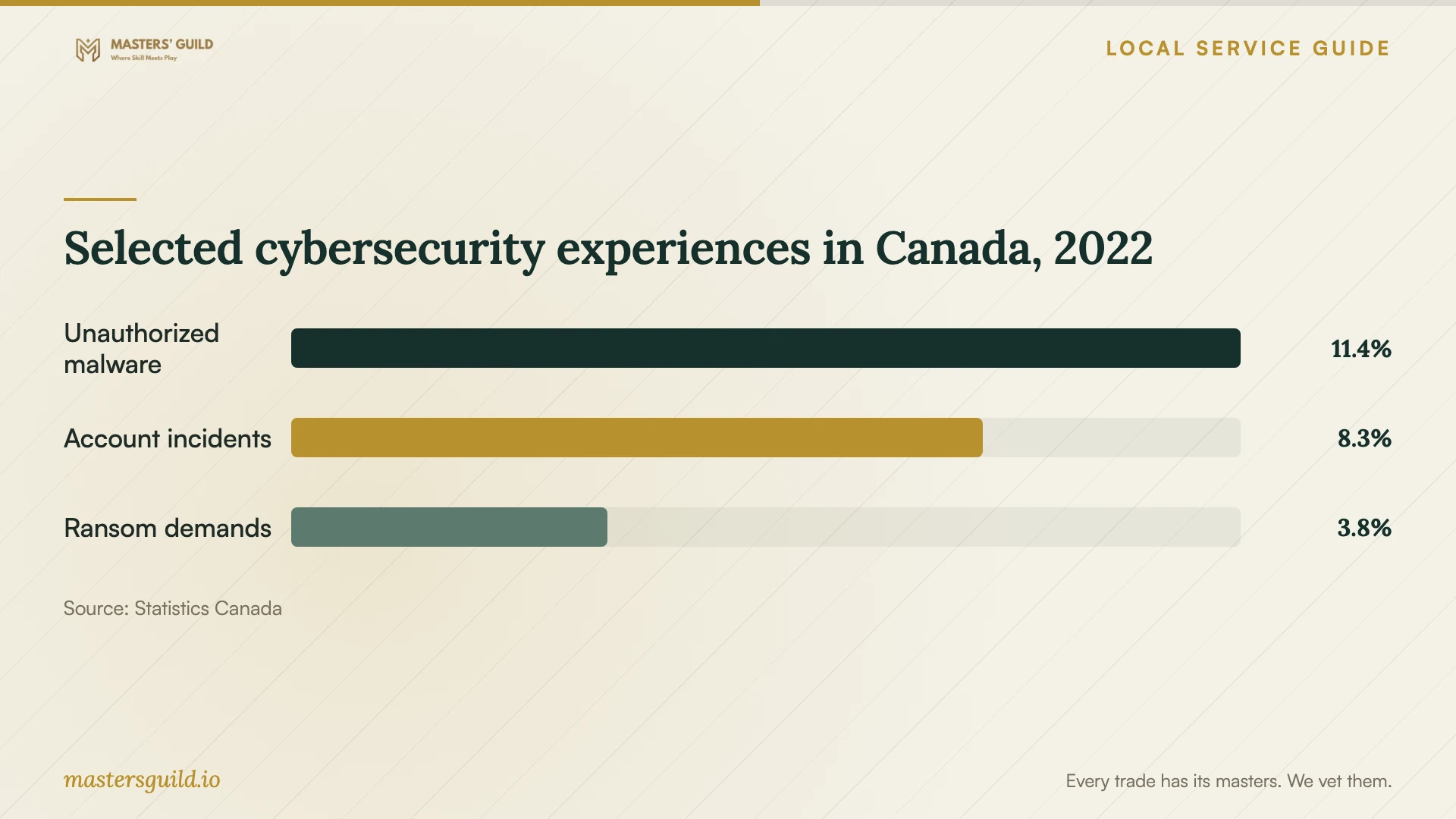
Statistics Canada’s historical national figures distinguish malware installed without permission, hacked accounts or fraudulent messages, and cyber-ransom demands. Use the chart to frame your description of the incident. The figures do not diagnose your device or measure current Edmonton repair demand. [4]
Selected cybersecurity experiences in Canada, 2022
Local details that affect your job
Edmonton reporting after a repair scam
Edmonton Police Service directs victims to call 780-423-4567 or #377 from a mobile phone. If you sent money or shared financial information, EPS advises reporting it to the financial institution involved. Gather emails, screenshots and contact details. Before cleanup, discuss with the technician how to preserve information you may need for the report. [1]
Alberta privacy questions before device handover
Alberta’s privacy commissioner’s May 2010 guidance calls for organizations to designate someone responsible for compliance, respect consent changes and retain personal information only as long as reasonable for business and legal reasons. For a repair here, request the privacy contact’s name and a written explanation of backup retention. If you change your file-access permissions, discuss the consequences and record the revised scope. [2]
Choose the scope for your situation
| Your situation | Requested repair scope | Next step |
|---|---|---|
| Warnings or unfamiliar software | Diagnosis, cleanup assessment and separate system-repair quote | Record symptoms and set an approval limit |
| You allowed an unsolicited caller remote access | Device assessment and review of remote-access tools | Preserve contact details and discuss account checks |
| You sent money or shared financial information | Device assessment with an evidence-preservation discussion | Contact the financial institution and follow EPS reporting guidance |
| Encrypted files or a ransom demand | Recovery assessment, backup review and security-gap repair | Require approval before erasure or reinstallation |
Your hiring checklist
- Record the symptoms, recent downloads and any remote access you allowed.
- List essential files and applications, plus the backups you have.
- Save scam messages and contact details before discussing cleanup.
- Get the diagnostic charge, proposed total and extra-work approval limit in writing.
- Record permissions for file access, backup copying and retention.
- Confirm the appointment format and next update time.
- Require approval before a reset, reinstall or drive erasure.
- Check agreed files and applications with the technician before accepting the work.
Frequently Asked Questions
How much should I budget?
Get a quote for your device and symptoms. Request separate charges for diagnosis, cleanup, backup, file recovery and reinstallation, including travel or software costs. Agree on the amount the technician may spend before requesting further approval.
Should I choose remote service or drop-off?
Have the provider explain whether they can assess your symptoms remotely and what requires physical access. Verify the contact before granting access. EPS identifies remote desktop repair scams among scams affecting Edmontonians; choose your own provider rather than following an unsolicited caller’s instructions. [1]
Can someone promise to recover encrypted files?
Request an assessment before accepting that promise. EPS discusses backup restoration and possible decryption keys for some ransomware. That guidance does not establish whether your files are recoverable. Identify essential files and require approval before destructive work. [3]
What should I agree about privacy?
Record the files the technician may access, who may handle them, whether the provider may copy them and the intended retention period. Alberta guidance addresses reasonable purposes, consent and permitted exceptions. Request the provider’s privacy contact and discuss any change to your permissions. [2] [5]
Sources and scope
This guide combines the sources below with practical planning guidance. Figures apply to the stated geography and period; request a written quote for your property.