
Local service guide
Software installation in Durham, NC
Arrange Software installation in Durham by giving the technician your computer model, operating system, program names and intended task. Request an itemized total, agree on backup and account access, and define what you will test before completion. If you need help learning technology, Durham County Library offers free in-person Digital Navigator appointments; confirm whether your question fits before hiring an installer. [1]
Decide whether you need installation or learning help
Durham County Library’s Digital Navigators help with learning technology, finding affordable devices and accessing low-cost internet resources. The library offers free in-person appointments by phone or online booking. For help understanding how to use a program, ask whether a navigator can cover your question before committing to paid work. [1]
The library’s published service description does not promise software installation, repair or malware removal. Describe the exact task when you arrange an appointment. If you need someone to install and configure a program, ask a technician to quote that work and explain what they will deliver. [1]
Write your installation request around the result you need: opening household documents, signing into email, joining a video call or using a purchased application. Include the computer model, operating system and software name. Distinguish an application installation from new-computer setup or an operating-system change, and identify files and settings you want to preserve.
Compare labor, software purchases and applicable tax
North Carolina includes prewritten computer software within taxable tangible personal property. NCDOR says retail repair, maintenance and installation services sourced to the state are subject to applicable sales and use tax unless a statutory exemption applies. It also says retailer installation charges remain taxable when the retailer lists them separately. Ask the provider to explain the treatment of your specific work. [2] [3]
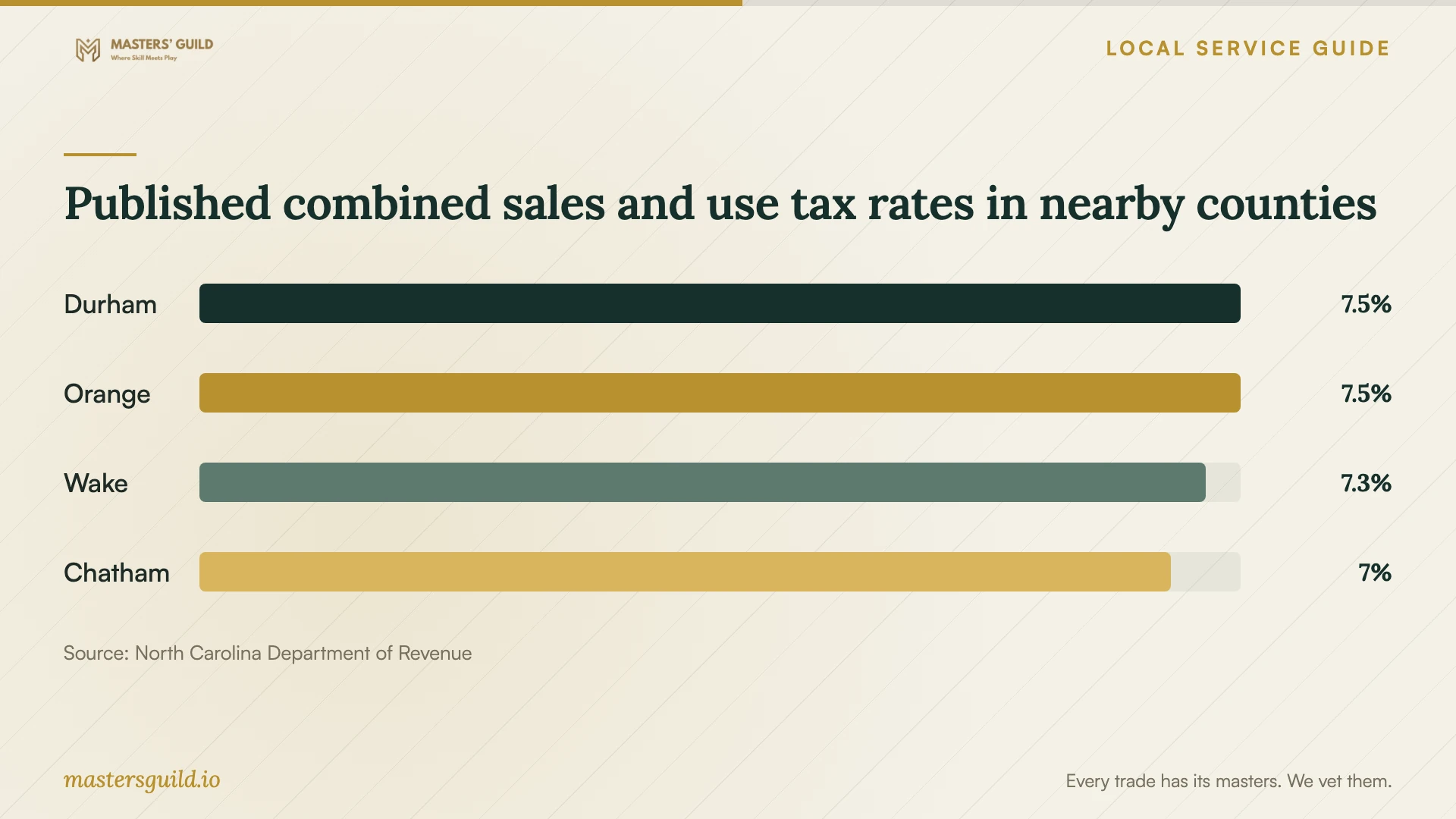
NCDOR’s current county table lists Durham County’s combined rate as 7.5%, including transit tax. For a taxable transaction sourced there, use that published rate as a budgeting reference and ask the seller to confirm its application. Give your service address rather than assuming the technician’s office county determines the rate. [3] [4]
Request separate amounts for labor, licenses, backup or transfer work, travel and follow-up support. Ask whether the technician quotes a fixed total or charges for time. Set an approval limit for extra work, and ask what you owe if they diagnose a problem but cannot complete the installation.
Before buying software, ask the technician to check compatibility and available storage. Specify activation, updates, configuration and task testing in the scope. For an operating-system change, request a backup and restoration plan that identifies the files and programs you want to keep and the steps the technician will take if installation fails.
Choose the service format and control remote access
NCDOJ describes tech-support scams that start with a phone call, email or computer pop-up claiming to have found a problem. Scammers request remote access, which can expose information on the computer and connected network. The department advises consumers to avoid responding to unsolicited support contacts and to find a company they know and trust. [5]
Choose the format with the technician after describing your computer’s condition. For remote work, explain any startup, internet or sign-in problem and ask whether they can complete the task while you remain present. For an in-home visit, identify any printer or connected device you want tested. For drop-off work, confirm accessories, approval arrangements and collection testing.
Before a remote session, verify the provider through contact details you have checked. Agree on the access tool, enter passwords and verification codes yourself, and close unrelated personal accounts. Ask the technician to disconnect and remove unattended access at completion unless you have agreed to ongoing support.
If you disclosed a password to a tech-support scammer, NCDOJ advises changing it and changing it on other accounts where you reused it. If you gave a scammer remote access, the department advises updating security software, running a scan and deleting anything it identifies as a problem. Describe that incident when arranging trusted help so you agree on more than an application installation. [5]
Prepare your files and agree on completion
Keep account access under your control. NCDOJ’s consumer guidance advises against sharing passwords and warns that remote-access scammers can install malware that uncovers usernames and passwords. Treat a request to send account credentials as a reason to discuss another way to complete the work. [5]
Before the appointment, back up the files you want to keep and check that you can open the backup. Gather purchase receipts and license records. Confirm access to the account used to buy the software and keep your recovery method available. Give the technician a list of required programs without adding passwords to the job description.
At handover, open each agreed program, check activation and perform the task you described when booking. Test access to saved files and any agreed email or printer connection. Restart the computer and repeat your essential task. Ask the technician to record unresolved issues, installed software and follow-up terms on the receipt.
Published combined sales and use tax rates in nearby counties
Local details that affect your job
Arrange a free local learning appointment
Durham County Library offers free in-person Digital Navigator appointments through online booking or 919-560-9311. Navigators help you learn technology, find affordable devices and access low-cost internet resources. Ask whether your software question fits that learning support before paying for instruction. Confirm installation needs separately because the library’s published description does not advertise software installation or repair. [1]
Compare quotes using Durham County tax guidance
NCDOR lists Durham County’s combined sales and use tax rate as 7.5%, including transit tax. North Carolina treats prewritten computer software as taxable tangible personal property, and NCDOR says separately stated retailer installation charges remain taxable. Ask each provider for an itemized total, the applicable transaction rate and any exemption they apply so you can compare the same scope of work. [2] [3] [4]
Choose the next step for your software request
| Your situation | Next step | Confirm before agreeing |
|---|---|---|
| You need help learning technology | Ask the library about a free Digital Navigator appointment | Whether your software question fits its learning support |
| You want an application installed | Request a defined installation quote | Compatibility, license ownership, activation and task testing |
| You plan an operating-system change | Agree on backup and restoration before work | Which files, programs and settings you want preserved |
| An unsolicited caller or pop-up requests remote access | Avoid responding and arrange trusted support | Provider identity through contact details you verify |
| Quotes include different charges | Compare itemized totals with applicable tax | Labor, licenses, extras, transaction sourcing and exemptions |
Your hiring checklist
- 1. Record your computer model, operating system, software names and the task you want to complete.
- 2. Confirm compatibility and the installation scope before purchasing software.
- 3. Back up the files you want to preserve, open the backup and gather license records.
- 4. Agree on remote, in-home or drop-off service, the technician’s identity and account-access arrangements.
- 5. Obtain an itemized total with applicable tax, diagnosis charges and an extra-work approval limit.
- 6. Keep recovery access available and enter your own passwords during the appointment.
- 7. Test activation, file access and your agreed task after a restart.
- 8. Keep the receipt and confirm unresolved issues, follow-up terms and removal of remote access.
Frequently Asked Questions
How much should I budget for installation?
Request a quote for your programs, devices and data work. Ask the provider to separate software purchases, labor and extras, then include applicable tax. NCDOR lists Durham County’s combined rate as 7.5%; ask the seller to confirm the rate and taxable charges for your transaction. [4]
Can the library install my software for free?
The library advertises free in-person Digital Navigator appointments for technology learning, affordable-device guidance and low-cost internet resources. Its published description does not advertise installation or repair. Describe your request and confirm the scope before relying on an appointment. [1]
Should I give a remote installer my password?
Arrange to enter passwords yourself and remain present during the session. Verify the provider before authorizing access. NCDOJ warns that scammers use unsolicited messages and pop-ups to gain remote access, and advises changing passwords disclosed to a tech-support scammer, including on accounts where you reused them. [5]
What should I test before accepting the work?
Open the agreed programs, check activation and perform your intended task. Test saved files and any agreed email or printer connection after a restart. Ask the technician to record unresolved issues and follow-up terms, and confirm that they have disconnected remote access.
Sources and scope
This guide combines the sources below with practical planning guidance. Figures apply to the stated geography and period; request a written quote for your property.