
Local service guide
Durham computer virus removal: hiring and preparation
For computer virus removal in Durham, choose a technician you have checked, agree on how they will protect your files, and request a written quote covering diagnosis, cleanup and any proposed reinstall. Ask whether the total includes applicable tax: North Carolina lists Durham County’s combined sales and use tax rate as 7.5%. If someone prompted you to seek help through an unsolicited infection warning, avoid the number or link in that message and choose support yourself. [1] [2] [3]
Describe the problem before agreeing to cleanup
Tell the technician what you saw, when it began and what you did next. Describe recurring alerts, browser changes, failed sign-ins or trouble starting the computer without deciding the cause yourself. Ask the technician to explain their findings before you approve treatment. A useful intake note distinguishes an on-screen warning from remote access you granted or a password you disclosed.
The North Carolina Department of Justice advises updating security software and running a scan if you suspect a computer problem. It also warns that scammers use phone calls, email and pop-up messages to offer supposed repairs. If the warning itself asks you to contact support, do not use its contact details. [3]
Ask whether the technician supports your operating system and can work with your computer’s present condition. For remote service, agree on who starts the session, how you will verify the technician and how they will end access. For drop-off or a home visit, confirm the appointment, equipment to bring and any travel charge before booking.
Agree on file handling before repair
List the files you need to keep, such as family photographs, household records and personal projects. Tell the technician whether you have a backup and when you last checked it. Ask them to explain any proposed file copy or restore and obtain your approval before erasing the drive or reinstalling the operating system.
Put access boundaries in writing. Ask which folders the technician needs to open, where they would store copied files and when they would delete repair copies. Arrange a way to enter required credentials without sending a list of account passwords. If you do not understand a requested permission, ask the technician to explain its purpose before granting it.
If you already gave a stranger remote access, say so during intake. The state Justice Department warns that a scammer with access can reach information on the computer and its connected network, including password-protected information. Ask the technician to address the access you granted as part of the agreed work. [3]
Compare complete quotes
Ask each technician to quote the same scope: diagnosis, agreed cleanup, checks after repair and a written account of the work. Request separate prices for backup, file recovery, reinstallation, replacement parts and software. Confirm what you owe if the technician finds a different problem or you decline the recommended repair.
North Carolina taxes retail repair, maintenance and installation services sourced to the state unless a statutory exemption applies. The Department of Revenue includes attempts to identify a problem for restoring property to working order in that definition. Do not assume that a diagnostic-only visit avoids tax; ask the provider to explain the invoice treatment. [1]
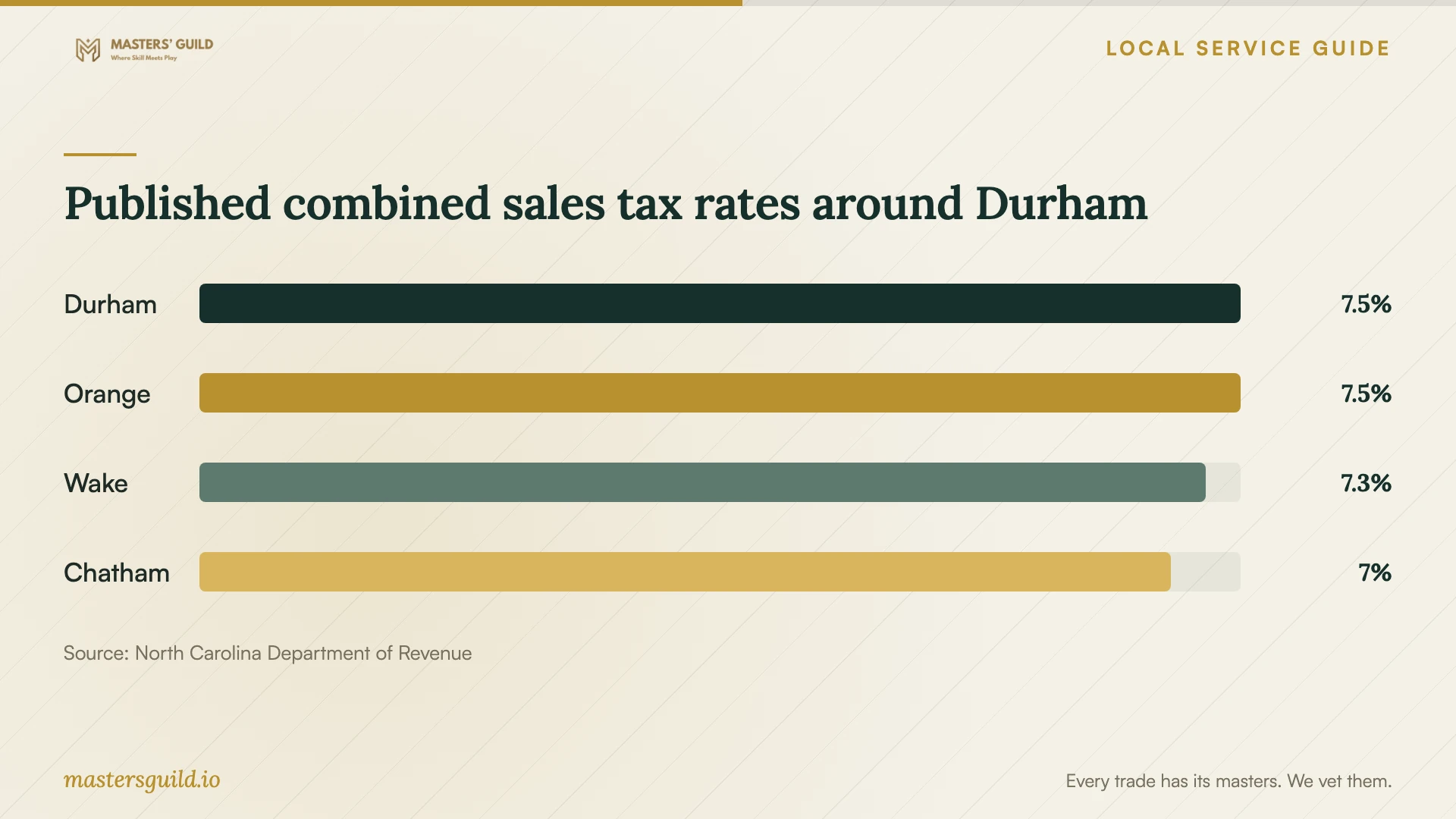
Durham County’s published combined rate is 7.5%, including the transit component. When comparing a Durham quote with one from a nearby county, ask which rate applies to your transaction and compare final totals. The county-rate chart provides invoice context, not a local cleanup price or a reason to choose a shop by tax rate alone. [2]
Define completion and account follow-up
Agree on a collection or completion target and ask when the technician will contact you if the scope changes. At handover, request a description of what they found, what they removed or changed, and what they checked afterward. Have them demonstrate the tasks that prompted the repair and confirm access to the files you asked them to preserve.
If you gave a scammer your username and password, the North Carolina Department of Justice advises changing that password and changing it anywhere else you reused it. Ask for help with this step if you need it, and specify which account work the technician’s quote includes. [3]
Before the appointment ends, confirm whether the technician left remote-access software installed and how you can remove or disable it. Ask what follow-up they offer if the original symptoms return, whether they charge for another diagnosis and which repair notes you should keep.
Published combined sales tax rates around Durham
Local details that affect your job
Durham County tax belongs in the quote comparison
As checked on October 14, 2026, the North Carolina Department of Revenue lists Durham County at 7.5%, Orange at 7.5%, Wake at 7.25% and Chatham at 7%. These are combined sales and use tax rates. Ask a provider to identify the applicable rate and give you a total including tax before comparing offers across county lines. [2]
North Carolina offers a scam complaint route
If the repair request began with an unsolicited warning or a stranger’s remote session, preserve the messages, receipts and company name before arranging cleanup. For Durham residents, the North Carolina Department of Justice provides the statewide scam reporting number 1-877-5-NO-SCAM and a consumer complaint option. Its guidance also calls for a security scan after granting a scammer access and password changes after sharing credentials. [3]
Match the next step to what happened
| Your situation | Next step | Ask before authorizing work |
|---|---|---|
| An unexpected pop-up tells you to call support | Do not call or click it; choose a support provider yourself. | Can you assess the warning before proposing paid cleanup? |
| You suspect a problem and can use the computer | Follow state guidance to update security software and run a scan. | What findings would justify further repair? |
| You gave a stranger remote access | Disclose the session and arrange a security scan and review. | Will you address the access I granted and explain your findings? |
| You shared an account password | Change it and change the same password on other accounts. | Does your quote include help with the affected accounts? |
| The technician proposes erasing or reinstalling | Agree on file preservation and give explicit approval first. | What files will you retain, and what is the complete price? |
Your hiring checklist
- Write down the symptoms, warning text and any access or credentials you shared.
- Identify the operating system and the files you need to preserve.
- Tell the technician about your existing backup and ask how they will handle repair copies.
- Request a written scope, final price including applicable tax and a limit for extra work.
- Require approval before erasing files, reinstalling the operating system or buying software.
- Confirm the appointment method, expected completion target and update arrangements.
- At handover, review the repair notes, preserved files, remote-access settings and follow-up terms.
Frequently Asked Questions
How much should I budget for virus removal?
Request an itemized quote for your device and the work you authorize. Ask for diagnosis, cleanup, file handling and any reinstall as separate items, then confirm applicable tax and the amount you owe if you decline repair. Set a spending limit and ask the technician to contact you before adding work.
Does a scary infection alert mean I need paid repair?
Do not approve work based on the alert alone. North Carolina’s Justice Department warns that scammers use pop-ups asking you to call or click for support. It advises updating security software and running a scan if you suspect a problem, and choosing a company you know and trust. [3]
Should I authorize a reinstall during the first conversation?
Ask for the diagnosis, file-preservation plan and total price first. Give the technician written instructions to obtain your approval before erasing the drive. Identify the files you need and ask them to explain how you will regain access to those files after the work.
What should I do after giving a scammer access?
The state Justice Department advises updating security software, scanning the computer and deleting identified problems. If you shared a password, change it and change it on other accounts where you reused it. Tell your chosen technician what happened and report the scam through the state complaint route. [3]
Sources and scope
This guide combines the sources below with practical planning guidance. Figures apply to the stated geography and period; request a written quote for your property.