
Local service guide
Smart Appliance Setup in Detroit, MI
Arrange Smart Appliance Setup in Detroit by asking for a quote that covers your exact appliance models, app pairing, connection testing and a hands-on demonstration. Separate physical installation from connected-feature setup in the quote. If you use DTE electricity, ask the installer to check your rate before programming delay-start schedules; DTE offers several residential pricing options with different usage windows. [1]
Define the job before comparing quotes
Describe the result you want: a dishwasher paired with its manufacturer app, washer cycle notifications on your phone, or compatible devices controlled through a chosen hub. Give the provider model numbers, your phone type and any existing hub details. Ask them to confirm which requested features they will configure and demonstrate.
State whether someone has completed the physical appliance installation. Ask providers to list delivery, moving, mounting, utility connections and app setup as separate tasks where relevant. If the appliance also needs connection work, identify who will handle that work before arranging the connected-feature visit.
Request a written price for the agreed scope and a clear rule for additional troubleshooting. Ask whether the quote includes router changes, account recovery, hub pairing and a return visit if setup remains incomplete. Compare those inclusions rather than choosing from headline prices alone.
Prepare your network and accounts
Have your appliance manuals, model numbers and Wi-Fi network name ready. Install the intended manufacturer apps and confirm you can sign in. Keep your phone available for verification messages, and enter passwords yourself during the visit. Ask the provider to explain proposed network changes before making them.
For an optional DTE Energy Bridge, check the network requirements before booking. DTE specifies a password-protected WPA2 home Wi-Fi network and describes Ethernet as an alternative. Its setup also requires Bluetooth and a supported Android or iOS device. Include network troubleshooting in the quote if you cannot confirm those requirements. [3]
Ask the provider to check the appliance manufacturer’s connection instructions before changing router settings. Agree on whether the visit includes troubleshooting an existing network or configuring new equipment. Record any changes and make sure you know how to restore your previous settings.
Program schedules around your actual DTE rate
Check your DTE account for your current rate before asking for an appliance schedule. DTE describes its standard Time of Day option as favoring weekday usage before 3 p.m. or after 7 p.m. It also offers an 11 a.m. to 7 p.m. option and Overnight Savers, which favors heavy usage between 1 a.m. and 7 a.m. A schedule for one plan may not suit another. [1]
On the Time of Day 3 p.m. to 7 p.m. plan, DTE recommends shifting laundry and dishwasher use to off-peak hours. Ask the installer to demonstrate a supported delay-start setting and explain how you can cancel or change it. Follow the appliance manual’s operating instructions when choosing a time. [2]
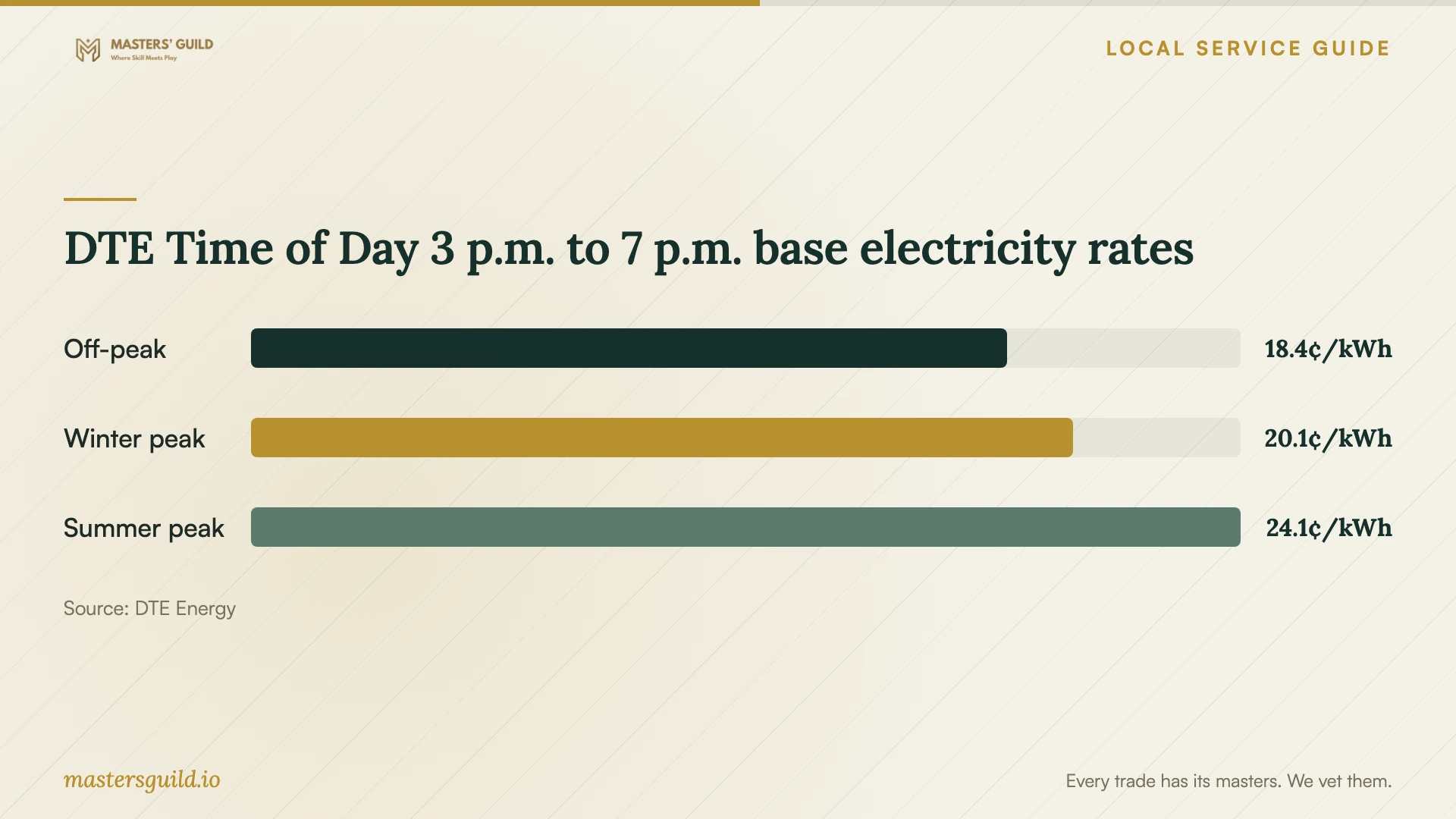
The rate chart compares DTE’s published base electricity prices for that standard plan. DTE excludes other surcharges, including Power Supply Cost Recovery, from these figures. Use the comparison to understand why timing deserves attention; it does not establish your appliance’s cycle cost, your setup fee or a promised reduction in your bill. [1]
Decide whether to include DTE Insight
Treat DTE Insight as a separate choice in the job scope. DTE says residential customers need a supported mobile device and a registered DTE online account, with an AMI smart meter for maximum capabilities. The Energy Bridge adds real-time monitoring and hub functions for compatible devices. Check the My Devices list before asking a provider to integrate an appliance. [3]
Set realistic expectations for the handover. DTE says usage data without an Energy Bridge has a delay of about 36 hours. Do not make same-day usage data a completion requirement for an app-only visit. With a Bridge, ask the provider to demonstrate the connection and explain the support route if meter binding fails. [3]
Check subscription terms in the app before adding equipment. DTE’s fetched FAQ describes a six-month trial followed by a $1.99 monthly fee for first-time users, while directing existing Premium users to My Plan for their subscription pricing. Keep that recurring charge separate from the provider’s setup quote. [3]
Agree on a practical completion test
Ask the provider to demonstrate the functions you named in the quote on your own phone. Repeat the steps yourself: open the app, identify the appliance, use an agreed control and change a schedule where supported. Ask for an explanation of any requested function they could not configure.
Keep a short handover record with device names, app names, network changes and unresolved issues. Confirm who owns each account and how you will recover access. Ask who handles follow-up questions and whether further troubleshooting would require another paid visit.
DTE Time of Day 3 p.m. to 7 p.m. base electricity rates
Local details that affect your job
DTE scheduling changes the setup brief
For a Detroit household on DTE’s Time of Day 3 p.m. to 7 p.m. rate, request a demonstration of supported laundry or dishwasher scheduling outside the weekday peak window. DTE provides off-peak pricing all weekend. Confirm your own rate first because DTE offers alternative plans with different preferred usage windows. [1] [2]
Energy Bridge placement may change the visit
For a household adding DTE’s Energy Bridge, identify an indoor outlet within 25 feet of the exterior AMI meter before booking. DTE recommends a location with one wall between the Bridge and meter and no nearby signal obstructions. Ask the provider to assess that location and its network connection before you include hub integration in the scope. [3]
Choose the scope that matches your goal
| Your goal | Scope to request | Before booking |
|---|---|---|
| Pair an installed appliance | Manufacturer app setup and a demonstration | Provide the model number and requested functions. |
| Resolve connection trouble | Appliance pairing plus agreed network troubleshooting | Ask which router changes and extra charges require your approval. |
| Schedule around DTE’s standard time-of-day rate | Demonstrate supported delay-start outside weekday 3 p.m. to 7 p.m. | Confirm your account uses that rate; weekends are off-peak. |
| Add DTE Energy Bridge | Meter binding, network connection and compatible-device pairing | Check the My Devices compatibility list and an indoor location within 25 feet of the meter. |
| Install and connect a new appliance | Separate physical installation and app-setup responsibilities | Confirm who handles each task and how you will assess completion. |
Your hiring checklist
- List appliance model numbers and the exact app functions you want.
- Confirm who will complete physical installation and connection work.
- Have your phone, manuals and account recovery access available.
- Ask the provider to confirm compatibility before purchasing extra equipment.
- Check your electricity plan before choosing appliance schedules.
- Request a written scope, troubleshooting limit and additional-charge policy.
- Operate the agreed functions yourself before accepting completion.
Frequently Asked Questions
Can I try app setup myself before hiring someone?
Try the manufacturer’s instructions if you feel comfortable with them. Keep a record of the step where you get stuck and any error message. Give that information to the provider so you can agree on a troubleshooting scope before the visit.
Do I need DTE Energy Bridge for smart appliance setup?
Decide whether you want DTE’s real-time energy monitoring or compatible-device hub functions as part of the job. DTE describes the Bridge as an optional addition and directs customers to the Insight app’s My Devices section for compatibility. Ask the provider to confirm your specific appliance before including integration. [3]
Will DTE Insight show today’s usage when setup finishes?
DTE says app usage data has a delay of about 36 hours without an Energy Bridge. For real-time monitoring, DTE requires the Bridge. Agree on a completion test that fits the equipment you have rather than expecting immediate usage data from app-only setup. [3]
How should I compare setup prices?
Compare written quotes for the same models and functions. Ask providers to separate app setup, network troubleshooting, physical installation and any equipment purchases. Agree on how they will charge for unresolved problems or extra work before the visit.
Sources and scope
This guide combines the sources below with practical planning guidance. Figures apply to the stated geography and period; request a written quote for your property.